GenImagePro
What is GenImagePro?
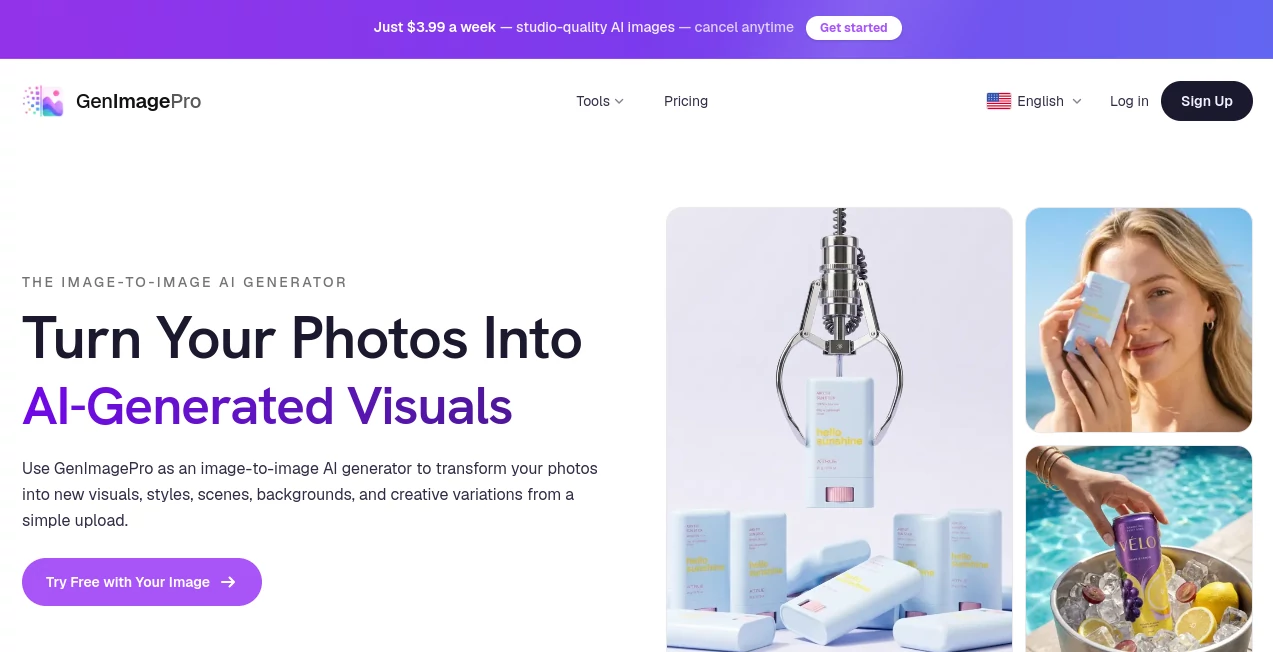
Creating professional-quality visuals no longer requires expensive software, advanced editing skills, or hours of manual work. This platform transforms ordinary photos into polished AI-generated images using a simple template-based workflow. Instead of writing complicated prompts, users only need to upload a photo, choose a style, and receive multiple creative variations within seconds.
Whether you are preparing product images for an online store, improving profile pictures, designing marketing assets, refreshing social media content, or experimenting with creative artwork, the experience feels intuitive from beginning to end. The extensive collection of ready-made templates removes the guesswork and allows both beginners and professionals to achieve impressive results quickly.
From ecommerce businesses and photographers to marketers and content creators, anyone looking for consistent visual quality can benefit from this streamlined AI image generation solution.
Key Features
User Interface
The interface is designed with simplicity in mind. Users upload a photo, browse through more than one hundred ready-made templates, select the desired style, and generate multiple high-quality variations. The clean workflow minimizes unnecessary settings, making image creation approachable even for people with no design experience.
Accuracy & Performance
The platform produces visually consistent results while preserving the important characteristics of the original image. Images are generated within seconds, allowing users to test multiple creative directions without slowing down their workflow. High-resolution outputs are suitable for websites, ecommerce listings, advertisements, print materials, and social media campaigns.
Capabilities
- Image-to-image AI transformation.
- More than 100 professionally designed templates.
- AI product photography.
- Portrait and professional headshot generation.
- Background replacement.
- Photo enhancement and image refinement.
- Creative portrait styles.
- Beauty and makeup visualization.
- Food photography improvements.
- Real estate virtual staging.
- Room redesign concepts.
- Pet portraits.
- Social media graphics.
- Commercial-ready image downloads.
- Multiple visual variations from a single upload.
Security & Privacy
Users work with their own uploaded images, while generated content can be used for commercial purposes according to the platform's usage terms. The straightforward workflow avoids unnecessary data collection during the creative process and focuses on efficient image generation for personal and business applications.
Use Cases
- Create professional product photography for ecommerce stores.
- Generate business headshots without hiring a photographer.
- Produce engaging marketing visuals for advertising campaigns.
- Design attractive social media posts.
- Create branded lifestyle product images.
- Improve restaurant menu photography.
- Generate virtual staging for real estate listings.
- Create creative portraits and profile pictures.
- Produce promotional images for blogs and websites.
- Experiment with artistic visual styles from existing photos.
Pros and Cons
- Pros
- No prompt-writing knowledge required.
- Very beginner-friendly workflow.
- Large collection of ready-made templates.
- Fast image generation.
- Commercial usage supported.
- Suitable for both personal and business projects.
- Produces multiple image variations automatically.
- Works across many image categories.
- Cons
- Template-driven workflow offers less manual control than advanced editing software.
- Best results depend on the quality of the uploaded image.
- Some advanced customization options may be limited compared to prompt-based AI generators.
Pricing Plans
The platform allows users to try image generation before upgrading. Additional paid plans provide expanded access, making it suitable for creators, businesses, ecommerce sellers, agencies, and marketing teams that require larger production volumes and commercial workflows.
How to Use GenImagePro
Step 1: Upload your existing photo.
Step 2: Browse the available AI templates.
Step 3: Select the visual style that best matches your goal.
Step 4: Generate multiple AI-enhanced versions.
Step 5: Download the preferred result and use it for marketing, ecommerce, websites, social media, or print projects.
Comparison with Similar Tools
Unlike many AI image generators that rely heavily on carefully crafted text prompts, this solution focuses on a template-first experience. That makes it particularly appealing for users who prefer predictable results without spending time learning prompt engineering.
Traditional design software often requires significant editing knowledge, while prompt-based AI tools may involve trial and error before achieving the desired outcome. Here, the curated templates simplify the creative process and help users produce polished visuals much faster. For ecommerce brands, marketers, and small businesses, this practical approach can significantly reduce production time while maintaining consistent visual quality.
Conclusion
This AI-powered image generation platform offers an impressive balance between simplicity and professional output. By removing the complexity of prompt writing and replacing it with an extensive collection of ready-made templates, it makes high-quality visual creation accessible to everyone.
Whether the goal is improving product photography, creating eye-catching social media content, generating professional portraits, or enhancing existing photos, the platform delivers a smooth and efficient experience. Its combination of speed, versatility, commercial usability, and beginner-friendly workflow makes it an excellent choice for creators, businesses, agencies, and online sellers looking to elevate their visual content.
Frequently Asked Questions (FAQ)
What types of images can be transformed?
Users can upload portraits, product photos, food images, room interiors, pets, vehicles, and many other image types for AI transformation.
Do I need to write AI prompts?
No. The template-based workflow eliminates the need for prompt engineering, making image creation much easier for beginners.
Can the generated images be used commercially?
Yes. Commercial use is supported according to the platform's terms of service.
Is it suitable for ecommerce businesses?
Absolutely. Product photography, background replacement, and lifestyle product images are among its strongest capabilities.
Who will benefit the most from this platform?
Content creators, marketers, ecommerce sellers, designers, photographers, agencies, bloggers, and small businesses can all benefit from its fast and efficient AI image generation workflow.
AI Photo & Image Generator , AI Photo Enhancer , AI Image to Image .
These classifications represent its core capabilities and areas of application. For related tools, explore the linked categories above.

GenImagePro Alternatives Product

Just Christm…

free ai face…
chibi art

onstyle

Fine Image

AI Picture G…

ArchOne AI

Make Image C…

Stylize Image