


















GenMix
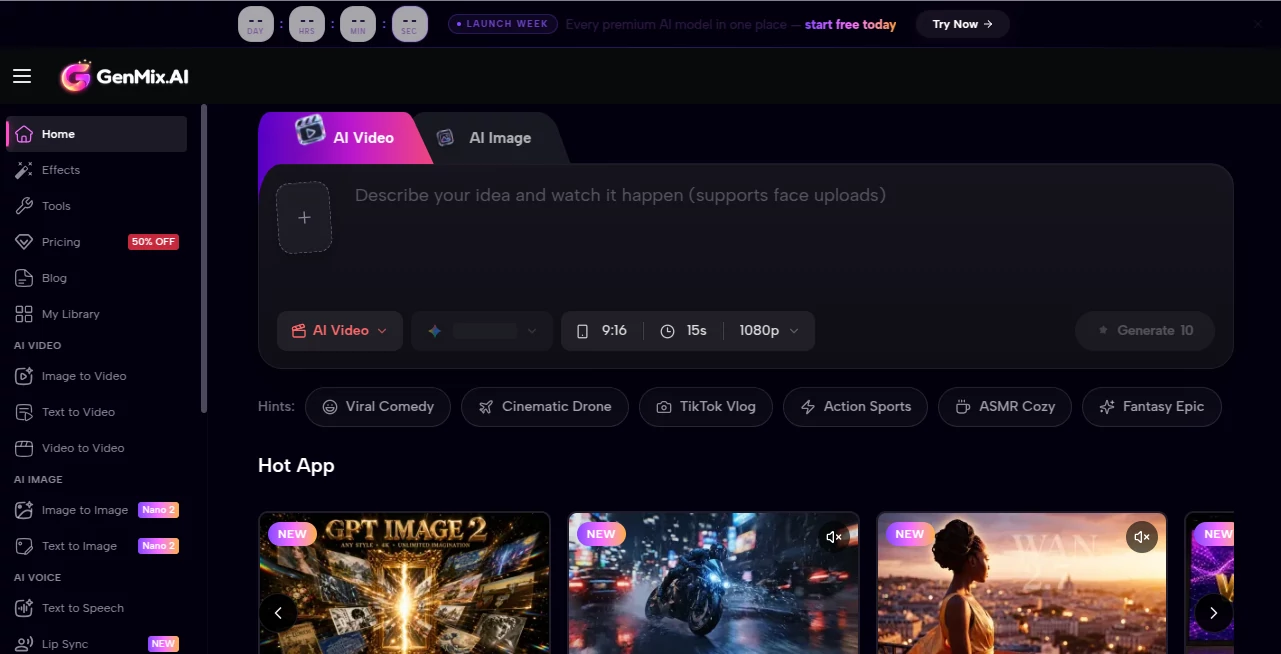
What is GenMix?
Most creators waste too much time jumping between different AI tools—one for video, another for images, yet another for voiceovers. GenMix quietly solves that headache by putting nearly every top-tier model under one roof. You describe what you want, pick the right engine for the job, and get professional-looking results without the usual friction. I’ve seen freelancers go from juggling five tabs to finishing entire social campaigns in one place, and the quality holds up surprisingly well even on ambitious prompts. It feels like the creative workspace many of us have been wishing for.
Introduction
GenMix brings together powerful models like Sora, Veo, Kling, Wan, and more into a single, easy-to-use platform. Whether you need cinematic video clips, stunning images, natural voiceovers, or lip-synced animations, everything lives in one dashboard. It’s particularly loved by marketers, YouTubers, indie filmmakers, and educators who need fast, high-quality content without learning a dozen different interfaces. The real strength is how seamlessly it lets you switch between tools while keeping your projects organized. Instead of fighting tech, you spend time actually creating.
Key Features
User Interface
The dashboard is clean and practical. You have quick access to different creation modes—text to video, image to video, text to image, voice, and more—without digging through complicated menus. Projects are neatly organized, previews load fast, and the flow from idea to final file feels smooth. It’s the kind of interface that gets out of your way so you can focus on being creative rather than learning yet another complicated tool.
Accuracy & Performance
The platform delivers consistently strong results across different models. Videos show natural motion and good prompt adherence, images come out detailed and stylistically accurate, and voices sound natural with solid lip-sync options. Generation times are reasonable for the quality level, and the system handles complex prompts better than many single-model tools. You get reliable output without constant rerolls, which saves real time in actual workflows.
Capabilities
You can create text-to-video, image-to-video, video-to-video, text-to-image, voiceovers, lip-sync animations, and more using premium models. It supports multiple aspect ratios, styles, and lengths, making it suitable for social media, presentations, ads, or storytelling. The all-in-one nature means you can generate a script, turn it into voice, create matching visuals, and build a complete video—all without leaving the platform.
Security & Privacy
Your projects and generated content stay under your control. The platform follows standard security practices so you can work on client material or personal ideas with confidence. It’s built for creators who value both quality and peace of mind.
Use Cases
Marketers quickly generate product videos and matching voiceovers for campaigns. YouTubers create thumbnails, shorts, and full video segments in one session. Teachers turn lesson plans into engaging animated explainers. Indie creators prototype story ideas with visuals and narration before full production. Social media managers batch-create consistent content across platforms. The flexibility makes it valuable for anyone who needs visuals and audio on a regular basis.
Pros and Cons
Pros:
- Access to multiple premium models in one convenient place.
- Smooth workflow from idea to complete video with voice.
- Good quality across video, image, and audio generation.
- Time-saving for creators who need different content types.
- Clean, practical interface that supports real work.
Cons:
- Heavy daily use benefits from paid plans for unlimited access.
- Learning the strengths of each model takes a little practice.
- Very long or highly complex videos may still need editing.
Pricing Plans
GenMix offers a free tier with daily credits so you can test different models and see the quality firsthand. Paid plans provide higher limits, faster generation, priority access during busy times, and full commercial usage rights. The pricing feels reasonable for the creative output and time it saves—many users say it replaces several separate tool subscriptions.
How to Use GenMix
Start by choosing your creation type—video, image, or voice. Write a clear prompt describing what you want, add reference images if needed, and select the best model for the job. Adjust settings like duration, style, or aspect ratio, then generate. Review the result, regenerate variations if desired, and download or continue refining in the same project. For complete videos, you can combine visuals with generated voiceovers in the same workspace. The process stays intuitive even as your projects grow more ambitious.
Comparison with Similar Tools
While many platforms focus on just video or just images, GenMix brings multiple strong models together in one place with a unified experience. It saves the hassle of managing separate accounts and learning different interfaces. The combination of quality, speed, and workflow integration makes it especially practical for creators who need to produce different types of content regularly.
Conclusion
Creativity shouldn’t be slowed down by switching tools and learning curves. GenMix gives you a powerful, all-in-one workspace that respects your time and delivers impressive results across video, images, and voice. Whether you’re building a brand, telling stories, or creating content for work or fun, it makes the process smoother and more enjoyable. For anyone serious about visual and audio content, having this kind of versatile toolkit feels like a genuine advantage.
Frequently Asked Questions (FAQ)
Do I need technical skills to use it?
No—the interface is designed to be approachable while still offering advanced control for experienced users.
Can I use it for commercial projects?
Yes, paid plans include commercial rights for the generated content.
How good is the video quality?
It leverages top models and produces results suitable for social media, presentations, and even professional prototypes.
Is there a free way to try it?
Yes, the free tier gives you daily credits to test different creation types.
Can I generate both video and matching voice?
Absolutely—you can create visuals and voiceovers in the same platform for complete content pieces.
AI Text to Speech , AI Video Generator , AI Text to Video , AI Image to Image .
These classifications represent its core capabilities and areas of application. For related tools, explore the linked categories above.

GenMix Alternatives Product

Seedance 4.0

MaxArt AI

happyhorsevi…

AI Pixel Ani…

Kling 3.0 – …

NB2 Hub

MuseArt AI

Viewra

Veo 4
