
Genpire
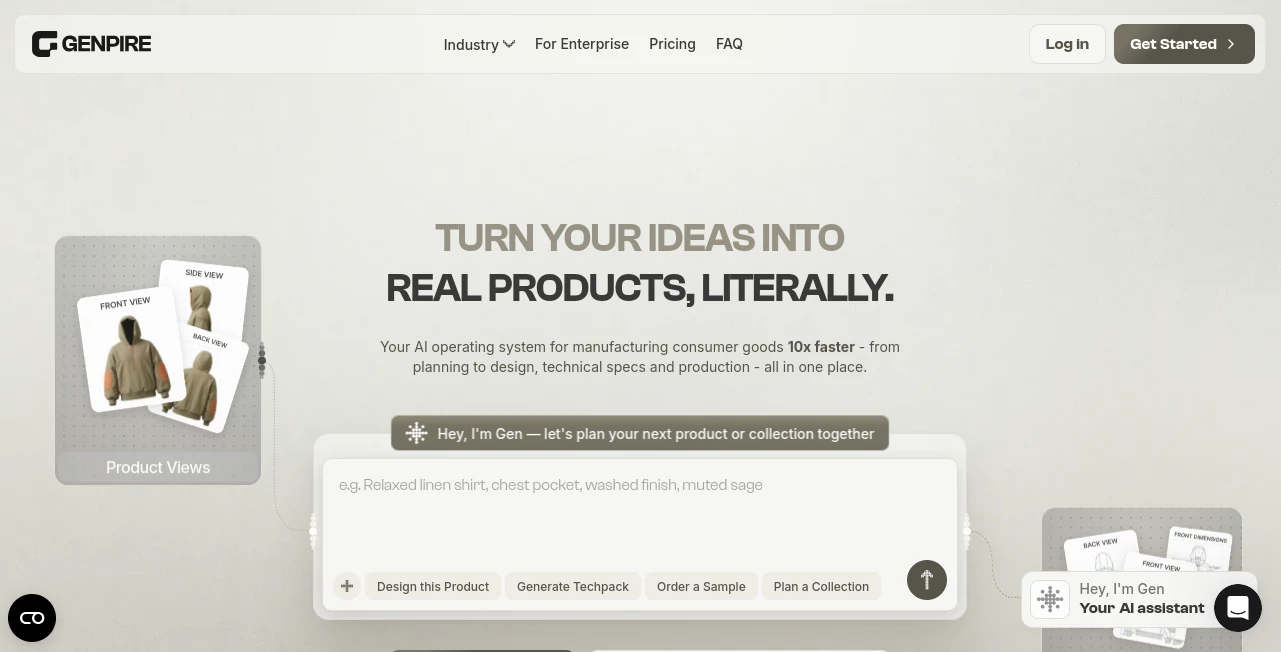
What is Genpire?
Turning a product idea into something a manufacturer can actually build usually takes far more than a good concept. Designers need technical drawings, measurements, construction details, bills of materials, revisions, and a clear way to communicate with suppliers. For independent creators and smaller brands, that process can quickly become expensive and time-consuming.
Genpire brings much of that workflow into a single AI-powered product development platform. Users can start with a written idea, an existing design, or a sketch and move toward product visuals, technical specifications, and factory-ready documentation without starting every stage from scratch.
The platform is designed for a wide range of consumer products, including fashion, footwear, jewelry, furniture, home goods, toys, gadgets, and accessories. Its main appeal is the connection between creative product development and the technical work required to move an idea toward manufacturing.
Key Features
- AI-assisted product creation from prompts, sketches, or reference designs
- Factory-ready technical packs with measurements, construction details, and bills of materials
- Multi-view product generation for front, back, side, and other perspectives
- AI moodboards, palettes, references, and brand-focused creative assets
- Editable product specifications and technical details
- Technical sketches and flat drawings for product development and presentations
- RFQ and supplier workflows for moving from specifications toward manufacturing
- Sample and bulk-order workflows within the broader product development process
- Exports in practical formats including PDF, Excel, SVG, PNG, and bundled ZIP files
- Collaboration features for brands, teams, designers, and manufacturing partners
User Interface
The workflow is built around the idea of keeping product development in one place. Instead of jumping between an image generator, drawing application, spreadsheet, and separate technical documentation tool, users can develop and refine their product within a connected workspace.
Getting started is relatively straightforward. A creator can describe an idea in natural language or upload an existing design or sketch. From there, the AI helps turn the initial concept into product views and technical information that can be refined before being prepared for manufacturing.
The editing experience is particularly useful because generated results are not treated as untouchable final images. Product views, measurements, materials, colors, components, and other details can be revised manually or through AI-assisted changes.
Accuracy & Performance
The strongest performance advantage comes from reducing repetitive product-development work rather than simply generating attractive images. The platform can create construction details, component information, measurements, and BOM data as part of the technical documentation workflow.
A complete product package can require roughly 40 to 50 credits depending on its complexity. The company says its technical packs follow familiar manufacturing conventions and can be exported in formats commonly used by factories and sourcing teams.
AI-generated specifications should still be reviewed before production. Manufacturing involves physical tolerances, materials, supplier capabilities, and product-specific requirements that cannot always be determined perfectly from an AI-generated design.
Capabilities
The platform goes beyond basic product mockups. Its workflow can cover concept creation, product visualization, technical documentation, construction details, components, sourcing, RFQs, sample orders, and bulk production.
One interesting feature is its ability to adapt technical documentation to different product categories. Apparel may require information about seams, trims, closures, and measurements, while a piece of furniture may need information about frames, joinery, and other construction elements.
There is also a creative side to the platform. Users can develop moodboards, brand references, visual assets, product imagery, and marketing materials alongside the actual product specifications. That makes it useful when the same team is responsible for both product development and launch preparation.
Security & Privacy
Privacy is especially important for product creators because uploaded sketches, product concepts, specifications, and supplier information can represent commercially valuable work. The platform states that user content is not used to train AI models without explicit consent.
The service uses third-party AI technologies, including models and services from providers such as Google, OpenAI, Anthropic, and Perplexity. Users should therefore review the platform's privacy and AI policies when working with confidential or commercially sensitive product information.
Use Cases
- Fashion brands: Develop apparel concepts, technical flats, measurements, construction details, and tech packs.
- Footwear startups: Move from early concepts toward structured product specifications and manufacturing documentation.
- Independent product creators: Turn an idea or rough sketch into a more complete product concept without building a large design team.
- Furniture brands: Explore product concepts while developing the technical information needed for production.
- Consumer-goods companies: Manage multiple product concepts and collections through a connected workflow.
- Small brands: Reduce dependence on separate agencies, spreadsheets, designers, and sourcing workflows.
- Product teams: Collaborate on revisions and keep product information together as it moves toward manufacturing.
Pros and Cons
Pros
- Connects creative product design with manufacturing documentation
- Can generate technical packs from ideas, sketches, or references
- Supports multiple consumer-product categories
- Offers editable AI-generated results rather than static outputs
- Includes practical factory-oriented export formats
- Combines product creation, technical development, and sourcing workflows
- Can be useful for creators who do not have an in-house technical design team
Cons
- AI-generated technical information still requires human review before manufacturing
- Credit usage varies according to the complexity of each creation
- Advanced manufacturing workflows may take time to fit into an established company's existing processes
- Users with highly specialized CAD or 3D fitting requirements may still need dedicated professional software
Pricing Plans
The platform uses a credit-based system, with credits covering actions such as product creation, revisions, technical documentation, and creative generation.
- Go: $22.90 per month with 2,000 credits. It includes product and collection creation, manual edits, sketch and blank libraries, sample and bulk-order workflows, quote requests, and standard support.
- Pro: $37.90 per month with 4,500 credits. It adds Brand DNA, shared asset libraries, AI moodboards, a node-based creative studio, connectors, and priority support.
- Super: $74.90 per month with 10,000 credits. It includes the Pro features with substantially more credits and early access to selected new features.
Annual billing is available at a discount, while additional credit packs can be purchased when needed. The service also allows users to upgrade, downgrade, or cancel without a long-term lock-in. A free starting option is available without requiring a credit card.
How to Use the Platform
Start by describing the product you want to create or uploading an existing sketch, reference image, or design. Providing useful information about the product category, intended customer, materials, style, and purpose can give the AI more context to work with.
Review the initial product concept and generate additional views as needed. Once the visual direction is right, refine elements such as colors, materials, components, measurements, and construction details.
The next step is to build the technical documentation. Review the generated BOM, measurements, callouts, construction information, and other specifications carefully. Make any necessary manual adjustments before exporting the finished files.
When the product is ready for the next stage, the resulting documents can be exported for manufacturers or used through the platform's RFQ and supplier workflows. Samples can then be reviewed before moving toward larger production orders.
Comparison with Similar Tools
Traditional product development often involves several disconnected tools. A creator might use one application for concept images, another for technical drawings, spreadsheets for measurements and BOMs, and separate communication channels for manufacturers and suppliers.
This platform takes a different approach by connecting those stages. Instead of focusing only on visual generation, it attempts to maintain product context from the initial concept through technical documentation and manufacturing preparation.
That distinction makes it more comparable to an AI-assisted product development workflow than to a conventional image generator. For someone who only needs polished concept art, a general image-generation tool may be enough. For someone preparing a physical product for manufacturing, the technical and sourcing capabilities can make the integrated workflow considerably more useful.
Conclusion
For product creators, one of the hardest parts of turning an idea into reality is everything that happens after the initial concept. A beautiful render is only the beginning. Measurements, materials, construction, components, technical documentation, supplier communication, and revisions are what ultimately move a product toward production.
This platform tackles that gap by bringing AI-assisted design and manufacturing preparation into the same environment. Its ability to work from prompts and sketches, generate technical documentation, support multiple product categories, and connect product development with sourcing makes it particularly interesting for independent brands and growing consumer-product teams.
It is not a replacement for experienced designers, engineers, manufacturers, or quality control, and important production specifications should always be checked by qualified people. But for creators looking to reduce the amount of repetitive work between an idea and a factory-ready product, it offers a compelling and practical workflow.
Frequently Asked Questions (FAQ)
What is the platform mainly used for?
It is primarily designed to help creators and consumer-product brands develop physical products from initial concepts through technical documentation and manufacturing preparation.
Can I start with a sketch?
Yes. Users can upload sketches and reference designs as starting points, allowing the AI-assisted workflow to develop the concept and its technical documentation.
Does it generate tech packs?
Yes. The platform can generate factory-oriented technical packs containing product views, measurements, construction details, components, and BOM information.
What types of products can be created?
The platform supports several consumer-product categories, including apparel, footwear, accessories, jewelry, furniture, home goods, toys, gadgets, and other physical products.
Can the generated designs be edited?
Yes. Generated product views and technical information can be refined through AI-assisted prompts or manual editing.
What file formats can be exported?
Technical and product files can be exported in formats including PDF, Excel, SVG, PNG, and ZIP packages.
Is human review still necessary?
Yes. AI can accelerate product development, but measurements, construction details, materials, tolerances, and manufacturing requirements should be reviewed before a product enters production.
Does the platform offer a free way to start?
Yes. New users can begin creating without a credit card and move to a paid plan when they are ready to use additional credits and capabilities.
Are unused monthly credits carried over?
Monthly plan credits reset with the billing cycle. Purchased top-up credits have different rules and do not expire according to the current pricing information.
Can it help with manufacturers and suppliers?
Yes. The workflow includes RFQ and supplier-related capabilities, helping creators move from a completed product specification toward sampling and manufacturing.
AI Design Assistant , AI Clothing Generator .
These classifications represent its core capabilities and areas of application. For related tools, explore the linked categories above.

Genpire Alternatives Product

GPT Image 2 …

GPT Image 2 …

SparkIconAI

Image2GPT

Seed3D 2.0

poseup

Roomagic

RoomMaxxing

SciDraw AI