
GetDesign.md
What is GetDesign.md?
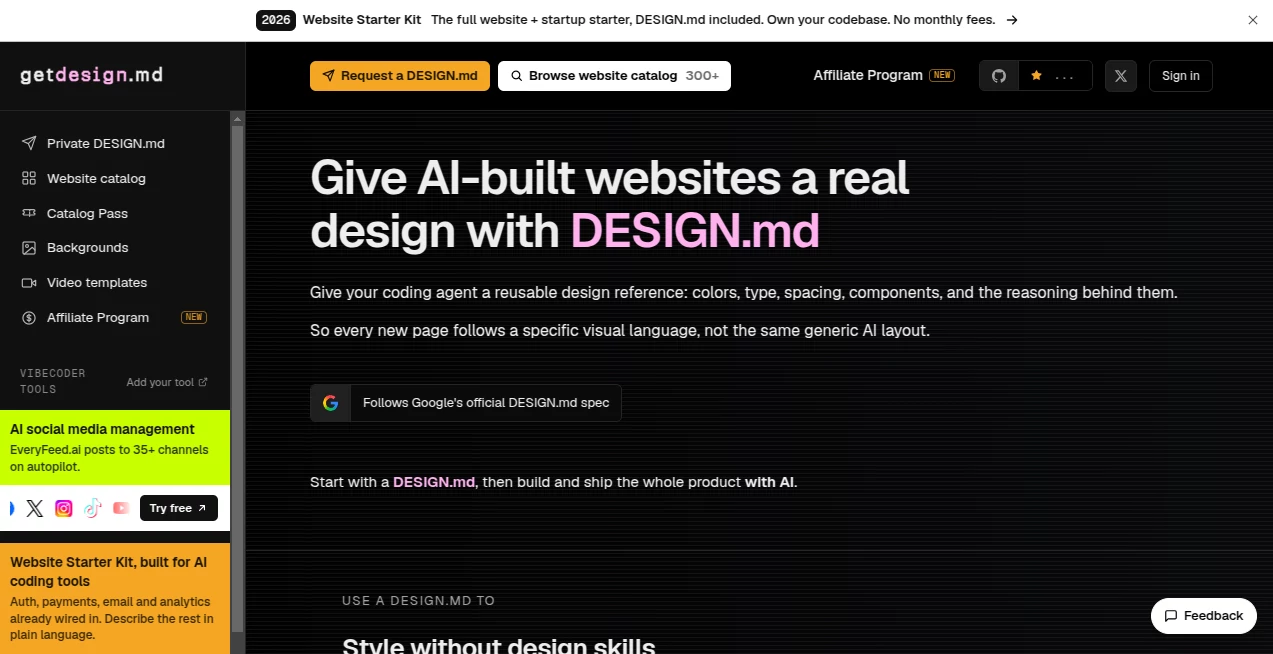
getdesign.md is a design reference platform built for people who use AI coding agents to create and improve websites. Its central idea is simple: instead of repeatedly explaining colors, typography, spacing, components, and visual style to an AI coding assistant, developers can provide a reusable DESIGN.md file that captures those decisions in a format AI agents can understand.
The platform offers a growing collection of DESIGN.md analyses based on recognizable websites and visual styles. These files can be used as practical starting points when building a new product, redesigning an existing interface, or trying to move an AI-generated website away from the familiar generic look.
It is particularly useful for developers who can build with AI but do not necessarily have a designer available for every project. The service also offers private DESIGN.md files for individual websites and a production-ready Website Starter Kit for users who want a more complete foundation.
Key Features
- Reusable DESIGN.md files containing visual design guidance for AI coding agents.
- Design references covering colors, typography, spacing, components, motion, and visual reasoning.
- A catalog of more than 300 design analyses covering recognizable brands and products.
- Support for using design references with AI coding tools such as Cursor, Claude Code, Codex, and other compatible agents.
- Private DESIGN.md creation based on a website supplied by the customer.
- Light and dark theme versions for private design files.
- Browser-based theme previews for reviewing design tokens before implementation.
- A Website Starter Kit with authentication, billing, dashboards, AI features, content pages, analytics, and deployment-ready functionality.
User Interface
The website keeps its own interface focused on the design-system concept. Visitors can browse a catalog of design analyses, search for visual references, inspect individual design systems, and explore related products. The presentation is developer-friendly rather than overloaded with decorative elements.
Each design analysis gives users a practical way to understand the visual language behind a website. For someone working with an AI coding agent, that makes the content considerably more useful than simply looking at screenshots and trying to describe the design manually.
Accuracy & Performance
A major strength is that the design references are intended to capture observable visual patterns rather than simply provide vague design advice. The platform describes DESIGN.md as a reusable reference containing elements such as colors, type scales, spacing, components, and the reasoning behind them.
Its documentation also explains that the broader getdesign workflow can open a website in a real browser, extract visual tokens and components, and return a production-oriented design.md. This approach gives developers a more structured starting point for recreating a visual language with an AI coding workflow.
Capabilities
The platform goes beyond a traditional design inspiration gallery. A developer can select a design reference, add the resulting DESIGN.md to a project, and instruct an AI coding agent to use it when working on the interface. This is useful for maintaining consistency as additional pages are created.
There is also a private design option for users who want a DESIGN.md generated specifically from their own website. The service provides both light and dark versions along with browser-based previews.
For larger projects, the Website Starter Kit adds a production-oriented codebase with authentication, social login and roles, payment and subscription billing, an AI chat assistant, knowledge search, blog and documentation functionality, SEO and LLMO pages, email features, analytics, file uploads, notifications, and deployment support.
Security & Privacy
Privacy becomes especially relevant when requesting a private design analysis. The service states that a private DESIGN.md created from a submitted website is delivered privately rather than published in the public directory. Its terms also distinguish between the publicly browsable design inspiration files and privately requested design files.
Customers should still review the current privacy policy and terms before submitting proprietary or sensitive website information, particularly when working on unreleased products.
Use Cases
- AI-assisted website development: Give an AI coding agent a concrete visual reference before asking it to build interface components.
- Redesigning existing websites: Use a structured design reference to guide an AI through a visual refresh without rebuilding the entire product.
- Design consistency: Keep new pages aligned with the same typography, colors, spacing, and component rules.
- Developer-led projects: Help developers achieve a more deliberate visual result when a dedicated designer is not available.
- Design inspiration: Study the visual patterns of well-known websites and adapt the underlying ideas to a different project.
- Client projects: Establish a repeatable design direction that can be handed to an AI coding workflow.
- New SaaS products: Combine the design system with the Website Starter Kit to get a stronger starting point for a complete product.
Pros and Cons
Pros
- Turns visual design decisions into instructions that AI coding agents can actually use.
- Useful for developers who want better-looking AI-generated interfaces without writing detailed design prompts from scratch.
- Large and varied collection of design references.
- Supports both public inspiration files and privately generated design systems.
- Works naturally with modern AI coding workflows.
- The Website Starter Kit provides considerably more than a basic landing-page template.
Cons
- The catalog is primarily useful to people already working with AI-assisted development.
- A DESIGN.md is a design reference, not a replacement for human design judgment.
- AI coding agents may still require several rounds of prompting and review before a design is reproduced accurately.
- The more advanced starter products are aimed at users building substantial websites or applications rather than people looking for a simple visual template.
Pricing Plans
The public DESIGN.md collection is available for browsing and downloading, making it possible to experiment with the concept without immediately purchasing a product.
For users who need a custom private design system, the service currently lists a Private DESIGN.md option at $39 as a one-time payment, discounted from $59. It includes a custom design analysis, light and dark versions, theme previews, and a private Discord channel.
The Website Starter Kit is listed at $249 as a one-time purchase, discounted from $299. It includes the private DESIGN.md offering alongside a production-ready website codebase and a range of features covering authentication, payments, AI functionality, content, analytics, email, file uploads, notifications, and deployment.
Because digital-product pricing can change, users should confirm the current price at checkout before purchasing.
How to Use getdesign.md
- Browse the available DESIGN.md references and find a visual direction that fits your project.
- Download or add the selected design reference to your project.
- Place the DESIGN.md where your AI coding agent can access it.
- Tell the coding agent to read the design reference before creating or modifying UI components.
- Ask the agent to apply the defined colors, typography, spacing, components, and other visual rules.
- Review the result and provide additional prompts when specific details need refinement.
For a completely custom direction, users can request a private DESIGN.md based on their own website. The service analyzes the requested site and delivers the resulting design system privately.
Comparison with Similar Tools
Traditional website builders generally focus on visually constructing pages inside an editor, while AI page builders often generate a complete interface from a prompt. This approach is different: the main goal is to give the AI coding process a reusable design language that can guide future implementation.
That distinction makes it especially interesting for developers using tools such as Cursor, Claude Code, Codex, or similar coding agents. Instead of asking an AI to “make it look professional” and hoping for a good result, the developer can provide a more concrete visual specification.
Compared with a static design gallery, the advantage is also practical. The output is intended to become part of the development workflow rather than remain something the developer merely looks at for inspiration.
Conclusion
AI has made it much easier to produce functional websites, but getting those websites to feel intentional and visually consistent is a different challenge. That is the problem this platform addresses.
By turning visual decisions into reusable DESIGN.md references, it gives developers a practical bridge between design inspiration and AI-assisted implementation. The public catalog is useful for experimentation, while private design extraction and the Website Starter Kit make the offering more relevant to serious product development.
For anyone building websites with AI coding agents and tired of interfaces that feel visually generic, this is a particularly useful addition to the development workflow.
Frequently Asked Questions (FAQ)
What is a DESIGN.md file?
A DESIGN.md file is a structured design reference that describes a website's visual language, including elements such as colors, typography, spacing, components, and related design decisions. It can be given to an AI coding agent as context for interface work.
Who is this platform designed for?
It is mainly aimed at developers, founders, designers, and builders who use AI coding agents to create or improve websites and applications.
Can I use the public DESIGN.md files for my own projects?
Yes. The service states that its public DESIGN.md files are free to browse, download, and use as starting points for projects.
Can I create a DESIGN.md for my own website?
Yes. A private DESIGN.md can be requested by submitting a website URL. The resulting design reference is prepared privately rather than added to the public inspiration catalog.
Does it replace a professional designer?
Not completely. It can reduce the amount of design specification work required during AI-assisted development, but human judgment is still valuable for branding, product strategy, usability, and final visual decisions.
Does the Website Starter Kit include AI functionality?
Yes. The starter kit includes features such as an AI chat assistant, knowledge search, and wiring intended for connecting AI providers, alongside standard product infrastructure.
Does it require a monthly subscription?
The listed private DESIGN.md and Website Starter Kit products are presented as one-time purchases rather than recurring subscriptions.
Can the design reference be used with AI coding agents?
Yes. The design system is specifically intended to be provided as context to AI coding agents so they can follow the defined visual language when creating or modifying interfaces.
AI Design Assistant , AI Website Designer , AI Design Generator , AI Developer Tools .
These classifications represent its core capabilities and areas of application. For related tools, explore the linked categories above.
GetDesign.md details
Website unavailable — View Alternatives
Pricing
- Freemium
Apps
- Web App
Categories

GetDesign.md Alternatives Product

Claude and C…

QR Menu Gene…

AppScreens
VexImg

Circle Crop …

Sento AI

Nano Banana 2

Pygmalion Pr…

Consistent C…