
GPTImage2-AI Image Generation
What is GPTImage2-AI Image Generation?
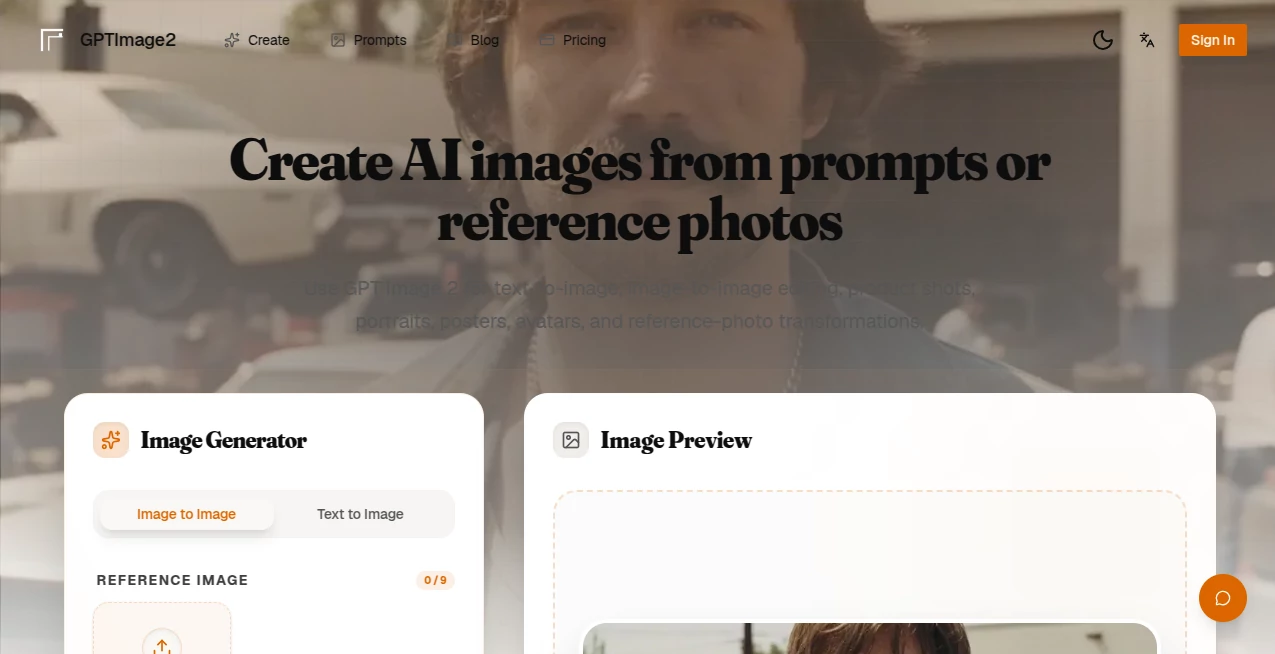
There’s something satisfying about typing a detailed idea or uploading a rough reference and getting back an image that actually feels finished. Not the usual blurry or generic output, but something sharp, coherent, and ready to use. This tool consistently delivers that experience. Whether you need photorealistic product shots, character consistency across multiple scenes, or clean text inside images, it handles the details that usually trip up other generators. I’ve watched designers and marketers go from frustrated experimentation to confident “this works” moments after just a few generations. The results look like they came from a skilled artist who understood exactly what you wanted.
Introduction
Most AI image tools still feel experimental — great for quick concepts but not quite ready for client work or commercial use. GPT Image 2 was built differently. It focuses on production-ready output: strong photorealism, excellent text rendering (including non-Latin characters), impressive character consistency, and the ability to use up to 14 reference images at once. You can start from a simple prompt or heavily guide the result with your own photos. The speed is practical, the quality is reliable, and the commercial rights are straightforward. For creators who need visuals that look intentional rather than “AI-generated,” it’s become a daily go-to.
Key Features
User Interface
The interface stays out of your way. A clean prompt box, easy reference upload area, aspect ratio choices, and resolution options are all right where you expect them. You see previews quickly, and the workflow feels natural whether you’re doing pure text-to-image or complex image-to-image editing. No overwhelming menus or hidden settings — just a focused space that lets you iterate fast without losing momentum.
Accuracy & Performance
It stands out in areas where others often stumble. Text inside images comes out readable and properly styled, even with complex fonts or non-English characters. Characters keep their look across multiple generations, lighting feels consistent, and the overall photorealism holds up at 1080p. Generation times are reasonable — fast enough for real workflow rather than waiting around. The model seems to understand context well, so prompts with multiple subjects or specific compositions rarely fall apart.
Capabilities
Strong text-to-image generation, advanced image-to-image editing, support for up to 14 reference images, photorealistic and stylized outputs, smart aspect ratio control, and high-resolution 1080p results. It excels at product mockups, portraits, posters, game assets, hairstyle try-ons, and commercial visuals. You can guide the AI heavily with references or let it interpret a detailed prompt freely. The balance between creative freedom and precise control makes it versatile for both quick ideas and client-ready work.
Security & Privacy
Your prompts and uploaded images are handled responsibly. The platform doesn’t train on user data, and outputs come watermark-free with full commercial rights. You can generate and download without unnecessary account requirements for basic use, giving you confidence when working on sensitive or client projects.
Use Cases
A product designer uploads a logo and gets polished packaging mockups ready for presentation. A content creator generates consistent character visuals across a series of social posts. A small business owner turns simple product photos into professional ad creatives without a photoshoot. A game developer builds concept art and character references quickly to test ideas with the team. The common theme is speed paired with quality that doesn’t need heavy post-editing.
Pros and Cons
Pros:
- Excellent text rendering and character consistency — two of the hardest things for AI to get right.
- Strong multi-reference support (up to 14 images) for precise control.
- Production-ready 1080p output suitable for commercial use.
- Fast enough to support real creative iteration rather than long waits.
- Full commercial rights with no watermarks on final images.
Cons:
- Higher resolutions consume more credits, which is expected but worth planning for.
- Very abstract or contradictory prompts can still produce mixed results.
Pricing Plans
It offers a practical free tier so you can test quality without commitment. Paid plans provide more credits, higher resolutions, and faster generation for regular users. The structure rewards heavier use without punishing occasional creators. Many people find the paid tiers pay for themselves quickly when replacing stock imagery or freelance design work.
How to Use GPT Image 2
Start with a clear prompt describing what you want. For more control, upload one or more reference images. Choose your aspect ratio and resolution, then generate. Review the result, tweak the prompt or references if needed, and download the high-res version. For product shots or character work, using multiple references dramatically improves consistency. The process is fast enough that you can generate several variations and pick the strongest one in one sitting.
Comparison with Similar Tools
Compared to DALL·E 3, it offers better photorealism, stronger text rendering, and more reference control. Against other general-purpose generators, the character consistency and multi-image composition stand out. It’s not the cheapest option, but for anyone needing commercial-grade, consistent, and detailed results, it frequently outperforms tools that focus more on speed than quality.
Conclusion
When you need visuals that look intentional and professional rather than obviously AI-generated, this tool delivers. It combines creative freedom with enough control to get repeatable, high-quality results. Whether you’re building a brand, creating content, or prototyping ideas, it turns the often frustrating process of generating images into something reliable and enjoyable. For many creators, it has quietly become one of the most useful tools in their daily workflow.
Frequently Asked Questions (FAQ)
How good is the text rendering?
One of its strongest points — especially for logos, posters, and any image containing readable text, including non-English characters.
Can I use multiple reference images?
Yes, up to 14 references at once for complex compositions and strong style guidance.
Are the images suitable for commercial use?
Yes, all generated images come with full commercial rights and no watermarks.
How fast are generations?
Usually 15–60 seconds depending on resolution. HD previews are especially quick.
What resolutions are available?
HD for quick testing and 1080p for final, client-ready output.
AI Photo & Image Generator , AI Art Generator , AI Image to Image , AI Text to Image .
These classifications represent its core capabilities and areas of application. For related tools, explore the linked categories above.
GPTImage2-AI Image Generation details
Website unavailable — View Alternatives
Pricing
- Free
Apps
- Web App
Categories

GPTImage2-AI Image Generation Alternatives Product
imagen 5

Fiddl.art

Nano Banana 2

AI Image Edi…
Transpic

Nano Banana 2

MuseArt AI
Wurt.app
Free GPT IMG