GPT Image 2
What is GPT Image 2?
Creating high-quality visuals no longer requires advanced design skills or hours of editing. This platform brings together powerful image generation and editing capabilities in a clean browser-based workspace, making it easy for anyone to transform ideas into professional-looking artwork. Whether you are designing marketing assets, social media graphics, product mockups, concept art, or presentation visuals, everything can be done from a single interface.
One of the biggest strengths is its impressive ability to follow detailed prompts while producing sharp, realistic images. It also delivers highly accurate text rendering inside images, making it especially useful for posters, advertisements, UI mockups, and branded graphics where readable typography is essential. Users can start with simple text prompts or upload reference images to guide the final result, providing flexibility for both creative exploration and commercial projects.
The workflow feels smooth from beginning to end. Multiple aspect ratios, high-resolution exports, advanced prompt controls, and image-to-image editing allow creators to fine-tune every detail without unnecessary complexity. Whether you are an experienced designer or someone generating AI artwork for the first time, the overall experience feels intuitive and rewarding.
Key Features
- Generate detailed AI images from text prompts.
- Edit existing images using reference uploads.
- Create images up to 4K resolution.
- Exceptional text rendering inside images.
- Support for multiple aspect ratios.
- Fast image generation workflow.
- Advanced prompt customization.
- Commercial usage rights.
- Browser-based editor with no installation.
- Flexible credit-based pricing options.
User Interface
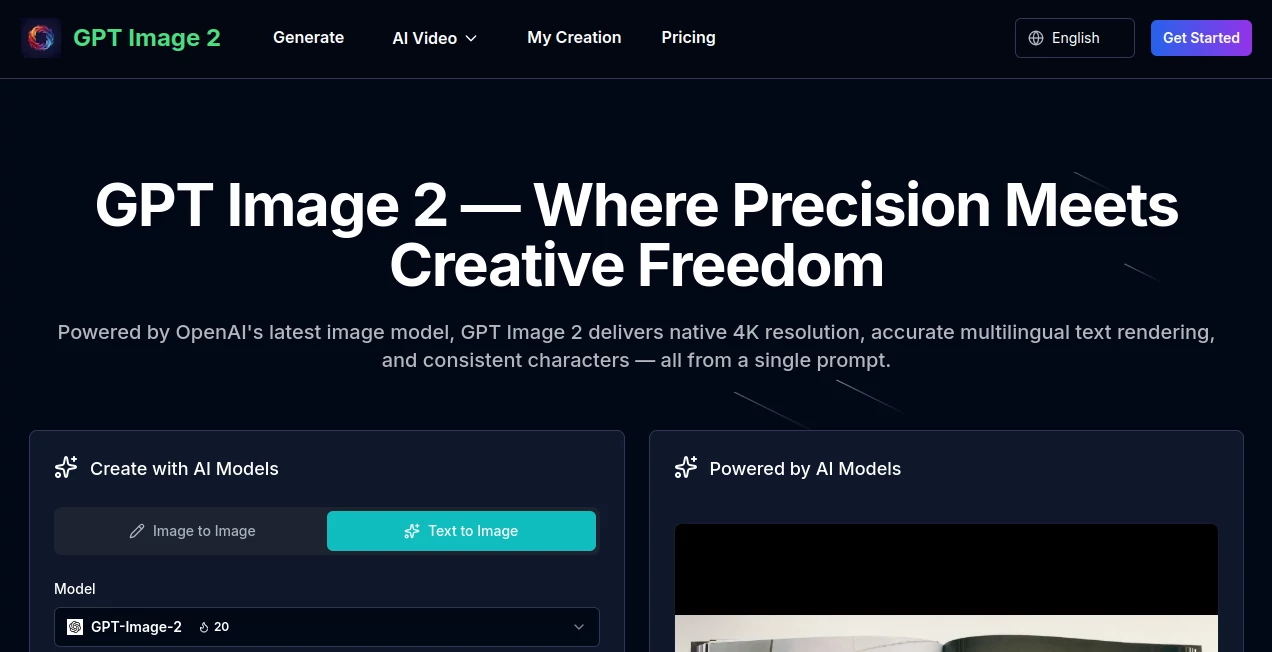
The interface is designed with simplicity in mind. Prompt writing, image uploading, model selection, resolution settings, and aspect ratio controls are all available within a single workspace. This streamlined layout reduces distractions and allows creators to focus entirely on developing their ideas. Even users who have never worked with AI image generators can begin producing results within minutes.
Accuracy & Performance
The platform performs particularly well when following complex instructions. Detailed prompts involving lighting, composition, perspective, colors, and object placement are reproduced with impressive consistency. One standout capability is its highly accurate rendering of readable text inside generated images, making it an excellent choice for promotional materials, presentations, packaging concepts, and interface mockups.
Capabilities
Beyond simple text-to-image generation, creators can upload one or more reference images to guide composition, artistic style, or character consistency. Multiple image outputs can be generated simultaneously, and advanced settings allow greater control over lighting, camera angles, quality, and negative prompts. This flexibility supports everything from creative experimentation to professional production workflows.
Security & Privacy
Projects are created through secure user accounts with a credit-based system. Commercial usage rights are available for generated images, making the platform suitable for business projects, marketing campaigns, client work, and digital products. Users maintain control over their creative workflow without requiring local software installation.
Use Cases
- Marketing campaign graphics.
- Social media content creation.
- Product advertisements.
- Website hero images.
- Presentation illustrations.
- UI and UX mockups.
- Book and magazine covers.
- Concept art for games.
- Educational visuals.
- Creative brainstorming and ideation.
Pros and Cons
Pros
- Produces highly detailed 4K-quality images.
- Excellent prompt understanding.
- Outstanding text rendering compared to many alternatives.
- Supports image editing with references.
- Simple browser-based experience.
- Commercial rights included.
Cons
- Free usage is limited.
- Higher-volume projects require additional credits or subscriptions.
- Internet connection is required for image generation.
Pricing Plans
A free plan allows new users to explore the platform with complimentary credits. Additional image generation is available through one-time credit packs as well as yearly subscription plans designed for individuals, creative professionals, and larger production teams. Commercial usage rights are included across available plans.
How to Use GPT Image 2
Start by creating an account and opening the image generation workspace. Enter a detailed prompt describing the scene, subject, lighting, colors, and artistic style you want to achieve. Optionally upload one or more reference images to influence the final output. Select your preferred aspect ratio and image quantity, adjust advanced settings if needed, and generate the images. After reviewing the results, you can refine the prompt, regenerate variations, or export the finished artwork in your preferred format.
Comparison with Similar Tools
Compared with many AI image generators, this solution stands out through its combination of realistic image quality, fast generation speed, and exceptional text rendering capabilities. While many competing platforms struggle with readable typography or precise instruction following, this platform consistently delivers clean text placement and accurately interprets complex prompts. The integrated image editing workflow and intuitive interface also make it attractive for both casual creators and professional designers.
Conclusion
For anyone looking to generate professional AI artwork without complicated software, this platform delivers an excellent balance of quality, speed, and usability. From marketing materials and branding assets to concept illustrations and creative experiments, it offers an efficient workflow that helps transform ideas into polished visuals. Its strong prompt interpretation, high-resolution output, and reliable text rendering make it one of the most practical choices for creators who value both creative freedom and production-ready results.
Frequently Asked Questions (FAQ)
Can beginners use this platform?
Yes. The interface is straightforward and designed for users with little or no design experience.
Does it support image editing?
Yes. Users can upload reference images and generate edited versions based on new prompts.
Can generated images be used commercially?
Commercial usage rights are available according to the platform's licensing and subscription terms.
Does it create high-resolution images?
Yes. The platform supports image generation and exports up to 4K resolution.
Is there a free version?
Yes. New users receive free credits that can be used to generate their first images before upgrading to paid plans.
AI Photo & Image Generator , AI Design Generator , AI Image to Image , AI Text to Image .
These classifications represent its core capabilities and areas of application. For related tools, explore the linked categories above.

GPT Image 2 Alternatives Product
DaVinci AI
Image To Ima…
AIGPTImage
Nano Banana 2
Pixel Art Vi…
PatchDesign.…

NepVox
Nano Banana …
Wolfcut Onli…