
Gradium
What is Gradium?
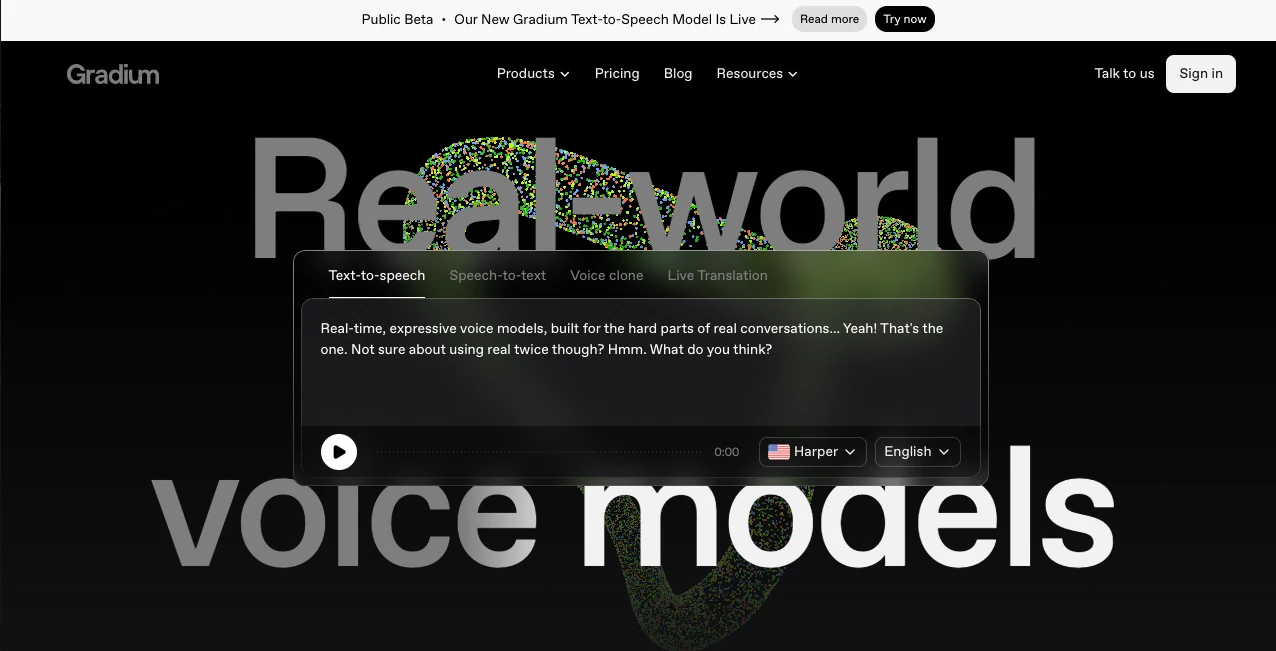
Voice AI becomes truly useful when it can respond quickly, sound natural, and keep up with the way people actually speak. Gradium is built around that idea, offering a collection of voice models designed for real-time applications rather than simple audio generation.
The platform brings Text-to-Speech, Speech-to-Text, voice cloning, and real-time speech translation together through APIs. It is particularly interesting for developers building voice agents, customer support systems, conversational applications, media products, and other experiences where even a small delay can make a conversation feel unnatural.
Its focus is not simply on producing a convincing voice. The technology is designed around latency, pronunciation accuracy, streaming performance, and scalability, which makes it a practical option for production-oriented voice applications.
Key Features
- Text-to-Speech: Turn written content into natural-sounding speech with expressive streaming and support for pronunciation dictionaries and accurate timestamps.
- Speech-to-Text: Convert spoken audio into text in real time, with custom vocabulary, code-switching, and semantic voice activity detection.
- Voice Cloning: Create an instant voice clone from a short audio sample, while higher-tier plans provide professional voice cloning for greater fidelity.
- Real-Time Translation: Translate spoken language into another language while preserving the voice and conversational character of the speaker.
- Multilingual Support: The platform currently supports English, French, German, Spanish, and Portuguese across its core voice capabilities.
- On-Device TTS: Its lightweight Phonon model is designed for offline, real-time speech generation on CPU-powered devices.
- Developer APIs: Developers can integrate the models into applications through API access, with official SDK support and integrations for popular voice-agent frameworks.
User Interface
The experience is primarily designed around developers and teams building voice-powered products. Instead of forcing users through a complicated media-production workflow, the platform provides direct access to voice models, documentation, voice libraries, demonstrations, and API tools.
The voice library is especially useful when testing different personalities and speaking styles. The catalog contains more than 200 voices across the supported languages, giving developers a practical starting point before creating a custom voice.
For someone evaluating the technology for the first time, the ability to experiment with voices and then move toward an API-based implementation makes the transition from testing to development relatively straightforward.
Accuracy & Performance
Performance is one of the strongest parts of the platform. The models are designed for streaming interactions where waiting for an entire response before playback is not an option.
The documentation reports an expected time-to-first-token below 300 milliseconds for streaming. Independent benchmark results published by the company also show very low time-to-first-audio performance, making the technology well suited to conversational voice agents.
Accuracy receives similar attention. Pronunciation handling is designed for difficult real-world inputs such as names, numbers, email addresses, acronyms, codes, and structured information. Speech-to-Text also includes semantic voice activity detection, helping applications determine whether a person has actually finished speaking instead of relying only on silence.
Capabilities
The platform covers most of the core building blocks required for a modern voice application. A developer can generate speech, transcribe conversations, create custom voices, and build speech translation workflows without having to assemble every audio component from unrelated providers.
One particularly useful capability is multilingual voice handling. The same voice can be used across supported languages, while mid-sentence language switching is supported for multilingual conversations. This can be valuable for international customer service, language-learning products, and voice assistants used by bilingual audiences.
Deployment flexibility is another advantage. Depending on the project, teams can work with cloud infrastructure, private cloud environments, on-premise deployments, or on-device speech generation.
Security & Privacy
Security requirements vary significantly between a prototype and a production voice application, so deployment flexibility can be important for teams handling sensitive information. The platform provides dedicated trust and security resources and supports private-cloud and on-premise deployment options for organizations with stricter infrastructure or data-residency requirements.
Voice cloning also deserves careful consideration. Organizations should only create or use a cloned voice when they have the appropriate permission from the person whose voice is being reproduced. This is especially important when deploying custom voices in commercial applications.
Use Cases
- AI Voice Agents: Build conversational assistants capable of responding naturally in real time.
- Customer Support: Power automated phone or voice support systems where response speed and accurate transcription matter.
- Content Creation: Produce narration, voiceovers, and other spoken content without recording every line manually.
- Multilingual Applications: Create products that can communicate naturally across English, French, German, Spanish, and Portuguese.
- Voice Cloning: Create consistent branded or character voices for applications and media projects.
- Live Translation: Develop applications that translate conversations while maintaining the speaker's voice characteristics.
- Gaming: Add dynamic character voices and conversational interactions to games.
- Mobile and Edge Applications: Use on-device speech generation when offline operation or reduced server dependency is important.
Pros and Cons
Pros
- Very low-latency streaming designed for real-time conversations.
- Text-to-Speech and Speech-to-Text available through the same platform.
- Instant voice cloning can work from a short voice sample.
- Supports multilingual speech across five languages.
- Real-time speech-to-speech translation capabilities.
- On-device Text-to-Speech provides an option for offline applications.
- API access is available across the pricing tiers.
- A free plan is available for experimentation without requiring a credit card.
Cons
- The current language selection is more limited than some larger multilingual speech platforms.
- Commercial use is not included with the free plan.
- Professional voice cloning is reserved for higher-level plans.
- Some advanced features are primarily aimed at developers rather than casual users.
Pricing Plans
The pricing system uses credits shared across the platform's voice services. This makes it possible to use the same subscription for different workloads instead of maintaining separate balances for each model.
- Free: $0 per month with 45,000 credits, approximately one hour of Text-to-Speech or four hours of Speech-to-Text, plus five instant voice clones.
- XS: $13 per month with 225,000 credits and approximately five hours of Text-to-Speech.
- S: $43 per month with 900,000 credits and approximately 20 hours of Text-to-Speech.
- M: $340 per month with 9 million credits and approximately 200 hours of Text-to-Speech.
- L: $1,615 per month with 45 million credits and approximately 1,000 hours of Text-to-Speech.
- Enterprise: Custom pricing with unlimited credits and customized capacity.
The credit system also covers Speech-to-Text and translation. Paid plans provide higher concurrency, commercial usage rights, and larger voice-cloning allowances. Startups may also be eligible for a program offering more than $2,000 in credits and six months of full API access.
How to Use It
- Create an account: Start with the free plan to explore the available voice capabilities.
- Choose a model: Select Text-to-Speech, Speech-to-Text, voice cloning, or one of the available translation capabilities depending on your project.
- Test the voices: Explore the voice library and listen to different options before selecting a voice for your application.
- Create a custom voice: If a standard voice does not fit your project, use the voice-cloning functionality with an appropriate audio sample and permission.
- Connect the API: Use the available developer documentation and SDKs to integrate the selected models into your application.
- Test real conversations: Evaluate latency, pronunciation, turn-taking, and transcription accuracy using realistic inputs rather than short demo sentences.
- Scale the deployment: Move to a paid plan or an appropriate deployment model when your application begins handling production traffic.
Comparison with Similar Tools
There are several strong voice AI providers on the market, but they do not all prioritize the same requirements. Some platforms focus heavily on voice libraries and content production, while others emphasize transcription, broad language coverage, or complete voice-agent platforms.
This platform stands out when low-latency voice interaction is the priority. Its combination of Text-to-Speech, Speech-to-Text, voice cloning, and speech translation creates a compact stack for teams that want to build their own conversational systems.
It is also worth considering the language requirement before choosing a provider. Five languages may be enough for a product targeting English, French, German, Spanish, or Portuguese audiences, but teams requiring dozens of languages may prefer a provider with broader language coverage.
For developers who want direct control over the voice layer rather than a fully packaged voice-agent product, the API-first approach is particularly appealing. It can be combined with orchestration frameworks and existing application infrastructure instead of requiring a complete change in the technology stack.
Conclusion
For developers and companies serious about building real-time voice experiences, this platform offers a compelling combination of speed, voice quality, transcription, cloning, translation, and deployment flexibility.
The strongest reason to consider it is the attention given to the difficult parts of voice AI. Fast response times are important, but so are pronunciation, turn-taking, multilingual consistency, and predictable performance when an application moves beyond a simple demo.
The free tier makes experimentation accessible, while the higher plans provide enough capacity for considerably larger workloads. Whether the goal is a customer-service agent, multilingual assistant, voice-enabled application, or on-device experience, the platform provides a solid technical foundation without requiring developers to build every speech component themselves.
Frequently Asked Questions (FAQ)
What is this voice AI platform used for?
It is primarily used for Text-to-Speech, Speech-to-Text, voice cloning, real-time speech translation, and building voice-powered applications and agents.
Does it offer a free plan?
Yes. The free plan provides 45,000 credits per month and does not require a credit card. It is intended for experimentation and does not include commercial usage.
How many languages are supported?
The core voice models currently support English, French, German, Spanish, and Portuguese.
Can I clone a voice?
Yes. Instant voice cloning can create a custom voice from a short audio sample. Professional voice cloning is available on selected higher-tier plans.
Is it suitable for real-time voice agents?
Yes. Low-latency streaming, semantic turn detection, accurate speech recognition, and responsive Text-to-Speech make it particularly suitable for conversational voice agents.
Can it translate speech in real time?
Yes. Its speech-to-speech translation capability can translate between the five supported languages while maintaining the characteristics of the speaker's voice.
Does it provide an API?
Yes. API access is available across the plans, allowing developers to integrate the voice models into their own applications and services.
Is there an on-device option?
Yes. The platform offers an on-device Text-to-Speech model designed to run offline on CPU-powered devices, making it useful for applications where local processing or reduced server dependency is important.
AI Voice Cloning , AI Speech Recognition , AI Text to Speech , AI Speech Synthesis .
These classifications represent its core capabilities and areas of application. For related tools, explore the linked categories above.

Gradium Alternatives Product

Whisper Web
vo4 ai

Seed Audio

Maestra

Free Voice C…

Fish Voice

Qwen3 TTS

Klyra AI
Sonicker