


















Hi-Ai
What is Hi-Ai?
There are moments when you need more than just one tool—you need something that can brainstorm ideas, generate images, create short videos, compose background music, and even help with research all in the same place. This platform brings that together in a way that feels surprisingly natural. You chat like you would with a creative friend, and it switches between tasks effortlessly. I’ve used it to go from a vague product idea to having mock images, a short explainer video, and even a custom jingle ready in one sitting. It doesn’t replace your creativity; it amplifies it and removes a lot of the friction that usually slows things down.
Introduction
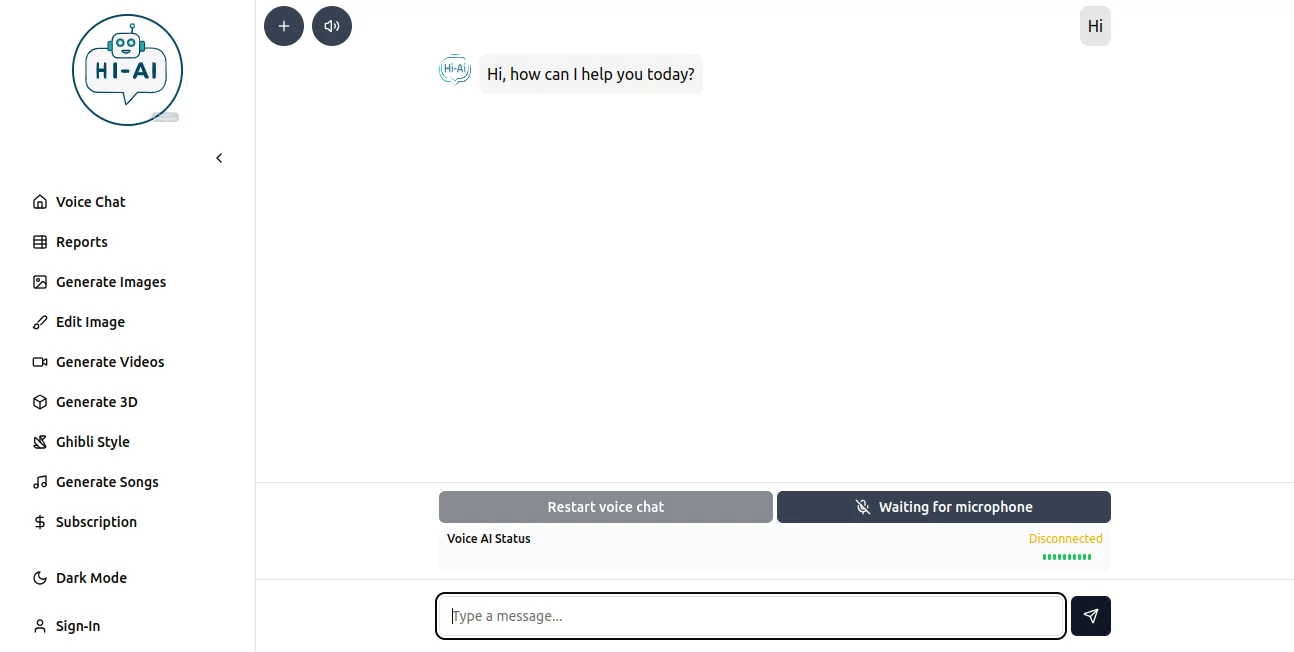
Most AI tools specialize in one thing—images, video, or text—but switching between them breaks your flow. Hi AI was built as a true all-rounder: video generation, music creation, image editing, 3D models, voice interactions, web research, and report writing. The interface feels like a single intelligent assistant rather than a collection of separate apps. Whether you’re a content creator needing quick assets, a marketer building campaigns, or someone just exploring ideas, it keeps everything in one conversation. The best part is how naturally it handles context—you don’t have to start over each time you want to try something new.
Key Features
User Interface
The chat-based design is clean and welcoming. You type or speak naturally, and the assistant understands when you want to generate an image, create a video clip, search the web, or compose music. Switching tasks is as simple as continuing the conversation. Previews load quickly, and you can refine results by giving follow-up instructions like “make it warmer” or “add subtle background music.” It never feels overwhelming, even when you’re jumping between different creative needs.
Accuracy & Performance
The outputs show real attention to detail. Video clips maintain decent consistency, images respect your descriptions without strange artifacts, and music actually fits the mood you describe. Web research and reports pull relevant information and summarize it clearly. Generation speed is solid—most tasks finish fast enough to keep you in the creative zone instead of waiting around. The more specific you are, the better the results, but it handles casual prompts surprisingly well too.
Capabilities
It covers a wide creative spectrum: text-to-video and image-to-video, music generation, image creation and editing, 3D mesh generation, voice conversations, intelligent web search, and structured report writing. You can build on previous outputs in the same chat—for example, generate an image, turn it into a video, then add custom audio. This connected workflow is what makes it feel like a genuine creative partner rather than isolated tools.
Security & Privacy
Your conversations and generated content are handled with care. The platform doesn’t use your creations for training without permission, and you maintain control over what you keep or delete. For personal projects or client work, that respect for privacy adds a layer of comfort that many all-in-one tools overlook.
Use Cases
A small business owner describes their new product and gets professional images, a short promotional video, and even background music ready to post. A YouTuber brainstorms thumbnail ideas, generates variations, then creates a quick intro clip with voiceover. A student researching a topic gets a well-structured report with sources, plus relevant images and diagrams. Content creators use it to maintain consistency across visuals, audio, and copy without switching between five different apps. It shines whenever you need multiple creative assets fast and cohesive.
Pros and Cons
Pros:
- True all-in-one experience that keeps your workflow in a single chat.
- Strong creative range covering video, music, images, 3D, and research.
- Context awareness means you build on previous outputs naturally.
- Fast enough to support real-time ideation and iteration.
Cons:
- As an all-rounder, it may not always match the absolute best specialized tool in one category.
- Some advanced features or higher quality outputs require paid credits.
- Very complex or highly specific requests can still need refinement.
Pricing Plans
It offers a generous free tier so you can explore and create without immediate pressure. Paid plans unlock higher limits, faster generation, priority access during busy times, and more advanced features. The pricing is straightforward and scales with how much you use it—many creators find the paid tier pays for itself quickly through time saved and quality gained.
How to Use Hi AI
Start a new chat and describe what you need in plain language. For example: “Create a 10-second promotional video for an eco-friendly water bottle, bright morning light, energetic feel.” Add reference images if you want specific styling. Once you have the video, you can say “add upbeat background music” or “generate matching thumbnails.” Keep the conversation going to refine or expand. Export your final assets when you’re happy. The more natural your instructions, the better the results tend to be.
Comparison with Similar Tools
Many AI platforms excel at one or two things but force you to jump between apps for a full project. This one keeps everything connected in one place, which saves enormous context-switching time. While specialized tools might edge it out in one narrow area, the convenience and cohesive workflow often make the overall output stronger for real-world creative work. It’s less about being the absolute best at everything and more about being genuinely useful across the board.
Conclusion
Creativity flows best when the tools get out of the way. This platform does that by combining multiple powerful AI capabilities into one natural conversation. It respects your time, understands your vision, and delivers results you can actually use. Whether you’re building a business, creating content, or just exploring ideas, it feels like having a talented creative partner always ready to help. In a world of scattered tools, having everything thoughtfully connected is a breath of fresh air.
Frequently Asked Questions (FAQ)
Do I need to be technical to use it?
Not at all. Just chat naturally like you would with a creative colleague.
Can I use my own reference images?
Yes—uploading references gives much stronger and more consistent results.
How fast are generations?
Most tasks complete in seconds to under a minute, keeping your momentum going.
Is there a free way to try it?
Yes, the free tier lets you explore and create meaningful work before upgrading.
AI 3D Model Generator , AI Video Generator , AI Music Generator , AI Image to Image .
These classifications represent its core capabilities and areas of application. For related tools, explore the linked categories above.

Hi-Ai Alternatives Product

Overlap

AI Polaroid …

AudioVideoGe…

EaseMaker

Seed3D 2.0

Gamelabs Stu…

Wan AI Video…

Image to Ima…

ArchOne AI
