
HI3D AI
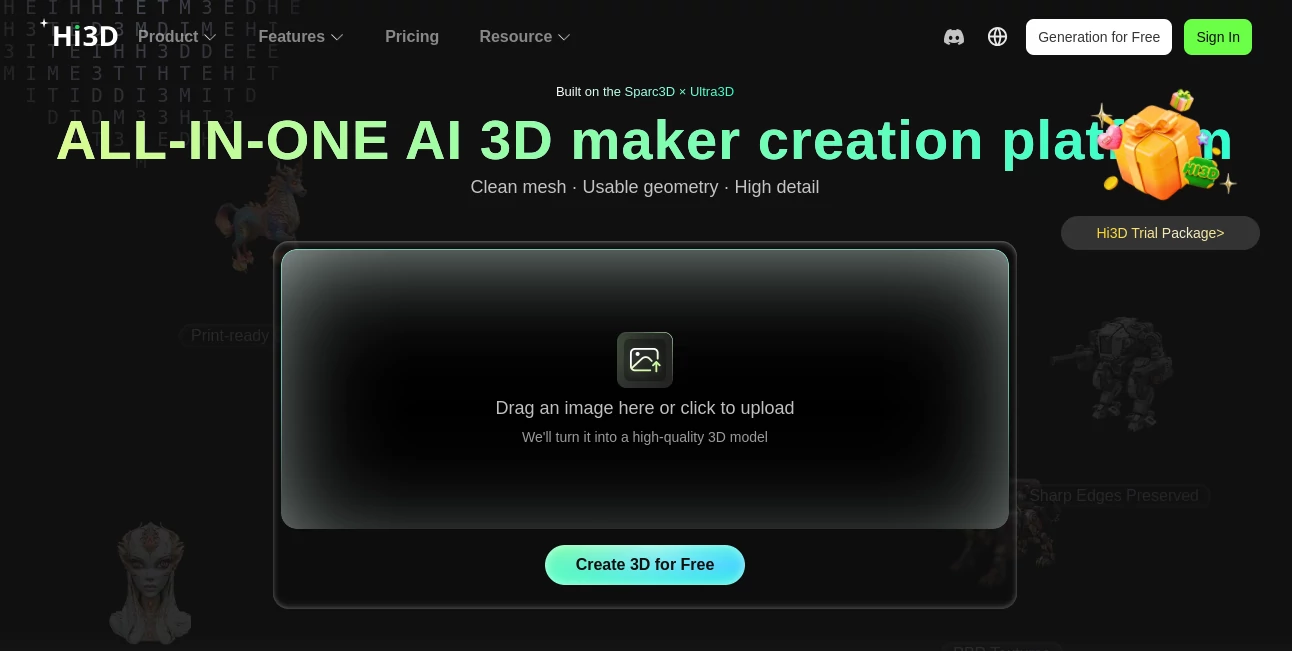
What is HI3D AI?
Creating production-quality 3D assets has traditionally required advanced modeling skills, multiple software packages, and hours of manual refinement. This platform changes that experience by combining AI-powered image-to-3D generation with manufacturing-focused optimization in one streamlined workflow. Whether you are designing collectibles, game assets, prototypes, or printable models, the entire process becomes significantly faster and easier.
Instead of generating beautiful models that still require extensive cleanup, the platform focuses on producing geometry that is practical for real-world applications. Hidden structures are intelligently reconstructed, meshes remain clean, and models are prepared for professional workflows. The result is a solution that appeals to designers, hobbyists, engineers, game developers, and 3D printing enthusiasts looking for reliable output without unnecessary complexity.
One of its biggest strengths is the ability to bridge creative design and manufacturing. From a single image or concept, users can quickly generate detailed 3D models that are suitable for visualization, editing, rendering, and even physical production with minimal additional work.
Key Features
User Interface
The interface is refreshingly straightforward. Uploading an image takes only a few seconds, and the generation process is clearly organized from input to export. Even first-time users can begin creating models without spending hours learning complicated controls. Navigation feels clean, while advanced options remain accessible for experienced creators who need additional flexibility.
Accuracy & Performance
The platform is built around high-precision AI models designed to preserve geometry, textures, and structural consistency. Instead of generating incomplete objects, it reconstructs invisible sections to produce more realistic and usable 3D assets. High-resolution outputs and optimized meshes reduce the amount of manual editing often required after AI generation.
Capabilities
- Generate high-quality 3D models from a single image.
- Support multi-view image reconstruction.
- Create production-ready geometry.
- Generate printable models with optimized meshes.
- Automatically reconstruct hidden object surfaces.
- Export in popular formats including OBJ, FBX, GLB, STL, and USDZ.
- Support game development, animation, industrial design, and 3D printing.
- Provide API access for developers and enterprise integration.
- Offer intelligent model splitting for manufacturing workflows.
- Produce clean textures suitable for rendering and editing.
Security & Privacy
User projects are processed through cloud infrastructure designed for professional AI workflows. API support allows businesses to integrate secure automated pipelines into existing production systems. As with any cloud-based creative platform, organizations working with confidential assets should review the official privacy policy and data handling practices before deploying the service for sensitive commercial projects.
Use Cases
- Designing 3D printable figures and collectibles.
- Rapid product prototyping.
- Creating assets for game development.
- Film and animation production.
- Industrial product visualization.
- Educational 3D modeling projects.
- AR and VR content creation.
- Digital art and concept design.
- Building custom manufacturing workflows through APIs.
Pros and Cons
Pros
- Excellent image-to-3D generation quality.
- Production-ready mesh generation.
- Supports multiple professional export formats.
- Simple interface suitable for beginners.
- Powerful API for enterprise integration.
- Optimized for real manufacturing and 3D printing.
- Hidden geometry reconstruction improves model completeness.
Cons
- Advanced projects may still benefit from manual refinement.
- Cloud processing requires an internet connection.
- Some premium capabilities require paid credits or subscriptions.
Pricing Plans
The platform offers free credits for new users, allowing creators to explore its capabilities before upgrading. Paid plans provide additional generation credits, higher processing capacity, and access to advanced features for professional creators and businesses. Enterprise API options are also available for organizations that need scalable AI-powered 3D generation.
How to Use Hi3D
Start by uploading a reference image or selecting the desired generation method. The AI analyzes the object, reconstructs its geometry, and produces a detailed 3D model. After reviewing the generated result, users can export it in their preferred file format for editing, rendering, game engines, or 3D printing. For manufacturing workflows, additional optimization and model splitting options simplify production even further.
Comparison with Similar Tools
Many AI 3D generators focus primarily on visual appearance, making them suitable for previews but requiring significant cleanup before production. This platform stands out by emphasizing practical geometry, print-ready meshes, and manufacturing optimization alongside image-to-3D generation. Developers also benefit from a comprehensive API that simplifies integration into larger creative or industrial pipelines. Users looking for assets that move beyond visualization into real production will appreciate this practical approach.
Conclusion
For creators who want more than attractive previews, this solution delivers a balanced combination of intelligent automation, high-quality reconstruction, and manufacturing readiness. It reduces technical barriers while maintaining professional output quality, making it valuable for hobbyists, designers, studios, engineers, and businesses alike. Its focus on usable geometry rather than purely visual results makes it a compelling option in the rapidly growing AI-powered 3D ecosystem.
Frequently Asked Questions (FAQ)
Can beginners create professional 3D models?
Yes. The interface is designed to simplify the creation process while still delivering high-quality results.
Does it support 3D printing?
Yes. Models are optimized for manufacturing workflows and can be exported in formats commonly used for 3D printing.
Which export formats are available?
Popular formats include OBJ, GLB, FBX, STL, and USDZ.
Can developers integrate the technology into their own applications?
Yes. API access allows businesses and developers to automate 3D generation inside their own products and workflows.
Who can benefit from this platform?
Game developers, product designers, artists, engineers, educators, manufacturers, and 3D printing enthusiasts can all take advantage of its AI-powered workflow.
AI 3D Model Generator , AI Text to 3D , AI Image to 3D Model , AI Developer Tools .
These classifications represent its core capabilities and areas of application. For related tools, explore the linked categories above.

HI3D AI Alternatives Product
Gemini Omni

volume shader

Workik

Seed3D 2.0

Vibe Coding …

GLM 5

Standard Com…

ImageToSTL

Geekflare AI