
HiTranscript
What is HiTranscript?
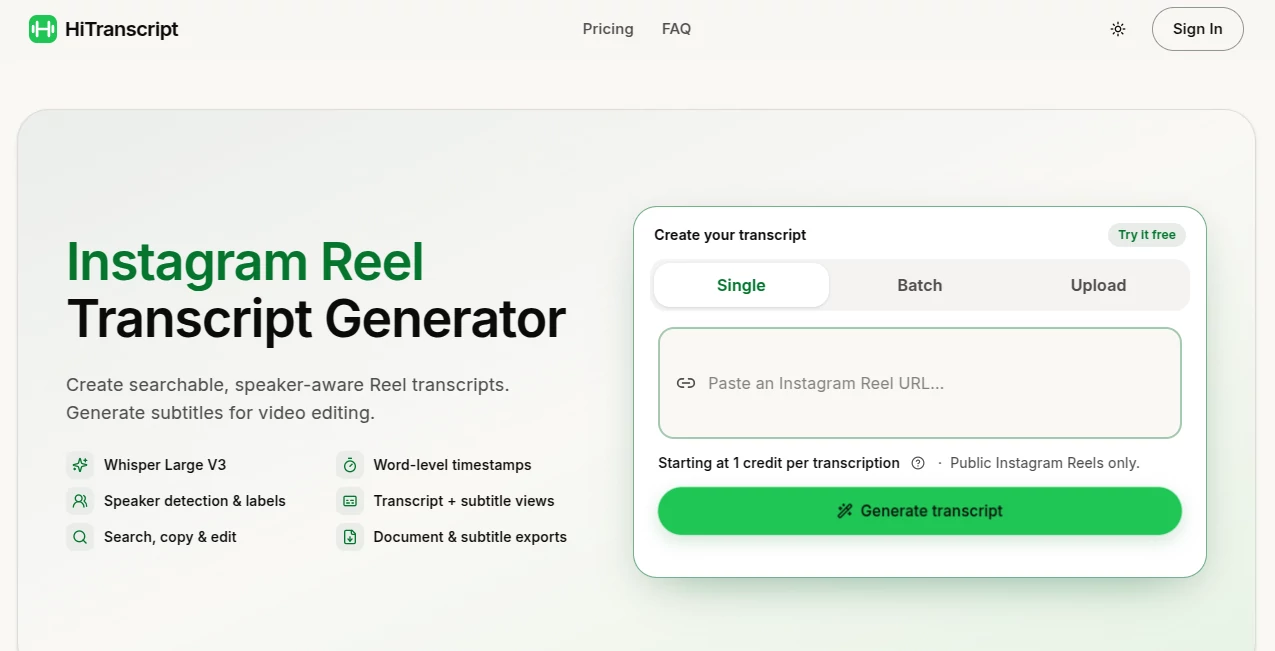
Turning spoken content from Instagram Reels into useful text should not require downloading videos, manually typing every sentence, or piecing together subtitles afterward. HiTranscript provides a focused way to transform public Instagram Reels into searchable transcripts and ready-to-use subtitles.
The service uses Whisper Large V3 for multilingual transcription and supports 99 languages. It can identify individual speakers when the audio provides enough evidence, add word-level timestamps, and present the result as either a readable transcript or timed subtitle cues.
What makes the approach particularly practical is its straightforward workflow. Paste a public Reel link, generate the transcript and subtitles, review the result, and export the material in the format that fits your project. For someone researching social media content or preparing short-form videos, that removes several unnecessary steps.
Key Features
- Transcription of public Instagram Reels
- Whisper Large V3 multilingual transcription with support for 99 languages
- Word-level timestamps for precise timing
- Automatic speaker detection and speaker labels
- Searchable and editable transcript results
- Transcript and subtitle viewing modes
- Single Reel and batch processing
- Local file upload for supported files
- TXT, DOCX, and PDF transcript exports
- SRT and WebVTT subtitle exports
- Batch export options including TXT, CSV, XLSX, and ZIP
User Interface
The interface is designed around the transcription task rather than surrounding it with unnecessary complexity. Users can choose between single processing, batch processing, or uploading a supported local file. For Instagram content, the main action is simply pasting a public Reel URL.
Once processing is complete, the workspace lets users switch between a conventional transcript view and subtitle-oriented views. This is useful because reading a conversation and editing a video are two different jobs, even though they rely on the same underlying transcript.
The ability to search, copy, edit, rename speakers, and merge speaker labels also makes the workspace more useful when the original audio contains several people talking.
Accuracy & Performance
The transcription system is powered by Whisper Large V3, a model designed for multilingual speech recognition. The service states that it supports 99 languages, making it suitable for more than English-language social media content.
Word-level timestamps are another important detail. Instead of receiving only a block of text, users can work with timing information that helps align spoken words with video content. Automatic subtitle segmentation then turns that timing data into more readable subtitle cues.
As with any automated speech recognition system, results can vary depending on pronunciation, background noise, overlapping conversations, audio quality, and the clarity of the original recording. The built-in editing and review tools are therefore useful for making final corrections before publishing.
Capabilities
The strongest part of the service is the combination of transcription and subtitle preparation. A public Reel can produce both readable text and timed subtitles in the same workflow.
Speaker detection can organize conversations into speaker-aware sections when distinct voices are detected. Users can then rename or merge the detected labels if necessary. For research, content repurposing, accessibility, and video editing, this can save considerable manual work.
Export flexibility is also well considered. Individual transcripts can be exported as TXT, DOCX, or PDF, while subtitles can be exported as SRT or WebVTT. Batch jobs provide additional TXT, CSV, XLSX, and ZIP options.
Security & Privacy
The service states that it uses access controls and encryption in transit to protect user data. Account holders can also delete their accounts from the account settings, which begins the process of disabling access and deleting stored source media and transcription content.
Users should still make sure they have permission to access and process the content they submit. The service specifically notes that it is independent from Instagram and that users should only use content they are allowed to access.
Use Cases
Social media researchers can use the service to turn spoken Reel content into searchable text, making it easier to review interviews, educational clips, discussions, and commentary.
Content creators can use transcripts as the starting point for subtitles, captions, articles, social posts, or other repurposed material. Having the spoken words available as editable text can make a short video much easier to reuse across different formats.
Video editors can benefit from word-level timing and SRT or WebVTT exports when preparing subtitles. The speaker-aware structure is especially helpful for interviews, podcasts published as Reels, and conversations involving multiple people.
Marketing teams can also use transcripts when reviewing large batches of social media content. Instead of watching every Reel from beginning to end simply to locate a particular statement, searchable text can make the discovery process considerably faster.
Pros and Cons
- Pros: Supports 99 languages, uses Whisper Large V3, provides word-level timestamps, detects speakers, offers transcript and subtitle views, supports batch processing, and provides several export formats.
- Pros: The pay-as-you-go model avoids forcing users into a recurring subscription.
- Pros: New users receive complimentary credits for trying the service.
- Cons: Instagram transcription is focused on public Reels, so private content is outside the main workflow.
- Cons: Automated transcription may still require manual corrections when recordings contain heavy background noise, unclear speech, or overlapping voices.
Pricing Plans
The pricing model is based on one-time credits rather than a recurring subscription. One credit covers one video under five minutes, while longer videos use an additional credit for each five-minute block. Failed transcription tasks do not consume credits.
New users receive 5 complimentary credits that remain valid for 30 days. Paid credits remain valid for 12 months.
- 200 credits: $9.99, covering up to 200 videos under five minutes.
- 1,000 credits: $19.99, covering up to 1,000 videos under five minutes.
- 3,000 credits: $49.99, covering up to 3,000 videos under five minutes.
This structure is particularly appealing for occasional users who do not want another monthly subscription. It can also work for heavier users who prefer purchasing credits in larger quantities.
How to Use HiTranscript
- Open Instagram and locate the public Reel you want to transcribe.
- Use Instagram's Share option and choose Copy link.
- Paste the Reel URL into the transcription field.
- Choose single processing or switch to batch mode if you have multiple Reels.
- Start the transcription process.
- Review the generated transcript and subtitle cues.
- Search, copy, edit, or adjust detected speaker labels when necessary.
- Export the finished transcript or subtitles in the required format.
For video editing, SRT or WebVTT is generally the practical choice. For research or repurposing, TXT, DOCX, or PDF may be more convenient.
Comparison with Similar Tools
Many transcription services are designed around uploaded audio and video files, while this service takes a more specific approach to public Instagram Reel content. That focus can be an advantage for social media workflows because the process begins with a Reel link rather than requiring users to first download and prepare the source file.
Another distinction is the combination of speaker-aware transcripts, word-level timing, subtitle generation, and batch processing. Users who simply need a plain transcript may not need all of these features, but creators and editors working with short-form video can benefit from having them together.
The pay-as-you-go pricing model also makes the service different from subscription-heavy transcription platforms. Instead of paying every month, users can purchase credits when they actually need transcription capacity.
Conclusion
For anyone working regularly with Instagram Reels, a good transcription workflow can turn spoken video into something much easier to search, edit, analyze, and reuse. This service keeps that process focused, combining multilingual speech recognition with timestamps, speaker detection, subtitles, batch processing, and practical export options.
The strongest appeal is its simplicity. There is no need to build a complicated workflow around separate transcription and subtitle tools. Paste a public Reel, review the result, make any necessary corrections, and export what you need.
The credit-based pricing is another welcome touch for users who prefer paying for actual usage instead of committing to a recurring plan. For creators, researchers, marketers, and video editors who frequently work with short-form Instagram content, it offers a useful bridge between social video and editable text.
Frequently Asked Questions (FAQ)
What can I transcribe?
The main workflow is designed for public Instagram Reels. Supported local file uploads are also available through the upload option.
How many languages are supported?
The transcription system supports 99 languages through Whisper Large V3.
Does it create subtitles automatically?
Yes. Transcription and subtitles are generated together, with word-level timing used to create timed subtitle cues.
Can it identify different speakers?
Yes. When distinct speakers can be detected, the transcript can organize their speech using speaker labels. Those labels can be renamed or merged during review.
What subtitle formats are available?
Subtitle exports are available in SRT and WebVTT formats.
Can I export a transcript as a document?
Yes. Individual transcripts can be exported as TXT, DOCX, or PDF, with options related to timestamps and detected speaker labels.
Is there a free option?
New users receive 5 complimentary credits, valid for 30 days, allowing them to try the transcription workflow before purchasing additional credits.
Is there a monthly subscription?
No. The pricing is based on one-time credit purchases, with no subscription or automatic renewal.
How long are paid credits valid?
Paid credits remain valid for 12 months.
Can I use transcripts from private Instagram content?
The main Instagram workflow is intended for public Reels. Users should only process content they are legally and otherwise permitted to access.
AI Instagram Assistant , AI Transcriber , AI Transcription , AI Captions or Subtitle .
These classifications represent its core capabilities and areas of application. For related tools, explore the linked categories above.
HiTranscript details
Website unavailable — View Alternatives
Pricing
- Freemium
Apps
- Web App
Categories

HiTranscript Alternatives Product

Zeemo AI

Speech Notes

Video Transl…

Pixelied

Adobe Podcast

Whisper AI

Quso AI
MP3 to Text …

Kapwing