
HTML Pub
What is HTML Pub?
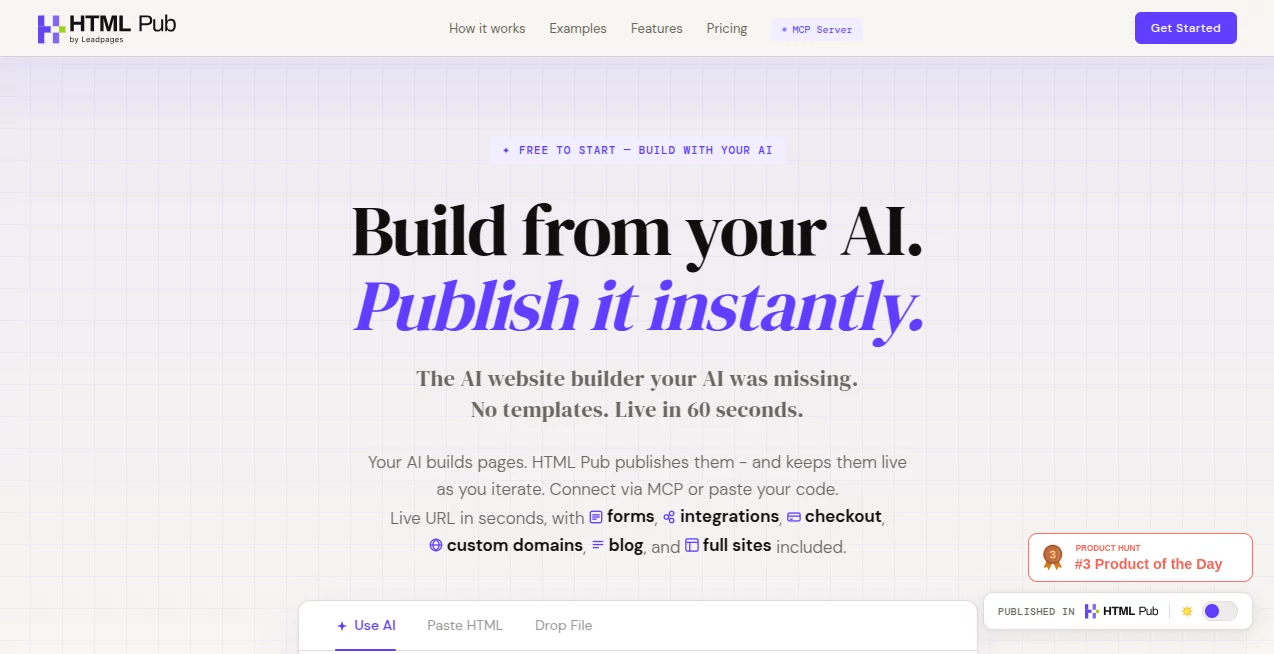
Building a polished web page usually involves more steps than expected. You need to create the design, write the code, find a place to publish it, connect a domain, and then keep everything updated. HTMLPub takes a much simpler approach by turning AI-generated HTML into a live, shareable web page without requiring a traditional hosting workflow.
The platform is designed for people who already use AI tools to create websites, landing pages, prototypes, portfolios, blogs, presentations, and other web experiences. Instead of leaving the generated code sitting in a chat window, users can paste their HTML, preview it, and publish it online. The service also works with MCP-compatible AI tools, making it possible to create and update pages through a conversational workflow.
For creators who want speed without giving up control over their code, this is an especially interesting combination. You can start with a simple prompt, make changes through AI, inspect the underlying HTML and CSS, and move toward a live page without setting up a deployment pipeline from scratch.
Key Features
- AI-powered page creation and editing through natural-language instructions.
- Full HTML and CSS code access for users who want direct control.
- Fast publishing from generated or existing HTML.
- MCP connectivity for working with compatible AI assistants and automation platforms.
- Custom domains with SSL support on paid plans.
- Built-in forms for collecting leads and responses.
- Checkout integrations with services such as Stripe, Shopify, Gumroad, and Lemon Squeezy.
- Built-in analytics for tracking visits, clicks, and conversions.
- Support for blogs, multi-page websites, landing pages, portfolios, prototypes, dashboards, newsletters, and ecommerce experiences.
- API access on higher-tier plans.
User Interface
The interface follows a practical workflow rather than trying to overwhelm users with a large collection of design controls. A creator can start with an AI-generated page, paste the resulting HTML, preview the result, and publish it. The visual editor also allows text, images, and layout elements to be adjusted directly on live pages.
This approach works particularly well for users who are comfortable describing what they want to an AI assistant. Someone might request a product landing page with a hero section, feature cards, testimonials, and a signup form, then continue refining the result instead of rebuilding the page manually.
Accuracy & Performance
The biggest performance advantage is the short path between an idea and a published page. The service states that pages can move from an AI prompt to a live URL in under a minute, while its homepage reports an average publishing time of around 10 seconds and 100% uptime.
Code access is another useful factor. Instead of forcing every project into a fixed visual template, users can inspect and modify the generated HTML and CSS. This makes it easier to correct small details, adjust layouts, or continue development outside the platform when necessary.
Capabilities
The platform goes beyond simple landing-page publishing. Users can create multi-page websites with navigation and linked pages, publish blogs with indexes and permalinks, collect form submissions, connect external services, accept payments, and monitor page performance.
The MCP connector is particularly useful for AI-focused workflows. Compatible tools such as ChatGPT, Claude, Cursor, n8n, and Make can interact with the publishing environment, allowing users to build and iterate on pages from within an AI-driven workflow.
For agencies and developers, API access on the Pro and Business plans adds another layer of flexibility. Instead of treating each page as an isolated project, teams can incorporate publishing into a broader workflow.
Security & Privacy
Published pages include HTTPS, while custom-domain connections include automatic SSL handling. The service also describes its analytics as privacy-friendly, giving users access to information such as visits, clicks, and conversions without requiring a separate analytics implementation for every page.
Users should still review the privacy and data-handling requirements of their own projects, especially when collecting customer information through forms or connecting third-party services. Payment processing can be connected through established providers rather than requiring users to build their own payment backend.
Use Cases
- Landing pages: Launch campaign pages, product launches, signup pages, and promotional websites quickly.
- AI-generated websites: Turn code produced by an AI assistant into a real, accessible website.
- Portfolios: Create personal or professional portfolios without configuring a traditional deployment environment.
- Prototypes: Test product ideas and interactive concepts with a live URL.
- Small businesses: Build practical websites with forms, custom domains, and payment options.
- Agencies: Create client pages, monitor performance, and manage multiple publishing projects.
- Blogs: Publish AI-assisted articles through the built-in blog functionality available on higher plans.
- Ecommerce: Add checkout functionality through supported payment and commerce integrations.
- AI automation: Connect compatible AI and automation tools through MCP for a more automated publishing workflow.
Pros and Cons
Pros:
- Very fast path from AI-generated code to a live page.
- Full access to HTML and CSS rather than relying entirely on locked templates.
- MCP support creates useful AI automation possibilities.
- Custom domains and SSL are available on paid plans.
- Forms, checkout, integrations, analytics, and blogging are available within the platform.
- A free plan allows users to experiment before committing to a subscription.
Cons:
- Live publishing requires a paid plan.
- The Free plan is limited to five pages for building and previewing.
- More advanced analytics and API functionality require higher-tier plans.
- Users looking for a traditional drag-and-drop website builder may prefer a more conventional visual-first platform.
- Some advanced website and business features are reserved for Pro and Business subscriptions.
Pricing Plans
The Free plan costs $0 per month and provides five pages for building and previewing, the full AI editor, 100 MB of storage, MCP connectivity, and 5,000 starting AI credits. Live publishing requires a paid subscription.
The Starter plan costs $10 per month and includes five pages, custom slugs, one custom domain, 1 GB of storage, MCP connectivity, and 4,000 AI credits per month. It is aimed at creators and smaller personal projects.
The Pro plan costs $29 per month and expands the allowance to 25 pages. It also adds API access, one custom domain, 5 GB of storage, unlimited assets per page, one blog, Pro analytics with 90-day retention, MCP connectivity, and 12,000 AI credits per month.
The Business plan costs $49 per month and is designed for teams and agencies. It provides 50 pages, API access, two custom domains, 10 GB of storage, two blogs, deeper analytics, CSV exports, MCP connectivity, and 20,000 AI credits per month.
Additional AI credit packages are also available, making it possible to increase usage without necessarily moving to a higher subscription tier.
How to Use It
- Describe the page you want to create to an AI assistant or use the built-in AI editor.
- Generate the HTML and CSS for your page.
- Paste or upload the generated HTML into the publishing editor.
- Preview the page and make any required changes.
- Use the visual editor or AI workflow to refine the content, images, and layout.
- Connect a custom domain if your plan supports one.
- Publish the finished page and share its live URL.
- Use forms, integrations, checkout, or analytics when your project requires additional functionality.
Comparison with Similar Tools
Traditional website builders are often centered around templates, visual controls, and proprietary editing environments. This platform takes a more code-oriented route. The user can begin with AI-generated HTML and CSS while retaining access to the underlying code.
That distinction can matter for developers, designers, and AI users who do not want their generated website locked inside a template system. Compared with conventional builders, the combination of full code access, API support, MCP connectivity, and HTML export provides a more flexible workflow for technical users.
It is not necessarily the best choice for someone who wants a purely visual website-building experience with no interest in code. For users who already work with ChatGPT, Claude, Cursor, or similar tools, however, the workflow can feel considerably more natural.
Conclusion
HTMLPub brings together two parts of modern web creation that are often separated: AI-generated code and straightforward publishing. The result is a workflow where an idea can move from a conversation to a functional web page with relatively little friction.
Its strongest advantage is the balance between simplicity and control. Beginners can use AI to get started, while more technical users can work directly with HTML and CSS, connect APIs, use MCP, configure custom domains, and integrate business tools.
For landing pages, prototypes, portfolios, small websites, AI-generated projects, and fast marketing experiments, it offers a practical alternative to setting up a complete hosting and deployment stack. The free starting option also makes it easy to test the workflow before deciding whether the paid features fit a larger project.
Frequently Asked Questions (FAQ)
What is this platform used for?
It is a publishing platform for turning AI-generated or existing HTML into live web pages. It can be used for landing pages, websites, blogs, portfolios, prototypes, dashboards, newsletters, ecommerce pages, and other web projects.
Do I need to know how to code?
No. The AI editor can generate and modify pages from natural-language instructions. However, users who understand HTML and CSS can access and edit the underlying code directly.
Can I use my own domain?
Yes. Starter and Pro include one custom domain, while Business includes two custom domains. SSL is handled automatically for connected domains.
Can I publish a page for free?
The Free plan allows users to build and preview up to five pages, but live publishing requires a paid plan.
Does it support AI assistants?
Yes. MCP connectivity allows compatible AI tools and automation platforms to create, update, and publish pages through a connected workflow.
Can I add forms to my pages?
Yes. Built-in forms can collect leads and responses, with email notifications and integrations available for supported workflows.
Can I accept payments?
Yes. Checkout functionality can be connected with services including Stripe, Shopify, Gumroad, and Lemon Squeezy without requiring users to build their own payment backend.
Does it provide analytics?
Analytics are available on higher-tier plans and can be used to monitor visits, clicks, conversions, and additional campaign information depending on the subscription.
Is there an API?
API access is available on Pro and Business plans, making the platform more suitable for developers and automated publishing workflows.
Can I create a full website instead of a single landing page?
Yes. Multi-page websites can include navigation, linked pages, shared styles, and sections such as home, about, pricing, and blog pages.
AI Landing Page Builder , AI Website Builder , AI No-Code & Low-Code .
These classifications represent its core capabilities and areas of application. For related tools, explore the linked categories above.

HTML Pub Alternatives Product

FigForm

Website Clon…

CatDoes

Agent Grid

Ideavibes AI

freellm.net

Bolt AI

ShipAhead

Perchance AI