
Image 2
What is Image 2?
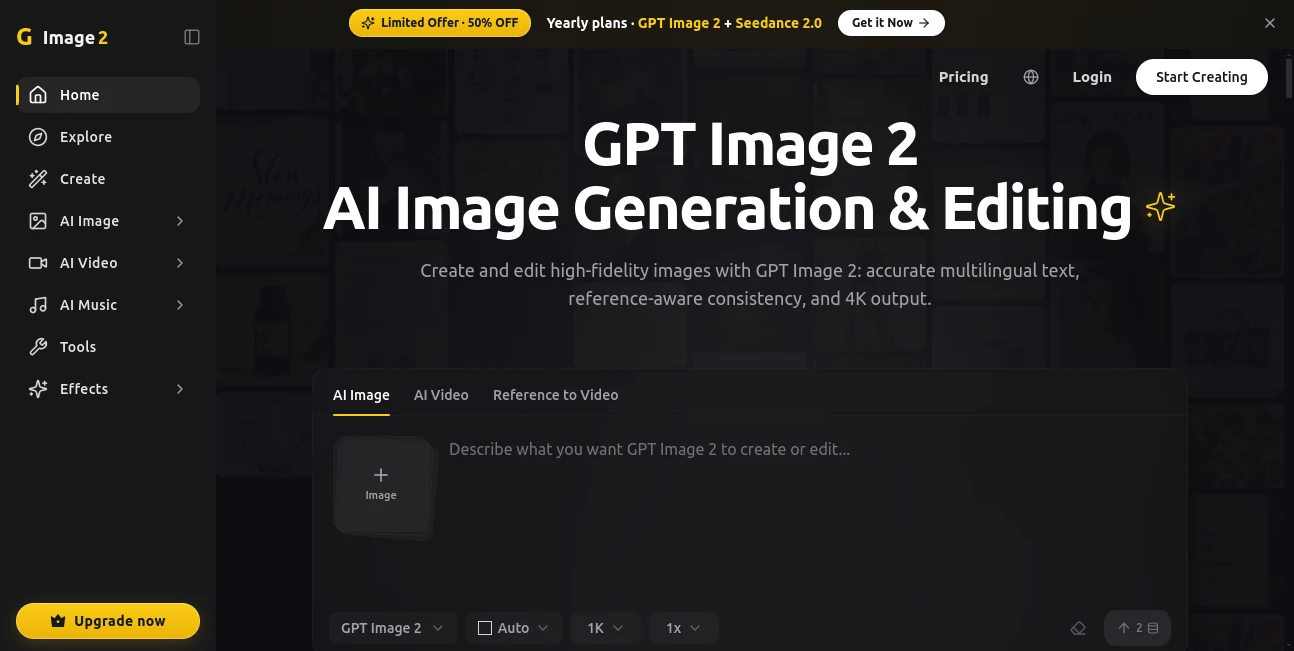
Image 2 is an advanced AI-powered image and video creation platform designed for creators, marketers, designers, and businesses that want to transform ideas into high-quality visual content. The platform combines powerful generation, editing, and animation capabilities in one simple workflow, allowing users to create professional visuals without requiring advanced design skills.
From realistic portraits and product visuals to creative artwork and animated scenes, this tool helps users bring concepts to life through natural language instructions. Whether you are building social media content, designing marketing materials, or exploring creative projects, it provides an efficient way to produce polished results quickly.
Key Features
- AI-powered image generation from simple text descriptions.
- High-quality image editing using natural language commands.
- Reference-based creation for maintaining visual consistency.
- Support for multilingual text generation inside images.
- Advanced image-to-video and text-to-video workflows.
- Character consistency across multiple generated visuals.
- AI-powered image restoration and enhancement.
- Background replacement and object editing features.
- High-resolution output options including 4K images.
User Interface
The interface is designed with simplicity in mind. Users can start creating by entering a description, uploading a reference image, or selecting a creative template. The clean workflow reduces the complexity often associated with professional design software, making visual creation accessible for beginners while still offering useful controls for experienced creators.
Accuracy & Performance
The platform focuses on producing accurate visuals that closely follow user instructions. It is especially useful for projects where details matter, such as product presentations, promotional graphics, and creative storytelling. The ability to understand references and preserve important elements helps users achieve more consistent results during multiple edits.
Capabilities
This solution goes beyond basic image generation by combining creative production and editing features. Users can create images from descriptions, modify existing pictures, generate animated content, improve old photos, and develop consistent characters or scenes for larger projects.
It can also help transform ideas into diagrams, illustrations, posters, marketing visuals, and cinematic-style content. These capabilities make it suitable for individuals and teams looking for a flexible creative assistant.
Security & Privacy
The platform is built to provide a straightforward creative environment where users can generate and manage their visual projects. Users should review the platform's privacy terms and commercial usage policies to understand how generated content and uploaded materials are handled.
Use Cases
- Marketing: Create advertising visuals, social media graphics, and promotional campaigns.
- E-commerce: Generate product images, lifestyle scenes, and brand materials.
- Content Creation: Design thumbnails, illustrations, and creative assets for online platforms.
- Design Projects: Produce concepts, artwork, and visual experiments.
- Education: Create diagrams, visual explanations, and learning materials.
- Personal Projects: Enhance photos, create portraits, and explore creative ideas.
Pros and Cons
Pros
- Easy-to-use workflow suitable for beginners.
- Combines image creation, editing, and video features in one place.
- Strong understanding of detailed prompts and references.
- Useful for both personal and professional creative projects.
- Supports high-quality visual outputs.
Cons
- Advanced features may require paid plans.
- Results can vary depending on prompt quality.
- Professional designers may still need additional editing software for complex projects.
Pricing Plans
The platform offers a free option for users who want to explore its basic features. Paid plans provide additional credits, faster workflows, higher usage limits, watermark-free downloads, and access to more advanced creation capabilities. Different plans are available for casual creators, professionals, and teams with higher content demands.
How to Use Image 2
- Create an account and access the creative workspace.
- Enter a detailed text description or upload a reference image.
- Choose the desired generation or editing option.
- Adjust available settings to refine the result.
- Export the final image or continue editing until it matches your vision.
Comparison with Similar Tools
Compared with traditional design software, this platform offers a faster approach by allowing users to describe their ideas instead of manually creating every element. While many AI creative tools focus on a single function, this solution combines generation, editing, enhancement, and video creation features in one environment.
It is a strong choice for users who want flexibility and speed without managing multiple separate applications for different creative tasks.
Conclusion
Creating professional visuals no longer requires years of design experience. With its combination of intelligent generation, editing features, and creative flexibility, this platform gives creators a practical way to turn concepts into engaging visual content.
From entrepreneurs creating brand assets to artists exploring new ideas, it provides a modern workflow that saves time while opening new creative possibilities.
Frequently Asked Questions (FAQ)
What can I create with this AI tool?
Users can create images, edit existing visuals, generate videos, enhance photos, and produce creative assets for personal or commercial projects.
Can beginners use this platform?
Yes. The workflow is designed to be simple, allowing users without design experience to create professional-looking results.
Does it support image editing?
Yes. Users can modify images, replace elements, improve quality, and make creative changes using text-based instructions.
Can generated content be used commercially?
Commercial usage depends on the selected plan and the platform's licensing terms. Users should check the current usage policy before publishing generated assets.
Does it create videos?
Yes. The platform includes AI-powered video creation features that allow users to transform ideas and images into animated content.
AI Photo & Image Generator , AI Image to Video , AI Video Generator , AI Image to Image .
These classifications represent its core capabilities and areas of application. For related tools, explore the linked categories above.

Image 2 Alternatives Product

ltx 2.3

NanoBananaPro

Image2

lyric video …

Shutterstock

The Influenc…

Nano Banana 2
Veo 3.2 AI V…

Banana AI