

















Imaginode
What is Imaginode?
Creating images, videos, voice-overs, and other AI content often means jumping between several different platforms. One tool handles images, another focuses on video, and a third is needed for text or audio. This quickly becomes frustrating, especially when a project needs several of these elements working together.
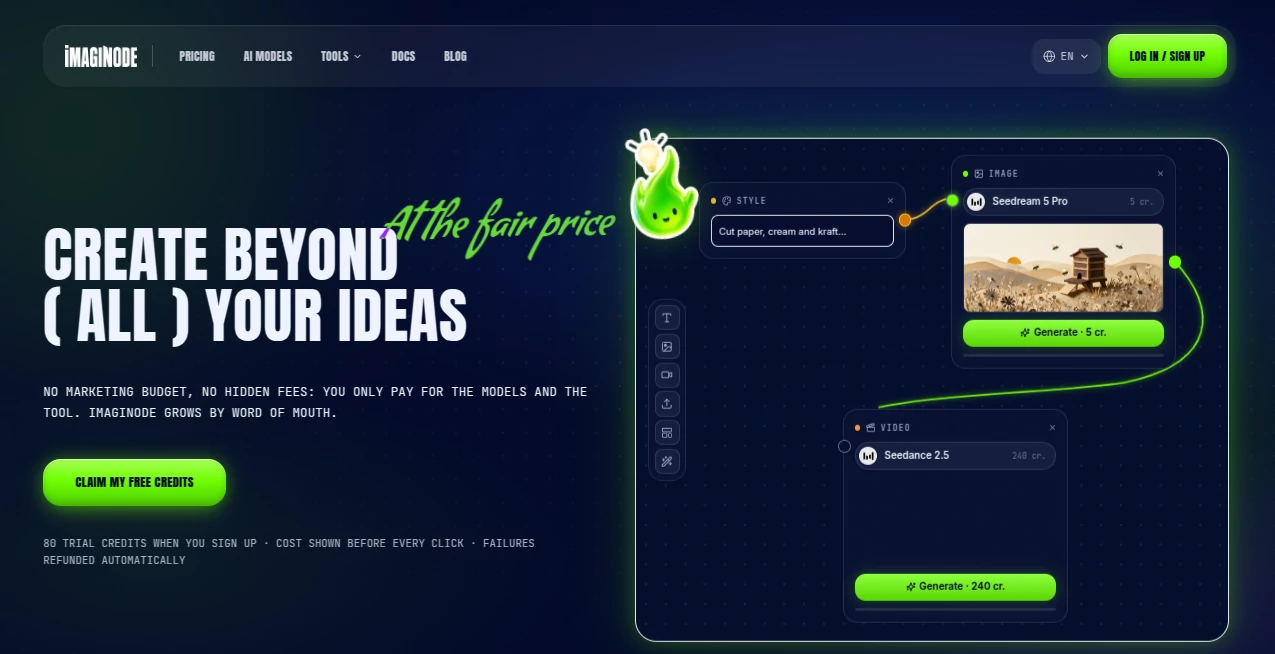
This AI creation studio takes a different approach by putting multiple creative models inside a visual node-based canvas. Users can connect text, images, videos, media, and camera nodes to build repeatable creative workflows from a single browser-based workspace.
There are currently 48 AI models available across image, video, text, and audio tasks. The service also uses a credit system where the cost of a generation is displayed before it is started, making it easier to understand what each generation will cost before spending credits.
Key Features
- Node-based canvas for connecting creative steps visually
- Access to 48 AI models from one workspace
- Image generation and image editing capabilities
- AI video generation with models from several leading providers
- Text and AI assistant models for writing prompts and creative planning
- Voice-over and audio generation options
- Reference image support for more consistent creative results
- Camera node for controlling visual composition and cinematic ideas
- Unlimited canvases across projects
- Server-side generation that continues even when the phone screen is locked
- Automatic credit refunds when a generation fails
- Transparent generation pricing displayed before clicking Generate
User Interface
The interface is built around a visual canvas rather than a traditional form-based generator. Each step can be represented by a node, and connections between nodes show how the creative process is assembled.
For someone who has never used a node workflow before, the concept may sound technical, but the interface is designed to be approachable. A basic project can be started in a couple of minutes, while more advanced users can build considerably more involved workflows.
Another useful detail is mobile support. The canvas works directly in a phone browser, allowing a user to start a project away from the computer and continue working on it later from a desktop without manually syncing files between devices.
Accuracy & Performance
Performance depends heavily on the AI model selected and the type of generation being requested. The platform provides access to different models for different quality and speed requirements, which gives users more control over the trade-off between experimentation and final output.
For example, a creator can begin with a lower-cost image model to test composition and then move to a more advanced model once the idea is right. This is a practical workflow for people who do not want to spend premium credits on every unsuccessful first attempt.
Video generation follows the same principle. Different models are available for short experiments, higher-quality footage, cinematic results, and other creative requirements. The actual credit cost changes according to the model, duration, resolution, and selected options.
Capabilities
The biggest strength is the range of creative capabilities available within one canvas. Image models can be used for portraits, illustrations, product visuals, and other artwork, while video models can turn ideas or images into moving scenes.
Text models can also help develop prompts before those prompts are passed into image or video nodes. This makes it possible to build a workflow where the written instruction, visual generation, and subsequent media creation are connected rather than handled as separate tasks.
Reference images are particularly useful when consistency matters. A creator working on a recurring character, visual style, or campaign can use references to guide subsequent generations instead of starting from an entirely blank prompt each time.
The platform also includes voice and audio models, making it possible to add narration and other audio elements to creative projects. This is especially useful for short-form video creators who want to produce more than just silent visuals.
Security & Privacy
The service is designed as a browser-based, server-side creative environment, so users do not need to install a heavy desktop application or run demanding AI models locally. Generation continues on the servers, which is also why a project can keep processing when a mobile screen is locked.
Users should still review the current privacy policy and terms before uploading confidential, personal, or commercially sensitive material. As with any cloud-based AI creation service, understanding how uploaded content and generated assets are handled is important for professional workflows.
Use Cases
Content creators: YouTube creators, social media publishers, and independent filmmakers can use the combination of image, video, text, and voice models to develop complete visual concepts without constantly switching services.
Marketing teams: Product images, advertising concepts, social media visuals, short promotional videos, and voice-overs can be developed from the same workspace. This can be especially convenient when a campaign needs multiple variations.
Designers: Designers can experiment with different visual directions, reference images, styles, and image models before selecting a final direction.
Video creators: A creator can begin with an image, connect it to a video model, and then build additional elements around the result. This makes the workflow useful for short cinematic clips, concept videos, animated stories, and social content.
Educators and students: The visual workflow can also be useful for learning how AI media generation works. Because each step is visible on the canvas, experimenting with different models becomes easier to understand.
Creative experimentation: Artists and hobbyists can try multiple models and approaches without maintaining accounts across numerous separate AI services.
Pros and Cons
- Pros: Large selection of AI models in one workspace
- Pros: Visual node-based workflow is useful for complex projects
- Pros: Image, video, text, and audio capabilities are available together
- Pros: Generation costs are displayed before starting a task
- Pros: Failed generations automatically return the spent credits
- Pros: Works from a phone browser as well as a desktop
- Cons: Credit-based pricing requires users to monitor consumption
- Cons: Premium video models can use substantially more credits than basic image generation
- Cons: Users unfamiliar with node-based workflows may need a little time to understand the canvas
Pricing Plans
The pricing system is based on credits rather than putting individual AI models behind separate subscriptions. One credit is approximately $0.012, and the cost of each generation is shown before the user confirms the operation.
The Starter plan costs $17 per month before tax and includes 900 credits. The Creator plan costs $55 per month before tax and provides 3,100 credits. The Studio plan costs $188 per month before tax and provides 10,500 credits.
All three plans provide access to the available AI models, so upgrading is primarily about increasing the amount of available credit rather than unlocking completely different product features.
There is also a one-time credit top-up option. For example, 300 additional credits are available for $7 before tax, and purchased top-up credits do not expire. This can be useful for users who need occasional extra generation capacity without changing their monthly subscription.
How to Use It
Start by creating a new project and opening a blank canvas. From there, add the nodes required for the project, such as text, image, video, media, or camera nodes.
Enter the desired prompt or connect an existing asset to the appropriate node. Nodes can then be connected to create a workflow where the output of one step becomes the input for another.
Before generating, check the displayed credit cost. For image experiments, it can make sense to begin with a lower-cost model and move to a more advanced option after the composition is working well.
Once the result is ready, continue adding nodes for additional images, video, text, or audio. The finished project remains organized on the same canvas, making it easier to return to the workflow and reproduce or modify it later.
Comparison with Similar Tools
Traditional AI image and video generators usually focus on a single generation interface. They can be excellent at producing individual assets, but a larger project may require moving those assets between several services.
This platform takes a more workflow-oriented approach. Instead of treating each generation as an isolated task, the node canvas lets users connect different creative stages together. That distinction makes it particularly interesting for people creating multi-step projects rather than simply generating one image from a prompt.
Another notable difference is the shared credit system. Users can access multiple image, video, text, and audio models without maintaining separate subscriptions for each model provider. This makes experimentation more convenient, especially for creators who like comparing different models for the same idea.
Conclusion
For creators who regularly move between AI image, video, text, and audio tools, having everything inside one visual workspace can remove a surprising amount of friction. The node-based approach is the standout feature, giving projects a structure that goes beyond the usual prompt-and-generate workflow.
The combination of many AI models, transparent credit costs, reference images, camera controls, mobile access, and automatic refunds for failed generations makes the service particularly appealing to creators who want flexibility without maintaining a collection of separate AI subscriptions.
It may take a little experimentation to become comfortable with the canvas, but once the workflow clicks, it offers a practical way to turn an initial idea into a connected creative project.
Frequently Asked Questions (FAQ)
What can I create with this platform?
You can create AI-generated images, videos, voice-overs, and other creative assets. Text and assistant models can also help develop prompts and ideas that can be connected to visual generation workflows.
How many AI models are available?
The platform currently provides access to 48 AI models across image, video, text, and audio categories.
Can I use it on a smartphone?
Yes. The node canvas works in a mobile browser, and generation continues on the server even if the phone screen is locked. Projects can then be reopened from a computer without manually syncing the workflow.
How much does AI image generation cost?
Image generation can start at 1 credit, with the exact amount depending on the selected model. The generation cost is displayed before the user clicks the Generate button.
How much does AI video generation cost?
Video costs vary according to the selected model, duration, resolution, and audio options. A five-second video can require considerably more credits than a basic image generation.
What happens if a generation fails?
Failed generations are automatically refunded in credits, so users do not permanently lose credits because of an unsuccessful generation.
Do credits expire?
Monthly subscription credits are tied to the paid subscription period and reset at renewal. One-time top-up credits remain available until they are used and do not expire.
Is it suitable for beginners?
Yes. The interface is designed to be approachable for beginners, while the node system also gives experienced creators room to build more advanced workflows.
Can I use reference images?
Yes. Reference images are supported and can be useful when working with recurring characters, visual styles, or other projects where consistency matters.
Do I need to install software?
No. The main experience runs in the browser, with generation handled server-side. It can also be installed from the browser as a home-screen application without requiring a traditional app-store installation.