
Img2.AI
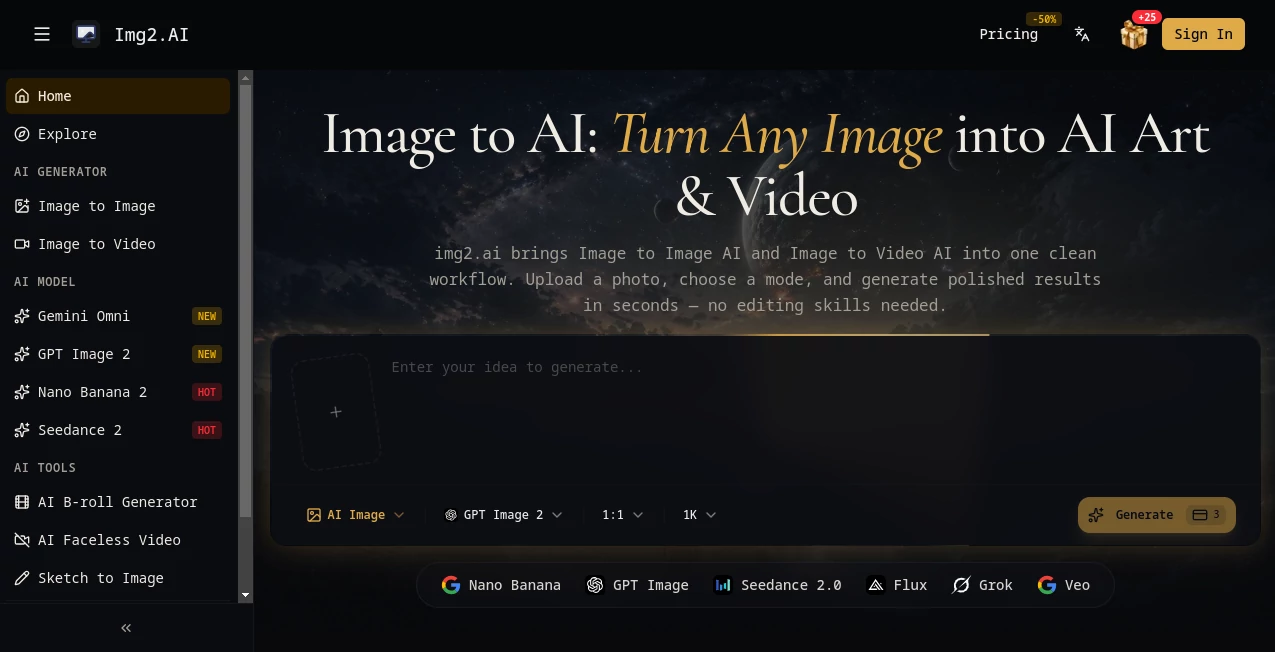
What is Img2.AI?
Creating professional-looking visuals no longer requires advanced design skills or complicated editing software. img2.ai offers a simple creative workflow where users can transform images, generate new artwork, and create videos with the help of modern AI models. The platform combines image-to-image transformation and image-to-video generation in one place, making it useful for creators, marketers, designers, and everyday users who want to bring ideas to life faster.
Whether you want to redesign an existing photo, explore new artistic styles, create engaging social media content, or experiment with visual concepts, this platform provides an accessible way to achieve impressive results. Its clean interface and straightforward process make AI-powered creativity approachable even for beginners.
Key Features
User Interface
The platform focuses on simplicity. Users can upload an image, select a creative mode, add instructions, and generate a new result without dealing with complicated settings. The workflow feels familiar, similar to using a modern design application, but with AI handling the transformation process behind the scenes.
The organized dashboard helps users quickly switch between image creation and video generation options. The experience is designed for both casual experimentation and professional creative projects.
Accuracy & Performance
The AI models are designed to understand user instructions and preserve important details from original images while applying requested changes. This makes it possible to create variations that maintain the main subject, composition, and overall visual identity.
For example, a product photo can be transformed into a different visual style, a simple sketch can become a polished illustration, or an ordinary image can be adapted into a more cinematic scene. The platform supports high-quality outputs while keeping the creation process fast.
Capabilities
The tool provides several creative functions for generating and editing visual content. Users can explore different AI-powered workflows depending on their goals.
- Image to Image Generation: Transform existing photos into new styles, concepts, and variations.
- Image to Video Creation: Convert static images into dynamic video experiences.
- Text Guided Editing: Describe changes using natural language prompts.
- Creative Style Transformation: Experiment with artistic looks and visual themes.
- Multiple AI Models: Access different generation models for various creative needs.
- Reference Image Support: Use existing visuals as guidance for new creations.
Security & Privacy
Privacy is an important consideration for anyone working with personal or business images. The platform provides private generation options through paid plans, helping users maintain control over their creative projects.
Users creating commercial content, marketing assets, or brand visuals can benefit from features designed for professional workflows, including commercial usage rights available with subscription plans.
Use Cases
This AI-powered creative platform can support a wide range of personal and professional projects. Some common applications include:
- Creating social media graphics and visual campaigns.
- Generating marketing images for products and services.
- Transforming portraits into creative artwork.
- Producing visual concepts for designers and artists.
- Creating short AI-generated video content.
- Developing advertising creatives and promotional materials.
- Exploring new ideas before starting a full design project.
A content creator, for example, can quickly turn a basic photo into several unique versions for different platforms. A small business owner can create promotional visuals without hiring a designer for every campaign.
Pros and Cons
Pros:
- Easy-to-use interface suitable for beginners.
- Combines image and video AI generation in one platform.
- Supports image editing through natural language instructions.
- Offers access to multiple AI models.
- Useful for both personal and commercial creative projects.
- Fast workflow with minimal technical requirements.
Cons:
- Advanced users may want more manual creative controls.
- Large-scale professional production may require higher-tier plans.
- AI-generated results can vary depending on prompt quality.
Pricing Plans
The platform uses a credit-based pricing system with subscription options designed for different types of users. Paid plans provide additional credits, faster generation, private creations, commercial licenses, and access to all available features.
- Basic Plan: Designed for light users who need regular AI image and video generation.
- Pro Plan: Suitable for creators and professionals requiring more credits and advanced features.
- Max Plan: Built for heavy users who need large-scale creative production.
How to Use img2.ai
Using the platform is straightforward:
- Upload an image or start with a creative idea.
- Select the desired generation mode.
- Write a prompt describing the result you want.
- Choose an AI model and settings.
- Generate the final image or video.
- Download and use the result for your project.
The simple process allows users to focus more on creativity and less on technical editing steps.
Comparison with Similar Tools
Many AI image generators focus only on creating images from text prompts. This platform stands out by combining image transformation and video generation features in a single workflow.
Compared with traditional editing software, it removes the need for manual adjustments and complicated techniques. Compared with basic AI generators, it provides more flexibility by allowing users to start from existing images and guide the creative direction.
Conclusion
img2.ai provides a practical solution for anyone looking to create impressive visual content with AI. By combining image editing, image generation, and video creation capabilities, it helps users turn simple ideas into polished results quickly.
From marketers and designers to hobbyists and content creators, the platform offers a convenient creative workspace that makes advanced AI technology easier to use. Its balance of simplicity, quality, and flexibility makes it a valuable addition to modern digital creation workflows.
Frequently Asked Questions (FAQ)
What can this AI platform create?
It can generate AI images, transform existing photos, and create AI-powered videos from images using text instructions and creative models.
Do I need design experience to use it?
No. The platform is designed for beginners and professionals, allowing users to create content through simple prompts and uploads.
Can generated content be used commercially?
Yes, commercial usage rights are available through eligible paid plans, making it suitable for business projects and marketing materials.
Does it support image editing?
Yes. Users can upload images and describe desired changes to create new versions while maintaining important visual elements.
Is there a free option available?
Users can explore the platform, while advanced features and higher usage limits are available through paid subscription plans.
AI Photo & Image Generator , AI Image to Video , AI Video Generator , AI Image to Image .
These classifications represent its core capabilities and areas of application. For related tools, explore the linked categories above.

Img2.AI Alternatives Product

Reztune
whisk ai

textile gen

HappyHorse
Blur & Unblu…
nano banana

Kling O1

China Brush

MuseCraft.AI