Inspo AI
What is Inspo AI?
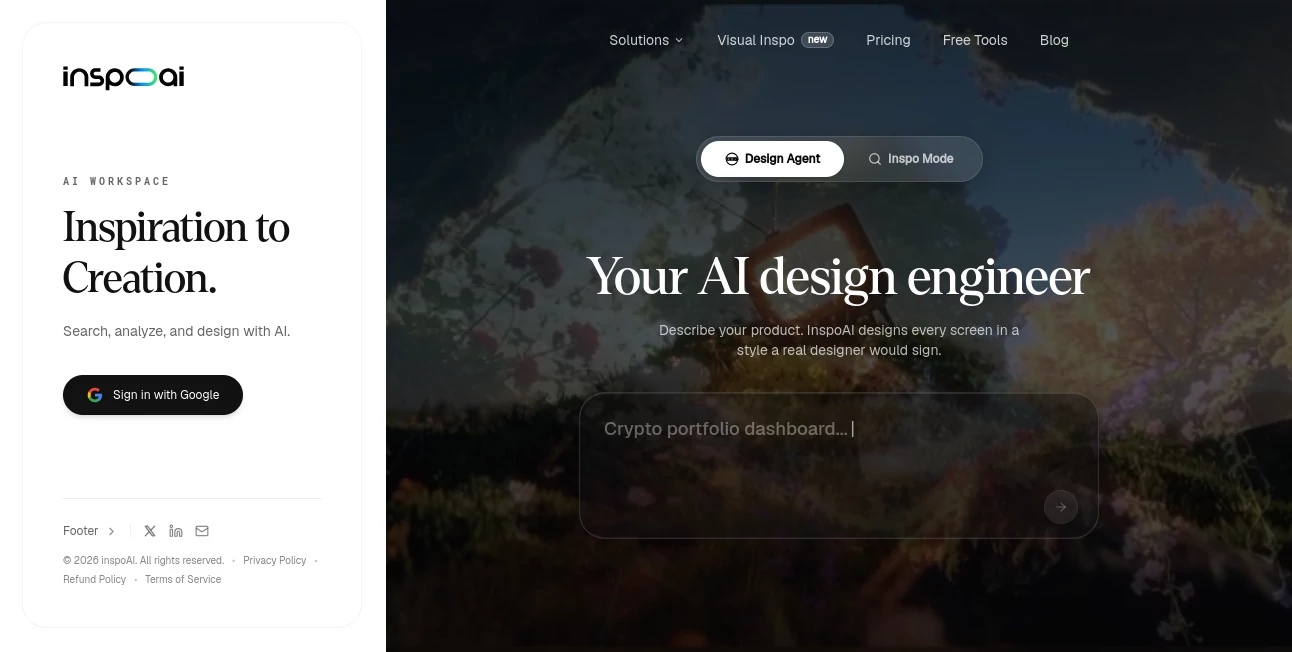
Finding the right design reference can take longer than creating the design itself. A designer may jump between inspiration libraries, saved bookmarks, competitor websites, moodboards, and team chats before finally finding something that feels close to the original idea. Inspo AI brings much of that process into one workspace, combining design discovery, visual research, brand intelligence, collaboration, and AI-assisted creation.
The platform is built for people who work with digital products and visual communication, particularly UI/UX designers, brand teams, marketers, agencies, and independent creatives. Instead of relying only on generic image generation, it focuses heavily on helping users find, understand, organize, and develop design references that are useful in real projects.
Its design search works with natural-language queries, allowing users to describe what they are looking for rather than relying entirely on traditional keyword searches. With more than 150,000 indexed design assets and a curated design index, the service gives creative professionals a practical starting point when they need fresh direction.
Key Features
- AI-powered design search using natural language.
- Search filters for industry, style, color, and font.
- AI recommendations for discovering relevant references.
- Moodboard creation and sharing.
- Design audits for checking visual consistency.
- Brand scanning and competitor research.
- AI-assisted design generation through chat.
- Live collaboration for creative teams.
- Screenshot-to-Figma functionality.
- Chrome extension access for collecting inspiration while browsing.
- Saved search history for returning to previous research.
- Access to a large collection of real-world UI screens.
User Interface
The workspace is designed around a straightforward research-to-creation workflow. Instead of forcing users to move between several unrelated applications, the main features sit within the same environment. Searching for references, collecting ideas, creating moodboards, reviewing designs, and working with teammates can therefore feel like parts of one continuous process.
The natural-language search experience is particularly useful for designers who know what they want visually but do not necessarily know the exact terminology to use. A request such as finding clean fitness-app interfaces with strong typography can be much easier than trying dozens of separate keyword combinations.
Accuracy & Performance
For design research, usefulness depends heavily on relevance. The platform approaches this by combining natural-language search with filters covering areas such as industry, visual style, color, and typography. AI recommendations can also introduce references that may not appear in a narrowly defined search.
The indexed collection is another important part of the experience. The service currently promotes access to more than 150,000 design assets, with paid plans providing access to a larger curated design index and premium real-world UI screens. This makes it particularly practical when a designer needs several references rather than a single example.
Capabilities
The strongest part of the platform is the breadth of its creative workflow. A user can begin by searching for interface inspiration, collect useful examples into a moodboard, review a design against brand guidelines, investigate competitor visual direction, and then move toward creating a new concept.
Brand teams can use the auditing and scanning features to spot visual inconsistencies and study competing brands. Marketing teams can build campaign moodboards and align creative direction before production begins. Agencies and freelancers can use polished moodboards during client presentations while also speeding up the early ideation stage.
The AI design generation feature adds another useful step. Rather than stopping at research, the workspace can help turn a description of a product into interface concepts, making the transition from inspiration to experimentation considerably faster.
Security & Privacy
Privacy is an important consideration when design work involves unreleased products, client projects, or internal brand material. The service states that it follows GDPR requirements, uses SSL-secured connections and 256-bit encryption, and does not sell or share users' design work.
These protections are especially relevant for professional teams that need to explore ideas without treating their creative assets as public material.
Use Cases
- UI/UX Design: Find interface references, typography ideas, layouts, and visual patterns before starting a new product.
- Brand Development: Review visual consistency, examine competitor branding, and keep creative work aligned with brand standards.
- Marketing Campaigns: Build campaign moodboards and give stakeholders a shared visual direction before production.
- Client Presentations: Agencies and freelancers can turn research into polished moodboards for presenting creative concepts.
- Product Design Research: Explore examples from different industries and styles without maintaining dozens of separate bookmarks.
- Creative Ideation: Use AI-powered recommendations and design generation when the initial concept is still taking shape.
- Competitive Research: Study competitor websites and identify visual patterns that can inform a new creative direction.
Pros and Cons
Pros:
- Combines design research and creation in one workspace.
- Natural-language search makes inspiration discovery easier.
- Useful filters for style, industry, color, and typography.
- Moodboards can be created and shared with others.
- Includes design auditing and competitor brand scanning.
- Supports live collaboration.
- Screenshot-to-Figma is useful for designers moving from references into editable work.
- Offers a substantial collection of indexed design assets.
Cons:
- Higher usage limits and larger feature allowances require a paid plan.
- The wide range of features may take some time for new users to explore.
- Professionals who only need occasional inspiration may not need the full workspace.
Pricing Plans
The platform offers a seven-day free trial without requiring a credit card. The Lite plan starts at $12 per month and includes 30 agentic UI generations per month, 25 searches per day, three moodboard creations and shares, five design audits, five brand scans, collaboration features, Screenshot-to-Figma, the Chrome extension, and access to the curated design index.
The Freelancer plan costs $22 per month and increases the limits to 60 agentic UI generations, 100 searches per day, 30 moodboards, 30 design audits, and 30 brand scans.
The Pro plan is listed at $39 per month and provides 100 agentic UI generations, 300 searches per day, unlimited moodboards, and up to 1,000 design audits and brand scans. It also includes priority support.
Annual billing is available with savings of up to 25%, according to the current pricing page.
How to Use It
- Create an account and enter the design workspace.
- Describe the type of inspiration you need using a natural-language search.
- Refine the results using filters such as industry, style, color, and font.
- Save useful references and organize them into a moodboard.
- Share the moodboard with teammates or clients when feedback is needed.
- Use design audits or brand scans when you need to review visual consistency.
- Explore competitor references when researching a market or visual category.
- Move from research into AI-assisted design generation when you are ready to develop a new concept.
Comparison with Similar Tools
Traditional design inspiration platforms are excellent for browsing visual references, but they can leave research, organization, brand review, and creation spread across different services. This workspace takes a broader approach by putting these activities together.
It is especially appealing for designers who regularly move between inspiration research and actual product work. Someone researching a landing page, for example, can find relevant references, organize them into a moodboard, examine competing visual directions, and continue toward a new interface concept without rebuilding the research process elsewhere.
For teams, the collaboration and brand intelligence features also give it a different focus from tools that are primarily image or UI inspiration libraries. It is less about simply collecting attractive screenshots and more about turning research into a repeatable creative workflow.
Conclusion
Good design rarely starts with a completely blank canvas. It usually begins with references, comparisons, experiments, and a clear understanding of what already works. This platform makes that early stage much easier to manage by bringing search, moodboards, brand research, design audits, collaboration, and AI-assisted creation into one place.
For UI/UX designers, agencies, marketers, and brand teams, the biggest advantage is the reduction in friction. Instead of spending hours moving between inspiration sources and scattered project materials, users can research and develop ideas within a more connected workflow.
If your design process involves frequent visual research and you want a faster path from a rough idea to a well-informed concept, this is a strong workspace to consider.
Frequently Asked Questions (FAQ)
What is this AI design workspace used for?
It is designed for finding UI and visual inspiration, creating moodboards, auditing designs, researching competitor brands, collaborating with teams, and generating new design concepts with AI.
Can I search for design inspiration using natural language?
Yes. Users can describe the type of design they want and then refine results using filters for industry, style, color, and font.
Can I create moodboards?
Yes. Moodboards can be created and shared, making the feature useful for creative direction, client presentations, and team discussions.
Does it support competitor research?
Yes. The brand scanning capabilities are designed to help users examine competitor websites and understand their visual and brand direction.
Is there a free trial?
Yes. A seven-day free trial is currently available without requiring a credit card.
Does it work with Figma?
Yes. The available plans include Screenshot-to-Figma functionality, allowing users to move from visual references toward editable design work.
Who can benefit most from it?
UI/UX designers, brand teams, marketing teams, agencies, freelancers, and other creative professionals who regularly research, organize, evaluate, and develop visual ideas can benefit from the platform.
AI Design Assistant , AI Website Designer , AI Design Generator , AI Graphic Design .
These classifications represent its core capabilities and areas of application. For related tools, explore the linked categories above.
Inspo AI details
Website unavailable — View Alternatives
Pricing
- Free
Apps
- Web App
- Chrome Extensions
Categories

Inspo AI Alternatives Product

Z Image Turbo
Brat Generat…

Uni-1

AppScreens

svgstud.io

Face Shape D…

Zilivo AI

Z-Image

Pixora