Jam SQL Studio
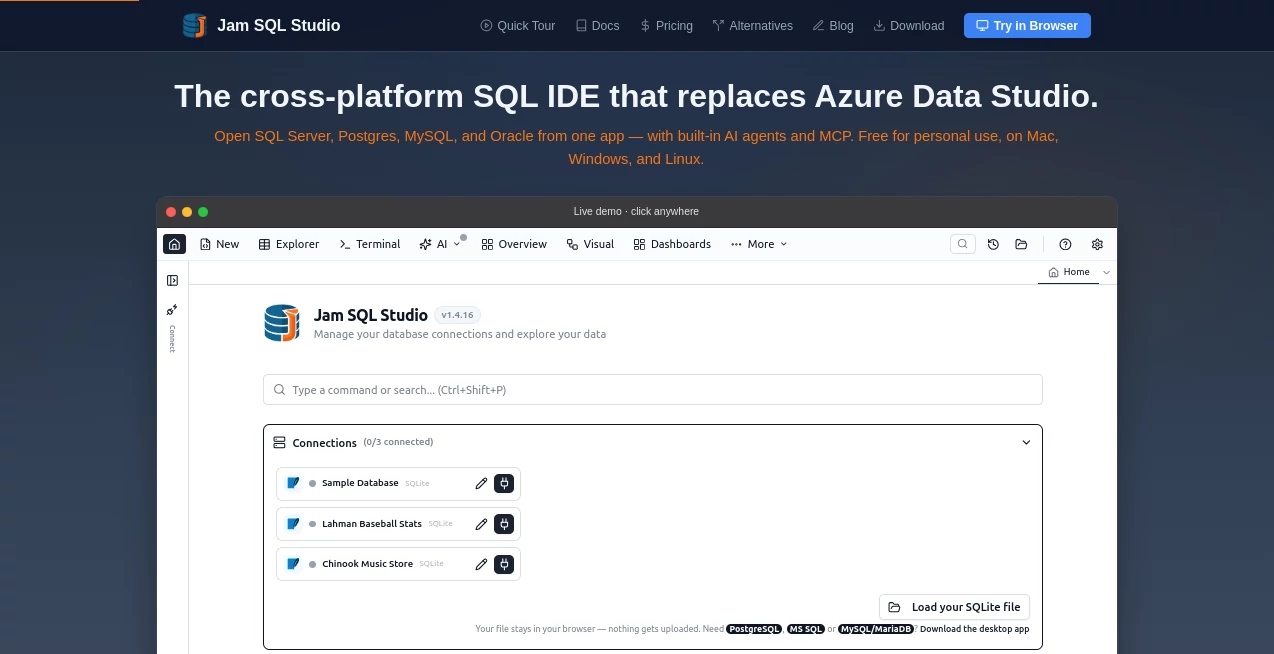
What is Jam SQL Studio?
Managing databases often means switching between multiple applications, juggling different database engines, and relying on disconnected workflows. This modern SQL development environment brings everything together in one polished desktop application, making database administration, query development, performance analysis, and AI-assisted workflows feel far more efficient.
Designed for developers, data engineers, analysts, and database administrators, it supports SQL Server, PostgreSQL, MySQL, MariaDB, Oracle, SQLite, Azure SQL, and additional enterprise database platforms from a single interface. Instead of forcing users to adapt to multiple tools, it creates one consistent workspace where writing queries, exploring data, comparing schemas, and analyzing execution plans become faster and more enjoyable.
One of its strongest advantages is the thoughtful integration of AI capabilities without compromising security. Rather than sending sensitive information to remote services by default, AI features are optional, locally controlled, and built around privacy-first principles. This approach gives technical teams confidence while still providing modern AI-assisted productivity.
Whether someone is maintaining production databases, creating reports, optimizing slow queries, or simply learning SQL, the experience feels responsive, organized, and surprisingly intuitive. The combination of professional database tooling and carefully designed AI assistance makes it an impressive solution for both individual developers and collaborative engineering teams.
Key Features
User Interface
The interface is clean, responsive, and consistent across Windows, macOS, and Linux. Multiple database connections can be managed from one workspace while SQL editors, notebooks, data explorers, charts, and schema browsers remain easy to navigate. Intelligent auto-completion, syntax highlighting, command shortcuts, and notebook support help users stay focused instead of searching through menus.
Accuracy & Performance
Query execution is backed by advanced IntelliSense, execution plan visualization, schema comparison, data comparison, and built-in charting. These capabilities help developers understand how queries behave, identify performance bottlenecks, and improve database efficiency with confidence.
Capabilities
- Supports multiple major relational database engines.
- Cross-platform desktop application for Windows, macOS, and Linux.
- Integrated SQL notebooks for documentation and analysis.
- Visual execution plans for query optimization.
- Schema comparison and synchronization tools.
- Data comparison between environments.
- Built-in chart generation from query results.
- AI workspace for assisted SQL development.
- Model Context Protocol (MCP) support for AI agents.
- Data export to CSV, JSON, and spreadsheet formats.
- Integrated terminal and script management.
- Session persistence to continue work seamlessly.
Security & Privacy
Security receives significant attention throughout the platform. AI features are optional instead of mandatory, allowing organizations to decide when they should be enabled. Local-first architecture keeps sensitive database information on the user's machine, while AI integrations can operate in read-only mode with configurable permissions and detailed audit logging. This design makes the platform suitable for professional environments where database security cannot be compromised.
Use Cases
- Developing and testing SQL queries.
- Managing multiple database platforms from one application.
- Optimizing slow database queries using execution plans.
- Comparing production and development schemas.
- Database administration across enterprise environments.
- Data exploration and visualization.
- Teaching SQL and database concepts.
- Collaborative SQL development with AI assistance.
- Generating reports from relational databases.
- Supporting DevOps and engineering database workflows.
Pros and Cons
Pros
- Excellent support for multiple database engines.
- Modern interface with fast navigation.
- Cross-platform compatibility.
- Built-in AI workflow designed for developers.
- Advanced database comparison tools.
- Visual execution plans and charting.
- Strong privacy-focused architecture.
- Free personal edition available.
Cons
- Some advanced capabilities require a Pro subscription.
- The extensive feature set may take time for beginners to master.
- Professional database concepts still require SQL knowledge to use effectively.
Pricing Plans
- Personal: Free for personal use with unlimited database connections and core SQL development features.
- Pro Monthly: Monthly subscription that unlocks advanced visualization, schema comparison, commercial licensing, and additional professional capabilities.
- Pro Yearly: Annual subscription offering the complete professional feature set at a discounted yearly price.
How to Use JamSQL
- Install the desktop application on your preferred operating system.
- Create a connection to your preferred database engine.
- Open a SQL editor or notebook.
- Write or import SQL scripts.
- Execute queries and review results.
- Analyze execution plans to improve performance.
- Compare schemas or datasets when working across environments.
- Optionally enable AI features for assisted development while keeping full control over security settings.
Comparison with Similar Tools
Compared with traditional SQL management applications, this platform combines database administration, SQL development, AI-assisted workflows, execution analysis, schema comparison, notebooks, and visualization within one unified experience. Instead of depending on plugins or multiple utilities, users receive an integrated workflow that supports modern software development while maintaining compatibility with several leading database systems.
Its emphasis on privacy, local AI integration, and cross-platform support also makes it particularly attractive for developers who work across different operating systems or manage heterogeneous database environments.
Conclusion
This platform successfully modernizes SQL development by bringing together powerful database management capabilities and practical AI assistance without sacrificing security. The thoughtful user experience, wide database compatibility, and professional-grade tooling make it suitable for everyone from individual developers to enterprise database teams.
For organizations seeking a single workspace that simplifies database development, improves productivity, and embraces modern AI workflows while respecting data privacy, it delivers an impressive balance of usability, performance, and reliability.
Frequently Asked Questions (FAQ)
Does it support multiple database engines?
Yes. It supports SQL Server, PostgreSQL, MySQL, MariaDB, Oracle, SQLite, Azure SQL, and several additional database platforms.
Can beginners use it?
Yes. The interface is approachable, although learning SQL fundamentals will help users benefit from its advanced capabilities.
Is there a free version?
Yes. A free personal edition is available with many core features included.
Does it include AI functionality?
Yes. AI-assisted workflows are available and designed with local-first, privacy-focused controls.
Who is this platform best suited for?
It is ideal for software developers, database administrators, data engineers, analysts, and technical teams working with relational databases.
AI SQL Query Builder , AI Code Assistant , AI Developer Docs , AI Developer Tools .
These classifications represent its core capabilities and areas of application. For related tools, explore the linked categories above.

Jam SQL Studio Alternatives Product

TutuoAI

Skillselion

HostFinder

Nestify

Latency Atlas

ShipAhead

Vibe Code Pi…

Sendmux

Empiriolabs …