
Key & BPM Lab
What is Key & BPM Lab?
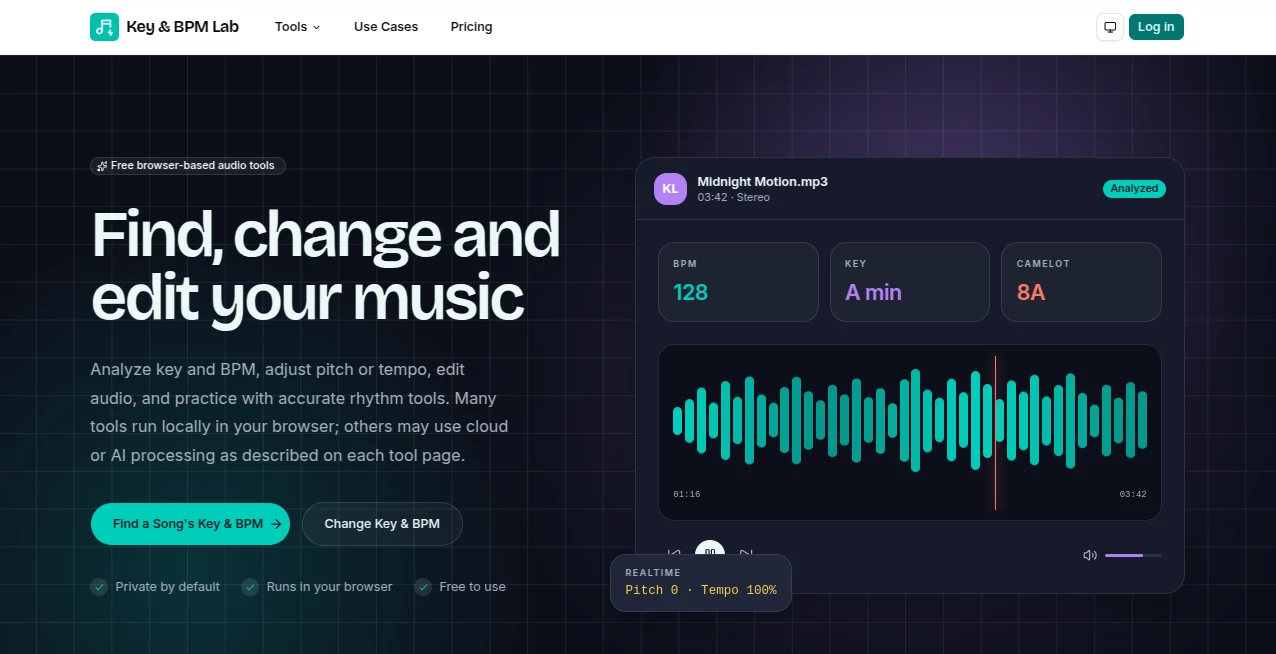
Finding the right tempo, musical key, or preparing audio files for a performance often requires several different applications. This platform simplifies that process by bringing practical audio utilities into one browser-based workspace. Built for musicians, producers, DJs, remix artists, podcasters, and creators, it focuses on speed, accuracy, and complete privacy while keeping the workflow refreshingly simple.
One of its biggest strengths is local processing. Instead of sending recordings to remote servers, supported audio files are analyzed directly inside the user's browser whenever possible. This approach gives creators greater confidence when working with unreleased tracks, demos, or commercial projects. Whether you're organizing a DJ set, preparing samples, or checking the musical characteristics of a recording, the tools are designed to reduce repetitive work and let creativity stay at the center of the production process.
Key Features
User Interface
The interface is clean and easy to navigate, making it suitable for both experienced professionals and newcomers. Most tools follow a simple upload-and-analyze workflow, reducing the learning curve. Clear labels, fast navigation, and organized results help users complete tasks without unnecessary distractions.
Accuracy & Performance
The platform delivers reliable BPM and musical key estimation for a wide variety of music genres. Processing happens directly within the browser, which removes upload delays and produces quick results. Performance naturally depends on the device being used, but modern computers handle most supported audio files efficiently. Automatic analysis is intended to accelerate music production while still encouraging creators to trust their own musical judgment when reviewing final results.
Capabilities
- Browser-based BPM detection.
- Musical key identification.
- Support for common audio formats including MP3, WAV, FLAC, and M4A.
- Waveform visualization.
- Audio conversion and trimming utilities.
- Audio exporting options.
- Practical tools for DJs preparing harmonic mixes.
- Helpful utilities for musicians, producers, and content creators.
- Fast local processing without lengthy uploads.
Security & Privacy
Privacy is one of the platform's strongest selling points. Audio processing is performed locally in the browser, meaning uploaded recordings are not transferred to remote servers during supported operations. This design is particularly valuable for professionals handling confidential projects, unreleased songs, or client recordings. The privacy-first approach makes it a trustworthy option for creators who prefer to keep their work on their own devices.
Use Cases
- Preparing DJ playlists with accurate tempo and key information.
- Checking harmonic compatibility before live performances.
- Analyzing demo tracks before mastering.
- Organizing music libraries more efficiently.
- Preparing samples for remix projects.
- Studying musical characteristics of recordings.
- Supporting podcast and audio editing workflows.
- Speeding up music production tasks.
Pros and Cons
Pros
- Private browser-based audio processing.
- Simple interface suitable for all experience levels.
- Fast analysis without server uploads.
- Useful collection of music production utilities.
- Supports multiple popular audio formats.
- Excellent for DJs and producers.
Cons
- Analysis accuracy may vary for recordings with changing tempos or unusual musical structures.
- Performance depends on the user's device.
- Very large audio files may require additional processing time.
Pricing Plans
The platform offers browser-based audio tools with free access to many core features. Availability of advanced capabilities may change over time as additional tools are introduced.
How to Use Key BPM Lab
Open the desired audio utility, choose an audio file from your computer, and allow the browser to process it locally. Within moments, the selected tool displays the requested information such as tempo, musical key, waveform data, or other available results. Depending on the utility, users can then export, trim, convert, or continue working with the processed audio.
Comparison with Similar Tools
Unlike many online audio utilities that depend on cloud uploads, this platform emphasizes local browser processing to improve privacy and reduce waiting time. While many competing services specialize in only one function, this collection combines multiple music production utilities within a consistent interface. The result is a smoother workflow for DJs, producers, musicians, and creators who regularly analyze or prepare audio files.
Conclusion
For anyone working with digital audio, having dependable utilities available instantly inside a browser can significantly improve productivity. The combination of privacy-focused processing, practical music analysis, and an easy-to-use interface makes this platform an excellent companion for music production, DJ preparation, podcast editing, and creative audio projects. It successfully balances convenience with professional functionality, making everyday audio tasks considerably faster while respecting the privacy of every recording.
Frequently Asked Questions (FAQ)
Does audio processing happen online?
Most supported tools process audio locally inside your browser, helping keep recordings on your own device.
Who can benefit from these tools?
DJs, musicians, producers, podcasters, remix artists, and content creators can all benefit from the available audio utilities.
Which audio formats are supported?
Common formats such as MP3, WAV, FLAC, and M4A are supported by many of the available tools.
Is BPM detection accurate?
The analysis provides reliable tempo estimates for most recordings, although complex performances may occasionally require manual verification.
Can beginners use the platform?
Yes. The straightforward interface makes it accessible for beginners while still providing useful functionality for experienced professionals.
AI Audio Enhancer , AI Music Generator , AI Speech to Text , AI Voice & Audio Editing .
These classifications represent its core capabilities and areas of application. For related tools, explore the linked categories above.

Key & BPM Lab Alternatives Product

Adobe Podcast

Lyrics to So…
Seed Audio

VoiceMOAT

Happy Horse …

Omnesuite AL…

Voice Art

Krisp

Whisper AI