
LayerBack
What is LayerBack?
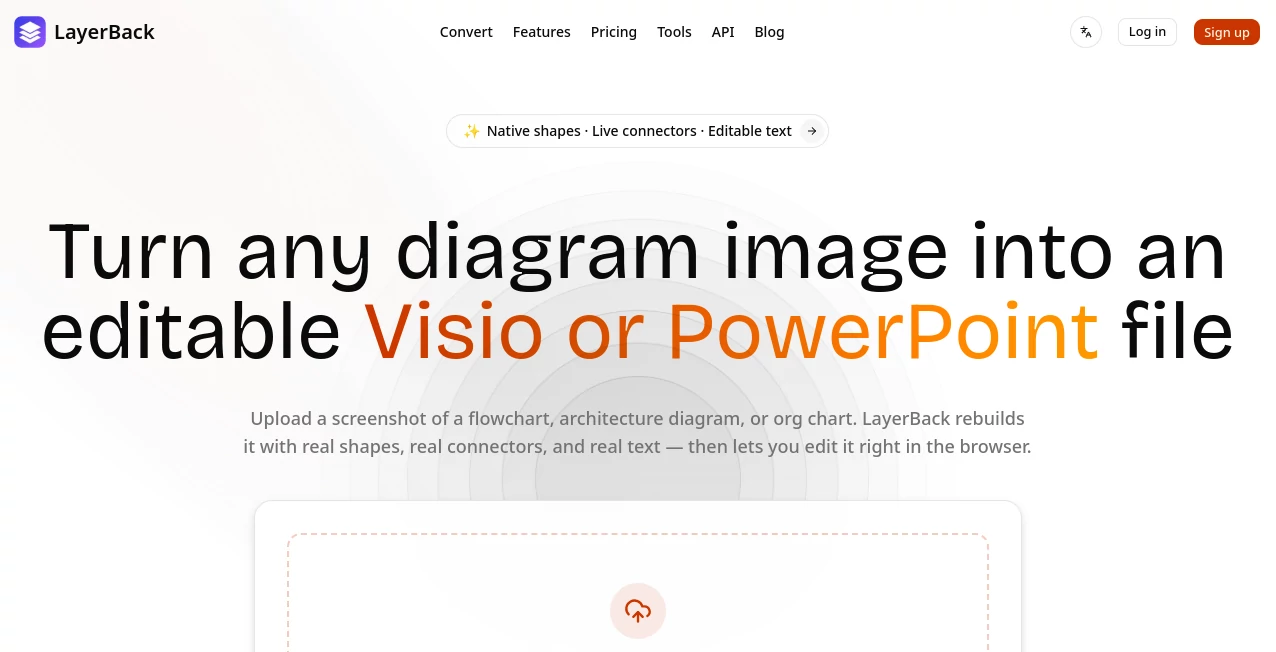
Turning a diagram screenshot into something you can actually edit is usually more frustrating than creating the diagram in the first place. A flowchart may contain dozens of boxes, arrows, labels, and connectors, and recreating all of them manually can take a surprising amount of time.
LayerBack takes a different approach. Instead of simply placing an image inside a PowerPoint or Visio document, it analyzes the uploaded diagram and reconstructs its individual elements as editable objects. Text becomes editable text, shapes become native shapes, and connectors remain connected to the objects they belong to.
The service is designed for common diagram images such as flowcharts, architecture diagrams, and organizational charts. Users can upload PNG, JPG, WebP, or PDF files up to 20 MB and receive editable output in formats including VSDX, PPTX, draw.io, and SVG.
For anyone who has ever been handed an old diagram as a screenshot and asked to update it, this can remove one of the most tedious parts of the job.
Key Features
- Image-to-editable diagram conversion: Converts diagram images into files containing individual editable elements rather than a single embedded picture.
- Native shapes and text: Boxes, diamonds, containers, labels, and other diagram elements can be moved, rewritten, and restyled.
- Connected arrows: Diagram connectors are rebuilt so they remain attached when shapes are moved.
- Multiple export formats: Converted diagrams can be exported as VSDX, PPTX, draw.io, or SVG.
- Browser-based editing: Users can make changes online before downloading the finished file.
- Multiple input formats: PNG, JPG, WebP, and PDF files are supported.
- Conversion history: Users can access previous conversions from the online workspace.
- REST API: Developers can integrate diagram conversion into their own applications and automated workflows.
- Completion webhooks: Automated systems can receive a callback when a conversion job has finished.
- MCP support: An MCP server allows AI agents and compatible MCP clients to use the diagram conversion capability.
User Interface
The interface is deliberately straightforward. The main workflow begins with uploading a diagram by dropping a file into the conversion area, browsing for it, or pasting an image from the clipboard. The supported file types are clearly presented, and the conversion process can be started without navigating through a complicated setup.
After conversion, the result can be edited in the browser. This is particularly useful when a diagram is mostly correct but needs a few labels changed, shapes repositioned, or visual details adjusted before it is exported.
The overall experience feels focused on completing one specific job rather than making users learn another large design application.
Accuracy & Performance
The main strength of the conversion process is its focus on structure rather than appearance alone. A screenshot contains pixels, but a useful editable diagram needs relationships between objects. The system attempts to reconstruct those relationships, including the connection between arrows and the shapes they point toward.
The website states that conversions can be completed in about 30 seconds, although actual processing time can naturally vary depending on the uploaded diagram and processing conditions.
For straightforward flowcharts and organizational diagrams, this approach can save considerable manual work. Users should still review complex conversions before using them in important presentations or documentation, especially when the original image contains unusual layouts or difficult-to-read elements.
Capabilities
The platform goes beyond a simple image conversion utility. Its output can be used in several established diagramming and presentation environments, including Visio, PowerPoint, draw.io, and SVG workflows.
The developer-focused side is also notable. A REST API can accept image data and return editable diagram formats, while completion webhooks can notify an application when a job is ready. This makes the service suitable for batch processing, internal tools, migration projects, and automated workflows.
There is also support for AI-agent workflows through MCP. This opens an interesting possibility for developers who want an AI assistant to take a diagram image and turn it into a usable editable document as part of a larger process.
Security & Privacy
When working with diagrams, privacy can be an important consideration because uploaded files may contain internal architecture, business processes, organizational information, or project details. Users should review the provider's current privacy policy and terms before uploading confidential material.
For automated integrations, API authentication is handled through an API key. Developers should keep those credentials private and use appropriate access controls when incorporating the service into production systems.
Use Cases
- Updating old flowcharts: Convert screenshots of outdated process diagrams into editable files and modify them instead of rebuilding them from scratch.
- Software architecture documentation: Turn architecture screenshots into editable diagrams that development teams can maintain over time.
- Organizational charts: Rework static organization chart images when team structures or roles change.
- Business presentations: Bring existing diagrams into PowerPoint and adjust them for a new presentation.
- Documentation migration: Convert collections of static diagram images into editable formats for a documentation project.
- Design revisions: Make changes to labels, shapes, colors, and positioning without recreating the entire diagram manually.
- Automated workflows: Developers can connect the API to applications that need to process diagram images automatically.
- AI agent workflows: MCP support makes diagram conversion available to compatible AI-agent environments.
Pros and Cons
Pros
- Produces genuinely editable diagram elements instead of simply embedding the original image.
- Supports VSDX, PPTX, draw.io, and SVG output.
- Preserves editable text, shapes, and connectors.
- Includes an online editor.
- Supports PNG, JPG, WebP, and PDF uploads.
- Offers a REST API for automation.
- Provides webhooks for asynchronous conversion workflows.
- Includes an MCP option for AI-agent integrations.
- Free credits are available for initial conversions.
Cons
- Complex or low-quality source diagrams may require manual corrections after conversion.
- Credit limits apply to conversions on paid and free plans.
- The service is focused specifically on diagram conversion rather than being a complete general-purpose diagram design platform.
- Users working with highly confidential diagrams should review the current privacy terms before uploading files.
Pricing Plans
The service uses a credit-based pricing model. New users can start with a free plan that includes 20 credits, equivalent to two conversions, without requiring a credit card.
The Free plan also includes access to all listed output formats, the online editor, and conversion history. It allows two conversions at the same time.
The Pro plan is listed at $10 per month on the current yearly-discounted pricing display and includes 1,000 credits per month, equivalent to up to 100 conversions. It also adds API access, five simultaneous conversions, email support, and automatic refunds for failed conversions.
The Plus plan is listed at $20 per month on the current yearly-discounted display and provides 3,000 credits, or up to 300 conversions, with up to 10 simultaneous conversions and priority support.
The Max plan is listed at $40 per month on the current yearly-discounted display. It includes 10,000 credits, equivalent to up to 1,000 conversions, supports up to 20 simultaneous conversions, and provides higher API rate limits, priority support, and early access to new features.
How to Use the Tool
- Upload a diagram: Select or drag in a PNG, JPG, WebP, or PDF containing the diagram you want to convert.
- Start the conversion: Begin the conversion process using the available credits.
- Review the result: Once processing is complete, inspect the reconstructed diagram and check the text, shapes, and connectors.
- Edit online: Make any necessary changes directly in the browser.
- Choose an output format: Export the finished diagram as VSDX, PPTX, draw.io, or SVG.
- Automate when needed: Developers can use the REST API, webhooks, or MCP integration when diagram conversion needs to become part of a larger workflow.
Comparison with Similar Tools
Traditional image-to-document converters generally focus on placing the original image inside another file format. That may be enough when the goal is simply to package an image, but it does not solve the problem of editing the individual components of a diagram.
Manual recreation in Visio, PowerPoint, or another diagramming application provides much more control, but it can be slow when the original diagram already exists as an image. Every box, label, arrow, and connector may need to be recreated individually.
This approach sits between those two options. It starts with an existing visual diagram but attempts to reconstruct its underlying objects so the result can be edited. That makes it especially attractive when the source material is available only as screenshots or exported images and rebuilding it manually would be unnecessarily time-consuming.
Conclusion
Converting a diagram screenshot into an editable document sounds simple until you actually have to recreate dozens of shapes and connectors by hand. This tool addresses that specific problem with a practical workflow: upload the diagram, let the system reconstruct its components, make adjustments in the browser, and export the result in a format that fits the rest of your workflow.
Its support for Visio, PowerPoint, draw.io, and SVG gives the converted files useful flexibility, while the API, webhooks, and MCP integration make it more interesting for developers and teams with larger-scale automation requirements.
For professionals who regularly receive diagrams as screenshots or static files, the biggest benefit is straightforward: less time spent redrawing existing work and more time spent actually improving it.
Frequently Asked Questions (FAQ)
Is the converted diagram actually editable?
Yes. The conversion is designed to recreate diagram elements as editable objects rather than placing the original screenshot inside a document. Text, shapes, and connectors can be modified after conversion.
Which files can be uploaded?
Supported input formats include PNG, JPG, WebP, and PDF. The website currently lists a maximum upload size of 20 MB.
Which output formats are available?
Converted diagrams can be exported as VSDX, PPTX, draw.io, and SVG files.
Can developers automate the conversion?
Yes. A REST API is available for automated conversion workflows. Completion webhooks can also notify an application when a conversion job has finished.
Is there a free option?
Yes. New users receive 20 free credits, which the website describes as two free conversions. No credit card is required to get started.
Can the converted diagram be edited before downloading?
Yes. An online editor is included, allowing users to review and modify the converted diagram before exporting it.
AI Diagram Generator , AI Documents Assistant , AI Image to 3D Model , AI Presentation Generator .
These classifications represent its core capabilities and areas of application. For related tools, explore the linked categories above.

LayerBack Alternatives Product

MyMap.AI
AI Diagram M…

Pixal3D
markdown to …

ImageToSTL

BookTranslat…

PDF Inspector

AfterSession

aiiStudio