
ego lite
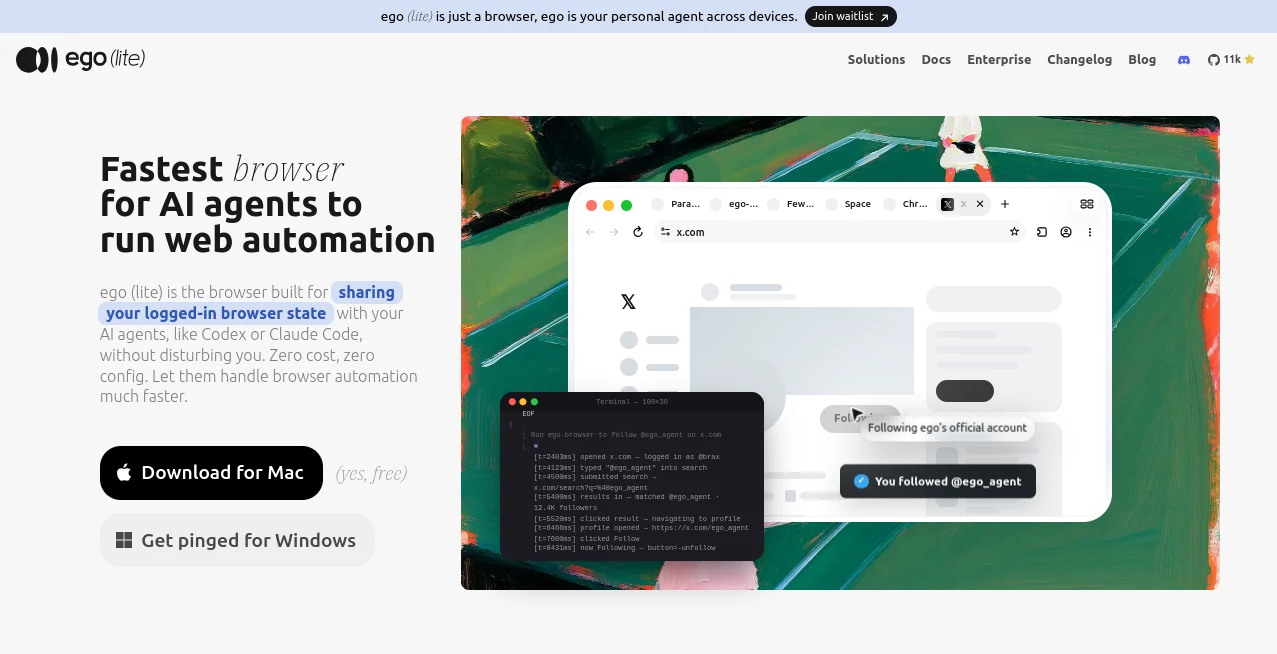
What is ego lite?
ego (lite) is a Chromium-based browser designed to bring AI agents into the same browsing environment people already use every day. Instead of forcing an agent to work inside a separate, empty browser, it allows agents such as Claude Code, Codex, Cursor, and other compatible tools to work with existing tabs, logins, and browser data.
The idea is particularly useful for tasks that normally require a person to stay involved: navigating websites, filling forms, collecting information, managing social accounts, checking dashboards, handling bookings, or working inside SaaS platforms. The browser is free to use, requires no account, and currently runs on macOS with support for both Apple Silicon and Intel Macs.
What makes the approach interesting is the balance between normal browsing and automation. You can continue using your own tabs while an AI agent works separately in its own Space, making browser automation feel less disruptive and more practical for everyday workflows.
Key Features
- AI agent browser: Lets compatible AI agents control a real Chromium browser rather than a separate blank browser instance.
- Chrome data migration: Onboarding can migrate tabs, tab groups, bookmarks, saved passwords, extensions, cookies, login sessions, and browser profiles.
- Separate Spaces: Agents can work in their own workspace while your personal browsing remains untouched.
- Parallel automation: Multiple browser tasks can run in separate Spaces without competing for the same tabs.
- ego-browser integration: The connection layer allows agents to interact with pages through browser actions such as navigation, clicking, filling forms, waiting, capturing, and page snapshots.
- Lower token usage: Several in-page actions can be composed into a single JavaScript execution rather than requiring a separate tool call for every step.
- External agent support: The browser can be controlled by a variety of coding and AI agent environments rather than locking users into one model.
- Local data storage: Browsing information, cookies, passwords, and login sessions remain on the user's computer according to the product's stated privacy model.
User Interface
The interface is intentionally familiar because it is built on Chromium. Users can continue working with common browser features such as tabs, tab groups, bookmarks, profiles, extensions, downloads, and incognito mode.
The more interesting part is the addition of Spaces. An agent receives its own workspace where it can perform browser tasks without taking over the user's active tabs. For someone who wants to keep working while automation runs in the background, this separation is a practical touch rather than just a cosmetic feature.
Accuracy & Performance
Performance is one of the strongest selling points. The browser uses a custom semantic snapshot approach rather than relying solely on traditional DOM access, helping agents understand pages with less unnecessary information. The system is also designed to work with challenging web elements such as cross-origin iframes, shadow DOM, and third-party widgets.
The company reports that complex browser automation tasks can finish up to 3.45 times faster than agent-browser while using fewer tokens. These figures are vendor-reported benchmarks, so actual performance can vary depending on the website, agent, and task.
In practical use, the biggest advantage is not simply raw speed. Combining several browser actions into fewer executions can reduce the back-and-forth between an agent and the browser, which can make complicated workflows considerably more efficient.
Capabilities
The browser is suited to tasks that depend on websites where the user is already logged in. Agents can interact with social networks, real estate and shopping websites, booking services, SaaS back offices, internal tools, and other web applications.
For example, a user could ask an agent to collect information from several logged-in pages, prepare social media actions, search for products, monitor account activity, or complete repetitive administrative work. Because the agent can inherit the existing browser session, workflows that would otherwise involve repeated authentication can become much simpler.
It also supports agents that can execute shell commands, including Claude Code, Codex, Cursor, Continue, Gemini CLI, Hermes Agent, OpenClaw, OpenCode, and custom in-house agents.
Security & Privacy
Privacy is an important part of the product's design. According to the official website, browsing history, cookies, passwords, login sessions, bookmarks, and pages loaded in the browser remain stored locally on the user's computer and are not uploaded by the product.
The ability to reuse existing browser sessions is powerful, but it also means users should treat connected AI agents with the same care they would give any automation software that can access logged-in websites. It is sensible to review which accounts and websites an agent is allowed to operate before assigning sensitive tasks.
Use Cases
- Social media automation: Monitor accounts, collect engagement information, draft posts, and perform repetitive social workflows.
- Job searching: Search listings, navigate career sites, and assist with repetitive application-related browser tasks.
- Research: Gather information from multiple websites and work through pages that require an existing login.
- Shopping: Search products, compare listings, and monitor information across online stores.
- Travel and bookings: Navigate booking websites and assist with repetitive search and reservation workflows.
- SaaS administration: Work with dashboards and back-office systems where automation through a public API may not be available.
- Internal business tools: Automate repetitive browser-based operations inside private web applications.
- Browser testing: Give development agents a browser environment for interacting with real web pages and interfaces.
- Web scraping: Collect information from pages that may require navigation, sessions, or interaction rather than simple HTTP requests.
Pros and Cons
Pros:
- Free with no subscription required.
- No account is required to get started.
- Works with an existing Chrome setup.
- Can reuse authenticated browser sessions.
- Agents can work in separate Spaces.
- Supports multiple external AI agents.
- Designed to reduce unnecessary browser automation token usage.
- Local data storage provides a strong privacy-oriented approach.
- Useful for both everyday browsing and agent-driven automation.
Cons:
- Currently available for macOS only.
- Windows and Linux versions are planned but do not have a firm release date.
- The product is still in beta, so some workflows may need refinement.
- Users need a compatible AI agent to take full advantage of the automation capabilities.
- Giving an AI agent access to logged-in sessions requires careful consideration of permissions and account security.
Pricing Plans
The browser is completely free to use. There is no subscription requirement and users do not need to create an account before getting started.
The current downloadable version is available for macOS, supporting both Apple Silicon and Intel processors. Windows and Linux support is on the roadmap, but the company has not announced a firm release date for those platforms.
How to Use the Tool
- Download and install the browser on a supported Mac.
- Complete the initial onboarding process.
- Choose whether to migrate your existing Chrome browser data.
- Allow the setup process to install the browser skill used by compatible local AI agents.
- Open a supported agent such as Claude Code, Codex, or Cursor.
- Use the browser integration to give the agent a task.
- Let the agent perform the work inside its own Space while you continue using your regular tabs.
A simple workflow could be asking an agent to search several websites, extract specific information, organize the findings, and return the results. More advanced users can build repeatable browser workflows around the same browser connection.
Comparison with Similar Tools
Traditional automation libraries such as Playwright and Puppeteer are excellent choices for developers who want to write browser automation directly in code. However, they are generally programming libraries rather than complete daily-use browsers that inherit an individual's existing browsing environment.
Browser automation frameworks such as Browser Use and agent-browser take a different approach as well. They can provide powerful automation capabilities, but they typically operate through their own browser-control architecture rather than making the user's everyday browser the central workspace.
The main distinction here is the combination of a normal Chromium browser, existing browser state, external AI agents, and isolated Spaces. For users who want an AI agent to work with websites they are already signed into, that combination can remove several setup and authentication hurdles.
Conclusion
AI browser automation becomes much more useful when it can work with the web environment people already have. This browser takes that approach seriously by combining familiar Chromium browsing with agent-controlled Spaces, existing login sessions, and support for a growing range of AI coding and automation agents.
It is especially appealing for developers, researchers, marketers, and power users who regularly repeat browser-based tasks. The fact that it is free and requires no account makes experimentation easy, while the local-first approach gives users more control over their browser data.
For anyone interested in giving AI agents practical access to real websites without constantly creating separate browser sessions, this is a compelling option to explore.
Frequently Asked Questions (FAQ)
What is this browser used for?
It is designed for everyday browsing as well as AI-powered browser automation. Compatible agents can navigate websites, click elements, fill forms, read pages, and perform multi-step workflows.
Is it free?
Yes. The product is currently free and does not require a subscription or user account.
Does it work with Chrome data?
Yes. During onboarding, users can migrate Chrome tabs, tab groups, bookmarks, saved passwords, extensions, cookies, login sessions, and browser profiles.
Can an AI agent use my existing website logins?
Yes. One of the main purposes of the browser is to let agents work with the authenticated browser state already available on the user's computer. This can reduce the need to repeatedly sign in.
Can I continue browsing while an AI agent works?
Yes. The agent operates inside its own Space, allowing the user to continue working in their own browsing workspace.
Which AI agents are supported?
It can work with agents such as Claude Code, Codex, Cursor, Continue, Gemini CLI, Hermes Agent, OpenClaw, and OpenCode. Custom agents that can run shell commands can also connect through the browser integration.
Is it available on Windows or Linux?
Not currently. The available version runs on macOS, supporting both Intel and Apple Silicon. Windows and Linux versions are on the roadmap without a confirmed release date.
Does it store my browsing data online?
According to the product's privacy information, browsing history, cookies, passwords, login sessions, bookmarks, and loaded pages are stored locally on the user's computer rather than uploaded.
Is the browser suitable for developers?
Yes. Developers can connect coding agents to the browser and use it for browser automation, testing, research, data collection, and repetitive web workflows without being tied to a particular AI model or SDK.
AI Web Scraping , AI Browsers Builder , Code & IT , AI Developer Tools .
These classifications represent its core capabilities and areas of application. For related tools, explore the linked categories above.
ego lite details
Website unavailable — View Alternatives
Pricing
- Free
Apps
- Web App
- Windows App
- Mac App
Categories

ego lite Alternatives Product

Firefox

DevUtilX

AI Wire

Gemini Omni

Mythx AI

NetlifyAPP

MyToolster W…

CtrlOps

Discord Time…