
LumiMusic
What is LumiMusic?
Creating original music no longer requires years of training, expensive recording equipment, or complex production software. This platform makes music creation approachable for anyone by turning simple text prompts or custom lyrics into complete songs with melodies, vocals, arrangements, and polished production. Whether the goal is producing background music for videos, testing songwriting ideas, or building soundtracks for commercial projects, the entire creative process becomes faster and far more accessible.
One of its biggest strengths is the balance between simplicity and creative freedom. Beginners can describe a mood or genre in a few words and receive a complete composition within moments, while experienced creators can refine outputs with detailed prompts, custom lyrics, voice selection, tempo preferences, and genre combinations. Instead of replacing creativity, it acts as a collaborative studio that helps transform ideas into finished audio.
Content creators, marketers, game developers, educators, podcasters, and independent musicians can all benefit from a workflow that dramatically reduces production time without sacrificing originality. From cinematic scores and energetic electronic tracks to relaxing piano melodies or vocal pop songs, the possibilities cover a remarkably broad musical landscape.
Key Features
User Interface
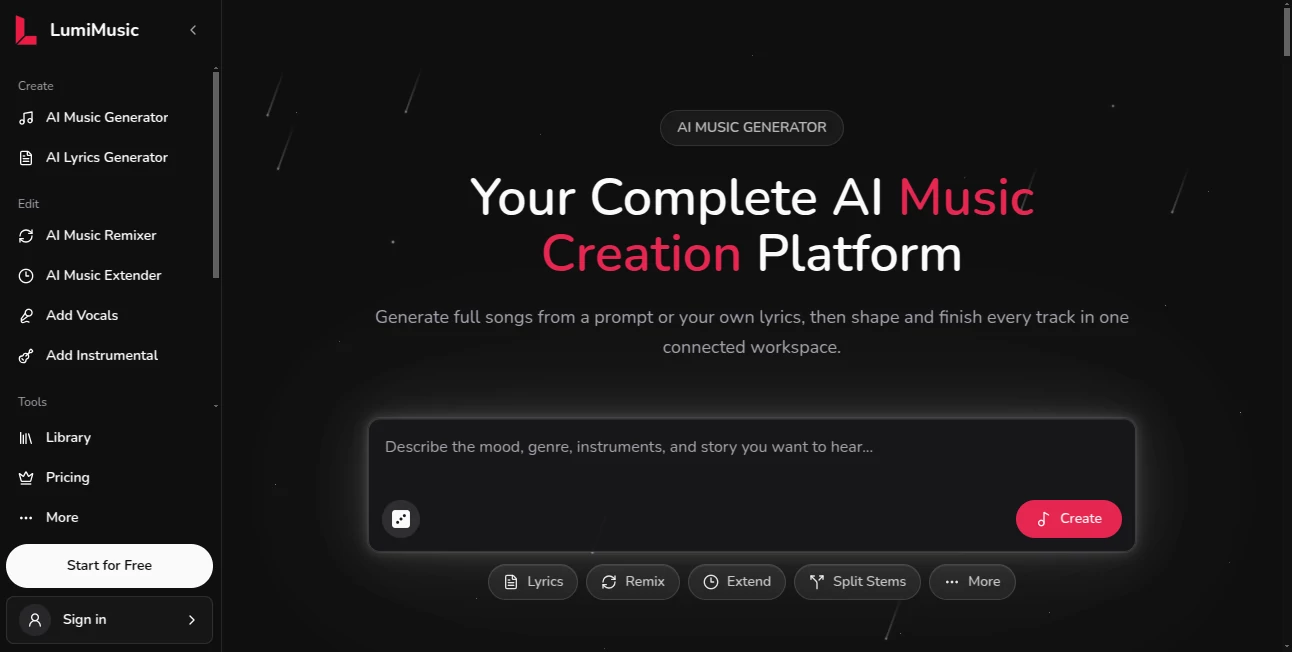
The interface is designed around a prompt-first workflow. Users simply describe the type of music they want, choose optional settings such as mood, genre, tempo, or vocals, and generate a complete composition with only a few clicks. Navigation remains straightforward even for people who have never worked with music production software before.
Accuracy & Performance
The generated tracks closely follow the creative direction provided in prompts. Detailed descriptions generally produce more personalized results, allowing users to experiment with different emotions, instruments, vocal styles, and musical structures until they find a version that perfectly matches their vision.
Capabilities
- Generate complete songs from text descriptions.
- Create original lyrics automatically.
- Transform existing lyrics into fully produced songs.
- Produce instrumental tracks without vocals.
- Support multiple musical genres and moods.
- Create AI-generated singing voices.
- Generate beats for different music styles.
- Export high-quality audio for creative projects.
- Create multiple variations from a single idea.
- Suitable for both personal and commercial creative workflows depending on the selected plan.
Security & Privacy
The platform operates entirely online, removing the need for local production software while simplifying project management. Users can generate, preview, and download music from their workspace, making it easy to organize creative projects without maintaining a complicated production environment.
Use Cases
- Produce background music for YouTube videos.
- Create soundtracks for podcasts.
- Generate music for social media content.
- Develop original demo songs.
- Compose music for game development.
- Create advertising jingles.
- Generate cinematic trailer music.
- Write and produce songs from custom lyrics.
- Create royalty-friendly music for presentations.
- Experiment with new musical concepts before entering a professional studio.
Pros and Cons
- Very beginner-friendly workflow.
- Fast music generation from simple prompts.
- Supports vocals, lyrics, and instrumental compositions.
- Large selection of genres and moods.
- No music production experience required.
- Useful for creators across many industries.
- Commercial usage depends on the subscription plan.
- Creative results may require multiple prompt refinements for highly specific compositions.
Pricing Plans
A free option is available for users who want to explore the platform and experiment with music generation. Paid subscription plans unlock additional features, expanded generation capabilities, higher-quality exports, and commercial usage rights for eligible plans. Pricing may change over time, so checking the official pricing page before purchasing is recommended.
How to Use LunaMusic
- Open the music generation workspace.
- Describe the desired song, mood, genre, or atmosphere.
- Optionally add your own lyrics or allow AI to generate them.
- Select voice preferences, tempo, and additional settings.
- Generate the composition.
- Preview the results and regenerate if needed.
- Download the finished track for your creative project.
Comparison with Similar Tools
Unlike many AI music generators that focus only on instrumentals or basic beat creation, this solution combines text-to-music generation, lyric creation, vocal synthesis, beat production, and complete song composition within a unified workflow. The streamlined interface makes it suitable for beginners, while its customization options provide enough flexibility for experienced creators who want greater control over the final result.
Conclusion
Modern content creation often demands original music, but traditional production can be expensive and time-consuming. This platform offers a practical alternative by helping creators transform written ideas into polished songs in just a few steps. The combination of AI composition, lyric generation, vocal production, and broad genre support creates an impressive creative environment that serves everyone from hobbyists to professional content teams. For anyone looking to produce original music quickly while maintaining creative control, it represents a powerful addition to today's AI-powered creative toolkit.
Frequently Asked Questions (FAQ)
Can beginners create music with this platform?
Yes. No previous music production experience is required, making it suitable for first-time users.
Can I generate songs from my own lyrics?
Yes. Existing lyrics can be transformed into complete songs with vocals and musical arrangements.
Does it support different music genres?
Yes. Users can create music across a wide variety of genres, moods, and styles.
Can I create instrumental music?
Yes. Instrumental tracks without vocals can be generated for videos, games, presentations, and other creative projects.
Is commercial use available?
Commercial rights are available on eligible paid plans, while free usage is generally intended for personal projects.
AI Text to Music , AI Singing Generator , AI Music Generator , AI Voice & Audio Editing .
These classifications represent its core capabilities and areas of application. For related tools, explore the linked categories above.

LumiMusic Alternatives Product

MeloLab AI M…

Mp3ToMidi
Lyria 3 AI M…

MP3toMIDI

mp3tourl

MakeBPM

MakeBestMusic

Lyrics to So…

happyhorse