MakeImg AI
What is MakeImg AI?
MakeImg AI is a multi-model image generation platform built for people who want more control over how their visuals are created. Instead of being tied to a single image model, users can choose between several production-grade options, including Seedream 4, Nano Banana 2, Nano Banana Pro, GPT Image, GPT Image 2, Flux Kontext Pro, Ideogram V3, and Imagen 4 Fast. This makes the platform particularly useful when one model works better for a specific visual style, while another is better suited to typography, realism, or fast experimentation.
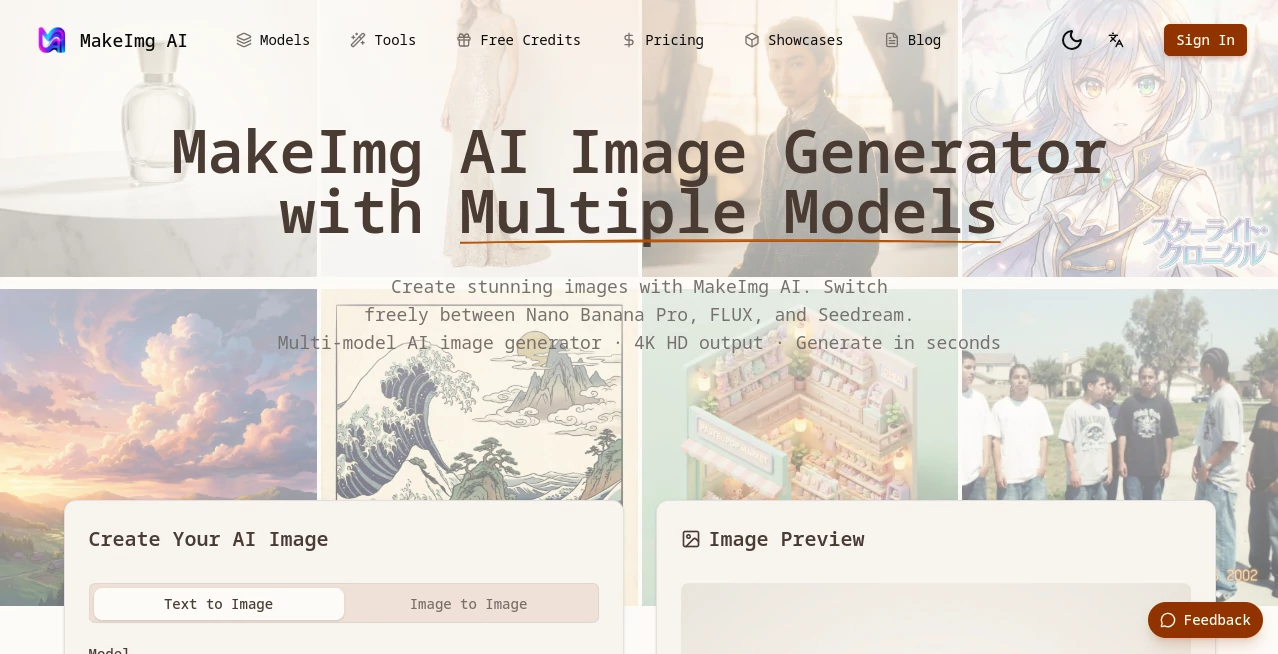
The workflow is straightforward: describe an idea, choose a model, select an aspect ratio, and generate. The platform supports both text-to-image and image-to-image creation, giving users a practical way to start from scratch or transform an existing reference.
For example, a social media manager could create a vertical promotional image, while an online store owner could generate product visuals and a designer could experiment with poster concepts. The same workspace can handle all three without requiring separate accounts or complicated software.
Key Features
- Multiple AI image models: Choose from fast and professional models depending on the project, including options focused on typography, photorealism, editing, and general creative work.
- Text-to-image generation: Turn written descriptions into original visuals using natural-language prompts.
- Image-to-image generation: Upload reference images and use them as the foundation for transformations, stylistic changes, and creative variations.
- Accurate text rendering: Models such as Nano Banana Pro and Ideogram V3 are designed for projects where readable text inside an image matters.
- High-resolution output: Images can be generated or exported at resolutions reaching up to 4K, depending on the selected plan and model.
- Flexible aspect ratios: Square, landscape, portrait, and other dimensions make the generated visuals easier to adapt to different platforms.
- Style presets: Presets such as watercolor, oil painting, sketch, cinematic, portrait, and product provide a quick starting point.
- Generation history: Previous images, prompts, and settings can be revisited rather than recreated from memory.
- Image editing tools: The platform also includes background removal, image upscaling, and AI-powered editing alongside generation.
User Interface
The interface keeps the main creative controls close together. Users can switch between text-to-image and image-to-image modes, choose a model, set an aspect ratio, select a style preset, and enter a prompt without navigating through a complicated workflow.
This simplicity is useful for beginners, but it does not feel restrictive for experienced creators. Someone working on a quick social post can get started immediately, while a designer can compare different models and refine the result through several iterations.
Accuracy & Performance
Performance varies by model, but the platform provides both fast and higher-fidelity options. Seedream 4, Nano Banana 2, and Imagen 4 Fast are positioned as faster models for everyday generation and experimentation, while professional options such as Nano Banana Pro, GPT Image 2, Flux Kontext Pro, and Ideogram V3 prioritize capabilities such as detailed rendering, text accuracy, photorealism, and instruction following.
The platform reports typical generation times in the seconds range, making it practical for workflows where users need to test several visual directions rather than waiting for a single result.
Capabilities
The strongest aspect of the platform is its range. A user creating a poster with detailed lettering can select a typography-focused model. Someone producing a realistic product scene can switch to a model optimized for photorealistic imagery. For quick creative exploration, a fast model can produce several directions before the user commits to a more detailed generation.
Image-to-image functionality adds another useful layer. Rather than starting with a blank prompt every time, users can upload an existing image and experiment with new styles or visual interpretations while keeping the original composition as a reference.
The platform also supports prompts in more than 50 languages, while flexible aspect ratios make the results suitable for social posts, presentations, websites, advertisements, product pages, and other digital formats.
Security & Privacy
Privacy is an important consideration whenever users upload reference images or create commercial material. The platform provides dedicated privacy and terms documentation, while the available plans distinguish between features such as private generation and commercial licensing. Users working with sensitive client material should review the current privacy policy and terms before uploading confidential assets.
Use Cases
- Social media content: Create posts, stories, campaign graphics, and visual variations for different platforms.
- Marketing campaigns: Produce advertising concepts, promotional graphics, banners, and campaign visuals without starting every design from scratch.
- E-commerce: Generate product scenes, lifestyle imagery, packaging concepts, and promotional visuals for online stores.
- Graphic design: Explore poster ideas, branded artwork, illustrations, covers, and other visual concepts.
- Content creation: Develop thumbnails, blog illustrations, channel artwork, and supporting visuals.
- Portrait and character creation: Experiment with cinematic portraits, anime-inspired artwork, and other character concepts.
- Concept development: Quickly turn rough ideas into visual references before investing time in a final design.
Pros and Cons
Pros
- Several leading image models are available in one workspace.
- Supports both text-to-image and image-to-image workflows.
- Useful model selection for different creative requirements.
- Supports high-resolution output up to 4K on eligible plans.
- Multiple aspect ratios suit social media and professional design work.
- Includes additional tools such as background removal, upscaling, and image editing.
- Fast models make experimentation more practical.
Cons
- Higher-quality professional models consume more credits.
- Some advanced features depend on the selected subscription.
- Users unfamiliar with different image models may need some experimentation before finding their preferred option.
Pricing Plans
The platform uses a credit-based subscription system. New users can start with free credits before deciding whether they need a paid plan.
- Starter: $8.25 per month when billed annually, with 2,800 credits per year, standard generation speed, 1K output, 30-day history, and personal commercial use.
- Pro: $16.58 per month when billed annually, with 7,000 credits per year, priority generation, 2K output, 180-day history, private generation, full commercial licensing, and email support.
- Business: $33.25 per month when billed annually, with 16,000 credits per year, the fastest generation speed, 4K output, unlimited history, API access, team commercial licensing, and dedicated support.
Credit usage depends on the selected model. Fast models listed by the platform generally cost 5 credits per image, while professional models generally cost 18 credits. This structure gives occasional users a way to keep costs controlled while allowing frequent creators to scale their generation volume.
How to Use It
- Step 1: Create an account and use the available introductory credits to explore the platform.
- Step 2: Decide whether you want to generate an image from text or transform an existing reference.
- Step 3: Select an AI model according to the type of result you need. A fast model is suitable for exploration, while specialized models can be better for typography or photorealistic work.
- Step 4: Write a clear prompt describing the subject, composition, style, lighting, colors, and mood.
- Step 5: Select an appropriate aspect ratio and style preset if needed.
- Step 6: Generate the image and compare the result with your original idea.
- Step 7: Refine the prompt or switch models when the first result is close but not quite right.
- Step 8: Download the finished image at the available resolution or continue editing it with the available tools.
Comparison with Similar Tools
Many AI image generators concentrate on a particular model or visual style. This platform takes a different approach by putting several models behind one interface. That matters when the requirements change from project to project.
For example, a creator focused on readable typography may prefer a specialized model, while a photographer-style workflow may benefit from a photorealistic model. A user simply exploring ideas can choose a faster option and generate more variations for the same amount of time. Having these choices in one workspace reduces the need to move prompts and reference files between multiple services.
It is not necessarily the right choice for someone who only wants one highly specialized workflow. For creators who regularly move between marketing graphics, product images, portraits, illustrations, and experimental concepts, however, the multi-model approach is a particularly useful advantage.
Conclusion
This platform is a strong option for creators who want flexibility without building their workflow around a single image-generation model. Its combination of multiple models, text-to-image generation, image-to-image transformation, high-resolution output, flexible aspect ratios, and supporting editing tools makes it suitable for everything from quick visual experiments to commercial creative projects.
The biggest benefit is the freedom to choose the right model for the job. Instead of forcing every prompt through the same system, users can test a fast model for brainstorming, switch to a typography-focused option for a poster, or choose a photorealistic model for a product scene. That practical flexibility makes the service worth considering for designers, marketers, content creators, developers, and online businesses that produce visual content regularly.
Frequently Asked Questions (FAQ)
What type of images can I create?
You can create a wide range of visuals, including product photography, portraits, anime artwork, landscapes, posters, marketing graphics, digital art, and concept images.
Does it support image-to-image generation?
Yes. You can upload a reference image and use it as the starting point for transformations, style changes, and creative variations.
Can I create images containing text?
Yes. Several available models are specifically designed for accurate typography and can be useful for posters, banners, logos, advertisements, and branded graphics.
Can generated images be used commercially?
The platform states that generated images can be used commercially, although the exact licensing conditions depend on the applicable terms and subscription plan. Users should review the current terms before using generated material in an important commercial project.
What resolution is available?
Output can reach up to 4K on eligible plans. Lower resolutions are also available depending on the selected plan and generation workflow.
Which model should beginners choose?
Seedream 4 is presented as a strong starting point for everyday generation because it combines speed, quality, and relatively low credit usage. Users can then move to specialized models when a project requires stronger typography, photorealism, or detailed instruction following.
AI Photo & Image Generator , AI Photography , AI Image to Image , AI Text to Image .
These classifications represent its core capabilities and areas of application. For related tools, explore the linked categories above.
MakeImg AI details
Website unavailable — View Alternatives
Pricing
- Freemium
Apps
- Chrome Extensions
Categories

MakeImg AI Alternatives Product
SeeDream 4.5
Imagine2

GPT Image 2 …

Image To Ima…
AI Photo Edi…

Nano Banana 2
z image

JPG to Small
AniFlow AI