


















MCPhq
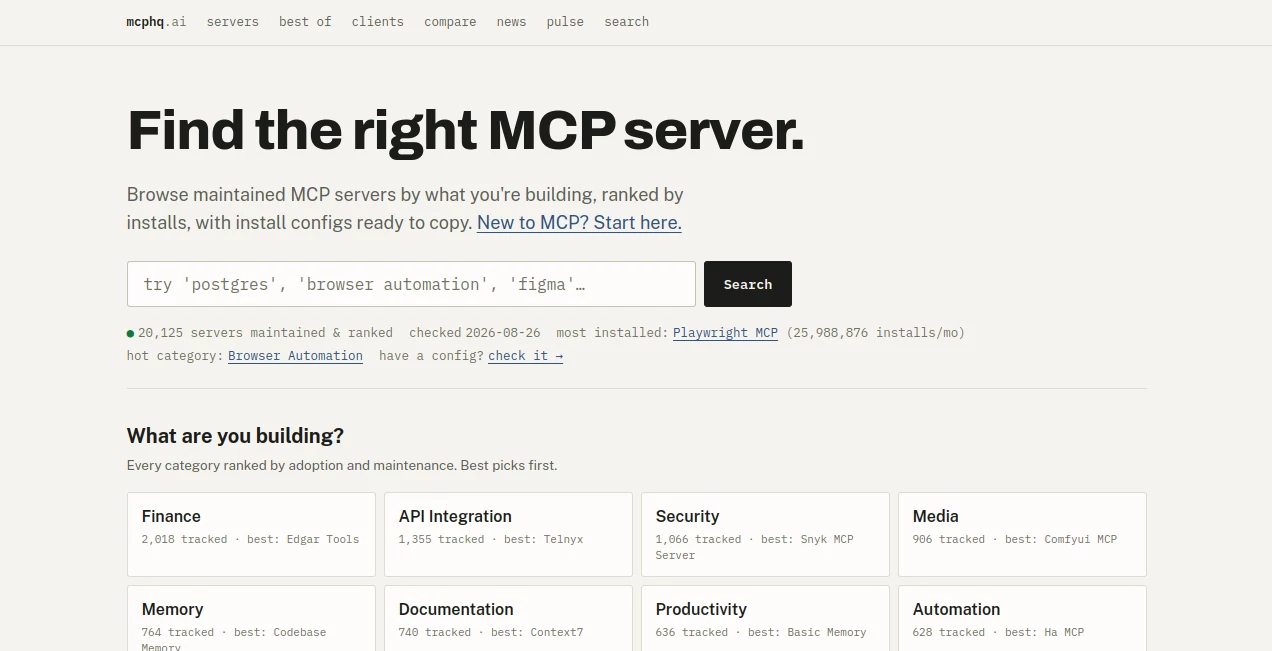
What is MCPhq?
Finding the right Model Context Protocol server can be surprisingly difficult. The ecosystem is growing at a rapid pace, with thousands of servers covering everything from databases and browser automation to coding, search, memory, and cloud infrastructure. MCPhq brings this growing landscape into one searchable directory, helping developers and AI users discover maintained MCP servers based on what they are actually trying to build.
Instead of browsing scattered repositories and guessing which project is still active, users can explore servers ranked using practical signals such as monthly installs, GitHub stars, and recent maintenance activity. The platform currently tracks more than 20,000 MCP servers and regularly refreshes its data from primary sources.
Key Features
- Searchable directory of maintained MCP servers
- Rankings based on adoption and maintenance signals
- Monthly package installation statistics
- GitHub star and commit activity information
- Ready-to-copy installation configurations
- Support for local and remote MCP servers
- Category-based discovery for different development tasks
- Head-to-head comparisons between similar MCP servers
- Filtering by programming language and technical characteristics
- Stack analysis for users who already have an MCP configuration
- Regular verification using registry, repository, package, and endpoint data
User Interface
The interface is designed around discovery rather than unnecessary complexity. The main search area lets users describe what they are building or enter a technology such as PostgreSQL, browser automation, or Figma. From there, relevant servers can be explored through rankings and categories.
Category pages make the experience particularly useful when you know the problem but not the exact server you need. Developers can browse areas such as Browser Automation, Database, Coding Agent, Documentation, Web Scraping, Developer Tools, and Productivity, then compare the leading options.
Accuracy & Performance
One of the strongest aspects of the platform is the emphasis on current ecosystem data. Server information is checked regularly against primary sources, including the official MCP registry, GitHub activity, package registries, and live endpoint probes for remote servers.
This approach is valuable because an MCP directory can become outdated quickly. A project that looked promising several months ago may no longer be maintained. Showing recent commits, installation activity, and verification dates gives users more context before they connect a server to their AI workflow.
Capabilities
The platform goes beyond a basic list of MCP projects. Users can filter servers by implementation language such as TypeScript, Python, JavaScript, Go, and Rust. There are also views for remote servers, open-source projects, and technology-specific options such as PostgreSQL, Docker, and Jira.
Another useful feature is the configuration analyzer. Developers who already have an MCP configuration can use it to identify what fits their existing stack. Individual server pages also provide installation commands, configuration examples, required credentials, and information about whether a server runs locally or remotely.
For teams evaluating alternatives, the comparison section provides direct head-to-head views. This makes it easier to understand differences in adoption, maintenance, capabilities, and technical focus without opening multiple repositories manually.
Security & Privacy
Because MCP servers can give AI clients access to external services, files, databases, browsers, or APIs, understanding what a server actually connects to is important. The platform focuses on presenting verifiable information rather than assigning an unexplained safety score.
Users can inspect details such as repository information, licensing, installation requirements, environment variables, local versus remote execution, and verification status before deciding whether a server belongs in their workflow. Developers should still review the underlying project and permissions before granting an MCP server access to sensitive systems.
Use Cases
Developers can use the directory when building AI agents that need access to external tools or services. For example, someone creating a coding assistant may search for development, documentation, testing, database, or browser automation servers instead of implementing every integration from scratch.
It is also useful for teams evaluating infrastructure for AI agents. A company experimenting with browser automation can compare established options, while a data team can investigate database and analytics integrations. Researchers and developers can also follow the wider MCP ecosystem to see which categories are growing and which projects are receiving continued adoption.
A practical scenario is a developer who needs an MCP server for browser automation but is unsure whether to use a particular implementation. Rather than relying only on a repository description, they can compare installation activity, GitHub stars, recent commits, and the capabilities documented for each option.
Pros and Cons
- Pros: Large MCP server directory with regularly refreshed data.
- Pros: Rankings combine adoption and maintenance signals instead of relying purely on popularity.
- Pros: Installation configurations make it easier to move from discovery to implementation.
- Pros: Useful filters for languages, hosting models, technologies, and use cases.
- Pros: Comparison pages help developers evaluate competing servers quickly.
- Pros: Verification information adds useful context when assessing unfamiliar projects.
- Cons: The large number of available servers can still feel overwhelming for someone completely new to MCP.
- Cons: Rankings and installation numbers are useful signals, but they cannot replace a developer's own technical and security review.
Pricing Plans
The directory is primarily positioned as an ecosystem discovery and research resource rather than a conventional subscription-based AI application. Its core value comes from helping users discover MCP servers, inspect their technical details, compare alternatives, and find installation configurations.
Individual MCP servers listed in the directory may have their own pricing, authentication requirements, or commercial models. These details vary from project to project, so users should check the individual server information before integrating it into a production workflow.
How to Use MCPhq
- Start by describing the task or technology you need an MCP server for.
- Search the directory for relevant servers.
- Review rankings, installation activity, GitHub information, and recent maintenance.
- Open promising projects to inspect their capabilities and requirements.
- Check whether the server runs locally or remotely.
- Review required credentials and environment variables.
- Copy the provided configuration for your preferred MCP client.
- Test the integration before giving it access to production systems or sensitive data.
Comparison with Similar Tools
Traditional GitHub searches and MCP registries are useful starting points, but they often require developers to assemble the information themselves. This platform adds a discovery layer by combining server listings with adoption metrics, maintenance signals, categories, installation information, and comparisons.
Its strongest advantage is the way different signals are brought together. A developer does not have to judge a project solely by its GitHub star count or README. Recent commits, package downloads, category rankings, verification status, and installation details can all contribute to a more informed decision.
The comparison functionality is particularly helpful when two projects solve a similar problem. Instead of simply presenting two names, the platform can show differences in adoption and technical focus, giving developers a faster way to narrow down their choices.
Conclusion
The MCP ecosystem is expanding quickly, and finding a reliable server is becoming an important part of building capable AI agents. A well-organized discovery platform can save developers considerable research time, especially when dozens or hundreds of projects appear to solve the same problem.
With its focus on maintained projects, real-world adoption, installation details, technical filtering, verification, and direct comparisons, MCPhq offers a practical way to explore this rapidly changing ecosystem. It is particularly valuable for developers who want to connect AI clients with browsers, databases, APIs, documentation, cloud services, and other external capabilities without starting their search from scratch.
Frequently Asked Questions (FAQ)
What is an MCP server?
An MCP server is a program that gives an AI assistant access to a particular capability or external resource. Depending on the project, this can include databases, browsers, files, APIs, search systems, or development tools.
How are MCP servers ranked?
Rankings use signals such as monthly installation activity, GitHub stars, and recent maintenance. The goal is to surface projects that show both adoption and signs of continued development.
Can I find remote MCP servers?
Yes. The directory distinguishes remote servers from locally running projects, making it easier to identify integrations that can be connected through a remote endpoint.
Does every listed MCP server require installation?
No. Local servers generally require installation and configuration on your machine, while remote servers can often be connected through an endpoint provided by the project.
Which AI clients can work with MCP servers?
MCP servers can be used with compatible clients such as Claude Desktop, Cursor, VS Code, and other applications that support the Model Context Protocol. The exact configuration depends on the individual server and client.
How often is the server information checked?
The platform states that its ecosystem data is re-verified regularly, using sources such as the official MCP registry, GitHub, package registries, and live probes for remote endpoints.
Can I compare two MCP servers?
Yes. Dedicated comparison pages make it possible to evaluate similar servers using current adoption and maintenance information, along with differences in their intended capabilities.
AI No-Code & Low-Code , AI Code Assistant , AI API Design , AI Developer Tools .
These classifications represent its core capabilities and areas of application. For related tools, explore the linked categories above.

MCPhq Alternatives Product

TruthSpine

VercelAPP

Bolt AI

Devplan

AntForms

Mage Flow AI…

Claude and C…

RepoClip

Website Clon…
