
MemoryBase
What is MemoryBase?
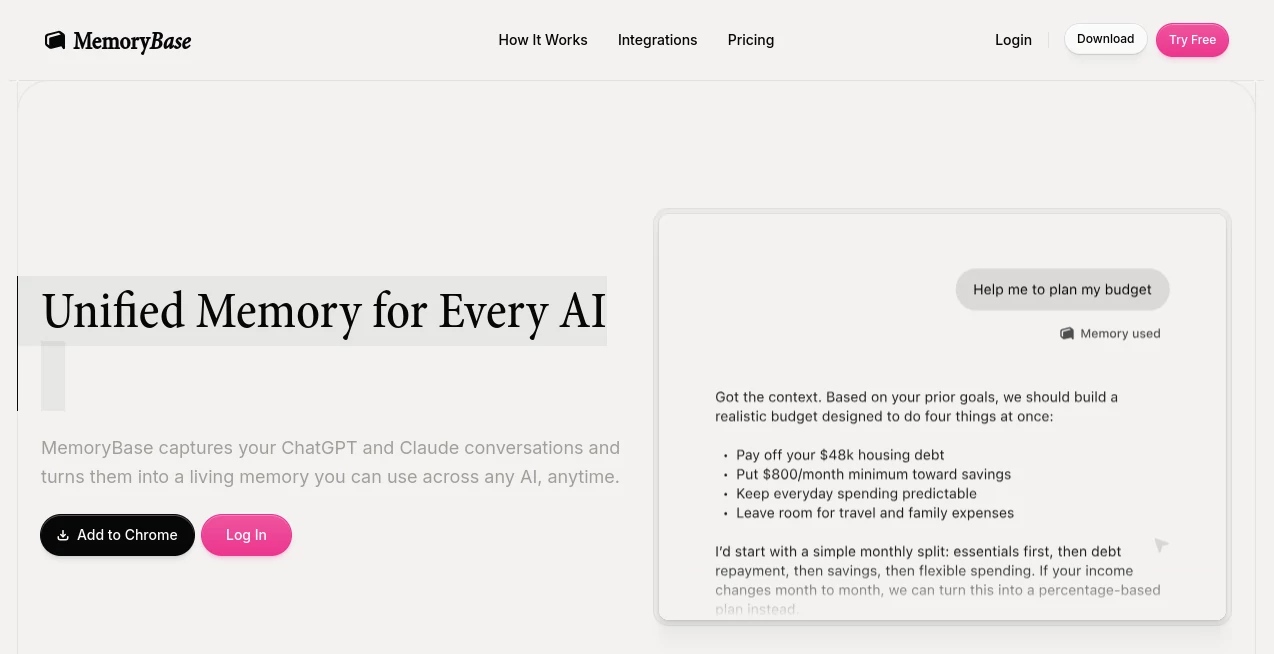
I can’t count how many times I’ve had to repeat the same context to different AI tools — explaining my project again to Claude after starting it in ChatGPT, or reminding an agent about preferences I already shared weeks ago. It breaks the flow and wastes time. This platform fixes that frustration elegantly. It quietly captures your conversations across major AI tools and turns them into a single, living memory that any of them can access when needed. The first time I used it, I switched from ChatGPT to Claude mid-project and the new model already knew everything important. That seamless continuity felt like a genuine breakthrough.
Introduction
Modern creators jump between different AI models depending on the task — one for writing, another for coding, yet another for research. But none of them remember what the others know. This tool bridges that gap by automatically saving and organizing your conversations into a unified memory layer. It works across ChatGPT, Claude, Gemini, and more, giving every AI the context it needs without you repeating yourself. For anyone who uses AI daily, it removes one of the biggest annoyances and makes the whole experience feel smarter and more personal.
Key Features
User Interface
The dashboard is clean and calm. You see your conversations grouped automatically by project or topic, with a simple timeline view and powerful search. Adding new memories or pushing context to a specific AI tool takes just a few clicks. It stays out of your way during normal work but is always ready when you need to browse, prune, or export memories. The Chrome extension makes capturing seamless, while the web app gives you full control.
Accuracy & Performance
It intelligently groups related conversations and extracts key context without you having to tag everything manually. When you ask an AI to continue a project, the right details surface naturally. Performance stays snappy even as your memory library grows, and the system is careful about what it stores so responses remain relevant and not bloated with old noise.
Capabilities
Automatic capture from ChatGPT, Claude, and other major models, cross-LLM memory sharing, one-click pushing of conversations into coding environments like Claude Code, universal agent memory, timeline and project-based views, and full export/import options. You stay in control — browse everything the AIs know about you, prune what you don’t need, and build custom context packs for different tools or projects.
Security & Privacy
Your memories stay yours. Sensitive data is stripped locally before syncing, everything is end-to-end encrypted, and you can export or delete anything at any time. There’s no lock-in and no unnecessary data sharing. For people who discuss important work or personal matters with AI, that level of control and transparency is reassuring.
Use Cases
A freelance writer starts a long article in ChatGPT, then continues editing in Claude — the new model already knows the tone, structure, and key points. A developer pushes conversation context straight into their coding agent so it understands the full project without re-explaining. A researcher builds a growing knowledge base across multiple sessions and models, returning to it weeks later with perfect continuity. Teams share project memory safely while keeping personal notes private. It fits naturally into any workflow where you use more than one AI tool regularly.
Pros and Cons
Pros:
- Eliminates repetitive context-giving across different AI platforms.
- Smart automatic organization saves hours of manual management.
- Seamless integration with major LLMs and coding environments.
- Strong focus on user control and privacy.
- Feels like a natural extension of how you already work with AI.
Cons:
- Still adding support for some newer models (though core ones are covered well).
- Heavy users will want the Pro plan for unlimited memory and advanced features.
Pricing Plans
A solid free tier lets you start capturing and using memory right away. Pro unlocks unlimited storage, advanced context packs, priority support, and access to new integrations as they launch. The upgrade feels worth it quickly for anyone who relies on AI daily — the time saved from not repeating yourself adds up fast.
How to Use MemoryBase
Install the Chrome extension or sign into the web app. It starts capturing conversations automatically from supported tools. When you switch models or start a new session, the relevant context is available with one click. Browse your memory timeline or project views to review or refine what’s stored. Push specific conversations into coding agents or build custom packs for different workflows. You can prune old items or export everything anytime. The whole system stays simple while giving you deep control.
Comparison with Similar Tools
While some note-taking apps or basic memory tools exist, few focus specifically on unifying conversations across different AI platforms with this level of intelligence and ease. Others require manual copying and pasting or lack the automatic organization and cross-tool pushing that make daily use truly seamless. This one stands out by feeling like a true memory layer rather than just another place to store notes.
Conclusion
AI tools are incredibly powerful, but they’re much better when they actually remember you. This platform makes that possible in a clean, private, and practical way. It removes one of the biggest daily frustrations of working with multiple AIs and turns scattered conversations into a coherent, useful memory. For anyone serious about getting the most from AI, it quickly becomes one of those tools you wonder how you ever lived without.
Frequently Asked Questions (FAQ)
Which AI tools does it support?
Currently ChatGPT, Claude, Gemini, and several coding environments, with more integrations coming.
Is my data private?
Yes — sensitive information is stripped locally, and you control everything.
Do I need to manually save conversations?
No — it captures and organizes them automatically.
Can I use it with coding agents?
Absolutely — you can push relevant conversations directly into tools like Claude Code.
What happens if I downgrade from Pro?
Your memory stays safe — you just lose access to unlimited features until you upgrade again.
AI Documents Assistant , AI Productivity Tools , AI Notes Assistant .
These classifications represent its core capabilities and areas of application. For related tools, explore the linked categories above.

MemoryBase Alternatives Product

VideoLens

Betula AI

Read PDF Alo…

Transcribe A…
Automaited

Lexikon AI

Ovulation Ca…

Discord Time…

eesel AI