
MenuForma
What is MenuForma?
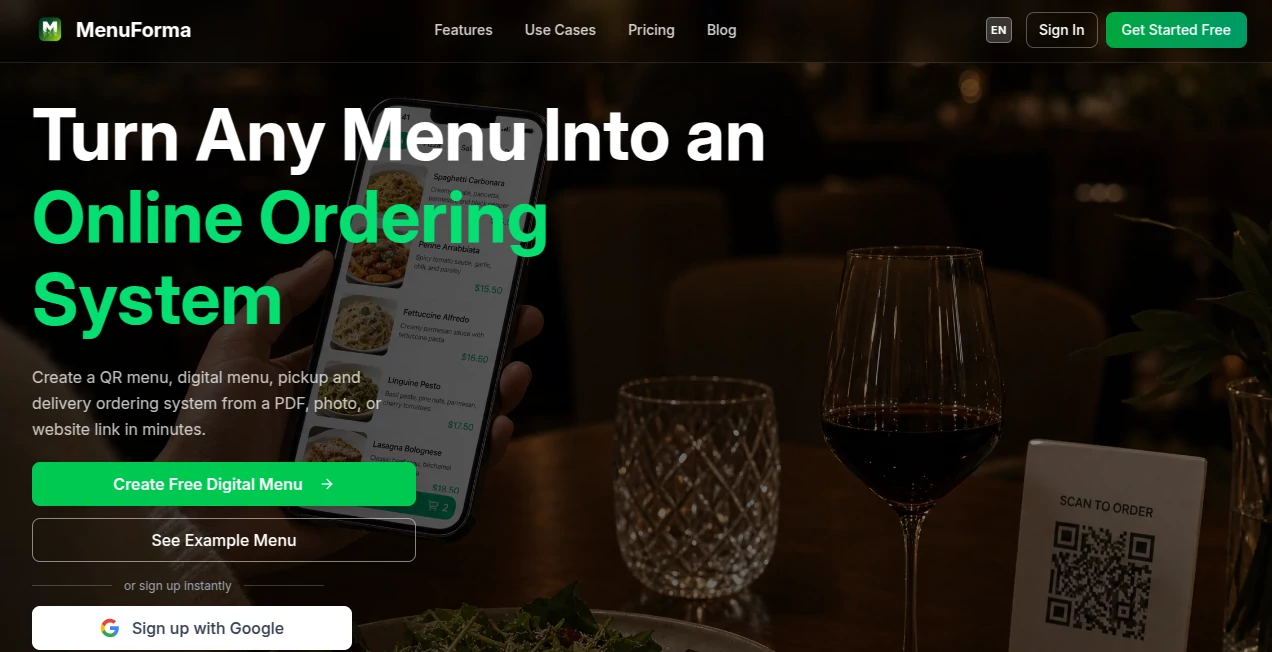
Running a modern restaurant is about much more than serving great food. Guests expect fast access to menus, mobile ordering, multilingual support, and a smooth digital experience from the moment they sit down. This platform brings all of those needs together in a single solution, helping restaurants transform traditional paper menus into interactive digital experiences within minutes.
Instead of rebuilding a menu from scratch, restaurant owners can upload a PDF, a photo, a spreadsheet, or even import an existing website menu. Artificial intelligence automatically extracts menu items, prices, and categories, then generates attractive descriptions and professional-looking food images where needed. The result is a polished digital menu that is ready for QR code sharing, online ordering, and customer engagement.
What makes the platform especially appealing is how much time it saves. Tasks that once required hours of manual editing can now be completed in only a few minutes. Whether managing a family restaurant, a busy café, a hotel, or a food truck, businesses can update prices, add seasonal dishes, and publish changes instantly without relying on technical skills.
Key Features
User Interface
The dashboard is clean, intuitive, and designed for restaurant owners rather than developers. Uploading an existing menu is straightforward, and the setup process guides users from import to publishing with minimal effort. Menu customization, QR code generation, and order management are all organized in an easy-to-follow workflow.
Accuracy & Performance
AI-powered menu extraction accurately recognizes menu items, prices, and categories from photos, PDFs, Word documents, spreadsheets, and website URLs. The extracted content remains editable, allowing businesses to quickly verify information before publishing. Fast processing means restaurants can launch a complete digital menu in just a few minutes.
Capabilities
- AI menu extraction from multiple file formats.
- Automatic food description generation.
- AI-generated food photography for menu items.
- QR code menu creation.
- Pickup, takeaway, and dine-in ordering.
- Support for more than 70 languages.
- Automatic menu translation.
- EU allergen labeling support.
- Google review collection tools.
- Restaurant analytics dashboard.
- Custom branded QR codes.
- Multiple restaurant management.
- Real-time menu updates.
- Online payment integration through Stripe.
Security & Privacy
Customer payments are processed through Stripe, reducing payment security concerns for restaurant owners. Sensitive payment information is not stored directly on the platform, while account management features help businesses securely control restaurant operations and staff access.
Use Cases
- Restaurants replacing printed menus with QR menus.
- Cafés looking for faster counter ordering.
- Hotels providing room-service ordering.
- Food trucks updating menus throughout the day.
- Bars promoting seasonal drinks and happy-hour specials.
- Restaurants serving international tourists with multilingual menus.
- Businesses wanting AI-generated food images without hiring photographers.
Pros and Cons
Pros
- Very fast menu creation using AI.
- Supports numerous import formats.
- Automatic translation into more than 70 languages.
- Integrated online ordering system.
- Professional AI-generated food images.
- Free plan available.
- No mobile application required for customers.
- Real-time editing and publishing.
Cons
- Some advanced AI features require a paid subscription.
- Online payments depend on Stripe availability.
- Designed primarily for restaurants and food businesses rather than general retail.
Pricing Plans
A generous free plan allows restaurants to create a digital QR menu with essential functionality. Businesses needing online ordering, AI food image generation, multiple languages, advanced customization, analytics, and additional management features can upgrade to an affordable paid plan as their operations grow.
How to Use MenuForma
Begin by uploading an existing menu as a PDF, image, spreadsheet, Word document, or website link. The AI automatically extracts menu items and organizes them into categories. Review and edit the imported content if necessary, generate food descriptions and images, enable multilingual support, customize the QR code, and publish the menu. Customers can immediately scan the QR code to browse the menu, place orders, and complete payments where enabled.
Comparison with Similar Tools
Many digital menu platforms focus only on QR code generation or simple online ordering. This solution stands out by combining AI-powered menu extraction, multilingual translation, food image generation, analytics, Google review collection, and restaurant management in one ecosystem. Businesses avoid juggling multiple services while offering customers a more engaging dining experience.
Conclusion
Restaurants continue to embrace digital technology, and having an intelligent menu system is becoming a competitive advantage rather than an optional upgrade. By combining automation, AI content generation, multilingual accessibility, QR ordering, and business insights, this platform simplifies restaurant operations while improving the customer experience. It is an excellent choice for hospitality businesses looking to modernize their service with minimal setup and ongoing maintenance.
Frequently Asked Questions (FAQ)
Can an existing paper menu be imported?
Yes. Menus can be imported from photos, PDFs, spreadsheets, Word documents, or website URLs.
Does it support multiple languages?
Yes. Menus can be translated into more than 70 languages, making them accessible for international guests.
Can customers order directly from the digital menu?
Yes. Restaurants can enable pickup, takeaway, dine-in, and other online ordering options depending on their plan.
Is there a free version available?
Yes. A free plan is available with core digital menu functionality, while premium plans unlock additional AI and business features.
Who benefits most from this platform?
Restaurants, cafés, hotels, food trucks, bakeries, bars, and other hospitality businesses that want a modern digital ordering experience will benefit the most.
AI Photo & Image Generator , AI Productivity Tools , AI Customer Service Assistant , Other .
These classifications represent its core capabilities and areas of application. For related tools, explore the linked categories above.

MenuForma Alternatives Product

Slackactivity

Agentys
steam worksh…

Flux2 Klein

IdeaHunter

Hugging Face

GoDices

AI Anime Pro

AiZolo