
MixVio
What is MixVio?
Creating polished visual and audio content often means jumping between several different AI platforms. One tool handles video, another focuses on images, and a third takes care of voice or music. This can quickly become frustrating, especially when a project needs all three.
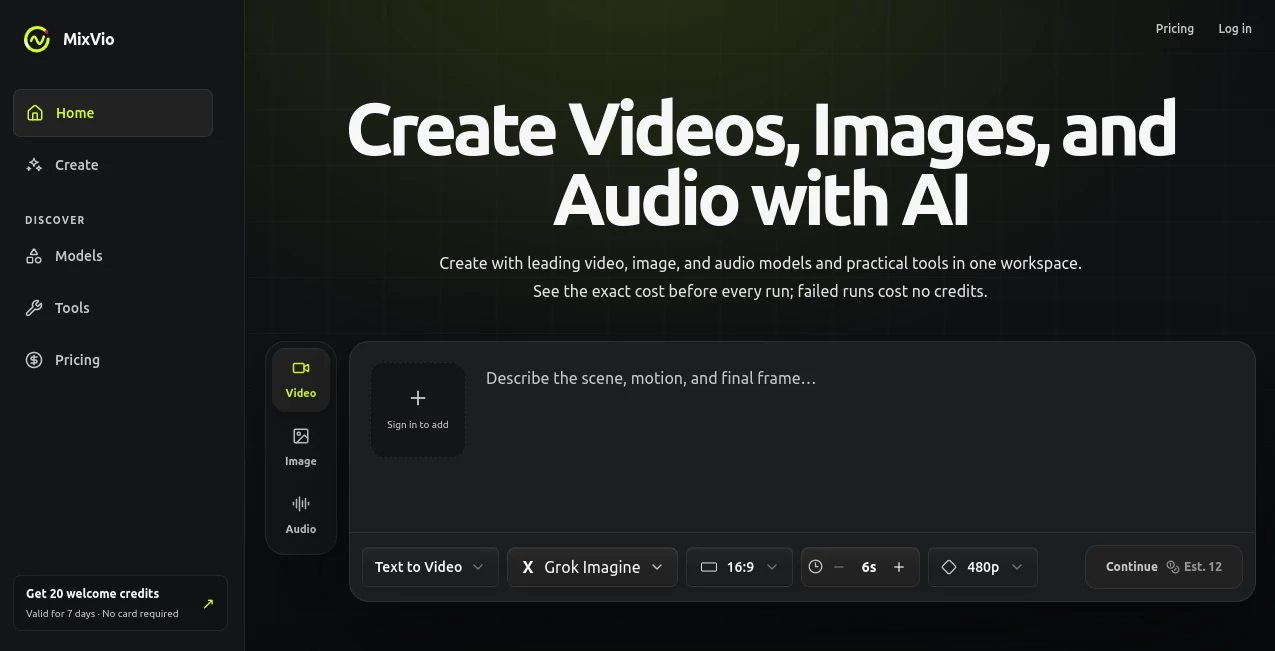
MixVio brings video, image, and audio generation together in one workspace. It gives creators access to a growing collection of AI models and practical creative tools, making it possible to move from an initial idea to a finished asset without constantly switching between services.
The platform supports everything from text-to-video and image-to-video generation to image editing, upscaling, voiceovers, and original music. There is also an Auto option for users who would rather describe what they want than spend time comparing models.
One particularly useful detail is the credit system. Before a generation starts, users can see the exact credit cost. If a generation fails, the reserved credits are automatically released, which makes experimentation considerably less stressful.
Key Features
- AI video generation from text and images
- Image generation and precise image editing
- AI audio and music creation
- Image-to-video animation
- AI video upscaling up to 4K through supported tools
- AI image upscaling for sharper visual assets
- Background removal
- Access to multiple leading AI video, image, and audio models
- Automatic model selection for supported creative tasks
- Exact credit estimates shown before generation
- Private workspace for uploads and generated results
- Commercial usage on paid plans
User Interface
The interface is designed around the creative task rather than the individual model. Users can choose between video, image, and audio creation and then describe the desired result in plain language. This approach makes the workspace approachable for beginners while still giving experienced creators control over the model and output settings.
The model menu is available when more control is needed, while the Auto option can recommend a compatible route. Users can also work with their own images, video, or audio on tools that support reference files. Accepted formats and limits are presented before submission, which helps avoid unnecessary trial and error.
For someone working on a social campaign, for example, the workflow can feel much more straightforward: create an image, animate it, improve the resolution, and prepare supporting audio without opening several unrelated platforms.
Accuracy & Performance
Performance depends on the selected model and the type of generation, but the platform gives users access to a broad selection of current video, image, and audio models. Supported video options include models capable of producing native audio, high-resolution footage, reference-based scenes, and longer continuous clips.
The available routes also cover different creative requirements. Some are better suited to short cinematic clips, while others are designed around image references, multi-shot storytelling, higher-resolution output, or longer single-take videos.
Image generation benefits from similar flexibility. Supported models can produce detailed still images, perform targeted edits, and maintain important elements from reference material. The ability to see the credit requirement before generation is another practical performance-related advantage because users can choose an appropriate route before spending credits.
Capabilities
The platform covers a surprisingly broad portion of the modern AI content workflow. Video creators can generate clips from written prompts or animate existing images. Depending on the selected model, they can work with different durations, resolutions, reference images, and native audio.
Image creators can generate new visuals, edit existing assets, remove backgrounds, and upscale images for higher-quality use. This makes the service useful for marketing graphics, product visuals, social media content, concept artwork, and other digital projects.
Audio is another important part of the workspace. Users can create voiceovers and original music, while scene-directed audio tools can combine speech, ambience, timing, and music cues into a single generated result.
The growing model catalog is also valuable for creators who like experimenting. Instead of being tied to one generation engine, users can select from different models depending on the visual style, resolution, input type, or creative goal they have in mind.
Security & Privacy
Privacy is built into the workspace experience. Uploaded files and generated results remain in the user's private workspace and are not publicly listed. Providers receive the necessary request data to complete the selected generation, while download links are scoped to the user's account and are short-lived.
Paid creations remain accessible after cancellation while the account stays active, subject to storage limits, deletion by the user, and applicable legal or safety requirements. Users should still make sure they have the necessary rights to any images, faces, voices, brands, or other reference material they submit.
Commercial usage is available with paid plans, while free-plan outputs are intended for evaluation rather than commercial publishing.
Use Cases
Social Media Content: Creators can turn simple ideas into short videos, animated images, thumbnails, and supporting audio. This is useful for TikTok, Instagram, YouTube Shorts, and other short-form channels.
Marketing Campaigns: Marketing teams can produce product imagery, advertising concepts, promotional videos, and audio assets from a shared creative workspace.
Product Demonstrations: An existing product image can become the starting point for an animated scene, while image enhancement and background removal can help prepare the final visual.
Video Production: Filmmakers and independent creators can experiment with different video models for cinematic scenes, reference-based animation, multi-shot concepts, and longer continuous clips.
E-commerce: Product-ready images, background removal, image enhancement, and creative variations can help online sellers prepare visual assets without maintaining a complicated editing workflow.
Content Prototyping: Before investing in a full production, creators can quickly test visual concepts, characters, camera movements, narration, music, and different creative directions.
Pros and Cons
Pros
- Video, image, and audio generation in one workspace
- Access to a growing selection of AI models
- Exact credit costs are shown before generation
- Failed generations do not consume credits
- Supports reference-based creative workflows
- Paid plans include commercial usage
- Private workspace for uploads and generated assets
- Useful combination of generation, editing, and enhancement tools
- Free access starts with 20 welcome credits and does not require a credit card
Cons
- Free access is limited and includes watermarked output
- Free assets expire after about seven days
- Subscription credits do not roll over between billing periods
- Some advanced models require a relatively large number of credits per generation
- Higher-volume production is better suited to the paid tiers
Pricing Plans
The platform uses a credit-based system, with the exact cost displayed before each generation. A free option gives new users 20 welcome credits valid for seven days, with no credit card required. Free usage comes with limitations such as watermarked output, lower-priority processing, limited model access, and no commercial usage.
The Starter plan costs $20 per month and includes 400 credits. It provides access to all models, watermark-free exports, commercial usage, higher-resolution video options, and up to two concurrent jobs.
The Pro plan costs $40 per month and includes 1,000 credits. It increases concurrent jobs to four, provides priority processing, supports batch generation of up to six items, and includes commercial usage and watermark-free exports.
The Ultra plan costs $100 per month and includes 3,000 credits. It is designed for heavier production workloads, with up to eight concurrent jobs, the highest queue priority, early model access, and batch generation of up to 12 items.
Annual billing is offered at a 50% discount compared with the equivalent monthly total. Subscription credits are granted monthly but do not roll over into the next billing period. Paid subscribers can also purchase additional credit packs, which have their own expiration period.
How to Use MixVio
Start by choosing whether you want to create a video, image, or audio asset. Describe the result you want in the workspace using a clear prompt. If the selected tool supports references, upload the relevant image, video, or audio file.
Next, choose the appropriate model or allow the Auto option to select a compatible route. Review the available settings, such as duration, resolution, aspect ratio, or other model-specific options.
Before submitting, check the displayed credit estimate. This is especially useful when testing expensive video models. Once everything looks right, start the generation and review the result.
If the output is close but not quite right, adjust the prompt or selected settings and generate another version. Since failed generations release their reserved credits, users can experiment without losing credits on unsuccessful runs.
Comparison with Similar Tools
Many AI creative platforms specialize in a single medium. Some concentrate almost entirely on video generation, while others are built primarily for image creation, voice synthesis, or music. This platform takes a broader approach by putting these creative formats into the same workspace.
Another difference is the model-selection layer. Instead of relying on one generation engine, creators can choose among multiple available models or use automatic routing. This can be useful when a project moves between different requirements, such as cinematic video, product imagery, reference-based animation, or generated audio.
The credit transparency is also worth noting. Users are shown the cost before submitting a generation, rather than discovering the final usage only afterward. For creators who regularly test several versions of an idea, this provides a clearer way to manage production costs.
It is not necessarily the perfect replacement for every specialized editing application. Professional users who require a full timeline editor, advanced compositing environment, or highly specialized post-production workflow may still need dedicated software. Its strongest advantage is bringing multiple AI generation and enhancement tasks into one practical environment.
Conclusion
For creators who regularly move between video, images, voice, and music, having these capabilities available in one workspace can remove a lot of unnecessary friction. The combination of multiple AI models, practical editing tools, reference-based workflows, and transparent credit estimates makes the platform particularly appealing for experimentation and content production.
The free credits provide a simple way to test the experience before paying, while the paid tiers add commercial usage, faster queues, higher limits, and broader production capabilities. The strongest fit is likely to be creators, marketers, small teams, and businesses that need to produce different types of AI-generated content without maintaining a collection of separate subscriptions.
For someone who wants to start with a simple idea and gradually turn it into finished visual and audio content, this all-in-one approach is a compelling option.
Frequently Asked Questions (FAQ)
Can I try the platform for free?
Yes. New accounts receive 20 welcome credits that remain valid for seven days, and a credit card is not required to start.
Can I generate videos from text?
Yes. Text-to-video is one of the main creative workflows, with multiple video models available depending on the required duration, resolution, references, and other settings.
Can I turn an image into a video?
Yes. Supported image-to-video tools can animate an existing image with movement and camera motion. The exact options depend on the selected model and route.
Can I upload my own files?
Yes. Tools that support reference material can accept user-provided images, videos, or audio. The accepted formats and limits are shown for the relevant route.
Are generated results private?
Yes. Uploaded files and generated results remain in the user's private workspace and are not publicly listed.
Can I use generated content commercially?
Commercial usage is included with paid plans, subject to the terms of service. Users are responsible for having the necessary rights to references, faces, voices, brands, and other material they provide.
Do failed generations consume credits?
No. Reserved credits are automatically released when a generation fails or is safely canceled.
Do unused monthly credits roll over?
No. Subscription credits expire at the end of the billing period. Purchased credit packs have their own expiration period.
Which paid plan is best for regular content creation?
The Pro plan is a strong middle option for creators and marketers who need more monthly credits, priority processing, four concurrent jobs, and batch generation. Users with substantially heavier production requirements may prefer Ultra.
Does the free plan include commercial usage?
No. Free-plan outputs are intended for evaluation. Commercial usage is available on the paid plans.
AI Photo & Image Generator , AI Video Generator , AI Music Generator , AI Text to Video .
These classifications represent its core capabilities and areas of application. For related tools, explore the linked categories above.

MixVio Alternatives Product

Berrioo
TryInks

uni-1

ai seedance …

Add Loved On…

Happy Horse

Gemini Omni …

Shutterstock

Seedance2 Vi…