


















Mowgli
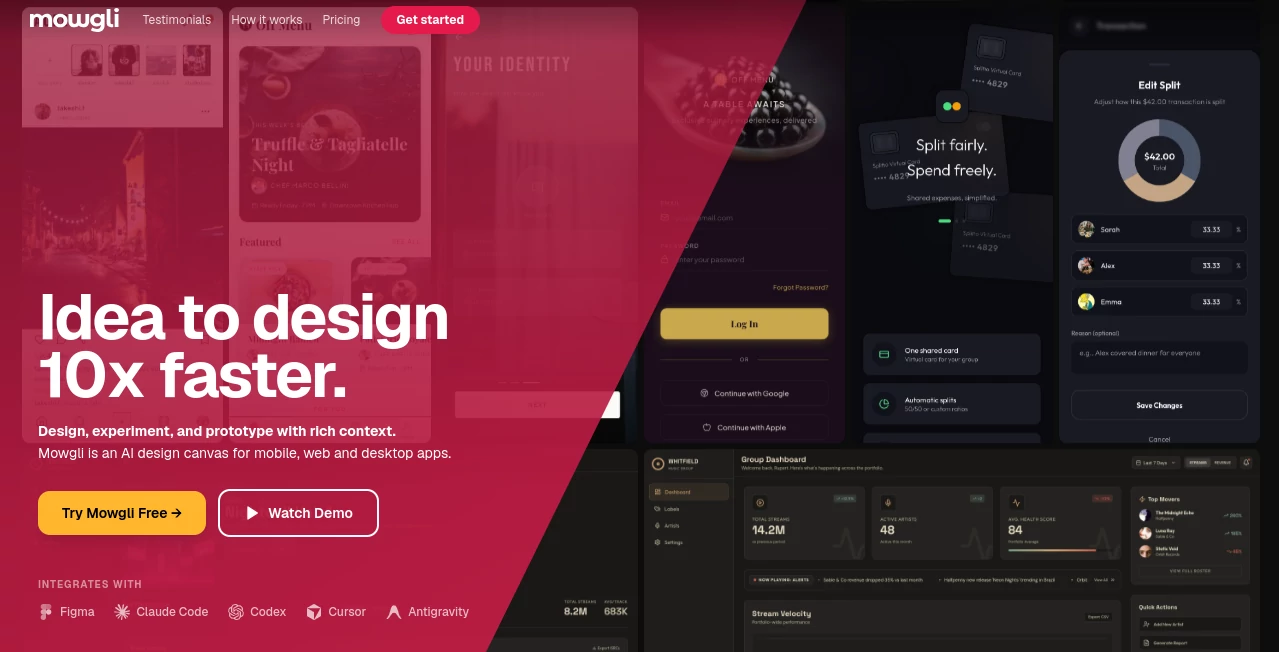
What is Mowgli?
Building a digital product usually involves long planning sessions, endless wireframes, and repeated design revisions before development even begins. This modern AI-powered design platform changes that experience by helping founders, designers, developers, and product teams transform ideas into polished interface designs within minutes. Instead of starting with a blank canvas, users begin with a simple product description and receive complete design concepts, product specifications, user flows, and interactive prototypes.
What makes this platform especially impressive is its focus on understanding the product before generating visuals. Through an intelligent questionnaire, it collects context about users, goals, workflows, and business requirements, producing designs that feel thoughtful rather than generic. Whether you're creating a mobile application, desktop software, SaaS dashboard, or web platform, the generated interfaces are remarkably complete and ready for further refinement.
For startups trying to validate an idea quickly or established companies accelerating product development, this solution dramatically reduces the gap between imagination and execution. The ability to edit designs through natural conversation, import existing Figma projects, generate production-ready React components, and collaborate with teammates makes it far more than a simple AI image generator—it becomes an intelligent design partner throughout the product lifecycle.
Key Features
User Interface
The interface is clean, modern, and designed for speed. Every project keeps specifications, user journeys, screens, prototypes, and design conversations inside a single workspace. Navigation feels intuitive, making it approachable even for users without professional design experience.
- Simple project creation from text descriptions
- Interactive design canvas
- Integrated AI chat for editing layouts
- Real-time collaboration for teams
- Built-in version history
Accuracy & Performance
Instead of randomly generating screens, the system first develops a structured product specification before creating interfaces. This additional context significantly improves design consistency across multiple screens and user flows. Responsive layouts, state management, and navigation logic are also considered during generation, resulting in designs that require fewer manual corrections.
Capabilities
- Generate complete high-fidelity UI designs from text prompts
- Create Product Requirement Documents (PRDs)
- Produce multiple design concepts before generation
- Generate interactive prototypes
- Edit designs using natural language conversations
- Import existing Figma projects
- Export React components and production-ready code
- Create AI-ready packages for development assistants
- Generate moodboards with multiple visual styles
- Adapt interfaces for desktop and mobile automatically
Security & Privacy
Projects remain organized with version history and collaborative controls that make teamwork safer and more transparent. Team workspaces include permission management and shared editing, while exported files allow organizations to continue development inside their preferred environments without disrupting existing workflows.
Use Cases
- Startup founders validating new product ideas.
- UX designers exploring multiple interface directions.
- Developers who need production-ready UI designs before coding.
- Product managers creating specifications alongside visual prototypes.
- Agencies producing client mockups much faster.
- Teams modernizing existing Figma projects with AI assistance.
- Companies building responsive web and mobile applications.
- Rapid MVP creation for investors and stakeholders.
Pros and Cons
Pros
- Produces complete multi-screen product designs instead of isolated mockups.
- Creates detailed product specifications automatically.
- Excellent integration with Figma workflows.
- Natural-language editing removes repetitive manual work.
- Interactive prototypes can be generated quickly.
- Exports React code for faster development.
- Supports collaborative design sessions.
- Suitable for both technical and non-technical users.
Cons
- Advanced exports require paid plans.
- Complex enterprise projects may still benefit from manual design review.
- Internet connection is required for cloud-based generation.
Pricing Plans
A generous Free plan allows new users to explore the platform with limited AI credits, moodboards, questionnaires, wireframes, and project history. Paid subscriptions unlock complete application design generation, unlimited exports, interactive prototypes, React code exports, Figma exports, AI-ready development packages, additional credits, priority support, and real-time collaboration features for larger teams. Enterprise options are also available for organizations requiring dedicated onboarding and advanced support.
How to Use Mowgli
Begin by describing your application idea in plain language. Answer the guided questions so the platform understands your audience, workflows, and product goals. Review several automatically generated design concepts and choose the visual direction that best fits your vision. Continue refining every screen through conversational editing, adjust colors or layouts, preview interactive prototypes, and finally export your work to Figma, React code, or AI coding assistants for development.
Comparison with Similar Tools
Many AI design generators focus on creating individual screens or simple mockups from prompts. This platform takes a broader product-centric approach by generating specifications, complete user journeys, responsive layouts, interactive prototypes, and production-ready exports together. The combination of conversational editing, structured product understanding, Figma compatibility, and developer-focused exports provides a more complete workflow than many traditional AI UI generators.
Conclusion
For anyone looking to reduce weeks of product design into hours, this platform offers an impressive combination of intelligence, flexibility, and usability. It doesn't simply generate attractive screens—it helps shape the product itself through structured planning, collaborative iteration, and seamless developer handoff. From early brainstorming to production-ready interfaces, it streamlines nearly every stage of modern product design while maintaining high visual quality and consistency.
Frequently Asked Questions (FAQ)
Can beginners use this platform?
Yes. The guided workflow makes it accessible even for users without professional UI or UX experience.
Does it support Figma?
Yes. Existing Figma projects can be imported, edited with AI, and exported back after refinement.
Can generated designs be converted into code?
Yes. Projects can be exported as React components along with development-ready assets.
Is it suitable for team collaboration?
Yes. Team plans include real-time collaboration, shared workspaces, and version history.
Can it create prototypes?
Yes. Interactive prototypes with realistic navigation and user flows can be generated directly from the design.
AI App Builder , AI Design Assistant , AI Website Designer , AI Design Generator .
These classifications represent its core capabilities and areas of application. For related tools, explore the linked categories above.

Mowgli Alternatives Product

ChromaPeel
VexImg

ColorPalette…

AI Interior …
![FLUX.2 [max] Image Generator - AI image generator with prompt gallery and production-ready editing workflows.](/media_submitaitools/telegram/flux2max.app-favicon.webp)
FLUX.2 [max]…

Invitation M…

bananaai.app
GPT Image 2 …

Image to Ima…
