Musicfy AI
What is Musicfy AI?
Musicfy AI is an AI-powered music creation platform built for people who want to move from a rough idea to something they can actually hear. Instead of requiring a full production setup, it lets users generate songs from prompts or lyric drafts, create instrumental tracks, and transform existing audio into new vocal directions.
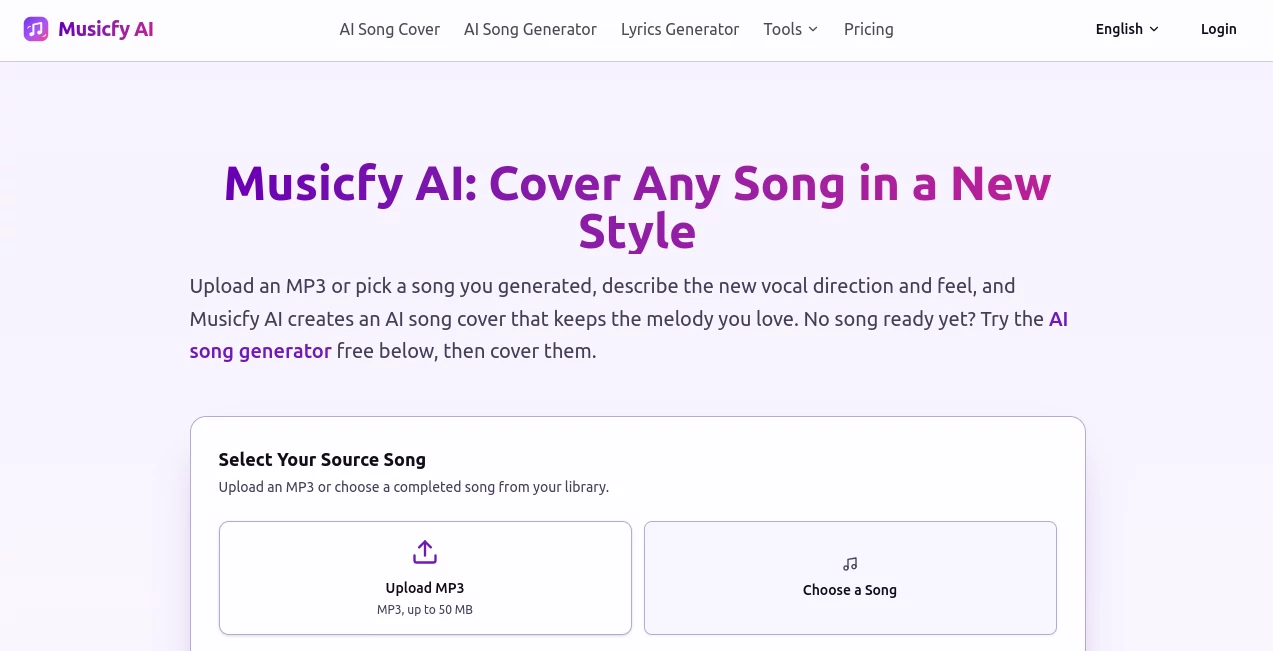
One of its most interesting features is the AI cover workflow. Users can upload an MP3 they have the rights to, describe the mood or style they want, choose a vocal direction, and create a new version while keeping the melody of the original track. This makes the platform useful not only for experimentation, but also for musicians, content creators, filmmakers, podcasters, and anyone who needs music quickly.
The workflow is particularly appealing when an idea is still unfinished. A songwriter can start with a chorus, a scene description, or even a simple mood and turn it into a playable draft. From there, the track can be extended, separated into stems, or converted to MIDI for further work.
Key Features
- AI song generation from text prompts and lyric drafts
- AI cover creation while preserving the source melody
- Male and female vocal directions for generated covers
- Instrumental music generation
- AI lyrics generation for verses, hooks, and choruses
- Song extension for developing promising musical ideas
- Vocal removal and stem separation
- Audio-to-MIDI conversion
- Copyright-free voices and community-created voice models
- Custom voice model training on supported plans
- Multiple music styles including pop, jazz, rock, EDM, cinematic, R&B, country, rap, acoustic, and lo-fi
- Daily free generations for users who want to test the workflow before paying
User Interface
The interface keeps the creative process relatively straightforward. Users can choose between creating an original song and working with an existing track, upload audio, enter instructions, select vocal preferences, and generate a result without having to navigate a traditional digital audio workstation.
The cover workflow is especially easy to understand. You start with an MP3 or an existing generated song, describe the direction you want, and then listen to the resulting version. For someone who simply wants to experiment with a melody without learning complicated production software, that simplicity is a major advantage.
Accuracy & Performance
AI music generation is naturally variable, and the platform itself makes that clear. The same prompt can produce different results, which is useful when the first generation does not quite capture the intended idea. Instead of treating the first output as a final master, it works better as a creative starting point that can be compared, refined, and extended.
Performance also depends on the complexity of the request, the selected workflow, and the plan being used. Paid tiers provide higher upload limits and faster generation options, while higher plans are designed for creators who need more custom voices and a more production-oriented workflow.
Capabilities
The platform goes beyond simple text-to-music generation. A user can begin with a prompt, rough lyrics, or an existing track and continue developing the result inside the same ecosystem. Generated songs can be extended, vocals can be separated from other elements, individual stems can be extracted, and audio can be converted to MIDI.
For creators working with video, podcasts, advertising, games, or social content, this combination can save a considerable amount of back-and-forth between different tools. It is also useful for musicians who want to hear alternative interpretations of their own demos before committing time to a full production.
Security & Privacy
Users should pay attention to the rights associated with audio they upload. The platform specifically advises users to upload tracks they have the necessary rights to use, particularly when creating covers intended for commercial purposes. Commercial rights for generated and covered music are available through paid plans, while uploaded source material remains the responsibility of the user.
For professional projects, it is sensible to review the current license, privacy policy, and commercial-use terms before publishing generated material or sharing it with clients. This is especially important when working with copyrighted recordings or recognizable voices.
Use Cases
- Songwriting: Turn unfinished lyrics, hooks, or musical ideas into playable song drafts.
- Music experimentation: Test different genres, moods, vocal directions, and arrangements without rebuilding a track manually.
- Content creation: Produce music for videos, social media projects, podcasts, and online content.
- Film and video: Create instrumental ideas around a scene, emotion, or visual concept.
- Game development: Explore variations of a musical theme for menus, gameplay, combat sequences, and other environments.
- Music education: Demonstrate how the same melody can feel different when interpreted through different styles.
- Demo production: Turn a rough concept into something concrete that can be reviewed before a professional recording session.
- Audio editing: Separate vocals and instruments or convert musical material into MIDI for additional production work.
Pros and Cons
Pros
- Easy starting point for people without advanced music-production skills
- Supports both original song creation and AI covers
- Can work from prompts, lyrics, or existing audio
- Includes useful post-generation tools such as stem separation and audio-to-MIDI conversion
- Free daily generations make it possible to test the core experience
- Supports several popular musical styles
- Paid plans provide commercial-use options for eligible generated content
Cons
- AI-generated results can vary considerably between generations
- Users need to understand copyright and licensing responsibilities when uploading existing songs
- Free outputs have restrictions around privacy and downloading
- Creators looking for detailed manual control may still prefer a traditional DAW for final production
Pricing Plans
The platform offers a free starting option with daily generations. According to its current product information, signing in provides three generations per day, with up to six songs depending on the generation output. Free songs are public and available for online streaming, while downloading and private tracks require a paid plan.
Paid plans are aimed at users who need higher limits, additional voice models, larger uploads, faster processing, and commercial-use rights. The available tiers include Starter, Professional, and Studio options, with higher tiers increasing the number of custom voices and upload capacity. The Studio tier is designed for heavier creative workflows and supports simultaneous voice training.
Because promotional pricing can change, users should check the current pricing page before purchasing. The important distinction is that upgrading is not simply about generating more music; paid plans also unlock capabilities intended for creators who want to download, keep projects private, or use eligible output commercially.
How to Use It
- Choose your starting point: Begin with a text idea, lyric draft, instrumental concept, or an existing MP3.
- Describe the sound: Explain the genre, mood, energy, vocal direction, or atmosphere you want.
- Generate: Let the music model create the first version of the track.
- Compare variations: Listen to the results and keep the version that best matches your original idea.
- Refine the track: Extend the song, separate stems, remove vocals, or convert audio to MIDI when additional editing is needed.
- Export or continue working: Depending on your plan and intended use, download the result or continue refining it within the workflow.
Comparison with Similar Tools
Many AI music platforms concentrate primarily on generating a song from a text description. This platform takes a broader approach by combining original song generation with cover creation and audio-processing tools.
That distinction matters for creators who already have musical material. Someone with an unfinished demo can use the system to explore a different vocal direction rather than starting from zero. Meanwhile, a creator with no track can begin with lyrics or a simple description and build an original musical draft.
It is therefore best suited to users who value experimentation and fast iteration. For detailed mixing, mastering, MIDI editing, and precise arrangement control, dedicated music-production software remains a better choice. The two approaches can also work well together: AI can handle early creative exploration, while a DAW can handle the final production.
Conclusion
For creators who regularly find themselves thinking, “I have an idea, but I need to hear it first,” this platform offers a practical answer. It brings song generation, AI covers, lyrics, voice experimentation, and several useful audio tools into one workflow.
The strongest part of the experience is the freedom to start from almost anywhere. A finished track, a few lines of lyrics, a scene description, or a simple musical concept can all become a starting point. The results will not replace every part of professional music production, but they can dramatically shorten the distance between an idea and a playable demo.
For musicians, video creators, podcasters, filmmakers, educators, and developers who need to explore musical ideas quickly, it is a compelling addition to the modern AI music toolkit.
Frequently Asked Questions (FAQ)
Can I create a song from lyrics?
Yes. You can provide a lyric draft and the system can build a song around it, including melody, sections, vocals, and production.
Can I create an AI cover from my own MP3?
Yes. You can upload an MP3 that you have the necessary rights to use, describe the desired musical direction, and generate a new version while retaining the source melody.
Can I generate instrumental music?
Yes. The song generator can create instrumental tracks from descriptions, making it useful for background music, video projects, games, and other creative work.
Is there a free version?
Yes. After signing in, the free plan provides daily generations. Free songs are public and streaming is available, while private tracks and downloads require a paid plan.
Can AI-generated music be used commercially?
Commercial rights are available on paid plans for eligible generated and covered music. If you upload an existing song for a cover, you are responsible for making sure you have the appropriate rights to that source material.
Can I separate vocals from a song?
Yes. The available audio tools include vocal removal and stem separation, allowing users to isolate vocals and other elements from supported tracks.
Can I train my own voice?
Yes. The platform provides custom voice training, with the number of custom voices and available capabilities depending on the subscription tier.
AI Voice Changer , AI Text to Music , AI Voice Cloning , AI Music Generator .
These classifications represent its core capabilities and areas of application. For related tools, explore the linked categories above.

Musicfy AI Alternatives Product

MusicGPT AI

AI Music API
AI Describe …

Klyra AI

Custom Gift …

AI Voice Clo…

ElevenLabs

ModelsLab
SongFromShort