
Music to Video
What is Music to Video?
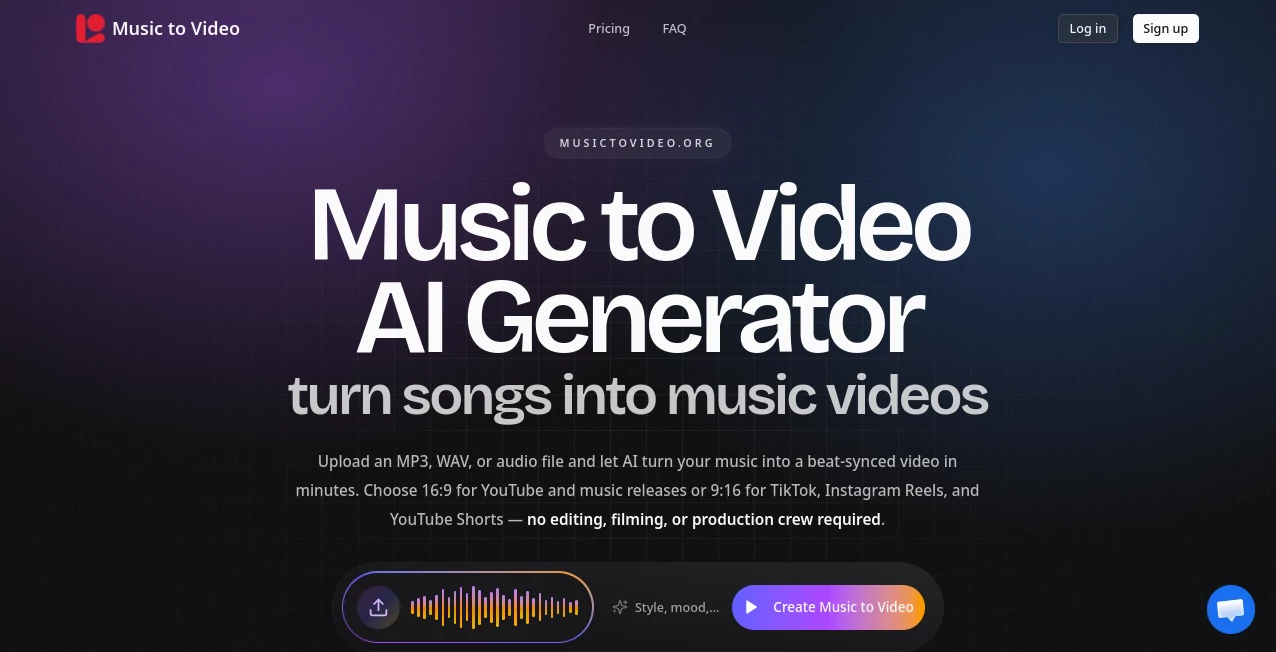
Creating a professional music video no longer requires a production crew, expensive equipment, or weeks of editing. This platform transforms audio tracks into visually engaging videos by analyzing the rhythm, mood, and structure of each song before generating scenes that naturally match the music. The result feels intentional rather than random, giving artists and creators a faster way to publish polished visual content.
Whether the goal is promoting a new single, creating vertical clips for social media, or producing a cinematic release for YouTube, the workflow remains simple. Upload an audio file, select the preferred aspect ratio, describe the visual style if desired, and let the AI handle the rest. The platform is especially appealing for independent musicians who want to release more content without dramatically increasing production costs.
Key Features
- Creates beat-synced AI music videos from uploaded audio.
- Supports MP3, WAV, and M4A audio files.
- Generates both 16:9 widescreen and 9:16 vertical videos.
- Analyzes tempo, mood, and song structure automatically.
- Allows optional visual style descriptions.
- Preview scenes before the final render.
- Edit individual scenes without recreating the entire project.
- Produces watermark-free video exports.
- Commercial usage available with eligible plans.
- Works with original recordings, instrumentals, and AI-generated music.
User Interface
The interface is refreshingly straightforward. Every important step is presented in a logical sequence, making it accessible even for creators who have never edited a video before. Uploading music, choosing an aspect ratio, selecting a creative direction, and reviewing generated scenes all happen inside a clean workflow that minimizes unnecessary complexity.
Accuracy & Performance
Instead of simply attaching stock footage to a soundtrack, the platform analyzes musical elements such as tempo changes, chorus transitions, and emotional intensity. Scene changes are generated to follow the rhythm, producing videos that feel synchronized with the audio. Rendering is completed within minutes for most projects, making it practical for frequent releases and promotional campaigns.
Capabilities
Beyond traditional music videos, the platform can produce lyric-style videos, animated visualizers, social media clips, performance-inspired visuals, album artwork animations, and character-driven scenes. Both horizontal and vertical formats are supported from the beginning, eliminating the need to manually crop videos for different platforms later.
Security & Privacy
Users upload their own audio files and maintain creative control throughout the generation process. Scene previews allow adjustments before spending credits on the final render, helping creators avoid unnecessary costs. Commercial usage is supported on paid plans, although users remain responsible for owning or licensing the audio they upload.
Use Cases
- Independent musicians releasing new singles.
- Bands creating affordable music videos.
- Content creators producing short-form promotional videos.
- Artists publishing lyric videos.
- Record labels testing visual concepts before filming.
- Social media marketers creating TikTok, Reels, and Shorts content.
- Creators converting AI-generated songs into shareable videos.
Pros and Cons
Pros
- Very simple workflow.
- Beat-aware visual synchronization.
- Supports multiple audio formats.
- Vertical and widescreen output.
- Scene previews before final rendering.
- No watermark on generated videos.
- Suitable for creators with little editing experience.
Cons
- Longer videos require more credits.
- Creative quality depends on the uploaded prompts and music.
- Commercial publishing requires proper ownership of uploaded audio.
Pricing Plans
The service offers free starter credits so new users can test the workflow before subscribing. Paid plans include Starter, Creator, and Studio tiers with increasing monthly credit allowances for longer videos and higher production volumes. A one-time credit pack is also available for occasional projects without committing to a subscription.
How to Use Music to Video AI Generator
- Upload an MP3, WAV, or M4A audio file.
- Select either 16:9 widescreen or 9:16 vertical format.
- Optionally describe the desired visual style.
- Allow the AI to analyze the music and generate synchronized scenes.
- Preview individual scenes and adjust them if necessary.
- Render the final MP4 video and download it.
Comparison with Similar Tools
Many AI video generators focus primarily on text prompts and often treat music as an afterthought. This platform takes the opposite approach by building every visual around the uploaded audio itself. Its beat-aware generation, scene preview system, flexible aspect ratios, and support for music-specific workflows make it particularly attractive for musicians, labels, and creators who regularly publish music-related content rather than general-purpose videos.
Conclusion
For musicians and creators looking to publish more visual content without investing in expensive production, this solution offers an impressive balance of speed, quality, and creative flexibility. The combination of automatic music analysis, synchronized visuals, editable scene previews, and support for multiple publishing formats makes it an excellent choice for modern music promotion. Whether producing a full release video or short social clips, the platform significantly reduces the time between finishing a song and sharing it with an audience.
Frequently Asked Questions (FAQ)
Can I upload my own music?
Yes. You can upload MP3, WAV, or M4A audio files that you own or have permission to use.
Does the AI synchronize visuals with the beat?
Yes. The system analyzes tempo, rhythm, mood, and song sections to create beat-aware scene transitions.
Can I create videos for TikTok and Instagram Reels?
Yes. Vertical 9:16 output is supported alongside standard 16:9 widescreen videos.
Can I preview my project before rendering?
Yes. Individual scenes can be reviewed and adjusted before generating the final video.
Is there a free version?
Yes. New users receive free credits to test the platform before choosing a paid subscription.
AI Image to Video , AI Music Video Generator , AI Video Generator , AI Text to Music .
These classifications represent its core capabilities and areas of application. For related tools, explore the linked categories above.

Music to Video Alternatives Product

Happy Horse:…

Seedance 2 V…

TyTyAi

Image2
GenVideo AI

Happy Horse …

Seedance 2.0…

happyhorse ai

Seedance 2.0…