
















What is OG Online Ruler?
OG Online Ruler turns your computer, tablet, or phone screen into a practical measuring tool. It is designed for those moments when you need a quick physical measurement but do not have a ruler nearby. Instead of relying on an approximate browser scale, the tool lets you calibrate the display and place an object against a ruler shown at its actual size.
The experience is refreshingly straightforward. Choose a measurement unit, calibrate the screen, select the edge of the display you want to use, and start measuring. It supports centimeters, millimeters, inches, and pixels, making it useful for everyday objects as well as digital design work.
Key Features
- Actual-size on-screen ruler for physical measurements
- Centimeter, millimeter, inch, and pixel measurement modes
- Four screen calibration methods
- Rulers available on the top, bottom, left, or right edge
- Movable measurement guides
- Live X/Y coordinates with a crosshair
- Two-point Measure Box for checking width and height
- Fullscreen mode for maximizing the available measuring area
- Keyboard shortcuts for faster operation
- No account, installation, camera permission, or file upload required
User Interface
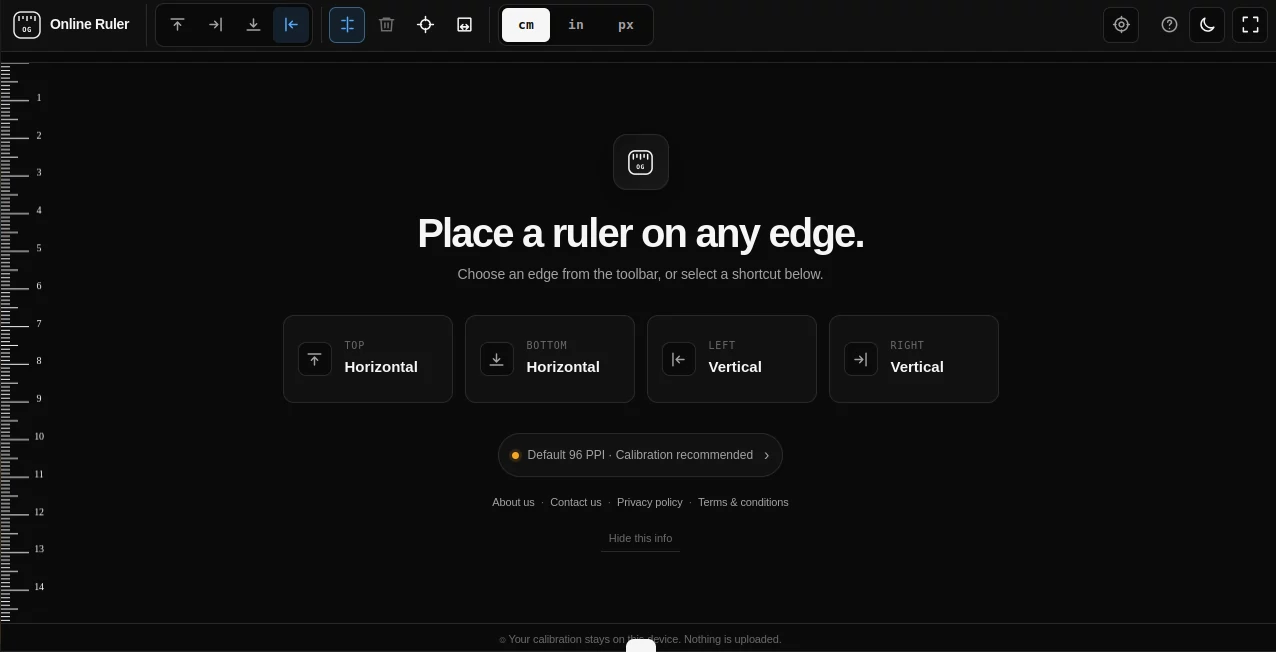
The interface keeps the important controls close at hand without making the screen feel crowded. A toolbar provides quick access to ruler placement, guides, crosshair controls, measurement options, calibration, fullscreen mode, and theme settings.
Users can place the ruler along any of the four screen edges. This is particularly handy when checking both horizontal and vertical dimensions. The guides can also be pinned, moved, adjusted with the keyboard, or removed when they are no longer needed.
Accuracy & Performance
Screen-based measurement has one obvious challenge: a browser pixel is not automatically the same as a physical millimeter. The tool addresses this by providing several calibration methods instead of simply assuming a standard display size.
You can use automatic detection, select a known device, enter the screen's diagonal size, or calibrate against a standard bank card. The bank-card method is especially practical because the reference dimensions are standardized at 85.60 × 53.98 mm.
For better results, the recommended setup is simple: keep browser zoom at 100 percent, maximize the browser window, and recalibrate if you move the browser to another monitor. These small steps can make a noticeable difference when physical accuracy matters.
Capabilities
This is more than a static ruler displayed in a browser window. Users can switch between centimeters, inches, and pixels, use millimeter markings in centimeter mode, activate multiple ruler edges, and position guides wherever they are needed.
The crosshair provides live X/Y coordinates, while the Measure Box allows two points to be compared and displays their dimensions. Keyboard shortcuts make repeated measurements quicker, including dedicated keys for units, guides, crosshair, fullscreen mode, and theme switching.
Security & Privacy
Privacy is one of the more reassuring aspects of the tool. It works directly in the browser and does not require an account, download, or image upload. Calibration information stays on the user's device rather than being uploaded to a remote service.
The tool also does not need camera access. That makes it different from camera-based measurement applications that analyze an image or use augmented reality to estimate dimensions.
Use Cases
An online ruler is useful whenever a physical measuring tool is temporarily out of reach. Someone checking the size of a button, coin, screw, cable connector, piece of jewelry, craft component, or small package can place the item against the calibrated screen and read the measurement.
It can also be useful for designers and developers who need pixel measurements. Students can use it to understand the relationship between metric and imperial units, while makers and hobbyists can use two active ruler edges to estimate both the width and height of an object.
For example, imagine finding a small component on your desk and needing to know whether it is approximately 20 mm wide. Instead of searching for a ruler, you can calibrate the screen, switch to centimeters, place the component against the scale, and check its endpoint.
Pros and Cons
Pros:
- Free to use
- Works directly in a web browser
- Supports multiple measurement units
- Several calibration options improve physical measurement reliability
- Works on computers, tablets, and smartphones
- No account or installation required
- Does not require camera access
- Calibration data remains on the device
- Useful tools such as guides, crosshair, and Measure Box are included
Cons:
- The size of the object that can be measured is limited by the physical dimensions of the screen
- Accurate physical measurements depend on proper calibration
- A phone cannot display a full 12-inch physical ruler across its narrow screen
- It is better suited to small objects than large measurements
Pricing Plans
The tool is available free of charge. There is no account requirement or installation process, so users can open the web-based ruler and begin measuring without committing to a subscription.
This free approach makes it especially convenient for occasional measurements. If you only need a ruler once in a while, there is little reason to install another application or purchase a dedicated digital measuring solution.
How to Use OG Online Ruler
Start by opening the ruler in your browser and calibrating the display. You can choose automatic detection, select a known device, enter your screen's diagonal measurement, or use a standard bank card as a physical reference.
Next, choose the required measurement unit. Centimeters provide smaller millimeter divisions, while inches are useful for imperial measurements and pixels are convenient for digital work.
Select the screen edge closest to the object. Place one end of the object at the zero point and check where the other end meets the scale. For more detailed measurements, activate a guide, crosshair, or the two-point Measure Box.
For the best physical results, keep browser zoom at 100 percent and recalibrate whenever you move the browser to a different display.
Comparison with Similar Tools
Many browser rulers simply display a fixed-looking scale and leave the user to guess whether it represents true physical dimensions. This approach can be unreliable because displays vary considerably in physical size and pixel density.
This tool takes a more practical approach by making calibration a central part of the experience. Users can identify their device, enter a screen diagonal, or use a standard bank card to establish a physical reference. The combination of calibration, multiple ruler edges, guides, coordinates, and two-point measurements also makes it more versatile than a basic on-screen ruler.
It is not intended to replace professional measuring equipment. For precision engineering, manufacturing, or situations where very tight tolerances are required, a physical precision instrument remains the appropriate choice. For quick everyday measurements, however, the browser-based approach is remarkably convenient.
Conclusion
A good online tool does not always need to be complicated, and this ruler is a strong example. It solves a very specific problem: measuring something when a physical ruler is not available. The addition of practical calibration methods makes the experience considerably more useful than simply drawing a scale across a webpage.
Whether you are checking a small object, comparing dimensions, working with pixels, or simply need a ruler for a quick task, this browser-based solution provides a clean and accessible way to get the job done. The fact that it is free, private, and usable without an account makes it even easier to keep handy.
Frequently Asked Questions (FAQ)
Can I use my phone as a ruler?
Yes. A phone can be used for measuring small objects that fit within the physical dimensions of its screen. Calibrate the display first, select centimeters or inches, and align the object with the ruler edge.
What measurement units are supported?
The ruler supports centimeters, millimeters, inches, and pixels. In centimeter mode, smaller divisions provide millimeter measurements.
How do I calibrate the ruler?
You can calibrate the display through automatic detection, a known device profile, the screen's diagonal size, or a standard bank card. The card method provides a physical reference with standardized dimensions.
Can I measure objects with my camera?
No camera is required. The tool measures objects by displaying a calibrated physical scale directly on the screen rather than analyzing camera images.
Does calibration data leave my device?
No. The calibration information is stored on the device in the browser and is not uploaded.
Can I use the ruler in fullscreen mode?
Yes. Fullscreen mode provides more available screen space, which can be useful when you want to display a longer section of the physical ruler.
Can I measure in pixels?
Yes. Pixel mode is useful for designers, developers, and anyone who needs to compare dimensions directly with digital screen elements.
How accurate is an online ruler?
Accuracy depends heavily on display calibration and careful alignment. For everyday measurements, calibrating the screen correctly can make the on-screen scale substantially more reliable than using an uncalibrated browser ruler. Professional precision work should still use appropriate physical measuring equipment.