


















oioioi.ai
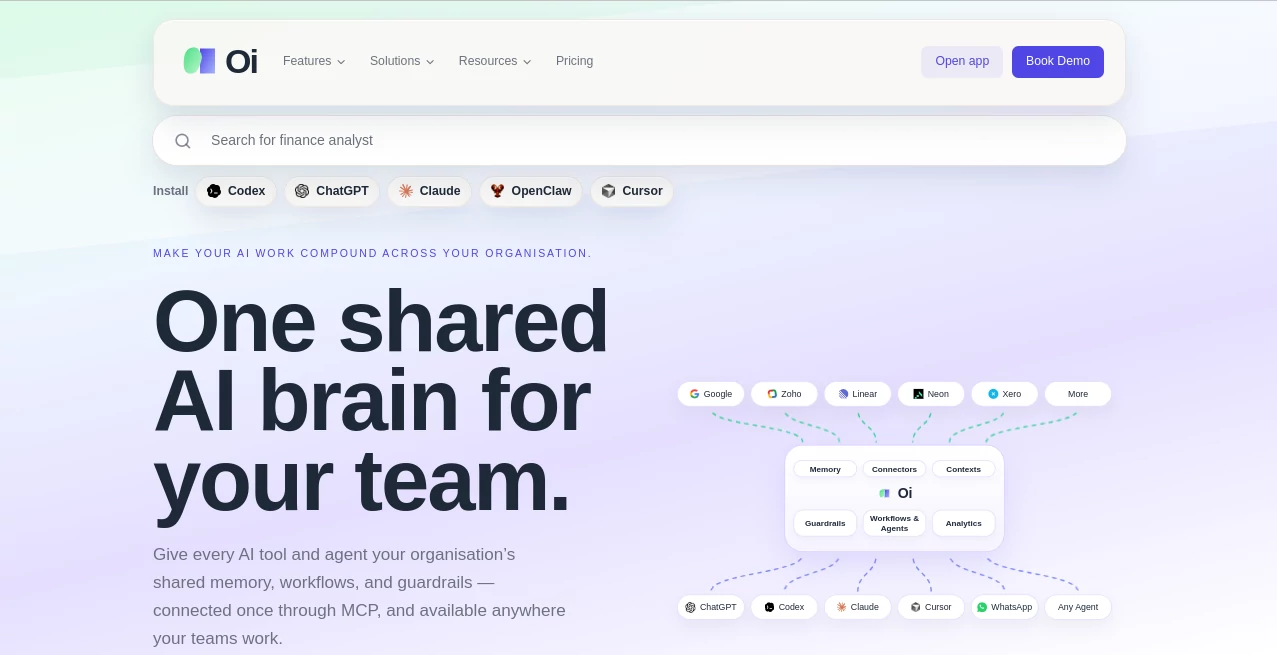
What is oioioi.ai?
Let’s be honest—working with AI tools can feel like a chaotic game of telephone. You tell one assistant your preferences, set up workflows in another, and by the time you switch to a third, everything is lost. It’s like starting from zero every single time. That’s the problem this platform solves. It’s a single, shared brain for your entire organization. Instead of each AI tool operating in its own silo, they all tap into the same memory, follow the same guardrails, and use the same connected workflows. A colleague of mine, who runs a busy marketing team, told me they wasted hours every week re-prompting tools and fixing inconsistencies. After setting this up, he said it felt like his team finally had a unified commander, not a bunch of scattered interns .
Key Features
This isn't just about saving a few settings. It’s about creating a persistent, intelligent foundation for all your AI interactions. The system understands what matters, remembers what’s important, and makes sure every agent is on the same page.
User Interface
You won't find a clunky dashboard full of confusing menus here. The core of the experience is designed to be as invisible as it is powerful. It works through a simple connection—the Model Context Protocol (MCP) . Once you configure it, your team interacts with their favorite tools like ChatGPT, Claude, or Cursor as they normally would. The "brain" works silently in the background, capturing corrections and preferences without any extra clicks. The review interface is clean and straightforward, allowing you to approve or reject suggested memories without getting lost in technical jargon .
Accuracy & Performance
What makes this system intelligent is how it filters information. It doesn't store everything equally. The platform categorizes memories into levels: the important "always" rules are protected and never forgotten, while casual observations are summarized to save context space . This means your AI agents are always working with the most relevant, high-quality information. It also boasts impressive startup speed, consuming around 100 tokens . It feels like your agent remembers you instantly, rather than having to read a long, cumbersome document every time you start a new session.
Capabilities
The system is built on a sophisticated cognitive model. It doesn't just remember facts; it understands context. It can capture your opinions, detect recurring habits, and even build a web of trust for advice from different sources . For example, if you consistently prefer a certain coding style, or if a colleague recommends a tool that works well, the brain learns and applies that knowledge. It also features an auto-learning system that captures corrections without needing you to say "remember that," and it presents softer signals in a review queue for you to curate .
Security & Privacy
Privacy is a huge concern when giving an AI access to your organization's knowledge. This platform addresses this by making your "brain" portable and inspectable. The core memory is stored in a simple, plain-text MEMORY.md file. This means you can look at everything the system has learned, edit it, and even manage it like code in your version control. There’s no black box where your data disappears. This level of transparency gives you and your team full control over your shared knowledge base.
Use Cases
The applications are vast, but the primary use is creating a frictionless AI experience for teams. A software development team can ensure that their AI pair programmers always follow the same coding conventions and use the correct internal libraries. A marketing department can maintain a consistent brand voice across all AI-generated copy, no matter which tool they use. It’s also invaluable for anyone who relies on multiple AI agents. Instead of switching contexts and repeating instructions, you get a seamless, unified experience where every tool is equally "clued in."
Pros and Cons
Pros:
- Provides a unified memory that travels with you across different tools like Cursor, Claude, and ChatGPT.
- Smart memory filtering saves context space and improves performance.
- Complete transparency with a plain-text memory file that you can inspect and edit.
- Captures preferences and corrections without needing you to use specific commands.
Cons:
- Setting up the MCP connection might require some initial technical configuration.
- It requires a shift in how you think about AI—as a persistent entity rather than a disposable assistant.
Pricing Plans
Specific pricing details are not immediately public, but the model is designed to be accessible. They offer an API connection which is typical for team-based tools . You can start by exploring the open-source foundation, which provides a way to get set up with the core MCP server .
How to Use Oioioi.ai
Getting started is surprisingly straightforward. First, you need to set up the MCP server, which acts as the bridge between the "brain" and your tools. For users of Cursor or Windsurf, you simply point the MCP client to the provided server URL . After authentication, the platform creates a MEMORY.md file in your project root. From there, just start working. The system will begin capturing your rules and preferences. You can review what’s being learned in the candidate queue and approve what you want to keep .
Comparison with Similar Tools
Most other memory solutions treat memory like a bag of strings or a simple vector store where everything is dumped and retrieved equally . This platform is different because it classifies information by importance. While other systems might have a startup cost of 2,000 tokens, this one is optimized to use around 100 tokens for its initial summary . This makes it incredibly efficient. It also doesn't just retrieve facts; it benchmarks decision accuracy, ensuring that the agent actually thinks like you, rather than just repeating what you've said .
Conclusion
If you’re tired of your AI tools feeling like they have amnesia, this platform is the solution you’ve been waiting for. It transforms the chaotic experience of using multiple assistants into a coherent, organized system. By providing a shared, persistent, and transparent memory, it ensures that your team's time is spent on creative work, not on re-teaching AI. It’s a fundamental upgrade to how we interact with technology, making the experience feel truly collaborative and intelligent.
Frequently Asked Questions (FAQ)
What is the "Memory Candidates" feature?
It’s a review queue that captures soft signals like corrections or implicit preferences. The system won't automatically add them to your "brain" without your approval, so you maintain control over what is remembered .
Does it work with any AI tool?
Yes, it works with any tool that supports the MCP (Model Context Protocol). This includes popular applications like Claude, Cursor, and ChatGPT .
What does "L3 Directive" mean?
These are your most important "always" and "never" rules. The system protects them at all costs, ensuring they are never compressed, summarized, or forgotten .
Is my memory file private?
Yes. The memory is stored as a portable, plain-text file on your end. You have full control over it, and you can inspect or edit it as you see fit .
AI Workflow Management , AI Knowledge Management , AI Team Collaboration , AI Developer Tools .
These classifications represent its core capabilities and areas of application. For related tools, explore the linked categories above.

oioioi.ai Alternatives Product

Skygen AI

Mage Flow AI…

AutoChangelog

Verne

Skillselion

Syncity AI

ClearWork

Agent Grid

Project Mela
