
OpenMusicPrompt
What is OpenMusicPrompt?
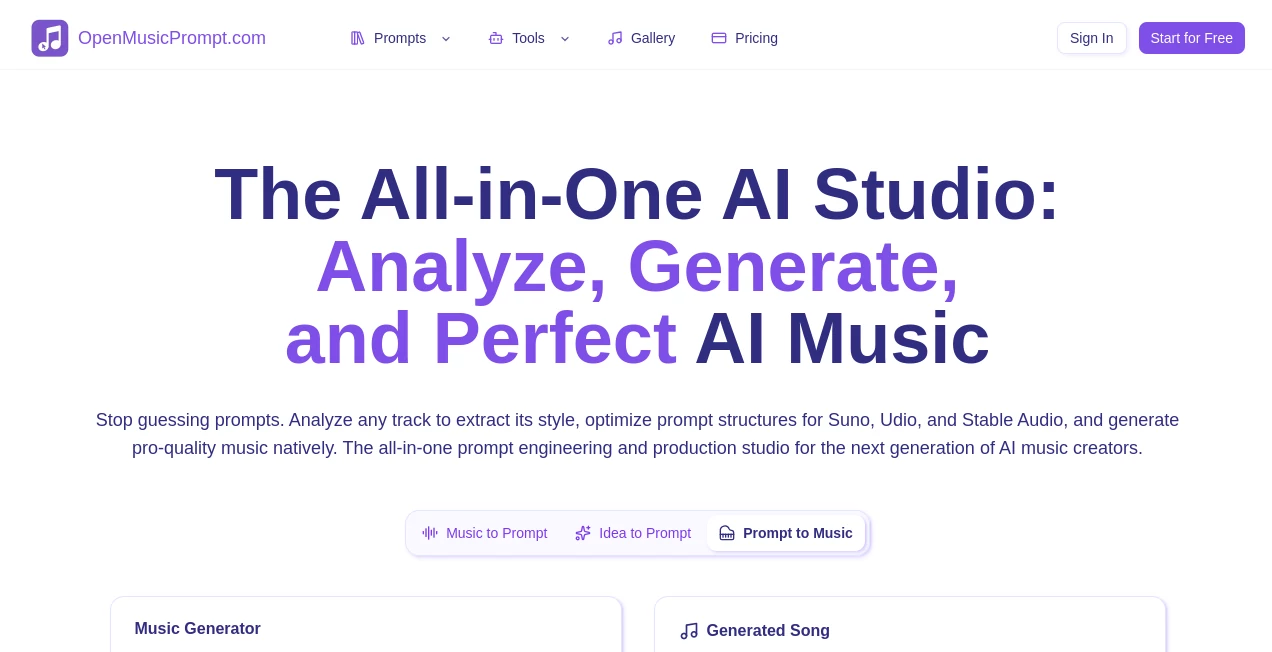
OpenMusicPrompt is an all-in-one AI music studio built for creators who want more control over the process of turning ideas into finished music. Instead of focusing on a single step, the platform brings together music generation, prompt creation, audio analysis, AI covers, lyrics, and prompt refinement in one place.
The workflow is particularly useful for people working with AI music generators such as Suno, Udio, and Stable Audio. A rough idea can be expanded into a structured music prompt, while an existing track can be analyzed to identify elements such as genre, mood, tempo, instrumentation, and rhythmic characteristics. This makes the creative process feel less like guessing and more like experimenting with a clear direction.
For someone who has ever typed a vague music description into an AI generator and received something completely different from what they imagined, this approach can make a noticeable difference. You can start simple, refine the details, and keep adjusting the result until the concept is closer to what you actually want.
Key Features
- AI music prompt generation from simple song ideas
- Music-to-prompt analysis for MP3, WAV, and M4A files
- Support for Suno, Udio, and Stable Audio workflows
- AI music generation with different creation modes and models
- AI lyrics generation and lyrics-to-song workflows
- AI song covers and music transformation tools
- Music description and audio analysis capabilities
- Prompt refinement and editing for iterative creation
- Curated music prompts and genre-specific inspiration
- Multilingual input and output support for prompt workflows
User Interface
The interface is designed around a straightforward creation workflow. Depending on the tool being used, creators can enter a song idea, upload an audio reference, select a target model, choose an output language, and generate a result without navigating through a complicated production environment.
The prompt generator is especially approachable. A user can describe a song in ordinary language, optionally choose a target platform such as Suno, Udio, or Stable Audio, and then generate a more structured prompt. Generated prompts can also be moved back into the editing workflow, which is handy when the first version is close but not quite right.
Accuracy & Performance
One of the stronger aspects of the platform is its focus on model-aware prompting. Rather than treating every AI music generator as though it understands instructions in exactly the same way, the tools are designed around the requirements of different music-generation platforms and versions.
The music analysis workflow can examine an uploaded track for characteristics including genre, mood, tempo, instrumentation, rhythm, and structure. The resulting information can then be turned into an AI-ready description. This is useful when a creator knows what kind of sound they want but struggles to describe it precisely in words.
Performance also benefits from an iterative workflow. Instead of expecting one prompt to produce the perfect result, users can generate, review, edit, and regenerate. That small change in approach can save considerable time when experimenting with different arrangements, vocals, energy levels, or production styles.
Capabilities
The platform goes beyond a basic text-to-music prompt generator. Its broader toolkit covers several parts of the AI music workflow, including music generation, lyrics, covers, audio analysis, prompt creation, and creative refinement.
The music generation workflow offers Simple Mode for a faster starting point and Custom Mode for users who want more control. Custom creation can include lyrics, vocal choices, genres, moods, instruments, and other musical parameters. The system also provides a large selection of style and production tags for more detailed control.
For creators working from existing material, the Music to Prompt feature can analyze an audio reference and turn its musical characteristics into a structured prompt. There is also a dedicated music describer for examining tracks and producing detailed descriptions, while the prompt library provides ready-made inspiration across different genres and styles.
Security & Privacy
Privacy is an important part of the service's positioning. The AI music prompt generator states that it follows a zero-data-retention approach for prompts and generated results, meaning creative inputs and outputs are not intended to be stored on its servers. The music analysis workflow also states that uploaded audio is processed in real time and deleted after analysis rather than being retained for AI training or shared with third parties.
This is particularly relevant for musicians, producers, and clients working with unreleased ideas. Even so, users should always review the current privacy policy and terms before uploading confidential commercial material or sensitive recordings.
Use Cases
AI Music Creation: Musicians can start with a basic idea such as a genre, mood, instrumentation, or story and turn it into a detailed prompt suitable for an AI music generator.
Prompt Engineering: Creators who regularly use Suno, Udio, or Stable Audio can use structured prompts and model-aware workflows to reduce trial and error.
Reference Track Analysis: Producers can upload an existing track to investigate its musical characteristics and use the resulting description as inspiration for a new creative direction.
Background Music: Content creators can develop instrumental ideas for videos, podcasts, presentations, games, and other projects where an original musical atmosphere is needed.
Songwriting: Writers can work from an idea, generate lyrics, explore musical styles, and move toward a complete song without switching between several unrelated tools.
Music Experimentation: Beginners can experiment with genres, moods, voices, instruments, and production descriptions without needing extensive knowledge of traditional music production software.
Professional Prototyping: Producers can use AI-generated concepts as early sketches before deciding which ideas deserve further development, arrangement, recording, or production.
Pros and Cons
Pros
- Broad collection of AI music creation and analysis tools
- Useful support for Suno, Udio, and Stable Audio workflows
- Music-to-prompt analysis can turn audio references into useful descriptions
- Prompt editing encourages an iterative creative process
- New users receive free credits to test the platform
- One-time credit packages are available instead of mandatory recurring subscriptions
- Paid credit packages include commercial usage rights for generated audio and lyrics according to the site's pricing information
Cons
- The large number of tools may take some time for new users to explore
- Free users have restrictions on models, downloads, history, and commercial use of generated audio and lyrics
- AI-generated music can still require several attempts before reaching the desired result
- Commercial creators should independently consider copyright and originality issues before publishing AI-generated work
Pricing Plans
The service uses a credit-based pricing model. New users receive 10 welcome credits, while the free tier also provides 5 free credits daily starting from the second day. The free plan does not include Hi-Fi and Ultra models, music downloads, history storage, or commercial rights for generated audio and lyrics.
The Starter package costs $19.99 as a one-time purchase and includes 200 credits. Standard costs $49.99 for 600 credits, Premium costs $99.99 for 2,500 credits, and Ultimate costs $299.99 for 10,000 credits. Purchased credits do not expire while the account remains active.
Paid packages add features such as higher processing priority, larger history or audio-cache capacity, access to higher-end models, and commercial usage rights for generated audio and lyrics. The Premium and Ultimate plans also add features intended for heavier or more professional workflows.
How to Use the Platform
Start by choosing the workflow that matches your goal. If you already have a musical idea, open the prompt-generation workflow and describe the concept in plain language. Mention useful details such as genre, mood, instruments, tempo, vocals, or the atmosphere you want.
Next, select the target music platform when the option is available. Choosing a specific model can help the generator adapt the prompt to the way that platform handles musical instructions.
Generate the prompt and review the result. If something feels too energetic, too slow, too electronic, too acoustic, or simply different from your original idea, move the result back into the editing workflow and adjust the description.
If you already have an audio reference, use the music-analysis tools instead. Upload a supported audio file, select the desired analysis or prompt mode, and let the system examine the track. You can then copy the resulting description or continue refining it for your next AI music experiment.
Comparison with Similar Tools
Many AI music services concentrate primarily on generating a song from text. This platform takes a wider approach by combining generation with prompt engineering and audio analysis. That makes it particularly interesting for users who want to understand why a musical idea works, reproduce certain characteristics in a new prompt, or move between different AI music platforms.
Another distinction is the emphasis on iterative prompting. Rather than treating the generated prompt as the final answer, the workflow encourages creators to edit and regenerate. This is useful for experienced users who already understand that small changes in instrumentation, arrangement, mood, vocal direction, or production language can significantly change an AI-generated track.
It is not necessarily a replacement for a traditional digital audio workstation, professional recording setup, or dedicated mastering environment. Its strength is earlier in the creative chain: developing ideas, analyzing references, generating music concepts, and working with AI-oriented prompts.
Conclusion
For anyone exploring AI music creation, the biggest advantage here is the breadth of the workflow. You can begin with a simple thought, turn it into a structured prompt, generate music, analyze references, create lyrics, experiment with covers, and refine ideas without constantly moving between unrelated services.
The platform is especially appealing to creators who use AI music generators regularly and want more control over the instructions they provide. Beginners can use the simpler workflows to get started, while experienced creators can dig into tags, models, analysis, and iterative refinement.
It will not remove the creative judgment required to make a genuinely good song, and AI output can still be unpredictable. But as a creative workspace for exploring musical ideas and improving the way those ideas are communicated to AI models, it offers a well-rounded set of tools worth exploring.
Frequently Asked Questions (FAQ)
What can the platform be used for?
It can be used for AI music generation, music prompt creation, audio analysis, AI lyrics, song covers, music descriptions, and prompt refinement. It is designed to support several stages of an AI-assisted music workflow.
Which AI music platforms are supported?
The prompt-generation tools support workflows for platforms including Suno, Udio, and Stable Audio. Dedicated tools are also available for specific platforms and model versions.
Can beginners use it?
Yes. The basic prompt workflow allows users to describe an idea in ordinary language. More advanced controls are available for creators who want to specify musical styles, tags, vocals, instruments, moods, and other details.
Is there a free version?
Yes. New users receive 10 welcome credits, and the free tier provides 5 additional free credits daily starting from the second day. Free usage has limitations compared with paid credit packages.
Does it offer a subscription?
The current pricing model is based on one-time credit purchases rather than recurring subscriptions. Available packages range from 200 credits to 10,000 credits.
Can generated music be used commercially?
According to the current pricing information, audio and lyrics generated with paid credit packages include commercial usage rights. Content generated under the free tier is limited to personal, non-commercial use. Users are still responsible for checking originality and applicable copyright requirements before commercial distribution.
Can I analyze an existing song?
Yes. The music analysis tools can accept supported audio formats such as MP3, WAV, and M4A and identify characteristics including genre, mood, tempo, instrumentation, and rhythmic patterns. The analysis can also be converted into an AI-ready prompt.
Are uploaded audio files stored?
The music analysis service states that uploaded audio is processed in real time and deleted after analysis. It also states that uploaded files and creative material are not used for AI training or shared with third parties.
Can I create instrumental music?
Yes. The music-generation workflow includes an instrumental option designed to focus the generation process on musical elements without vocals.
Does it support different languages?
Yes. The prompt-generation workflow supports multilingual input and lets users choose an output language. The service recommends English when maximum compatibility with supported AI music models is the priority.
AI Text to Music , AI Music Generator , AI Voice & Audio Editing .
These classifications represent its core capabilities and areas of application. For related tools, explore the linked categories above.
OpenMusicPrompt details
Website unavailable — View Alternatives
Pricing
- Freemium
Apps
- Web App
Categories

OpenMusicPrompt Alternatives Product

Soniq Chat

Solmi AI

Goose Pod

Lyrics to So…

Klyra AI

Sonicker

LORY

Lyria.run

MP3toMIDI