
OrcaRouter
What is OrcaRouter?
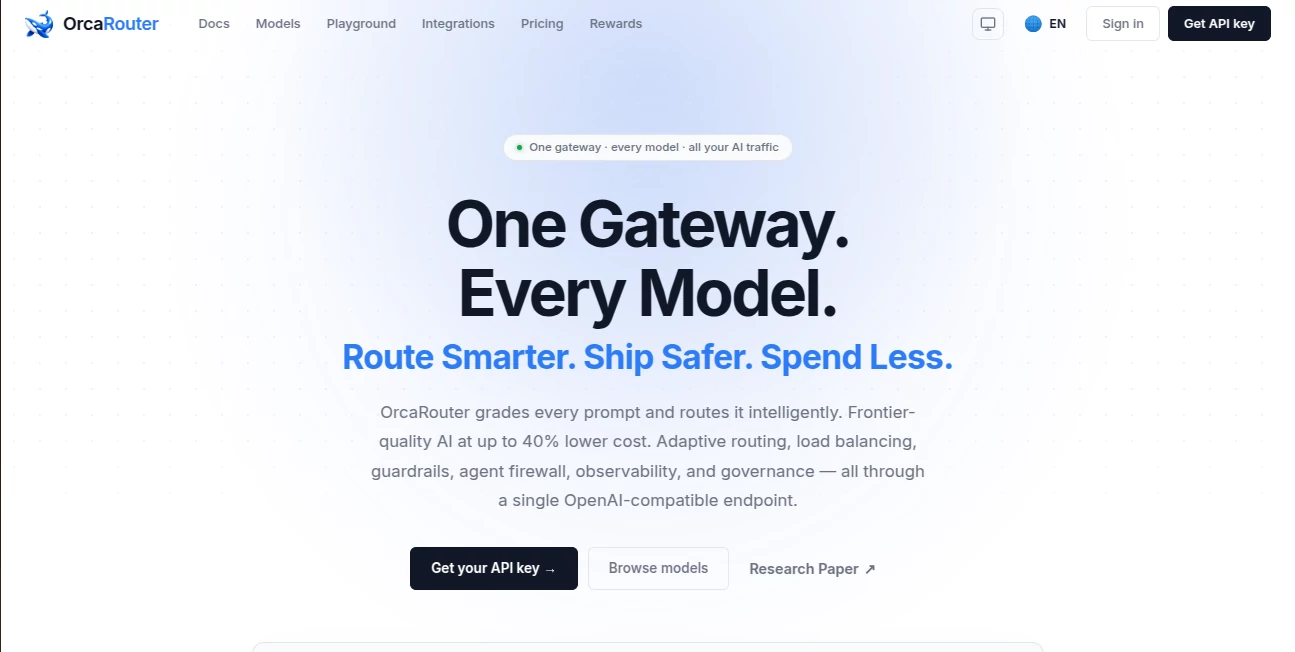
I’ve lost count of how many times I’ve switched between different AI models mid-project because one was too slow, another too expensive, or a third suddenly rate-limited. The constant juggling was exhausting. Then I started using this gateway and everything simplified. One single endpoint, one API key, and it intelligently picks the right model for every request — balancing quality, speed, and cost without me having to think about it. The first time I saw my token spend drop noticeably while response quality stayed excellent, I knew I wouldn’t go back to managing providers manually.
Introduction
Managing multiple AI providers has become its own full-time job. Different APIs, different pricing, different limitations — it all adds friction when you just want to build. This platform acts as a smart, unified gateway that sits in front of 200+ models from OpenAI, Anthropic, Google, Grok, DeepSeek, and many others. It grades each prompt in real time and routes it to the best available model, with automatic failover if something goes wrong. No markup on tokens, full observability, and it works with the SDKs and tools you already use. For developers and teams tired of vendor lock-in and unpredictable costs, it feels like finally having a reliable co-pilot for your AI infrastructure.
Key Features
User Interface
The dashboard is clean and practical. You get a clear overview of usage, costs, and routing decisions across all models. Setting it up is almost embarrassingly simple — change one base URL and API key in your existing code, and you’re done. Live logs show exactly which model handled each request and why. Everything feels built for people who ship code, not just browse dashboards. No unnecessary complexity, just the information and controls you actually need.
Accuracy & Performance
The routing intelligence is impressive. It doesn’t blindly pick the cheapest option — it evaluates prompt difficulty and sends complex reasoning tasks to frontier models while routing simpler ones to fast, cost-effective ones. Accuracy hovers around 75%+ on public benchmarks, and failover happens in under 50 milliseconds so users rarely notice when a provider hiccups. In real projects, this means more consistent performance and noticeably lower bills without sacrificing output quality.
Capabilities
It supports streaming, tool calls, vision, structured outputs — basically everything your OpenAI-compatible code already does. You get guardrails, prompt versioning, caching, budget controls, and an agent firewall for safer production use. Observability is excellent: every call is logged with cost, latency, and routing rationale. Teams especially love the centralized governance and the ability to set custom routing rules as they scale.
Security & Privacy
Your API keys and traffic stay protected with strong encryption and compliance standards (SOC 2, GDPR, etc.). You can bring your own keys (BYOK) so the platform never touches your provider billing directly. For companies handling sensitive data or running production agents, that level of control and transparency is a big deal.
Use Cases
A startup building an AI customer support agent routes expensive models only when truly needed, cutting costs by 30-40% while maintaining quality. An indie developer experiments with multiple LLMs without changing code or managing separate keys. A larger team runs internal tools with strict budgets and guardrails, getting detailed analytics on every interaction. Researchers test different models side-by-side on the same prompts without extra overhead. Wherever you’re using AI at scale or experimenting quickly, it removes friction and adds intelligence.
Pros and Cons
Pros:
- One endpoint for 200+ models with zero token markup.
- Smart, adaptive routing that actually saves money without hurting quality.
- Lightning-fast failover so your app stays reliable.
- Full observability and governance features for production use.
- Drop-in compatibility with tools you already love.
Cons:
- Advanced team governance features require higher plans.
- Learning the best routing strategies takes a little time (though defaults work great out of the box).
Pricing Plans
Routing itself is free — you only pay the underlying providers at their normal rates. The free tier is generous for individuals and small projects. Paid plans add team features, advanced analytics, custom rules, and priority support. Many teams find the platform pays for itself quickly through reduced token spend and engineering time saved on infrastructure management.
How to Use OrcaRouter
Sign up, grab your API key, and update your OpenAI client base URL to theirs. That’s literally it for most setups. Start sending requests with model="orcarouter/auto" and it begins intelligently routing immediately. Check the dashboard to see routing decisions, costs, and performance. Add guardrails or custom rules as your usage grows. The migration is so smooth that most people are up and running in under five minutes.
Comparison with Similar Tools
Other routers often add markup, have clunkier interfaces, or lack deep observability. This one stands out with zero token markup, strong accuracy on prompt routing, and genuinely useful governance tools. It feels built by developers for developers — practical, transparent, and focused on real production needs rather than hype.
Conclusion
Managing AI infrastructure shouldn’t be harder than building the actual product. This gateway makes it simpler, smarter, and more cost-effective. It gives you access to the best models without the usual headaches, while adding reliability and visibility that production apps actually need. For solo builders and growing teams alike, it’s one of those tools that quickly becomes invisible because it just works — and that’s the highest praise any infrastructure product can earn.
Frequently Asked Questions (FAQ)
Do I need to change my code?
Usually just one line — the base URL and API key. Everything else stays the same.
Is there really zero markup?
Yes. You pay providers directly at their published rates.
How fast is the routing decision?
Under 1ms in most cases, with failover under 50ms.
Does it work with LangChain, Cursor, etc.?
Yes — any OpenAI-compatible SDK or framework works seamlessly.
Can teams use it together?
Absolutely — paid plans include shared access, analytics, and governance features.
AI API Design , AI Developer Docs , AI Developer Tools .
These classifications represent its core capabilities and areas of application. For related tools, explore the linked categories above.

OrcaRouter Alternatives Product

Kimi K2.5

ABC Dynamic …
Latency Atlas

Nestify

Prava Ai

Empiriolabs …

cznull

ChatFlowchart
Skillselion