
OVR IT
What is OVR IT?
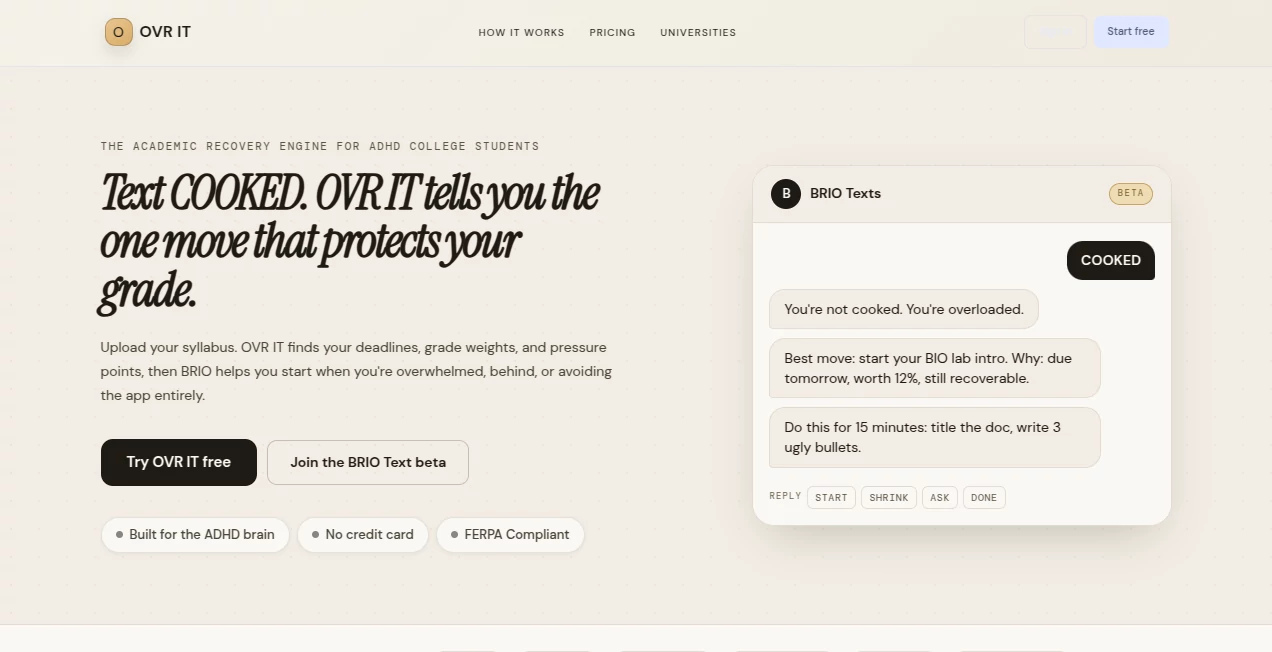
OVR IT is an AI-powered academic support platform designed to help college students overcome overwhelm, organize their semester, and take the next meaningful step forward. Built with ADHD students and executive-function challenges in mind, it focuses on reducing the pressure of large workloads by transforming complex academic situations into clear, manageable actions.
Instead of creating another endless task list, the platform helps students understand what matters most right now. By analyzing course information, deadlines, grade weights, and available study time, it provides a practical path forward when everything feels urgent at the same time.
The experience is designed around a simple idea: students often do not need more information — they need a clearer starting point. With tools for syllabus organization, assignment breakdown, recovery planning, and grade-aware prioritization, it offers a supportive approach to academic productivity.
Key Features
User Interface
The interface is built around simplicity and reduced cognitive load. Students can quickly upload their syllabus, review extracted information, choose how much time they currently have, and receive a focused next action.
Rather than overwhelming users with dozens of unfinished tasks, the platform highlights the most important move based on academic impact and current circumstances. This makes it especially useful during stressful periods such as midterms, final projects, or weeks where assignments have started to pile up.
Accuracy & Performance
The platform uses AI to analyze academic documents and extract important information such as assignment deadlines, exams, and grade percentages. Students can review extracted details before saving them, helping maintain control over their academic planning.
Its grade-aware prioritization system helps students understand which tasks deserve attention first. Instead of simply sorting tasks by date, it considers the relationship between deadlines and academic importance.
Capabilities
- Syllabus Scanner: Extracts deadlines, assignments, and grade weights from course documents.
- AI Task Breakdown: Converts large assignments into smaller, achievable starting steps.
- Grade-Based Prioritization: Helps identify tasks with the biggest impact on academic results.
- Recovery Planning: Creates a realistic path for students who have fallen behind.
- Smart Study Scheduling: Builds plans around available time and personal productivity patterns.
- Assignment Decoder: Helps turn confusing instructions into clear action steps.
- Grade Predictor: Allows students to understand how assignments may affect final results.
- Focus Support: Encourages progress through smaller, achievable work sessions.
Security & Privacy
Privacy and user control are important parts of the platform. Academic information remains under the student's control, and users can review information before it becomes part of their planning system.
The service is designed with education-focused privacy considerations, including protection of student information and responsible handling of uploaded academic materials.
Use Cases
OVR IT can support a wide range of students who struggle with planning, prioritization, or getting started on assignments. It is particularly useful for students who experience executive-function difficulties or feel overwhelmed by traditional productivity systems.
- Students managing multiple courses and deadlines.
- College learners who struggle with starting large assignments.
- Students recovering after missing deadlines or falling behind.
- Students who need a clearer understanding of academic priorities.
- Anyone looking for a simpler alternative to complicated productivity systems.
For example, a student facing five unfinished assignments may not know where to begin. Instead of presenting another overwhelming checklist, the system can help identify the most valuable first action and create momentum through smaller steps.
Pros and Cons
Pros
- Designed specifically around academic challenges and student workflows.
- Reduces overwhelm by focusing on one important next step.
- Combines AI planning with real academic context.
- Useful for students who struggle with traditional productivity methods.
- Includes tools for both prevention and recovery after falling behind.
Cons
- Focused mainly on academic productivity rather than general workplace project management.
- Students still need to verify course information and maintain engagement with their studies.
- Some advanced features require paid plans.
Pricing Plans
The platform offers a free option for students who want to start organizing their academic workflow without financial commitment. Paid plans provide access to additional capabilities and deeper planning features.
- Free Plan: Basic academic planning features and essential support tools.
- Pro Plan: Additional features such as expanded uploads and advanced academic tracking.
- Pro AI Plan: Enhanced AI-powered scheduling, forecasting, and productivity insights.
- Study Group Plan: Designed for collaborative academic groups.
How to Use OVR IT
Getting started is simple. Students can upload their course syllabus and allow the system to identify important academic details such as deadlines and grading information. After reviewing the extracted information, they can select their available study time and receive a practical next step.
- Upload your syllabus or academic information.
- Review extracted deadlines and grade details.
- Select your available time or current situation.
- Follow the recommended action plan.
- Continue updating progress as the semester develops.
Comparison with Similar Tools
Many productivity applications focus on creating lists, reminders, and schedules. While these tools can be useful, they often assume users already know how to prioritize and begin their work.
OVR IT takes a different approach by focusing on academic decision-making. It connects deadlines, grades, workload, and available time to help students decide what deserves attention first.
For students who feel stuck because everything appears equally important, this approach can provide a more focused and supportive experience than traditional task-management platforms.
Conclusion
OVR IT provides a thoughtful solution for students who need more than another checklist. By combining AI-powered academic organization with recovery-focused planning, it helps learners move from stress and uncertainty toward clear action.
Its student-first design makes it especially valuable for those who struggle with task initiation, prioritization, or maintaining momentum throughout a demanding semester. Instead of asking students to become perfect planners, it helps them make progress one realistic step at a time.
Frequently Asked Questions (FAQ)
What is OVR IT designed for?
It is designed to help college students manage academic responsibilities, prioritize important tasks, and recover when they fall behind.
Can it help students with ADHD?
Yes. The platform was created with ADHD students and executive-function challenges in mind, focusing on reducing overwhelm and improving task initiation.
How does the syllabus feature work?
Students upload their syllabus, and AI extracts important information such as deadlines, assignments, and grading details. Users can review the information before saving it.
Is there a free version available?
Yes. Students can begin with a free plan and upgrade if they need additional AI-powered features.
Can it replace a tutor or academic advisor?
No. It is designed as a planning and productivity support tool that helps students organize their workload and make better decisions about their study process.
AI Task Management , AI Education Assistant , AI Homework Helper , AI Productivity Tools .
These classifications represent its core capabilities and areas of application. For related tools, explore the linked categories above.

OVR IT Alternatives Product

Gizmo

aipen.ink

DocReplacer

vivgrid

Your Own AI

Skygen AI

Peanut AI

LongTerMemory

Agentys