
Panvoxx
What is Panvoxx?
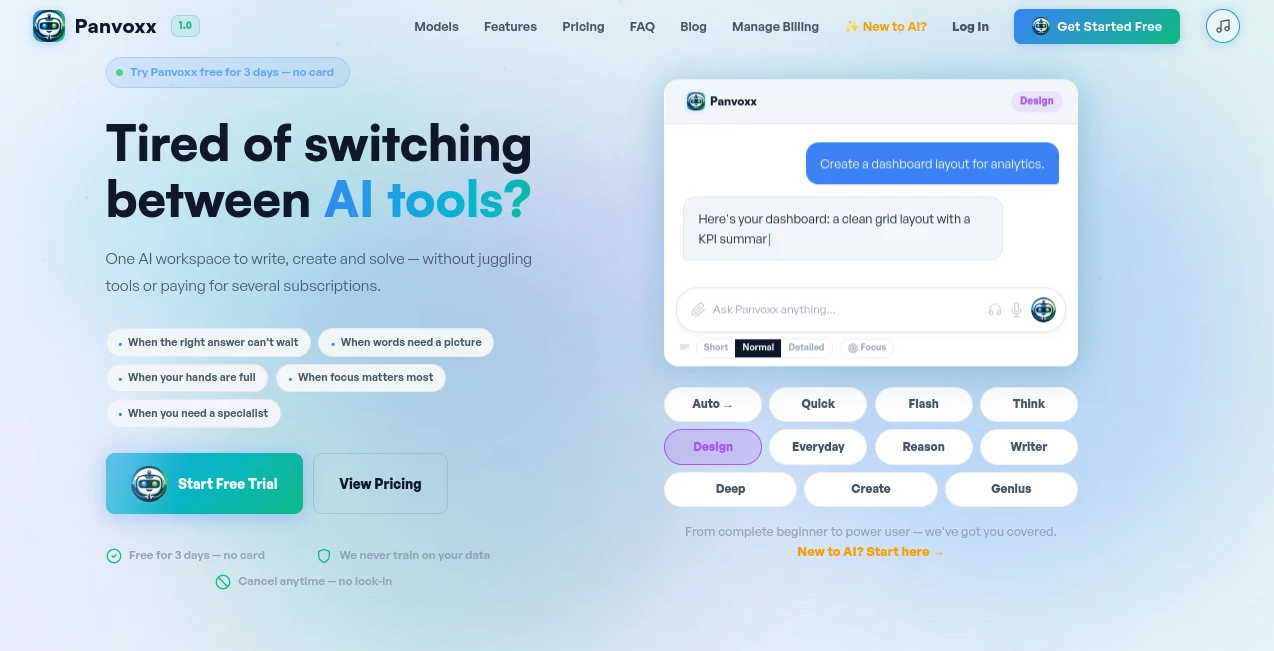
Panvoxx is an all-in-one AI workspace designed to bring multiple advanced AI capabilities together in a single, simple environment. Instead of managing several subscriptions and switching between different platforms, users can access a collection of specialized AI models for writing, research, coding, image creation, document analysis, and everyday problem-solving.
The platform is built for people who want practical AI assistance without complicated setups. Whether you are preparing a business report, improving an email, analyzing a document, generating creative ideas, or solving technical challenges, it provides a flexible workspace that adapts to different tasks.
With multiple AI models, automatic model selection, web search capabilities, file uploads, AI agents, and creative tools, the platform focuses on making advanced artificial intelligence accessible for beginners while still offering powerful features for experienced users.
Key Features
- Multiple AI Models in One Place: Access different models designed for speed, creativity, reasoning, coding, research, and image generation.
- Automatic Model Selection: The system can choose the most suitable AI model depending on the complexity and type of request.
- AI Image Creation and Editing: Generate images from text prompts and modify existing images using natural language instructions.
- Document Understanding: Upload files and receive summaries, explanations, insights, and structured information.
- Live Web Search: Get updated information with online search capabilities instead of relying only on stored knowledge.
- Specialized AI Agents: Use dedicated assistants for areas such as research, career preparation, finance, fitness, legal topics, and more.
- Conversation Memory: Keep personalized interactions by allowing the AI to remember preferences and previous discussions.
- Export Options: Convert generated content into useful document formats for sharing and professional use.
User Interface
The interface is designed with simplicity in mind. Users can start by describing their problem naturally instead of searching through complicated menus or learning technical commands.
The clean workspace makes it easy to switch between models, change response styles, upload files, create images, and manage conversations. This approach makes the experience comfortable for both first-time AI users and professionals who need fast access to advanced tools.
Accuracy & Performance
Performance is supported by different AI models specialized for specific tasks. Simple questions can be handled quickly, while deeper analysis, research tasks, coding challenges, and complex reasoning can be directed toward more powerful models.
The ability to select different models or allow automatic routing helps users receive responses that better match their needs. This makes the platform suitable for a wide range of workflows, from quick daily questions to detailed professional projects.
Capabilities
The platform covers a broad range of AI-powered activities. Users can write articles, create marketing materials, analyze information, generate images, review code, translate content, summarize long documents, and prepare professional materials.
Its specialized agents provide additional support for specific situations. For example, someone preparing for a job interview can use career assistance, while a business owner may benefit from research or marketing-focused help.
Security & Privacy
Privacy is an important part of the platform experience. The service uses encrypted connections and states that user conversations are not used for training AI models. Data protection practices are designed to give users more confidence when working with personal, business, or professional information.
Use Cases
- Content Creation: Writers, marketers, and creators can generate articles, social media content, emails, and creative ideas.
- Business Workflows: Companies can use AI assistance for reports, customer communication, research, and planning.
- Education: Students and teachers can simplify complex topics, summarize materials, and create learning resources.
- Programming: Developers can receive coding support, debugging suggestions, and technical explanations.
- Creative Projects: Designers and creators can generate concepts, images, and visual ideas.
- Personal Productivity: Individuals can organize tasks, plan projects, prepare documents, and solve everyday problems faster.
Pros and Cons
Pros
- Multiple AI models available under one subscription.
- Supports writing, coding, research, images, and document tasks.
- User-friendly interface suitable for beginners.
- Includes specialized AI agents for different industries.
- Offers web search and file analysis features.
- Reduces the need for multiple separate AI subscriptions.
Cons
- Advanced features require paid plans.
- Users who only need one specific AI function may not need the full platform.
- Heavy usage may require higher-tier plans.
Pricing Plans
The platform offers flexible plans based on different usage levels. New users can start with a free trial to explore available features before choosing a subscription.
- Free Trial: A short trial period with access to multiple AI models for testing.
- Lite Plan: Designed for casual users who need daily AI assistance.
- Plus Plan: Suitable for regular users who need access to more models and higher usage limits.
- Pro Plan: Built for professionals who rely on AI for daily work.
- Business Plan: Designed for teams and heavy AI usage.
- Enterprise Plan: Created for users requiring maximum capacity and larger usage limits.
How to Use Panvoxx
Getting started is straightforward. Users create an account, enter their request, and allow the AI workspace to recommend or provide the most suitable assistance.
For better results, users can provide detailed instructions, upload relevant files, select a preferred AI mode, or let automatic routing handle model selection. The platform can then help with writing, analysis, creative tasks, coding, and many other workflows.
Comparison with Similar Tools
Many AI platforms focus on a single area, such as writing assistants, image generators, or coding helpers. This platform takes a broader approach by combining multiple AI experiences into one workspace.
Instead of paying separately for different services, users can manage various AI tasks from one account. This makes it especially useful for people who regularly move between creative work, research, productivity tasks, and technical projects.
Conclusion
Panvoxx provides a practical way to work with modern AI without the frustration of managing multiple tools. Its combination of different AI models, specialized assistants, creative features, and productivity capabilities makes it a versatile solution for individuals, professionals, and businesses.
For users looking for a single AI environment that can handle writing, research, coding, images, and everyday challenges, this platform offers a convenient and flexible experience that can simplify the way people use artificial intelligence.
Frequently Asked Questions (FAQ)
What can this AI platform help with?
It can assist with writing, research, coding, image creation, document analysis, translations, planning, and many other daily tasks.
Is it suitable for beginners?
Yes. The simple interface allows beginners to use AI without technical knowledge while still providing advanced options for experienced users.
Can users upload documents?
Yes. Users can upload files and receive summaries, explanations, and useful insights from their documents.
Does it include image generation?
Yes. The platform includes AI-powered image creation and editing features based on text instructions.
Are different AI models available?
Yes. Users can access multiple models designed for different tasks, including fast responses, creative writing, reasoning, coding, and image-related workflows.
AI Photo & Image Generator , AI Productivity Tools , AI Chatbot , AI Writing Assistants .
These classifications represent its core capabilities and areas of application. For related tools, explore the linked categories above.

Panvoxx Alternatives Product

mainaro

Nano Banana …

Nifty

AI Bypass Hub

renderpop

Astrology Bot

NanoEditor

Translate a …

Audio Convert