PDF Translate
What is PDF Translate?
There's nothing more frustrating than translating a important PDF only to end up with broken formatting, misplaced text, or a document that looks nothing like the original. This tool changes that experience completely. You upload your PDF — whether it's a contract, research paper, user manual, or marketing brochure — choose your languages, and receive a clean, professionally translated version that actually looks right. The layout stays intact, tables don't break, images stay in place, and the text reads naturally. I’ve watched colleagues go from hours of painful copy-paste work to uploading once and getting usable results in minutes. It feels like finally having a translator who actually understands documents.
Introduction
Most online translators are great for short paragraphs but fall apart when faced with complex PDFs. This platform was built specifically for real-world documents. It preserves fonts, spacing, headers, footers, bullet points, and even complex tables while delivering translations that read like they were written by a native speaker. Whether you're a business professional dealing with international contracts, a student working with foreign research papers, or a company localizing product manuals, it removes the biggest headache in document translation. The best part? It doesn't require any technical skills — just upload and go.
Key Features
User Interface
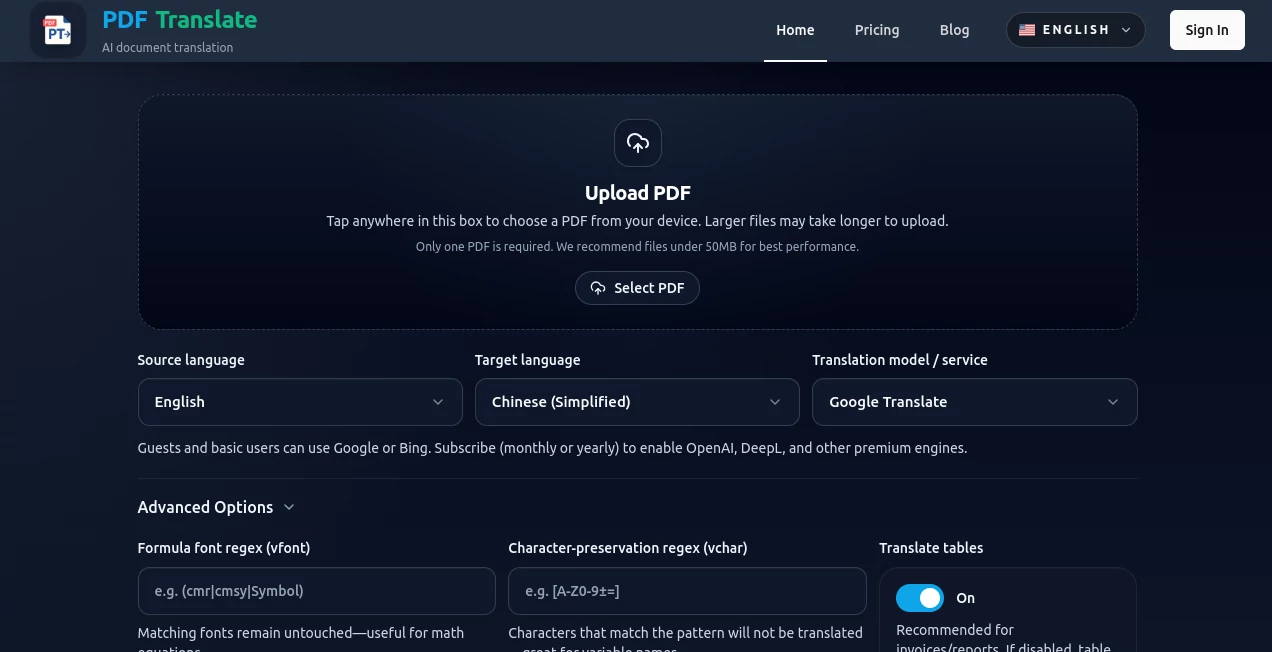
The interface is refreshingly straightforward. Drag and drop your PDF or click to upload, pick the source and target languages, and hit translate. A clean progress bar shows what's happening, and when it's done you get a side-by-side preview so you can check quality before downloading. No complicated menus, no hidden settings, no need to create an account just to test it. It respects your time.
Accuracy & Performance
The translations are noticeably better than generic tools because the system understands context across entire pages, not just sentence by sentence. Technical terms stay consistent, tone is preserved, and awkward literal translations are avoided. Processing speed is impressive even for larger files, and the output maintains the original document's visual integrity. Users regularly mention how surprised they are that headings, bullet points, and numbers survive the process intact.
Capabilities
It supports a wide range of languages, handles scanned PDFs through built-in OCR, preserves complex layouts including multi-column designs, and maintains hyperlinks and bookmarks where possible. You can translate entire documents or select specific pages. The results are downloadable as editable PDFs or Word files, making it practical for both final delivery and further editing. It's especially strong with legal, technical, and marketing documents where precision and appearance both matter.
Security & Privacy
Your documents are processed securely and deleted from the servers after translation. No unnecessary data retention, and no training on your private files. For anyone handling contracts, medical documents, or confidential business materials, this level of care provides real peace of mind.
Use Cases
A law firm translates client contracts for international deals without losing formatting or spending hours on manual fixes. An e-commerce company localizes product catalogs for new markets in record time. A university researcher turns foreign academic papers into readable English versions while keeping tables and citations intact. A small business owner translates user manuals for exported products, maintaining professional appearance across languages. The common theme is saving significant time while actually improving the final result.
Pros and Cons
Pros:
- Excellent layout preservation — one of the best I've seen.
- High translation quality that understands context and industry terms.
- Fast processing even for larger documents.
- Simple workflow that doesn't require technical knowledge.
- Strong privacy practices suitable for sensitive files.
Cons:
- Very artistic or heavily designed PDFs may need minor manual touch-ups.
- Free tier has reasonable but limited daily usage.
Pricing Plans
It offers a generous free tier that lets you test the quality on several documents per day. Paid plans provide higher volume, priority processing, and access to more advanced features. The pricing is straightforward and fair — many users find that the time saved on even a few important documents easily covers the cost of a monthly plan.
How to Use PDF Translation
Go to the homepage, drag your PDF into the upload area, select the original language and target language, then click translate. Once complete, review the preview, make any small adjustments if needed, and download your new document. For regular users, saving favorite language pairs speeds up future translations. The entire process is designed to feel effortless.
Comparison with Similar Tools
Generic online translators often destroy formatting and require heavy post-editing. Desktop software can preserve layout but usually costs a lot and has steep learning curves. This tool sits in the sweet spot: cloud-based convenience with professional-grade layout preservation and strong translation quality. It's particularly strong for users who need both accuracy and visual fidelity without complexity.
Conclusion
Good translation isn't just about converting words — it's about keeping meaning, tone, and appearance intact. This platform understands that. It turns what used to be a painful, time-consuming process into something simple and reliable. Whether you're working across borders, studying foreign materials, or expanding your business internationally, it gives you translated documents you can actually use and be proud of. In a world that moves fast, this is the kind of practical tool that makes a real difference.
Frequently Asked Questions (FAQ)
How accurate is the translation?
Very high for most common languages, especially when context is clear. Technical or legal content benefits from review but is significantly better than standard translators.
Does it work with scanned PDFs?
Yes, it includes OCR to handle scanned or image-based documents effectively.
Is my document kept private?
Yes — documents are processed securely and automatically deleted after translation.
What file formats can I download?
Translated PDF is the default, with options to export as Word in some cases.
Can I translate only specific pages?
Yes, you can select individual pages or ranges for translation.
AI Documents Assistant , AI PDF , AI Translate , AI Content Generator .
These classifications represent its core capabilities and areas of application. For related tools, explore the linked categories above.

PDF Translate Alternatives Product

kling 3

AI Entity

SEOAuthori

UPDF AI

ViraFlow

jpg to excel

Free Marketi…
livetalktran…

GPT Image 2