


















Plori
What is Plori?
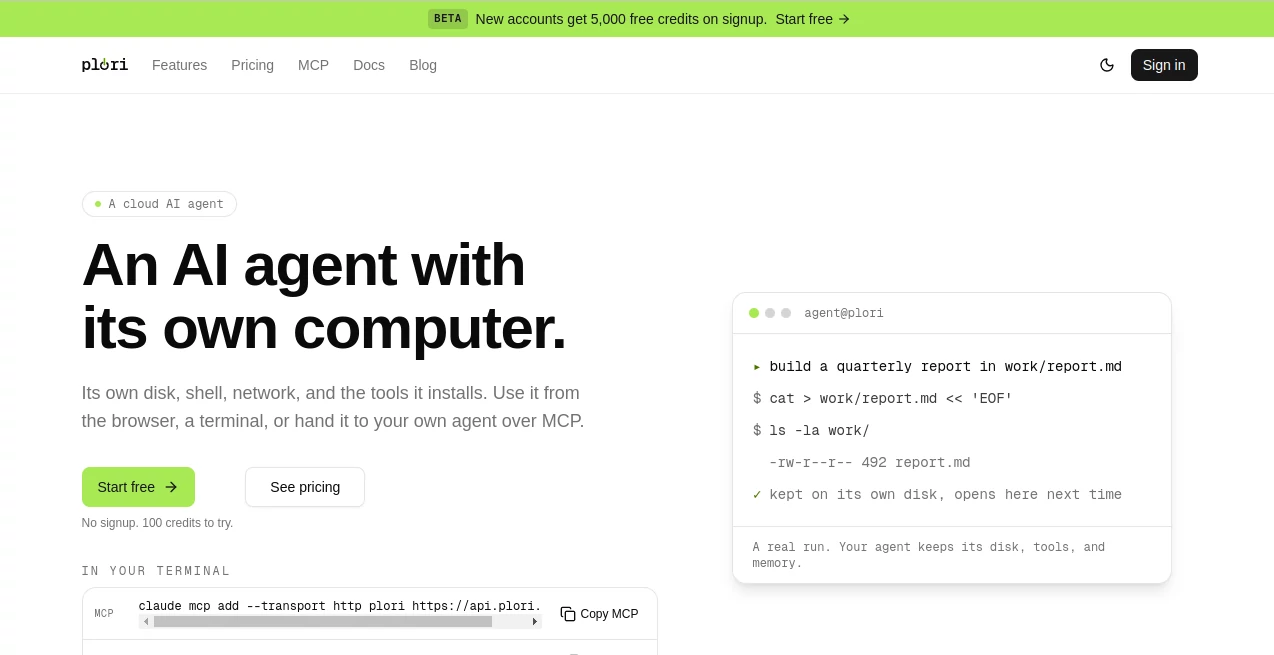
plori is a cloud-based AI agent designed to work from its own persistent computer rather than starting from a blank environment every time. It has its own disk, shell, installed tools, and long-term memory, allowing projects and files to remain available between sessions.
This approach makes it particularly interesting for developers, technical teams, and anyone who wants an AI agent that can do more than simply answer questions. An agent can work with files, run commands, use tools such as Python, Node, and Git, perform web research, and continue building on previous work.
One of the most useful ideas here is persistence. Instead of treating every conversation as an isolated task, the agent can keep the files and context it needs for ongoing projects. For example, someone working on a software project can ask the agent to create a report, modify files, research an issue, or build an automation and return to that work later.
Key Features
- Persistent cloud computer for every AI agent
- Persistent disk for storing project files
- Built-in shell, Python, Node, Git, and web search tools
- Long-term memory for projects and user preferences
- AI-built workflows for scheduled and webhook-based automation
- Background tasks for longer-running jobs
- Website publishing from an agent's disk
- Model Context Protocol support
- Multiple agents on paid plans
- Support for connecting a personal model provider key
- Interactive file and project management
- Credit-based usage with clear spending limits
User Interface
The interface is centered around interacting with an AI agent rather than managing a traditional cloud server. Users can start an agent directly in the browser, give it instructions, and let it work with its own environment.
The persistent workspace is especially convenient for ongoing projects. Files created during one session remain available later, while the agent can continue working with the same environment instead of rebuilding everything from scratch.
The service also provides dedicated areas for files, memory, workflows, and other agent capabilities. For developers who prefer working from the terminal, a command-line interface is available as well.
Accuracy & Performance
Performance depends on the model selected for a particular task, the complexity of the job, and the tools involved. The platform uses a routing approach that can select different models depending on what the task requires.
Simple questions and lightweight edits can consume only a few credits, while a typical development task or research job may use around 20 to 40 credits. Larger refactoring projects and deep research can require 100 or more credits.
A useful performance advantage is that idle agents can scale down to zero, stopping compute usage while their files and memory remain available. This makes the persistent environment practical for projects that are not running continuously.
Capabilities
The platform goes beyond basic chat-based assistance by giving agents access to an actual working environment. They can use a shell, run Python and Node applications, work with Git, search the web, install additional tools, and manipulate files.
It can also turn repeated instructions into standing workflows. These workflows can be triggered manually, on a schedule, or through webhooks. This opens the door to practical automations such as recurring research, scheduled reports, development routines, and other background processes.
Another notable capability is website publishing. A directory on an agent's disk can be served as a website under a dedicated subdomain, making it possible to turn files produced by an agent into a publicly accessible project.
For developers using external AI clients, Model Context Protocol support provides another route into the environment. The MCP connection can be used with compatible clients and development environments through a single account-scoped API key.
Security & Privacy
Each agent operates with its own computer and disk, separated from other agents. This isolated setup provides a dedicated working environment for files, tools, and project data.
Website publishing is private by default, which gives users control over when an agent's files should become publicly accessible.
The service also provides controls around credit consumption. When the credit balance reaches zero, the agent stops accepting new work rather than silently creating an unexpected bill. Additional disk storage is also hard-capped according to the amount purchased.
Use Cases
- Software Development: Developers can use a persistent environment for coding, debugging, Git operations, research, and project maintenance.
- AI Agent Development: Teams building AI agents can give those agents their own persistent computer and tools.
- Research: Long-running research tasks can use web search, files, scripts, and background execution in one environment.
- Automation: Repetitive tasks can be converted into scheduled or webhook-triggered workflows.
- Reporting: An agent can create and maintain reports and files over time instead of generating each report from scratch.
- Web Projects: Files produced by an agent can be published as a website directly from its environment.
- DevOps Work: Engineers can use shell commands, scripts, Git, and persistent project files for technical operations.
- Personal Projects: Independent developers can keep an AI assistant working inside a dedicated cloud environment without maintaining their own server.
Pros and Cons
Pros
- Persistent computer environment instead of a temporary sandbox
- Files, memory, and tools remain available between sessions
- Useful developer tools are available out of the box
- Supports scheduled, webhook, and manual workflows
- Can be controlled through MCP-compatible clients
- Offers a free plan without requiring a payment card
- Credit usage provides a straightforward way to monitor spending
- Supports bringing your own model provider key
Cons
- The product is currently in beta, so pricing and features may change
- Credit usage can vary considerably depending on model choice and task complexity
- Advanced usage is better suited to users who are comfortable with AI agents and technical workflows
- The free plan has limited disk space and agent capacity
- Heavy workloads may require a higher-tier subscription or additional credits
Pricing Plans
The service currently uses a credit-based pricing model during beta. Every plan includes an AI agent with its own computer and a shared account disk.
- Free: $0 per month, 500 credits per month, 1 GB of account disk, 1 agent, and 1 active workflow. New registered users also receive a welcome balance that tops up to 5,000 credits.
- Pro: $20 per month, 2,000 credits per month, 20 GB of account disk, up to 3 agents, 5 active workflows, and 2 concurrent runs.
- Power: $100 per month, 12,000 credits per month, 50 GB of account disk, up to 10 agents, 20 active workflows, and 5 concurrent runs.
Monthly plan credits refresh each billing cycle and do not roll over. Separately purchased top-up credits do not expire. Additional disk space is also available for users who need more storage than their plan includes.
How to Use plori
Getting started is relatively straightforward. Users can create an agent directly in the browser and begin experimenting without signing up. The temporary trial provides credits for trying the environment, while creating an account allows users to keep their work and access the Free plan.
- Create an AI agent in the browser.
- Give the agent a specific task or describe the project you want it to work on.
- Let it use its computer, files, shell, and available tools to complete the task.
- Return to the same agent later to continue working with its existing files and memory.
- Create a workflow when a task needs to run repeatedly.
- Connect an MCP client when you want to control the agent from a compatible external application.
For example, a developer could ask the agent to create a project report, save it to a specific directory, review the files, and later continue editing that same report. The persistent workspace is what makes this workflow different from a typical one-off AI conversation.
Comparison with Similar Tools
Traditional AI chat assistants are excellent for answering questions and generating content, but they usually do not provide the same persistent computer environment for an ongoing project. Cloud development environments, on the other hand, provide computing resources but generally require the user to manage much more of the environment themselves.
This approach sits between those two experiences. The user gets an AI agent that can reason and interact with tools, while the agent also has a persistent computer where its files, installed tools, and memory remain available.
For developers who want an AI assistant that can actually work inside a continuing project rather than simply provide snippets of advice, that distinction can be significant.
Conclusion
A persistent computer changes the way an AI agent can be used. Instead of treating every request as an isolated conversation, the agent can maintain files, remember project context, install tools, execute commands, and build workflows that continue operating over time.
The combination of persistent storage, real developer tools, memory, background tasks, workflow automation, and MCP connectivity makes this particularly appealing for developers and technically minded users. The Free plan also provides a practical way to explore the concept before committing to a paid tier.
For anyone looking for a cloud-based AI environment that can actually work on projects rather than simply talk about them, this is a compelling option worth exploring.
Frequently Asked Questions (FAQ)
What is plori?
It is a cloud AI agent platform where each agent has its own persistent computer, disk, tools, and memory. This allows the agent to continue working with projects across multiple sessions.
Does it have a free plan?
Yes. The Free plan costs $0 per month and includes 500 monthly credits, 1 GB of account disk, one agent, and one active workflow.
Can the agent run code?
Yes. The environment includes a shell along with tools such as Python, Node, and Git. The agent can also install additional tools when needed.
Can I automate recurring tasks?
Yes. Users can create standing workflows that run manually, on a schedule, or through webhooks. Workflows can be used for recurring automation and background processes.
Does it support MCP?
Yes. The platform supports the Model Context Protocol, allowing compatible AI clients and development environments to connect to agents through an MCP endpoint.
Can I use my own AI model API key?
Yes. Users can connect their own model provider key. In that setup, model usage is billed directly by the provider while the platform continues to charge for applicable compute and disk usage.
What happens when credits run out?
The agent stops accepting new work when the available credits reach zero, helping prevent unexpected charges. The agent's disk and memory are retained so work can continue after credits are renewed or added.
AI Workflow Management , AI Code Assistant , AI Developer Tools , AI DevOps Assistant .
These classifications represent its core capabilities and areas of application. For related tools, explore the linked categories above.

Plori Alternatives Product

Layven

Nimbalyst

AllInOneTools

OGimage

Weekly Brief

HY Motion

Youfiliate

GOLANG COLLE…

Project Mela
