
Polyglotta
What is Polyglotta?
Learning a language is rarely just about finding the equivalent of a word. A phrase can feel natural in one language, formal in another, and surprisingly different when viewed through a third. Polyglotta takes this idea seriously by bringing multilingual translation and language learning into the same experience. Instead of forcing users to move between separate translations one at a time, it lets them compare several languages side by side and explore how meaning changes across them.
The platform supports more than 70 languages and 97 language variants, including regional varieties of major languages as well as less commonly supported languages. It is designed for language learners, polyglots, translators, students, educators, researchers, travelers, and anyone who enjoys discovering how languages work.
What makes the experience particularly interesting is its combination of AI translation with community feedback. Users can discuss translations, vote on their quality, and add context when a result does not quite capture the intended meaning. The result is less like a conventional translation box and more like a multilingual workspace for people who want to understand language rather than simply convert it.
Key Features
- Multilingual translation across 70+ languages
- Side-by-side comparison of multiple target languages
- Translate mode for direct multilingual translation
- Ask mode for interactive language questions and explanations
- Three custom-optimized AI models for different levels of quality and speed
- AI-generated pronunciation audio with multiple voice options
- Automatic source-language detection
- Saved conversations and chat management
- Translation threads with comments and community feedback
- Voting, achievements, streaks, and public activity profiles
- Real-time streaming responses
- Cross-device synchronization
- Chrome extension for translating selected text
User Interface
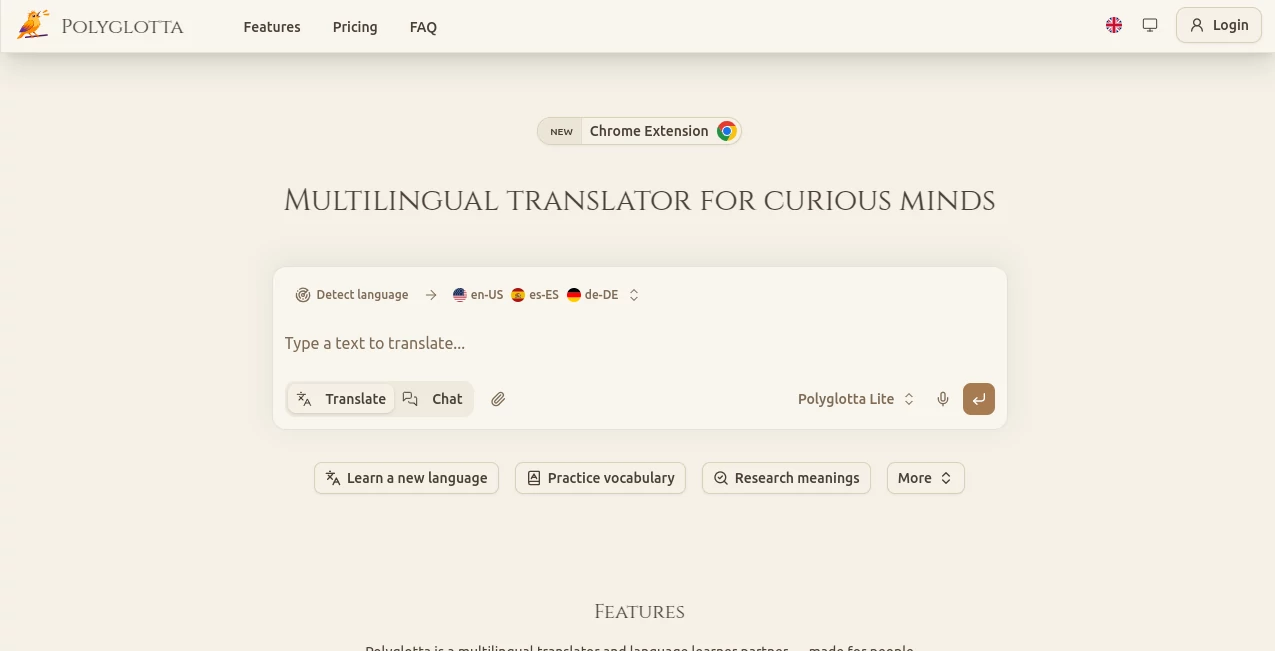
The interface is built around a straightforward chat and translation workflow. Users can enter text, choose target languages, and view multiple results without repeatedly opening separate translation sessions. The side-by-side presentation is especially useful when the goal is comparison rather than simply obtaining one answer.
The model selector also gives users control over how they want to approach a task. Someone checking a short phrase can use the faster option, while a learner investigating a difficult expression can move to a more capable model. Saved conversations make it possible to return to previous work instead of starting from scratch every time.
Accuracy & Performance
Translation quality depends heavily on context, language pair, sentence complexity, and the AI model being used. The platform addresses this by offering three optimized models: Lite for fast everyday requests, Pro for more advanced reasoning, and Max for demanding translation work involving complex grammar, idioms, and larger contexts.
An especially valuable feature is the community feedback layer. Users can upvote natural translations, downvote awkward ones, and discuss alternatives. This creates an additional way to examine questionable results instead of treating every AI-generated translation as automatically correct.
It is worth remembering that the service is still evolving. Its own documentation acknowledges that AI translations can occasionally be incomplete or incorrect. For important legal, medical, or business communication, human review remains a sensible step.
Capabilities
The strongest capability is the ability to see several translations at once. For example, a learner studying an English expression could compare Spanish, French, German, Japanese, and Arabic versions and notice which parts remain consistent and which change significantly.
The Ask mode expands the experience beyond translation. Users can ask about grammar, idioms, word origins, alternative expressions, or the reasoning behind a particular translation. This makes the platform useful as a learning companion rather than merely a translation utility.
Audio pronunciation adds another practical layer. Translations can be played aloud using AI-generated voices, allowing learners to hear unfamiliar words and practice listening and pronunciation. Users can also select from available voice options depending on the language.
The community system gives the platform another dimension. Translation threads, comments, votes, achievements, and activity streaks encourage users to participate instead of treating language learning as an entirely private activity.
Security & Privacy
Account data is handled through dedicated authentication and backend infrastructure. The service states that data is encrypted both in transit and at rest, while account-based conversations, votes, comments, and activity information are stored for logged-in users.
Users can manage their saved conversations, including renaming or deleting chats. The service also states that conversations are synchronized across supported devices, making it possible to continue language work from a desktop, laptop, tablet, or smartphone.
As with any online AI service, users should avoid entering confidential information unless they have reviewed the current privacy terms and are comfortable with how their data is handled.
Use Cases
- Language Learning: Compare translations, investigate grammar, listen to pronunciation, and ask questions about unfamiliar expressions.
- Polyglot Practice: Explore the same sentence across several languages and identify patterns between language families.
- Translation Research: Compare alternative translations and use community discussions to investigate nuance and context.
- Travel: Learn useful phrases and listen to pronunciation before visiting another country.
- Education: Teachers and students can use multilingual comparisons to demonstrate how meaning changes between languages.
- Content Creation: Writers and marketers can compare versions of a message before adapting it for different audiences.
- Cultural Exploration: Examine how idioms and expressions change when they move between cultures.
- Everyday Communication: Quickly translate short messages while keeping several target languages visible at the same time.
Pros and Cons
Pros
- Supports more than 70 languages and numerous regional variants
- Excellent side-by-side multilingual comparison
- Combines translation with interactive AI learning
- Multiple AI models for different use cases
- Useful pronunciation and audio features
- Community feedback can provide additional context
- Free plan available with daily credits
- Conversations can be saved and synchronized across devices
Cons
- AI translations can occasionally require human correction
- The most advanced models require a paid plan
- Credit usage varies depending on model and text length
- Some planned vocabulary features are not yet available
- The platform is still developing and may change over time
Pricing Plans
The service uses a credit-based system for its AI usage. The free option provides 100 credits per day and access to the Lite model, making it a practical starting point for casual users and learners.
The Student plan provides 500 daily credits and access to all three AI models. It is aimed at users who need more frequent translations and want access to stronger models without moving to an unlimited professional subscription.
The Professional plan is designed for heavier usage, offering unlimited credits and access to all three models, along with additional support and higher-quality audio features. Credit consumption depends on the selected model, the amount of text processed, and the resulting output.
Because pricing and plan features can change, users should check the current pricing information before subscribing.
How to Use It
- Create a free account using the available sign-up options.
- Enter the word, phrase, question, or passage you want to explore.
- Let the system detect the source language automatically or select it manually.
- Choose one or several target languages.
- Use Translate mode when you want direct multilingual results.
- Use Ask mode when you want explanations about grammar, idioms, context, or alternative translations.
- Switch between available AI models when the task requires a different balance of speed, cost, and quality.
- Use the audio controls to listen to pronunciation.
- Save useful conversations so you can return to them later.
- Participate in translation threads and community voting when you want to contribute feedback.
Comparison with Similar Tools
Traditional translation services are usually optimized around a simple source-to-target workflow. That approach is convenient when someone needs one quick translation, but it can make comparison difficult. The main advantage here is the ability to place multiple language versions beside each other and examine them together.
Another distinction is the learning-oriented Ask mode. Instead of stopping after producing a translation, the system can help users investigate why a phrase was translated in a particular way, discuss idioms, or explore alternative wording.
Community participation also separates the experience from a standard translation website. Translation threads and voting allow people to discuss whether an expression sounds natural and add context that may not be obvious from an isolated AI response.
For a person who only needs an occasional basic translation, a conventional translator may be simpler. For someone who regularly works across several languages or wants to understand the differences between translations, the multilingual comparison approach offers considerably more depth.
Conclusion
Polyglotta is an appealing choice for people who see translation as more than replacing one word with another. Its multilingual side-by-side workflow makes it easy to compare expressions, while the interactive AI mode turns individual translations into opportunities for learning.
The combination of 70+ languages, multiple AI models, pronunciation audio, saved conversations, and community feedback gives the platform a broader purpose than a basic translator. It can serve a student checking an unfamiliar phrase, a polyglot comparing several languages, a traveler preparing for a trip, or a translator investigating context and nuance.
The free daily allowance also makes it easy to experiment before committing to a subscription. For users who enjoy exploring how meaning changes from one language to another, this is a particularly interesting addition to the modern language-learning toolkit.
Frequently Asked Questions (FAQ)
How many languages are supported?
The platform supports more than 70 languages and 97 language variants, including regional varieties such as US and UK English, European and Latin American Spanish, and different Arabic and Chinese variants.
Is there a free plan?
Yes. The free plan provides 100 credits per day and access to the Lite AI model along with the core features.
Can I translate into several languages at the same time?
Yes. Multiple target languages can be selected so their translations appear side by side. This is one of the central features for comparing wording, structure, and cultural nuances.
What is the difference between Translate and Ask?
Translate is designed for direct multilingual translation. Ask works more like an interactive language partner, allowing users to ask about grammar, idioms, word meanings, cultural context, and alternative translations.
Does it support pronunciation?
Yes. Audio pronunciation is available for translations, with multiple voice options and higher-quality voices available on eligible plans.
Can the source language be detected automatically?
Yes. The system can automatically detect the source language, although users can manually select a language when they want more control over the translation context.
Are conversations saved?
Logged-in users can save conversations, rename chats, delete old conversations, and return to previous discussions. Account data is synchronized across supported devices.
Is it suitable for professional translation?
It can be useful for professional translation research, multilingual comparison, and exploring context. However, important professional, legal, medical, or highly sensitive translations should still be reviewed by a qualified human.
Which AI model should I choose?
The Lite model is suited to quick everyday translations and short phrases. Pro is intended for more complex language-learning and translation tasks, while Max is designed for demanding texts where deeper reasoning, context handling, and cultural nuance are more important.
Can I use it on different devices?
Yes. Account-based conversations, settings, achievements, and activity can synchronize across desktop computers, laptops, tablets, and smartphones.
AI Transcriber , AI Translate , AI Chatbot , AI Voice Assistants .
These classifications represent its core capabilities and areas of application. For related tools, explore the linked categories above.

Polyglotta Alternatives Product

Vapi

Gemini Omni

Gemini Omni …

Ryne AI

Tinylawn

Play Queens …

Manga Transl…

DeepSeek V4

Translate a …