
POP CREATOR
What is POP CREATOR?
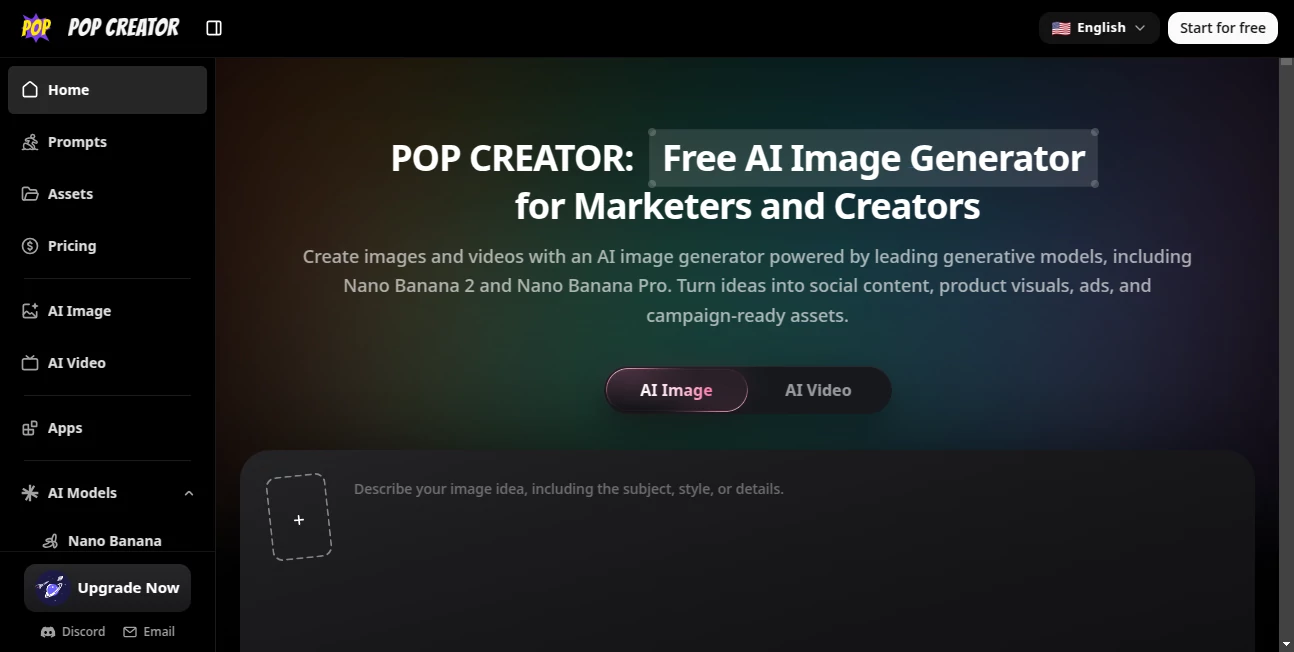
POP CREATOR is an all-in-one AI creative platform built for marketers, creators, designers, agencies, and teams that need to produce visual content without jumping between multiple tools. It brings AI image and video generation into one workspace, making it easier to turn a rough idea, written prompt, or reference image into something ready for review and further production.
The platform is particularly useful when the creative process involves experimentation. Instead of settling for the first result, users can compare different models, test visual directions, estimate credit usage, save successful prompts, and return to previous generations. This makes the experience feel less like a simple image generator and more like a practical creative workspace.
Key Features
- AI image generation using several leading image models, including Nano Banana, Nano Banana 2, Nano Banana Pro, GPT Image 2, and Seedream models.
- AI video generation with Veo models directly within the same creative environment.
- Text prompts and reference-image workflows for developing controlled visual concepts.
- AI-assisted prompt improvement and translation for turning rough ideas into stronger generation instructions.
- Credit estimates shown before generation, helping users understand the expected cost of different models and settings.
- Generation history for reviewing, downloading, comparing, and reusing previous work.
- Reusable creative presets for saving useful prompts and settings.
- High-resolution image generation with supported models reaching up to 4K.
- A dedicated background removal tool for quickly preparing visual assets.
User Interface
The interface is designed around a straightforward creative workflow. Users can choose an image or video model, enter an idea, add references when needed, and generate an asset without moving through a complicated production pipeline. The connection between prompts, models, credits, presets, and previous generations is one of the platform's strongest practical advantages.
The history and preset features are especially helpful for repeat work. For example, a marketer creating several product campaigns can keep a successful visual direction and reuse it rather than rebuilding the same prompt from memory.
Accuracy & Performance
Performance naturally varies according to the selected model, resolution, settings, demand, and generation type. The platform gives users access to models with different strengths, allowing them to choose between faster experimentation and more detailed final results.
For demanding image work, models such as Nano Banana Pro can produce high-resolution visuals with strong composition, reference-based editing, and improved text rendering. GPT Image 2 is another useful option when precise instructions and iterative editing are important. For quicker exploration, lighter models can be used to test several directions before spending more credits on a final version.
One practical detail is the estimated credit cost displayed before generation. This makes experimentation more predictable, particularly for users working with larger campaigns or limited monthly credits.
Capabilities
The platform covers a surprisingly broad part of the visual production process. A single product photograph can become the starting point for lifestyle scenes, advertising concepts, social media visuals, thumbnails, and campaign variations. Reference images can also be used to maintain a particular subject, layout, product, character, or visual style while exploring new directions.
Its model selection is another major strength. Instead of forcing every project through one generation engine, users can select among several models depending on the desired balance of quality, speed, cost, editing control, typography, and visual style.
Security & Privacy
Privacy features depend on the selected subscription. Paid plans include private generations, while eligible plans also provide commercial licensing and watermark-free exports. The platform's policies also explain that generation requests may be subject to queues, safety systems, capacity limitations, and fair-use controls.
Users working on commercial campaigns should still review the applicable terms and licensing conditions before publishing generated material, especially when the content contains brand assets, people, product claims, packaging text, or other business-critical information.
Use Cases
- E-commerce: Create product scenes, lifestyle visuals, seasonal concepts, and alternative product presentations from existing product images.
- Advertising: Explore multiple ad concepts before committing production time or advertising budget.
- Social Media: Produce visual posts, UGC-style concepts, campaign variations, and other social-first assets.
- YouTube: Develop thumbnails, Shorts covers, visual hooks, and supporting creative concepts.
- Real Estate: Explore staged interiors, property presentation concepts, and lifestyle-oriented visuals using existing photographs as references.
- Creative Agencies: Compare models and visual directions while keeping prompts, settings, and assets connected to a client project.
- Brand Campaigns: Test different compositions, environments, layouts, and creative treatments before moving into final production.
Pros and Cons
- Pros: Multiple leading AI image models in one workspace.
- Pros: Image and video generation are available within the same creative workflow.
- Pros: Reference-image support makes controlled visual experimentation easier.
- Pros: Credit estimates provide better visibility into generation costs.
- Pros: Generation history and presets are useful for recurring creative projects.
- Pros: High-resolution image generation is available on supported models and plans.
- Cons: Generation speed can vary depending on the model, settings, demand, and queue.
- Cons: Premium image and video generations can consume substantially more credits than simpler generations.
- Cons: Important text, packaging information, pricing, and legal copy should still receive human review before publication.
Pricing Plans
A free plan is available with 100 starting credits plus additional credits through daily check-ins. Paid options are designed for different levels of creative production.
- Free: $0, with 100 starting credits, additional weekly check-in credits, credit-based image and video generation, and unlimited free background removal.
- Starter: $29 per month or $107 per year, with monthly or annual credits, high-resolution image generation, video generation, and additional workflow benefits.
- Pro: $69 per month or $348 per year, with 8,500 monthly or 32,000 annual credits, special rates on selected models, and higher concurrency.
- Unlimited: $99 per month or $900 per year, with eligible unlimited image generation, 5,000 monthly or 60,000 annual credits, and discounts on video and other credit-based usage.
Annual subscriptions can provide significant savings, and the exact number of images or videos possible depends on the model, resolution, and generation settings. Pricing and plan benefits can change, so users should check the current plan details before subscribing.
How to Use It
- Choose whether you want to create an image or video.
- Select the AI model that best matches the type of result you want.
- Write a prompt describing the subject, composition, style, environment, and other important details.
- Use a reference image when you need the result to follow an existing product, character, layout, or visual direction.
- Improve or translate the prompt when necessary.
- Review the estimated credit cost before starting the generation.
- Generate the asset and compare the result with your original creative brief.
- Download the result or save useful prompts and settings as presets for future projects.
Comparison with Similar Tools
Compared with single-purpose image generators, the main advantage here is the ability to work with several models inside one environment. Users who normally move between separate platforms to test different image models may find this approach considerably more convenient.
It also has a practical advantage over tools focused exclusively on image creation because video generation is available in the same workspace. For marketers and content teams, this can reduce the friction between creating a campaign image, developing a thumbnail, and experimenting with short-form video.
Compared with broader design platforms, the focus is more strongly centered on generative workflows. The platform is therefore most appealing to users who want to explore AI-generated visual directions quickly rather than replace every traditional graphic design application they already use.
Conclusion
For anyone producing visual content regularly, the biggest attraction is not simply the ability to generate an image from a prompt. It is the way multiple creative steps are connected. Model selection, reference images, prompt improvement, credit estimates, generation history, presets, and video creation all fit into the same workflow.
That makes the platform particularly compelling for marketers, creators, agencies, e-commerce teams, and designers who need to explore many ideas before settling on a final direction. Whether the goal is a product campaign, social media asset, YouTube thumbnail, advertising concept, or short video, having several generation options available in one place can make experimentation faster and more manageable.
Frequently Asked Questions (FAQ)
Is there a free plan?
Yes. The free plan includes starting credits and additional credits through daily check-ins, along with access to credit-based image and video generation and unlimited free background removal.
Can I create both images and videos?
Yes. Image and video creation are available within the same workspace, with supported video models including Veo models.
Can I use reference images?
Yes. Reference images can guide the generation process for products, characters, layouts, styles, and other visual elements.
Does it support high-resolution images?
Yes. Supported models and paid plans can generate images at resolutions reaching up to 4K.
Which AI image models are available?
The available selection includes Nano Banana, Nano Banana 2, Nano Banana Pro, GPT Image 2, and several Seedream models. Availability and model settings can change over time.
Is AI video generation available on paid plans?
Yes. Paid plans include AI video generation, with the amount of video generation depending on the plan, model, resolution, and available credits.
Can generated content be used commercially?
Eligible paid plans include a commercial license. Users should still review the current terms and applicable restrictions for their specific use case.
Does the platform store previous generations?
Generation history allows users to review, download, compare, and reuse completed work. Eligible paid plans include extended asset storage.
Is image generation really unlimited on the Unlimited plan?
Eligible image generations can be unlimited on the Unlimited plan, but the service defines unlimited usage within its fair-use policy. Video and other non-eligible generations remain subject to credit usage.
AI Photo & Image Generator , AI Background Remover , AI Video Generator , AI Ad Creative Assistant .
These classifications represent its core capabilities and areas of application. For related tools, explore the linked categories above.
POP CREATOR details
Website unavailable — View Alternatives
Pricing
- Freemium
Apps
- Web App
Categories

POP CREATOR Alternatives Product

Kapwing

Adchat

KKV AI
PostPlus AI

Seedance 2.0

AI Gen

Video to Pro…
minimax H3

ToolIMG