
Questro AI Interpreter
What is Questro AI Interpreter?
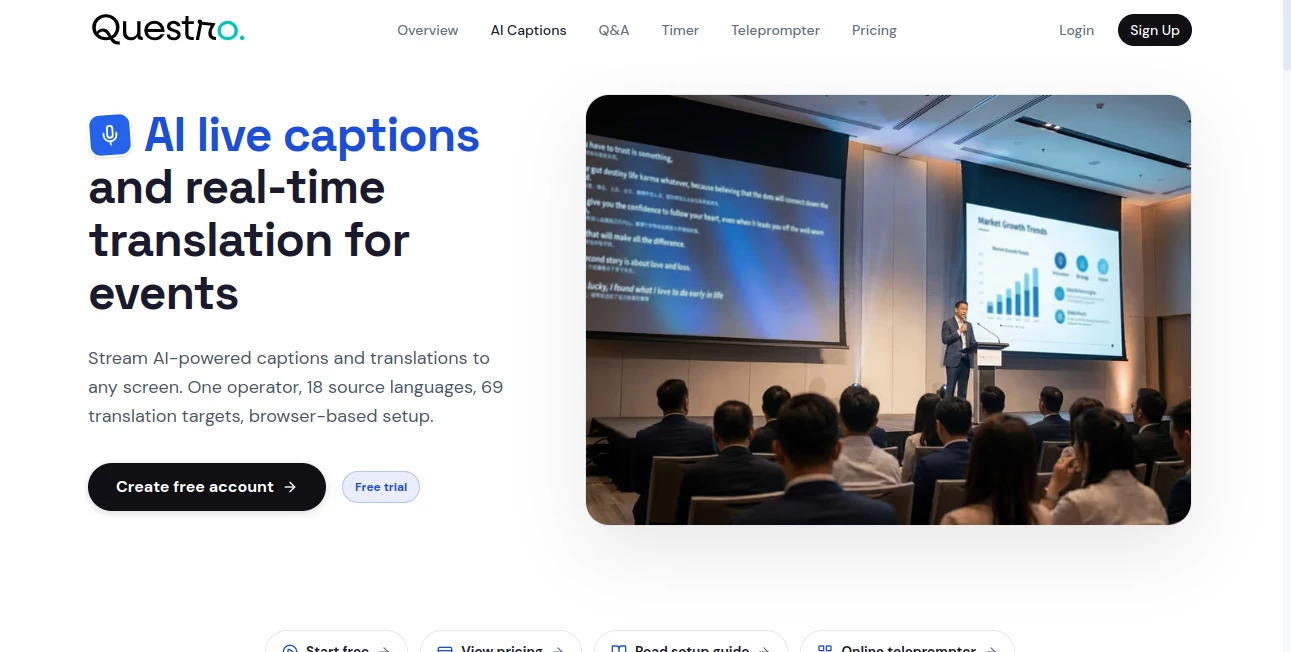
Questro AI Interpreter is a browser-based solution for adding live captions and real-time translation to conferences, meetings, webinars, presentations, and other live events. It is designed around a practical problem: making spoken content easier to follow when an audience includes people who speak different languages or need on-screen captions.
The setup is refreshingly straightforward. An operator can manage the live session from a browser while captions are sent to clean display screens or audience members' phones. There is no need to install a dedicated desktop application for every person who needs access. For event organizers working with limited technical resources, that simplicity can make a noticeable difference.
Another useful touch is the ability to upload scripts so the system has additional vocabulary context. This can be particularly helpful for presentations containing company names, specialist terminology, product names, or other words that may be difficult to recognize from speech alone.
Key Features
- Live AI-generated captions for events and presentations
- Real-time translation of spoken content
- Browser-based operation without a complicated software installation
- Clean display links for venue and presentation screens
- Mobile access so audience members can read captions on their own phones
- Script uploads for additional vocabulary context
- Designed for conferences, hybrid events, meetings, and public presentations
- One operator can manage the captioning workflow
User Interface
The interface is built with live-event operation in mind rather than overwhelming users with unnecessary controls. The browser-based approach makes it possible to keep the operator interface separate from what the audience sees. This is useful when one laptop is being used behind the scenes while a projector, confidence monitor, venue display, or audience phone shows the captions.
That separation also makes the workflow easier for small event teams. Instead of asking every attendee to understand the technology, the organizer can simply provide the appropriate display link or let attendees access captions from their phones.
Accuracy & Performance
Live captioning always depends on factors such as microphone quality, background noise, speaker clarity, accents, and terminology. The script-upload feature provides an extra layer of context that can be valuable for events where specialized vocabulary matters.
For a conference presentation, training session, or town hall, having captions appear as the speaker talks can make the event more accessible and easier to follow. Real-time translation extends that benefit to multilingual audiences, although important professional or legal events may still require a human interpreter when absolute linguistic precision is critical.
Capabilities
The platform focuses on the parts of live interpretation that organizers can put to work immediately. Spoken content can be turned into live captions, translated in real time, and displayed on screens around an event. Audience members can also follow captions from their own phones, which is particularly convenient when venue screens are limited.
Uploading a prepared script is another practical capability. If a speaker is discussing a technical product, organization, presentation, or specialized subject, providing vocabulary context can help the captioning workflow handle the terminology more effectively.
Security & Privacy
Because the service is intended for live events, organizers should consider the nature of the audio and material being processed before using it. Avoid sending confidential conversations or sensitive information through any third-party AI service unless the applicable privacy and data-processing requirements have been reviewed.
For public conferences, webinars, presentations, and similar events, the browser-based workflow provides a convenient way to control which display links are shared with operators and audiences. Teams should still follow their organization's policies for recordings, scripts, and other event materials.
Use Cases
- International conferences: Provide translated captions so attendees can follow presentations in their preferred language.
- Hybrid events: Display captions for people watching remotely as well as attendees in the venue.
- Corporate town halls: Make internal presentations easier to follow for multilingual teams.
- Training sessions: Add captions to educational or professional presentations where clarity is important.
- Webinars: Give remote audiences a readable version of spoken content while the presentation is underway.
- Public meetings: Help a broader audience follow live discussions through on-screen captions.
- Conference stages: Send captions to venue screens without putting the operator controls on the public display.
- Multilingual presentations: Translate spoken material in real time for audiences with different language backgrounds.
Pros and Cons
Pros
- Simple browser-based workflow
- Live captions and real-time translation in one service
- Audience members can use their phones to read captions
- Separate display links are useful for professional event setups
- Script uploads can provide useful vocabulary context
- Suitable for small teams that do not want complicated event software
- Free access provides an opportunity to test the workflow before committing to a paid plan
Cons
- Caption quality can vary depending on audio conditions and speech clarity
- AI translation should not automatically replace professional interpreters for high-stakes communication
- AI Interpreter usage is limited by the allowance included in each pricing plan
- Organizations handling confidential information should review their privacy requirements before using the service
Pricing Plans
The service is available as part of Questro's broader event toolkit. The Free plan includes 15 AI Interpreter minutes, making it useful for testing the workflow or running a short demonstration. The Pro plan costs $19 per month, or $15 per month when billed annually, and includes 2 hours of AI Interpreter usage each month.
For organizations preparing for a single event, the 7-Day Event Pass is an interesting alternative to a recurring subscription. It costs $99 as a one-time purchase, provides access to Pro features for seven days, and includes 10 hours of AI Interpreter usage. The pass does not automatically renew.
Usage begins when an interpreter recording session starts, and the remaining allowance can be viewed in the account settings. This makes it easier for organizers to keep track of usage before and during an event.
How to Use Questro AI Interpreter
- Open the AI Interpreter workspace in your browser.
- Prepare the live event and audio source that will be used for captioning.
- Select the required captioning and translation settings.
- Upload a presentation script when additional vocabulary context would be useful.
- Start the interpreter recording session.
- Open the clean display link on the venue screen, presentation display, or other audience-facing device.
- Share the appropriate access option with attendees who want to read captions on their phones.
- Monitor the session and check your remaining AI Interpreter allowance in Settings.
Comparison with Similar Tools
There are several established platforms for live captions, audience engagement, and event interpretation. The main difference here is the focus on keeping the workflow lightweight and browser-based while combining live captions, translation, and event display links.
Compared with larger event platforms, this approach can be attractive to organizers who do not need ticketing, registration, or full streaming infrastructure. It also sits naturally alongside other event-day functions such as timers, moderated Q&A, and teleprompter workflows.
For smaller conferences and hybrid events, the ability to test the service through a free allowance can also make the decision easier. Organizers can evaluate the captioning workflow with their own microphones, speakers, terminology, and venue screens before choosing whether they need a larger monthly allowance or a one-event pass.
Conclusion
For event organizers looking for a practical way to introduce live captions and translation, this is a compelling option. Its strongest point is not an enormous collection of features, but the way the important pieces fit together: one browser-based operator workflow, audience-friendly display links, mobile caption access, real-time translation, and optional script context.
It makes particular sense for conferences, town halls, webinars, training sessions, and multilingual presentations where accessibility and comprehension matter. The free allowance also gives teams a low-risk way to test the experience before an important event. When paired with good microphones and a well-prepared script, it can become a useful part of a modern live-event setup.
Frequently Asked Questions (FAQ)
What does this tool do?
It provides AI-powered live captions and real-time translation for events. Captions can be displayed on venue screens or accessed by audience members on their phones.
Can captions be displayed on a projector or venue screen?
Yes. The service provides clean display links that can be opened on screens used by the audience, making it suitable for conference rooms, stages, and other event environments.
Can attendees read captions on their phones?
Yes. Audience members can access captions from their phones, which is useful when organizers do not want to dedicate a large screen to every language.
Can I provide a script to improve terminology?
Yes. Scripts can be uploaded to provide vocabulary context, which can be useful when a presentation contains technical terms, product names, or specialized language.
Is there a free plan?
Yes. The Free plan includes 15 AI Interpreter minutes. Paid options provide larger allowances, including 2 hours per month with Pro and 10 hours with the one-time 7-Day Event Pass.
Is it suitable for multilingual conferences?
Yes. Real-time translation and display options make it particularly relevant for conferences and events where attendees speak different languages. For highly sensitive or legally critical communication, professional human interpretation may still be preferable.
AI Translate , AI Speech Recognition , AI Speech to Text , AI Captions or Subtitle .
These classifications represent its core capabilities and areas of application. For related tools, explore the linked categories above.
Questro AI Interpreter details
Website unavailable — View Alternatives
Pricing
- Free
Apps
- Web App
Categories

Questro AI Interpreter Alternatives Product

Speech Notes

Gpt Realtime…
RewriteBar

livetalktran…

Speech Text
BookTranslat…

Elispeak

Fish Voice

NepVox