


















QuickPod
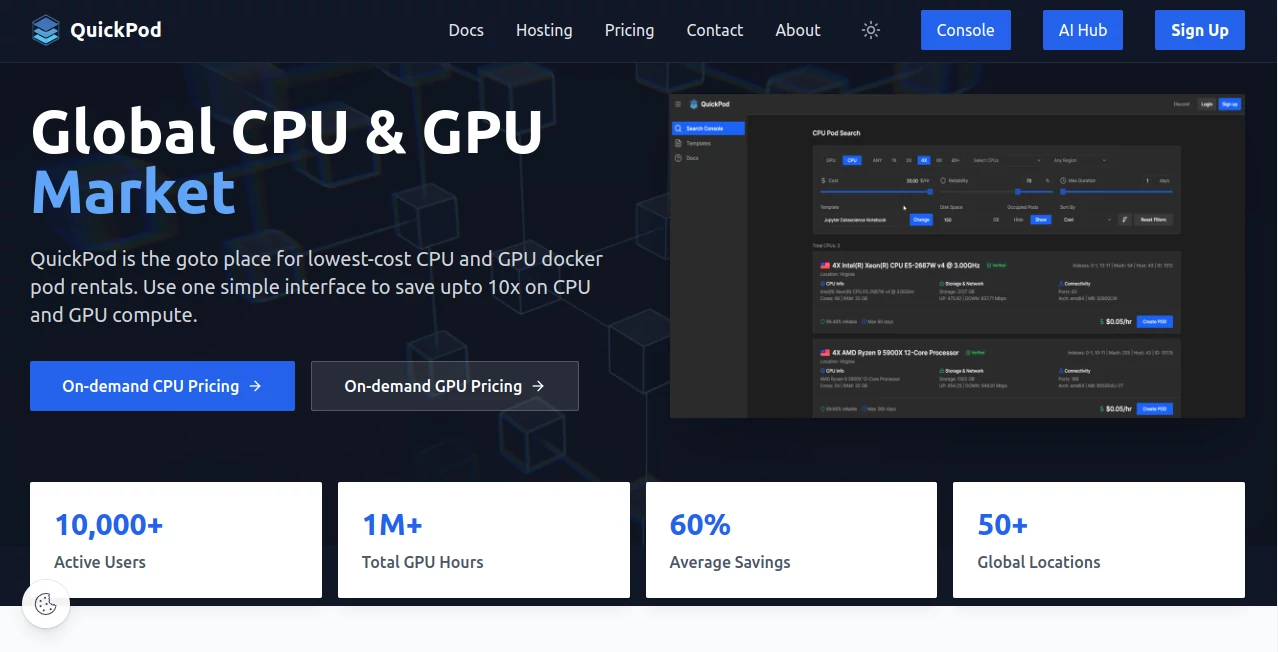
What is QuickPod?
QuickPod is a cloud computing marketplace built for people who need powerful CPU and GPU resources without committing to expensive traditional cloud infrastructure. The platform connects users with available computing machines from providers around the world, making it possible to rent resources for AI development, machine learning, rendering, research, testing, and other demanding workloads.
What makes the service particularly interesting is its marketplace approach. Instead of being limited to a fixed hardware catalog, users can search available machines and compare offers based on GPU type, GPU memory, CPU capacity, system RAM, location, pricing, and other requirements. The platform currently presents itself as a lower-cost alternative for compute-intensive workloads and says users can potentially reduce computing costs substantially compared with conventional options.
Key Features
- On-demand CPU and GPU instance rentals
- Search and filtering based on GPU type, GPU count, VRAM, CPU resources, region, pricing, and availability
- Docker-based computing environments
- Preconfigured templates for faster deployment
- Custom templates for specialized workloads
- Web-based connection options alongside SSH access
- Flexible rental periods without requiring traditional long-term cloud commitments
- REST API access for users who want to integrate infrastructure management into their own workflows
User Interface
The interface is designed around finding and managing compute resources rather than navigating a complicated collection of cloud services. The search console lets users switch between GPU and CPU resources and narrow available offers using practical filters such as GPU count, cost, VRAM, region, duration, and machine capabilities.
Once a suitable machine is found, users can select storage, choose a template, create an instance, and monitor its status from the console. The platform also includes pages for managing running pods, templates, account credits, and other infrastructure settings.
Accuracy & Performance
Performance depends largely on the specific machine selected because the marketplace brings together hardware from different providers. This can actually be an advantage for experienced users: instead of accepting a single standardized configuration, they can search for hardware that matches the workload and budget.
The platform performs GPU verification and periodically runs bandwidth tests for hosted machines. Machines that fail required checks can be removed from search results, while reliability is also affected by machine connectivity and whether client instances successfully start.
For workloads such as model training, inference, rendering, experimentation, or large data processing, choosing the right GPU and memory configuration can make a noticeable difference. A developer testing a model for a few hours, for example, may not need the same infrastructure as a team running a long training job.
Capabilities
The platform supports container-based workloads and provides templates that define the Docker image, configuration, and startup behavior of an instance. Users can work with public templates or create and customize their own templates for repeatable environments.
For developers who prefer direct infrastructure control, SSH access is available when the appropriate public key is configured. There is also a browser-based connection option, which is useful when users want to get into a running environment without setting up a complete local SSH workflow.
API support adds another layer of flexibility. The documentation separates read-only and read-write APIs, allowing infrastructure operations to be integrated into custom applications and automated workflows.
Security & Privacy
Security in a distributed compute marketplace depends not only on the platform but also on the configuration and provider behind each machine. The service uses account-based access and provides controlled connection methods for accessing rented environments.
Users should still treat rented computing instances like any external server: avoid placing unnecessary sensitive information on temporary machines, configure access carefully, use secure authentication practices, and remove instances when their work is complete. The documentation specifically recommends destroying unused pods because stopping an instance prevents GPU charges but storage charges can continue.
Use Cases
There are several situations where this type of infrastructure can be especially useful.
- AI and machine learning: Rent GPU capacity for model training, experimentation, inference, and fine-tuning without purchasing expensive hardware.
- Generative AI: Run GPU-intensive image, video, language, or multimodal workloads when local hardware is insufficient.
- Research: Researchers can temporarily access additional compute resources for experiments and computational workloads.
- Software development: Developers can create isolated Docker environments for testing applications and GPU-dependent software.
- 3D rendering: GPU resources can be used for rendering projects that would otherwise put significant pressure on a local workstation.
- Data processing: Large or compute-heavy processing jobs can benefit from additional CPU, RAM, and GPU capacity.
- Short-term experiments: A developer can rent a powerful machine for a specific test instead of investing in permanent infrastructure.
Pros and Cons
Pros
- Flexible access to CPU and GPU computing resources
- Marketplace model can provide more hardware and pricing choices
- Powerful GPU configurations can be rented on demand
- Docker templates make environment setup easier
- Web-based and SSH connection options are available
- Custom templates support repeatable workflows
- API access can help automate infrastructure operations
- Suitable for developers, researchers, and AI-focused workloads
Cons
- Performance and reliability can vary between individual machines
- Users need to understand basic server and Docker concepts for more advanced workloads
- Storage charges can continue even when a pod is stopped
- Some setup tasks require technical knowledge, particularly for users who want to host their own machines
- Availability and pricing can change depending on marketplace supply and demand
Pricing Plans
The service follows a usage-based marketplace model rather than presenting a single universal monthly subscription. Users add credit to their account and use that balance to rent available computing resources. The actual cost depends on the machine, hardware configuration, storage allocation, and rental conditions selected. :contentReference[oaicite:8]{index=8}
This model can be attractive for users who only need high-performance hardware occasionally. Instead of purchasing a dedicated GPU or maintaining a permanent server, they can pay for the resources required for a particular project. Current offers should be checked directly in the marketplace because available machines and prices can change.
How to Use It
- Create an account and add credit to the balance.
- Open the CPU or GPU search section.
- Use filters to find hardware that matches your workload, including GPU type, VRAM, CPU resources, region, and price.
- Select a suitable machine and choose the required storage allocation.
- Select an existing template or configure a custom environment.
- Create the pod and wait for the instance to become ready.
- Connect through the browser-based connection option or SSH.
- Run your workload and monitor the instance while it is active.
- Destroy the pod when the work is finished to avoid unnecessary storage charges.
The official quick-start documentation notes that cached Docker images can allow an instance to become available within seconds, while machines that need to download an image can take longer depending on internet speed.
Comparison with Similar Tools
Traditional cloud providers generally offer highly standardized infrastructure with extensive managed services, but they can become expensive for users who mainly need raw compute power. A marketplace approach takes a different route by allowing users to compare individual CPU and GPU offers.
This makes the platform particularly appealing to developers and AI researchers who already know what hardware they need. Someone looking specifically for a certain GPU with a particular amount of VRAM, for example, can filter available offers instead of choosing from only a few predefined cloud instances.
The trade-off is that marketplace infrastructure requires users to pay more attention to machine characteristics, availability, reliability, and configuration. For technically comfortable users, that additional choice can be a significant advantage.
Conclusion
For developers, researchers, AI builders, and other users who regularly encounter expensive GPU computing requirements, this marketplace offers an appealing way to access hardware without purchasing it outright. Its combination of flexible machine selection, Docker environments, templates, web connectivity, SSH support, and API capabilities gives it more depth than a simple GPU rental service.
The strongest reason to consider the platform is its focus on choice. Instead of forcing every workload into the same infrastructure model, it lets users search for resources that fit their technical requirements and budget. For a short experiment, an AI project, or a demanding compute job, that flexibility can make a meaningful difference.
Frequently Asked Questions (FAQ)
What type of computing resources are available?
The marketplace provides both GPU and CPU computing resources, with search options for different hardware configurations, GPU counts, memory requirements, regions, pricing, and other characteristics.
Can I use Docker?
Yes. Computing instances are based around Docker containers, and users can select predefined templates or create customized templates for their workloads.
Can I connect through SSH?
Yes. SSH access is supported when users configure their public SSH key. A browser-based connection option is also available for convenient access.
Is it suitable for AI workloads?
Yes. GPU computing is one of the platform's primary use cases, making it suitable for many AI and machine learning workloads that require more GPU power than a typical desktop or laptop can provide.
Can I create my own templates?
Yes. Users can create custom templates and customize existing public templates to better match their software and configuration requirements.
Do I continue paying after stopping a pod?
Stopping a pod prevents GPU charges, but storage charges can continue. When an instance is no longer needed, destroying it is recommended if the resources and stored data are no longer required.
Can the platform be controlled programmatically?
Yes. API documentation is available for both read-only and read-write operations, making the platform suitable for users who want to integrate compute management into their own software or automation workflows.
AI Research Tool , AI Developer Tools .
These classifications represent its core capabilities and areas of application. For related tools, explore the linked categories above.

QuickPod Alternatives Product

Greek Numero…

SuperAI

Zloth

Toflow AI

Domain Rank …

VercelAPP

Project Genie

PurityRadar

CrawlReady
