
EstateReel AI
What is EstateReel AI?
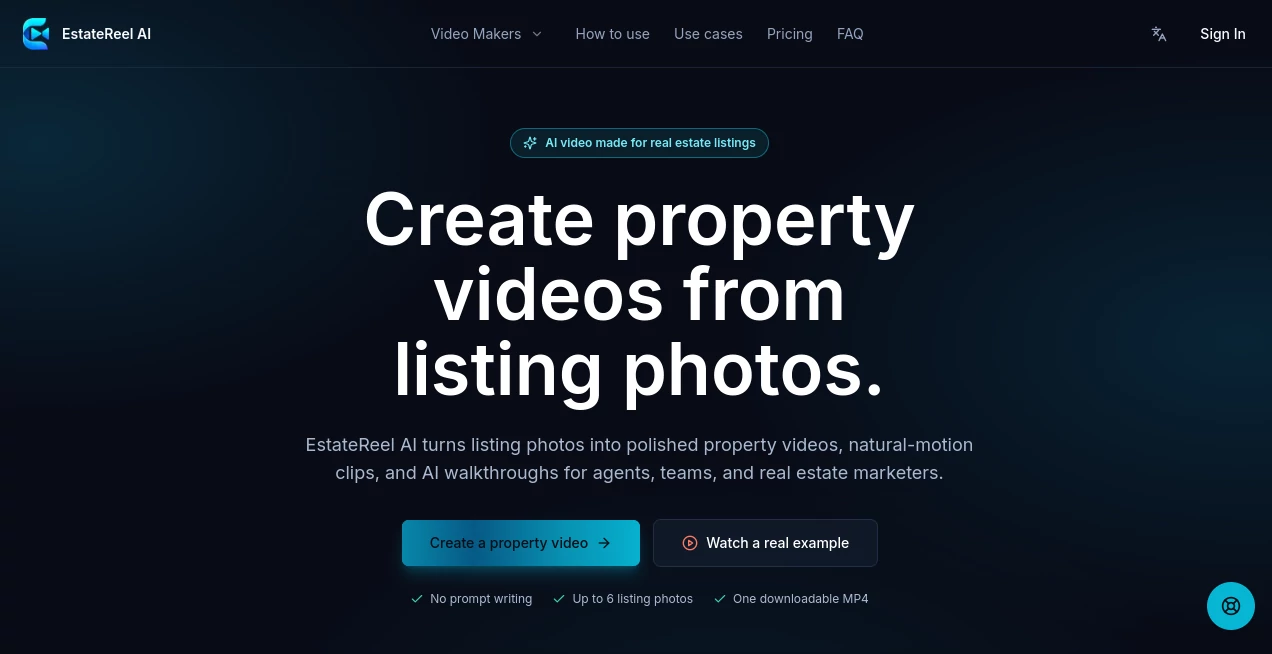
Creating engaging real estate videos has traditionally required expensive equipment, editing software, or hiring a professional production team. This platform changes that process completely by allowing agents and property marketers to generate polished listing videos in just a few minutes using artificial intelligence. Instead of spending hours editing footage, users simply provide a property listing, and the system automatically builds a presentation-ready video.
The platform combines AI-generated scripts, realistic voice narration, animated transitions, and built-in captions to produce marketing videos that are ready to share across websites, social media channels, and property listings. The result is a professional presentation that helps real estate professionals attract more buyers while dramatically reducing production costs.
Whether promoting residential homes, luxury apartments, rental properties, or commercial spaces, the workflow is designed to remove technical barriers and make video marketing accessible to everyone.
Key Features
User Interface
The interface is intentionally simple and efficient. Users only need to paste a supported property listing link, after which the platform automatically imports available property information and photographs. The clean dashboard keeps every generated project organized and easy to download.
Accuracy & Performance
The AI analyzes listing details to produce a property-focused sales script instead of generic marketing copy. Videos are typically generated within minutes, allowing agents to create promotional content almost immediately after publishing a listing.
Capabilities
- Generate professional real estate marketing videos automatically.
- Create AI-written property descriptions for narration.
- Produce natural-sounding voiceovers.
- Add synchronized captions for better accessibility.
- Apply smooth motion effects to listing photos.
- Create HD widescreen videos suitable for websites and YouTube.
- Download finished videos without watermarks.
- Pay only when creating videos instead of maintaining a monthly subscription.
Security & Privacy
Users retain access to their generated content through their dashboard. Since videos are produced directly from publicly available property listings, the workflow minimizes unnecessary file uploads while keeping the creation process straightforward and efficient.
Use Cases
- Real estate agents promoting residential properties.
- Brokerages producing listing videos at scale.
- Property managers advertising rental homes.
- Luxury property marketing campaigns.
- Social media promotion on YouTube, Facebook, and other platforms.
- Email marketing campaigns featuring video listings.
- Website property showcases.
- Real estate professionals looking to improve listing engagement without hiring videographers.
Pros and Cons
- Pros
- Extremely easy to use.
- Fast AI video generation.
- Professional voice narration included.
- Automatic captions improve viewer engagement.
- No recurring subscription required.
- Affordable compared to traditional video production.
- HD video output suitable for multiple marketing channels.
- Cons
- Primarily designed for real estate professionals.
- Video quality depends on the available listing photos.
- Customization options are currently more limited than advanced video editors.
Pricing Plans
The platform uses a credit-based pricing model instead of monthly subscriptions. Credits are purchased as needed and do not expire, making the service attractive for agents who publish listings throughout the year without paying recurring fees. Multiple credit bundles are available, offering lower costs per video for higher-volume users.
How to Use REVideoCreator
- Copy a supported property listing URL.
- Paste the listing into the platform.
- Allow the AI to collect photos and listing information.
- The system automatically writes a promotional script.
- An AI voiceover and captions are generated.
- Download the completed HD marketing video.
- Share it on property websites, social media platforms, or marketing campaigns.
Comparison with Similar Tools
Unlike traditional video editing software that requires manual editing, script writing, and voice recording, this solution automates the complete production workflow. Compared with hiring professional videographers, it significantly reduces both production time and cost while still delivering polished marketing videos. Its one-time credit system also stands out from many competing AI video services that rely on recurring monthly subscriptions.
Conclusion
Video marketing has become one of the most effective ways to capture buyer attention, but creating quality property videos has often been expensive and time-consuming. This platform removes those barriers by combining artificial intelligence with an exceptionally streamlined workflow. From script generation to voice narration and captions, nearly every production step is automated.
For real estate professionals who want to publish attractive listing videos quickly, maintain a consistent marketing presence, and reduce production costs, this solution offers an impressive balance of speed, quality, and simplicity. It is particularly valuable for agents handling multiple listings and looking to make every property stand out online.
Frequently Asked Questions (FAQ)
Can beginners create professional property videos?
Yes. The workflow is designed for users with no video editing experience.
Does the platform generate voice narration automatically?
Yes. AI-generated voiceovers are included as part of the video creation process.
Are captions added automatically?
Yes. Captions are generated automatically to improve accessibility and engagement.
Is there a monthly subscription?
No. The service uses a pay-as-you-go credit system rather than recurring subscriptions.
Where can generated videos be published?
Videos can be shared on real estate websites, YouTube, social media platforms, and digital marketing campaigns.
AI Video Generator , AI Video Editor , AI Social Media Assistant , AI Advertising Assistant .
These classifications represent its core capabilities and areas of application. For related tools, explore the linked categories above.

EstateReel AI Alternatives Product

Groniz
soro2

VideoLens

Gemini Omni …

XreplyAI

FinalLayer

시댄스 2.5

FluxMov

Seedance 2 V…