


















Recapo AI
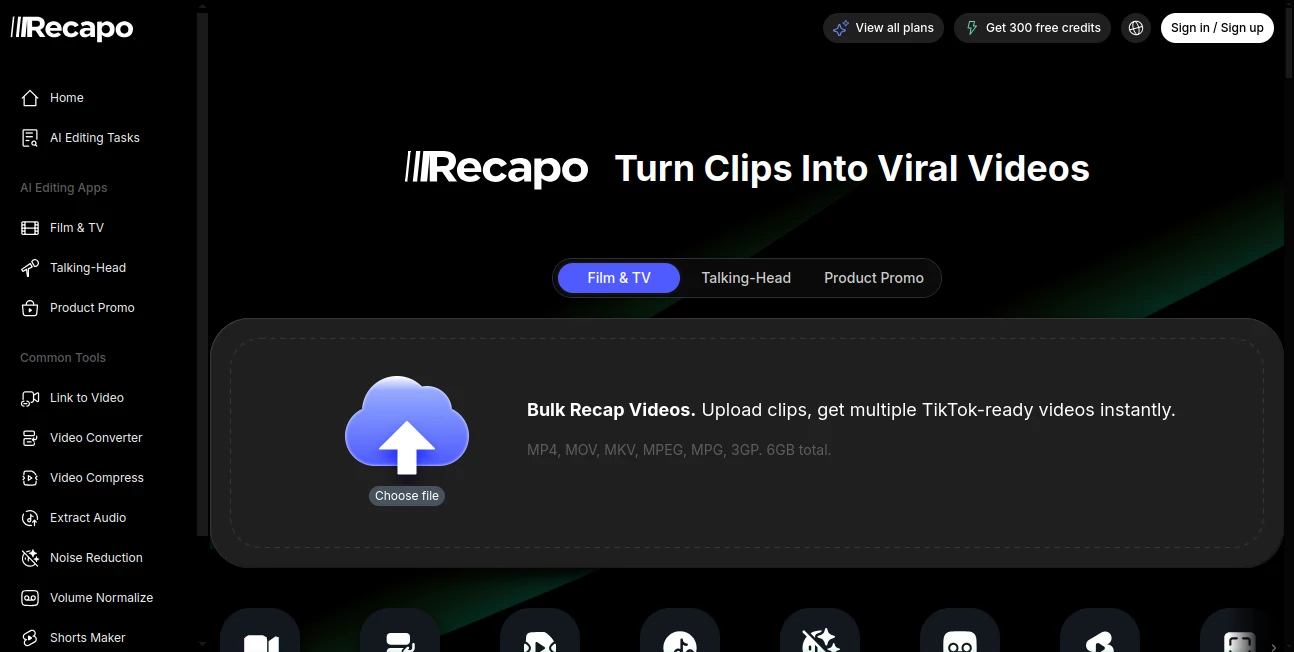
What is Recapo AI?
Creating engaging short-form videos from lengthy recordings often demands hours of manual editing. This platform changes that experience by combining intelligent video analysis with an automated production workflow that transforms raw footage into polished, shareable content. Whether the source is a podcast, webinar, movie, interview, livestream, educational course, or promotional video, the editing process becomes significantly faster while maintaining creative control.
Instead of spending valuable time searching for highlights, writing summaries, generating captions, and exporting multiple versions for different social platforms, creators receive an organized workflow that handles these repetitive tasks automatically. The result is a smoother production pipeline that allows editors, marketers, educators, and content creators to focus on storytelling rather than technical editing.
The platform supports everything from recap script generation and subtitle creation to voiceover preparation, cover generation, vertical video formatting, and highlight extraction. For anyone regularly publishing Shorts, Reels, or TikTok videos, it offers an impressive combination of speed, automation, and flexibility that reduces production time without sacrificing quality.
Key Features
User Interface
The workspace follows a straightforward upload-and-create workflow. Users simply upload one or multiple videos, define editing preferences such as language, duration, subtitles, aspect ratio, narration, or output style, and allow the system to generate an editable storyboard before rendering the final result. This approach minimizes the learning curve, making advanced video editing accessible even to creators with limited editing experience.
Accuracy & Performance
One of the strongest aspects is its ability to recognize meaningful scenes instead of selecting random clips. It identifies highlights, extracts story points, prepares subtitle drafts, and generates recap scripts that closely follow the original footage. Priority processing is also available on higher subscription plans, helping frequent creators produce content more efficiently. According to the platform, millions of videos have already been processed for creators across dozens of countries. :contentReference[oaicite:0]{index=0}
Capabilities
- Generate recap scripts from long videos.
- Create highlight clips automatically.
- Convert long-form content into vertical Shorts.
- Produce subtitle drafts and captions.
- Generate AI voiceover directions.
- Create storyboard-style editing plans.
- Support multiple video formats including MP4, MOV, MKV, MPEG, and MPG.
- Extract audio from video files.
- Reduce background noise.
- Normalize audio volume.
- Create thumbnail and cover images.
- Compress and convert video formats.
- Export content optimized for major social media platforms.
Security & Privacy
The service provides documentation describing upload handling, processing, and retention policies. Users working with confidential footage are encouraged to review the published privacy information before uploading sensitive material. This transparent approach helps professional creators understand how their content is managed throughout the editing process. :contentReference[oaicite:1]{index=1}
Use Cases
- Repurposing podcast episodes into engaging Shorts.
- Creating movie recap videos.
- Producing highlight reels from livestreams.
- Editing educational lessons into bite-sized clips.
- Generating promotional content for marketing campaigns.
- Turning interviews into social media snippets.
- Preparing YouTube Shorts from long-form videos.
- Building faceless content channels.
- Creating product demonstrations for online businesses.
- Accelerating agency video production workflows.
Pros and Cons
Pros
- Simple workflow requiring minimal editing experience.
- Excellent automation for repetitive editing tasks.
- Supports recap scripts, subtitles, covers, and voiceovers.
- Works with numerous video formats.
- Designed specifically for modern short-form content creation.
- Helpful for creators managing large volumes of video.
Cons
- Higher export quality is reserved for premium plans.
- Advanced creators may still perform manual polishing after AI editing.
- Large uploads require stable internet connectivity.
Pricing Plans
The platform offers a free trial for new users alongside four paid subscription options.
- Starter: Suitable for occasional creators with monthly credits and HD exports.
- Basic: Designed for consistent content production with increased upload limits.
- Pro: Includes Full HD output, custom narration voices, and priority processing.
- Ultimate: Delivers 4K exports, higher processing limits, and dedicated customer support for demanding production teams. :contentReference[oaicite:2]{index=2}
How to Use Recapo.ai
- Upload one or multiple source videos.
- Select the desired editing workflow.
- Choose language, duration, subtitles, narration, and output format.
- Allow the AI to analyze the footage.
- Review the generated storyboard and script.
- Make optional adjustments.
- Export videos optimized for YouTube Shorts, TikTok, Instagram Reels, or other platforms.
Comparison with Similar Tools
Unlike traditional video editors that require users to manually search through timelines, trim clips, create subtitles, and organize exports, this platform begins by understanding the entire video. It automatically identifies the most valuable moments before generating scripts, captions, highlights, voiceover drafts, and social-ready formats.
Compared with many AI editors that specialize in only one task, such as caption generation or video summarization, it combines multiple production stages into a single workflow. This integrated approach makes it particularly attractive for creators who publish content frequently across multiple social platforms.
Conclusion
For creators who regularly transform long recordings into engaging short-form videos, this platform provides a practical and thoughtfully designed workflow. Its combination of intelligent scene detection, automated scripting, subtitle generation, highlight extraction, and multi-platform exports dramatically reduces editing time while maintaining creative flexibility.
Whether you produce educational content, podcasts, livestream highlights, promotional videos, or movie recaps, the platform delivers a reliable solution that streamlines repetitive editing tasks. It represents an excellent choice for individuals and teams looking to scale video production without investing countless hours in manual editing.
Frequently Asked Questions (FAQ)
Can it convert long videos into Shorts automatically?
Yes. It can identify highlights, prepare captions, generate recap scripts, and export vertical videos suitable for popular short-form platforms.
Does it support subtitle generation?
Yes. Automatic subtitle drafts and caption generation are included as part of the editing workflow.
Who is this platform designed for?
It is suitable for creators, marketers, educators, agencies, podcast editors, livestream publishers, and businesses producing frequent video content.
Is there a free version?
Yes. New users can access core features through a free trial before upgrading to one of the premium subscription plans. :contentReference[oaicite:3]{index=3}
Which social media platforms are supported?
Content can be prepared for YouTube Shorts, TikTok, Instagram Reels, and other vertical video platforms through optimized export workflows. :contentReference[oaicite:4]{index=4}
AI Video Generator , AI Video Editor , AI Video Enhancer , AI Short Clips Generator .
These classifications represent its core capabilities and areas of application. For related tools, explore the linked categories above.

Recapo AI Alternatives Product

Motion Contr…

happyhorse

Screenify St…

FluxMov

vizstudio

Ltx 2.3

wan2-6.org

Seedance 2.0

ViewMax Stud…
