Reducto
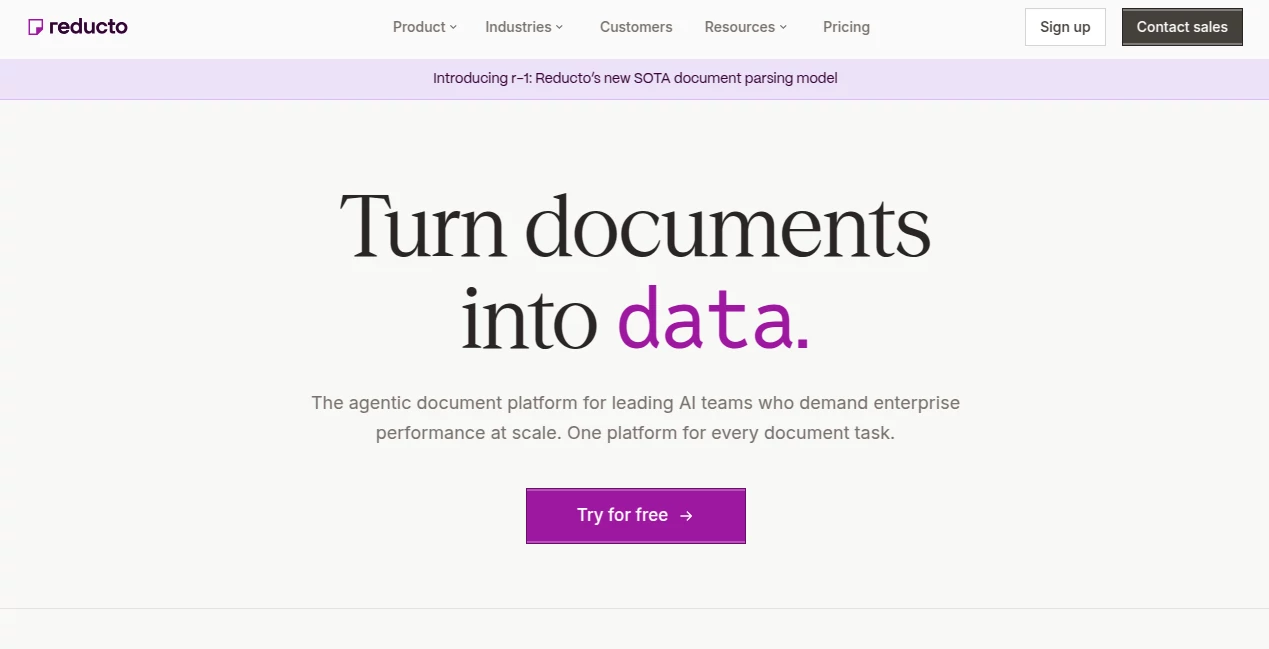
What is Reducto?
Reducto is an agentic document platform built for teams that need to turn complicated files into reliable, structured data. Instead of treating a document as a simple block of text, it can work with layouts, tables, figures, forms, images, and formatting together. This makes it particularly useful for companies building AI applications, RAG systems, document automation workflows, and data extraction pipelines.
The platform supports more than 30 file types and is designed to handle everything from ordinary PDFs to spreadsheets, presentations, scanned documents, and complex forms. Its APIs can parse documents, extract specific fields, classify files, split large documents, and even edit supported documents programmatically.
For a developer, the appeal is straightforward: instead of spending months building document-processing infrastructure and maintaining individual parsers for different file formats, the same API can sit behind a wide range of document workflows.
Key Features
- Document Parsing: Converts documents into structured output while preserving text, tables, figures, formatting, and document layout.
- Structured Extraction: Lets developers define a schema and retrieve specific information as structured JSON, with citations pointing back to the source.
- Document Classification: Routes documents according to categories described in natural language without requiring traditional training data.
- Document Splitting: Separates long files or multi-document uploads into logical sections for easier downstream processing.
- Document Editing: Can identify fillable elements such as blanks, tables, and checkboxes and populate them programmatically.
- OCR and Vision: Supports scanned pages, handwritten content, images, and difficult document layouts.
- LLM Optimization: Includes intelligent chunking and retrieval-focused processing designed to make extracted information more useful for AI applications.
- Broad File Support: Handles PDFs, images, spreadsheets, presentations, text documents, and numerous other formats through a unified platform.
- Multilingual Processing: Supports document parsing across more than 100 languages, including mixed-language documents.
User Interface
The platform is not limited to an API-only developer experience. Its Studio provides a visual workspace where teams can build, test, inspect, and deploy document workflows. This is especially useful when working with difficult files because developers can inspect extraction results and see how information maps back to the original document.
The combination of a visual environment and developer APIs is a practical touch. A team can experiment with a document workflow in Studio before turning the same idea into a production integration.
Accuracy & Performance
Document extraction becomes difficult when information is hidden inside complex tables, unusual layouts, charts, scanned pages, or forms. The platform approaches this problem with a multi-pass system combining OCR and vision-language models. Its parsing technology considers text, layout, tables, figures, and formatting together rather than processing each element in isolation.
The newer r-1 parsing model is positioned as the company's most capable parsing model and is designed to replace complicated multi-tool document pipelines with a unified approach. The platform reports that more than 5 billion pages have been processed, giving its technology substantial exposure to real-world document workloads.
For teams building applications where an extracted number needs to be traced back to its source, bounding-box and citation capabilities are particularly valuable. They make the output easier to inspect, verify, and audit instead of simply trusting an unexplained JSON response.
Capabilities
The platform covers several stages of a document-processing pipeline. Parse can turn an entire file into structured content, while Extract focuses on specific fields defined through a schema. Classify can determine what type of document has arrived, and Split can break lengthy or mixed files into useful sections.
There is also support for spreadsheets, advanced chart extraction, table processing, automatic page rotation, multilingual OCR, figure summarization, and document enrichment. These capabilities make it suitable for workflows where traditional text extraction alone would leave important information behind.
Developers can work with Python, Node.js, and Go SDKs, while API and MCP integrations provide additional ways to connect document processing to existing AI applications.
Security & Privacy
Security requirements vary considerably between a small startup and a large enterprise, so the available plans provide different levels of control. Higher tiers include options such as zero data retention agreements, Business Associate Agreements, EU and Australia data residency endpoints, VPC and on-premises deployments, custom SLAs, role-based access control, and SSO/SAML authentication.
This tiered approach is useful for organizations handling sensitive financial, healthcare, insurance, or legal documents. Enterprise customers can also request custom processing pipelines, rate limits, throughput, and dedicated support.
Use Cases
- Financial Document Processing: Extract information from financial statements, investor presentations, SEC filings, spreadsheets, and other complex financial materials.
- Legal Workflows: Process contracts, legal documents, forms, and large collections of files where precise extraction and source citations matter.
- Healthcare Applications: Turn difficult medical and administrative documents into structured information for downstream systems.
- Insurance: Extract relevant fields from claims documents, forms, reports, and supporting files.
- RAG Applications: Convert documents into structured, intelligently chunked content that can be passed into retrieval-augmented generation systems.
- Document Automation: Automate classification, extraction, splitting, and document editing without maintaining separate processing systems for every format.
- AI Agents: Give AI applications a more dependable way to read and act on information stored inside business documents.
- Data Migration: Transform large collections of legacy documents into structured information that can be used by modern applications.
Pros and Cons
Pros
- Supports more than 30 document and file formats.
- Handles tables, figures, layouts, forms, images, and scanned documents.
- Structured extraction can return schema-based JSON with source citations.
- Useful for RAG and other LLM-powered applications.
- Provides APIs as well as a visual Studio environment.
- Supports Python, Node.js, and Go.
- Offers enterprise security and deployment options.
- Multilingual document processing covers more than 100 languages.
Cons
- Usage-based pricing can become significant for very large document volumes.
- The platform is primarily aimed at developers and businesses rather than casual users looking for a simple document reader.
- Some advanced security, deployment, and support features require higher-tier plans.
- Complex extraction workflows may still require configuration and testing to achieve the desired results.
Pricing Plans
The Standard plan uses a pay-as-you-go model and currently includes $150 in free usage. It provides Parse, Extract, Edit, and Split APIs, support for more than 30 file types, no page limits, and up to five Studio seats. After the included usage is consumed, standard usage rates apply.
The Growth plan uses custom pricing and adds volume discounts, zero data retention agreements, Business Associate Agreements, premium rate limits, priority requests and support, EU and Australia data residency endpoints, and unlimited Studio seats.
The Enterprise plan is designed for organizations requiring deeper control. It adds VPC and on-premises deployments, custom MSAs and SLAs, custom rate limits and throughput, custom processing pipelines, dedicated on-call support, role-based access control, and SSO/SAML authentication.
Current Standard rates are listed per 1,000 pages, including $10 for Parse, $20 for Extract, $40 for Deep Extract, $20 for Split, $40 for Deep Split, $7.50 for Classify, and $60 for Edit, with a lower $15 rate for pre-filled pages under Edit. Growth and Enterprise customers receive custom rates and volume discounts.
How to Use Reducto
- Create an account and generate an API key through the Studio.
- Install the SDK for your preferred development environment, such as Python, Node.js, or Go.
- Provide the document through a supported URL, uploaded file reference, or another supported input method.
- Choose the appropriate operation, such as Parse, Extract, Classify, Split, or Edit.
- Configure the processing options according to the type and complexity of the document.
- Run the workflow and receive structured results through the API.
- Use citations and Studio inspection tools to verify important extracted information.
- Connect the resulting data to your application, database, RAG pipeline, AI agent, or automation workflow.
Comparison with Similar Tools
Many document AI services focus primarily on OCR or converting files into plain text. This platform takes a broader approach by combining parsing, structured extraction, classification, splitting, and editing in one environment.
The distinction becomes more noticeable with complicated documents. A basic OCR service may successfully recognize the words on a page while losing the relationship between a table, its headers, surrounding text, and the document's visual structure. Here, layout-aware processing, structured output, and citations are treated as important parts of the workflow.
It is also more developer-oriented than a typical consumer document assistant. That makes it a stronger fit for teams embedding document intelligence directly into software rather than users who simply want to upload a PDF and ask questions about it.
Conclusion
For companies building serious document-processing workflows, the ability to move from messy files to structured, traceable data is extremely valuable. The combination of parsing, extraction, classification, splitting, editing, OCR, layout awareness, and LLM-focused processing creates a versatile foundation for modern AI applications.
Its strongest advantage is not simply reading documents. It is turning the information inside those documents into something applications can actually use. Whether the goal is powering a RAG system, automating financial workflows, processing legal files, or building an AI agent that works with business documents, the platform offers a well-rounded developer toolkit with room to scale into enterprise environments.
Frequently Asked Questions (FAQ)
What is this platform used for?
It is used to parse, extract, classify, split, and edit documents programmatically. It is particularly useful for applications that need structured information from PDFs, spreadsheets, forms, scanned documents, and other business files.
What file types are supported?
The platform supports more than 30 file types, including PDFs, images, spreadsheets, presentations, and text documents. Supported formats include PDF, PNG, JPEG, TIFF, XLSX, XLS, CSV, PPTX, PPT, DOCX, DOC, and several additional formats.
Can it extract specific fields from documents?
Yes. The Extract API allows developers to define a schema and retrieve specific fields as structured JSON. Extracted values can also include citations that identify where the information came from.
Is OCR supported?
Yes. OCR is available for scanned pages, faxes, images, and handwritten content. The platform also supports automatic page rotation and multilingual document processing.
Can it work with RAG applications?
Yes. Document parsing includes features such as intelligent chunking and retrieval-oriented processing, making the output suitable for applications that need to feed document content into large language models and RAG pipelines.
Does it offer a free option?
Yes. The Standard plan currently includes $150 in free usage and uses pay-as-you-go pricing after the included amount is consumed.
Does it support enterprise deployments?
Yes. Enterprise customers can access options including VPC and on-premises deployments, custom SLAs, custom processing pipelines, role-based access control, SSO/SAML, dedicated support, and customized throughput.
Which programming languages are supported?
Official SDK support is available for Python, Node.js, and Go, alongside API, CLI, and MCP integrations.
Is it suitable for large document workloads?
Yes. The service is designed for production workloads and offers higher throughput, priority processing, volume discounts, and enterprise deployment options for organizations processing documents at scale.
AI Document Extraction , AI PDF , AI Documents Assistant , AI Developer Tools .
These classifications represent its core capabilities and areas of application. For related tools, explore the linked categories above.

Reducto Alternatives Product

Sourcetable

Presenti AI

Built2WinWeb
Transpic

Watermark in…

Ito AI

Solovio

Transcribe A…
Photo to Text