
AI Remove Text
What is AI Remove Text?
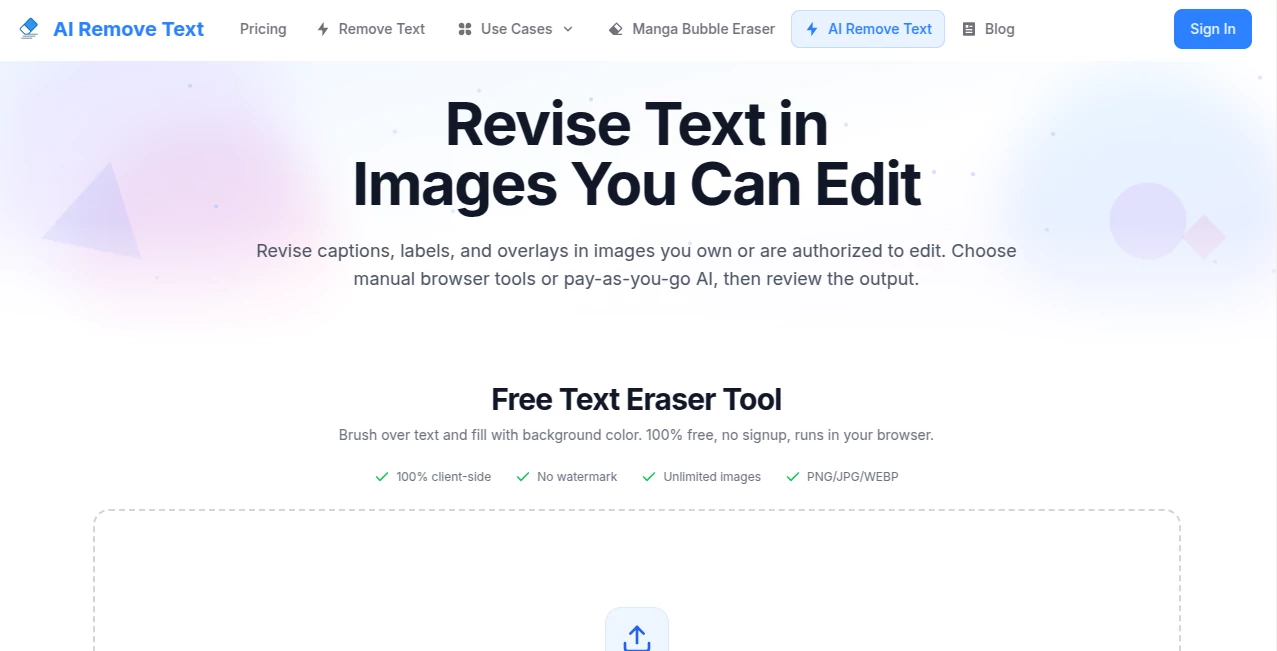
Editing text inside an image used to require advanced design software, careful cloning, and plenty of patience. Today, that process is much simpler thanks to an intelligent online solution built specifically for text removal and background reconstruction. Whether you need to clean up product photos, update marketing materials, remove captions, or prepare professional documents, this platform delivers an impressively smooth workflow that saves valuable time.
Designed for creators, designers, marketers, online sellers, and business professionals, the platform combines a completely free browser-based text eraser with optional AI-powered reconstruction for more demanding edits. Instead of forcing users to learn complicated editing techniques, it focuses on speed, simplicity, and reliable visual quality. The result is an editing experience that feels approachable even for beginners while remaining practical enough for professional work. The service supports PNG, JPG, JPEG, and WebP images, making it suitable for nearly every everyday editing task. According to the official website, simple edits can even be completed entirely inside the browser without uploading the image, offering additional convenience for privacy-conscious users. :contentReference[oaicite:0]{index=0}
Key Features
User Interface
The interface is refreshingly clean and easy to understand. Uploading an image takes only a moment, while drag-and-drop support keeps the workflow smooth. Users can simply brush over unwanted text or choose AI-assisted reconstruction for more complicated backgrounds. There are no unnecessary menus or confusing controls, allowing both first-time visitors and experienced editors to begin working immediately.
Accuracy & Performance
The platform analyzes surrounding textures, colors, and patterns to rebuild the selected area after text removal. Simple backgrounds are cleaned remarkably well, while more detailed scenes benefit from the AI reconstruction workflow. Processing is generally fast, and previewing results before downloading helps users verify the final image. As with every AI image editor, outcomes depend on image quality, text style, and background complexity.
Capabilities
- Remove unwanted text from photos.
- Clean document images while preserving layouts.
- Erase captions, overlays, and labels.
- Support JPG, PNG, JPEG, and WebP formats.
- Browser-based manual editing.
- AI-assisted background reconstruction.
- Pay-as-you-go credit system with no subscription.
- Unlimited browser-based manual edits.
- Preview results before downloading.
- Suitable for personal and professional editing.
Security & Privacy
Privacy receives notable attention throughout the service. The free browser-based editing mode processes images locally without uploading them, while AI-powered processing uses secure transmission for cloud-based reconstruction. Users are encouraged to edit only images they own or have permission to modify, reinforcing responsible usage and copyright awareness. :contentReference[oaicite:1]{index=1}
Use Cases
- Preparing clean product images for e-commerce listings.
- Updating promotional graphics without recreating designs.
- Removing outdated prices or labels.
- Cleaning presentation slides.
- Editing screenshots for tutorials.
- Improving social media visuals.
- Removing document annotations.
- Preparing marketing assets for advertising campaigns.
Pros and Cons
- Pros
- Very beginner-friendly interface.
- Free browser-based editing option.
- No subscription requirement.
- Fast AI-assisted processing.
- Supports common image formats.
- One-time credit purchases remain valid for one year.
- Useful examples demonstrate expected results.
- Cons
- Complex textures may still require manual review.
- AI processing uses credits.
- Desktop provides the best editing experience.
- Performance varies depending on image quality.
Pricing Plans
The platform follows a flexible pay-as-you-go pricing model instead of recurring subscriptions. Users purchase credits only when needed, with each processed image consuming one credit. Multiple credit packs are available for occasional users as well as professionals, and all credits remain valid for twelve months. A browser-based manual text eraser is also available free of charge for simpler edits. :contentReference[oaicite:2]{index=2}
How to Use Remove Text
- Upload an image in JPG, PNG, JPEG, or WebP format.
- Select the browser eraser or AI reconstruction workflow.
- Brush over the unwanted text if needed.
- Allow the system to process the selected area.
- Review the preview carefully.
- Download the cleaned image once satisfied.
Comparison with Similar Tools
Unlike many traditional image editors that require multiple manual steps, this solution focuses entirely on text removal and intelligent background reconstruction. The dedicated workflow makes it significantly easier for users who simply want clean images without learning advanced editing software. The availability of both free browser-based editing and optional AI reconstruction also gives users greater flexibility depending on the complexity of each project. Combined with one-time credit purchases instead of subscriptions, it provides an accessible option for both occasional users and professionals.
Conclusion
For anyone who regularly edits product photos, marketing graphics, presentations, or documents, this platform offers an excellent balance of simplicity, speed, and visual quality. The combination of manual browser editing and AI-assisted reconstruction allows users to choose the most appropriate workflow for each task while avoiding unnecessary software installations. Its straightforward interface, flexible pricing, and privacy-conscious design make it an attractive solution for individuals and businesses looking to streamline everyday image editing.
Frequently Asked Questions (FAQ)
Can beginners use this platform?
Yes. The interface is intentionally simple and requires no professional image editing experience.
Does it support common image formats?
Yes. JPG, JPEG, PNG, and WebP images are supported.
Is there a free option?
Yes. A browser-based manual text eraser is available without requiring payment.
Are subscriptions required?
No. AI processing uses one-time credit purchases rather than recurring subscriptions.
Can it handle complex backgrounds?
Yes, AI-assisted reconstruction is designed for more detailed scenes, although users should always review the final output before publishing.
AI Photo & Image Generator , AI Photo Enhancer , AI Background Remover .
These classifications represent its core capabilities and areas of application. For related tools, explore the linked categories above.

AI Remove Text Alternatives Product

ChatGPT Imag…

TextSharp | …

Gpt Image 1.5

Image Text E…

IMAGE 2

gempix2

GPTIMG2 AI

Nano Banana …

whisk ai