


















Revise
What is Revise?
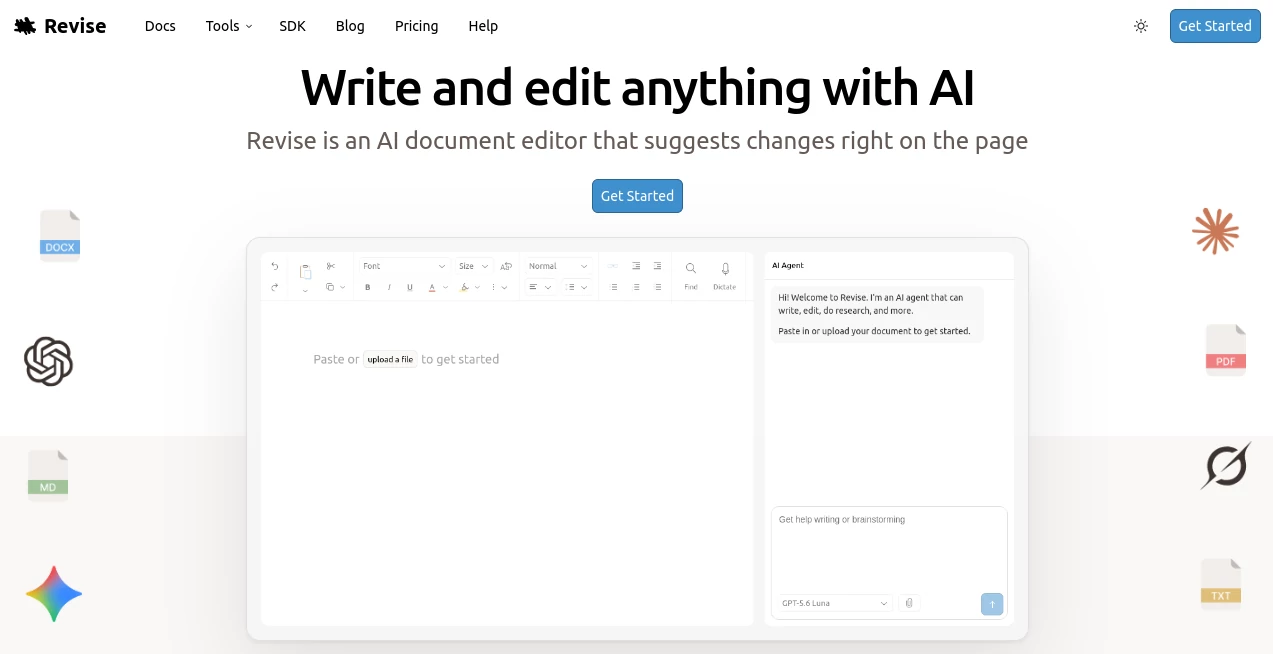
Writing a serious document often involves much more than putting words on a page. Reports need polishing, proposals need structure, contracts need careful revisions, and long documents can become difficult to manage after dozens of edits. Revise brings writing, editing, document management, and AI assistance into one browser-based workspace.
Revise is an AI-powered word processor designed for people who want the convenience of modern AI without giving up control over their documents. Its built-in AI agent can brainstorm ideas, create drafts, rewrite passages, improve clarity, research information, and work across an entire document. Instead of silently replacing your writing, proposed AI changes appear as reviewable edits that you can accept or reject.
The result is a practical writing environment that feels familiar to users of traditional word processors while adding a much more capable AI layer. It supports DOCX, PDF, Markdown, HTML, tables, images, mathematical equations, code blocks, and Mermaid diagrams, making it suitable for everything from everyday writing to long technical and professional documents.
Key Features
- Built-in AI agent for brainstorming, drafting, editing, rewriting, and research.
- Tracked AI changes that can be reviewed and accepted or rejected.
- Visual revision history for comparing previous versions of a document.
- DOCX compatibility with support for importing and exporting documents.
- PDF import and export capabilities.
- Real-time collaboration for working with other people.
- Support for multiple leading AI models from OpenAI, Anthropic, Google, and xAI.
- Rich document formatting with tables, images, equations, code blocks, and diagrams.
- Inline spelling and grammar suggestions.
- AI-powered PDF content extraction.
- Web research capabilities for finding information and citations.
- Automatic document saving and revision recovery.
User Interface
The interface keeps the writing experience at the center rather than turning the editor into a complicated AI dashboard. Users can write directly on the page and switch to the AI agent when they need assistance. The editor includes familiar formatting controls, document layout options, tables, images, page numbers, columns, and other features expected from a full word processor.
The AI agent appears alongside the document, allowing users to explain what they want in normal language. For example, instead of manually rewriting several paragraphs, a user can ask the agent to make a section more concise or improve its structure. The proposed changes then appear directly in the document for review.
Accuracy & Performance
One of the more useful aspects of the editing workflow is that AI-generated changes are not automatically treated as final. Additions and removals are visually identified, giving the writer an opportunity to inspect the result before accepting it. This is particularly helpful for professional documents where a small wording change can alter the meaning of a sentence.
The system can also handle more complex requests that span an entire document. The AI agent can plan multi-step tasks, work with document context, search for supporting information, and make coordinated edits rather than treating every paragraph as an isolated piece of text.
For proofreading, the platform also uses language models for inline spelling and grammar suggestions. Its approach is designed to consider context instead of relying only on basic word-by-word corrections.
Capabilities
The platform goes well beyond simple text generation. Users can ask the AI agent to brainstorm an outline, prepare a first draft, rewrite existing material, improve tone, reorganize sections, or help research a topic. It can also work with attached files and information from other documents when additional context is needed.
Another useful capability is model choice. Users can work with models from OpenAI, Anthropic, Google, and xAI, including GPT, Claude, Gemini, and Grok models. This gives writers more flexibility when a particular task benefits from a different model's writing style, reasoning ability, or efficiency.
For long documents, revision history is especially valuable. Instead of worrying about accidentally losing an earlier version, users can review previous states and recover an older version when necessary.
Security & Privacy
Documents and AI conversations are private by default and are only visible to other people when the user chooses to share them. The service states that data is encrypted both in transit and at rest, and users can delete their content when they want to.
This makes the platform particularly interesting for people working with documents that require a more controlled editing workflow. Even so, users should always review the privacy terms of any online document service before uploading highly sensitive or confidential material.
Use Cases
- Academic writing: Draft essays, organize research, improve paragraphs, and polish reports while keeping control over every suggested change.
- Business documents: Prepare proposals, reports, presentations, internal documents, and performance reviews in a structured editor.
- Legal writing: Review and revise legal documents, contracts, briefs, and related material while visually inspecting proposed changes.
- Technical documentation: Rewrite technical documentation and work with code blocks, structured content, and diagrams.
- Research: Ask the AI agent to research topics and gather supporting information or citations.
- Professional communication: Improve emails, reports, statements, and other business writing without moving text between multiple applications.
- Long-form writing: Work on stories, books, reports, and other lengthy documents while maintaining revision history.
- Collaborative editing: Share documents and work on them with other people in real time.
Pros and Cons
Pros:
- Combines a full word processor with an integrated AI agent.
- AI edits remain reviewable instead of silently overwriting the original text.
- Supports several major AI model providers.
- Strong DOCX and PDF compatibility.
- Useful revision history for long-running documents.
- Real-time collaboration is built into the workspace.
- Can work with long and complex documents.
- Offers a free tier with access to the core editor.
Cons:
- AI usage on the free plan is limited.
- More advanced AI models can consume the monthly allowance faster.
- Heavy users may need a paid plan for regular AI-assisted work.
- AI-generated changes still require human review, particularly for legal, medical, financial, or other high-stakes documents.
Pricing Plans
The platform uses a free-to-paid model. The free plan provides access to the full document editor together with a limited daily allowance of AI usage, making it possible to test the workflow before subscribing.
Paid plans increase the amount of AI work available each month. The Plus, Pro, and Max plans do not impose a daily AI limit and instead provide larger monthly usage allowances. The amount of AI usage consumed depends on the model selected, the length of the document, attachments, web searches, and the complexity of the requested task.
The service also supports additional usage for eligible paid users, allowing heavier users to continue working after reaching their included allowance. Billing can be monthly or yearly, and plan changes are handled through the account billing area.
How to Use Revise
Getting started is straightforward. Open the editor in a browser and create a document. You can begin writing directly or import an existing document. Files such as DOCX and PDF can be brought into the workspace, allowing you to continue working without rebuilding the document from scratch.
Once your document is ready, open the AI agent and describe what you need. A simple request such as “make this section clearer” can be used for a small edit, while a more detailed instruction can ask the agent to reorganize several sections or help develop a complete draft.
When the agent proposes changes, review them directly in the document. You can accept or reject individual suggestions or apply the changes together. For important documents, this review step is worth keeping in the workflow because it lets you retain your own judgment while still benefiting from AI assistance.
After finishing your work, you can export the document in supported formats such as DOCX or PDF. Revision history can also be used to revisit earlier versions if you need to recover previous work.
Comparison with Similar Tools
Traditional word processors such as Microsoft Word and Google Docs are excellent for creating and formatting documents, but their AI capabilities and workflows differ. This platform puts the AI agent directly inside the document editor, so users do not have to repeatedly copy text into a separate chatbot.
Compared with standalone AI writing assistants, the advantage is the combination of document structure, revision history, collaboration, file compatibility, and AI editing in one environment. It is also different from general-purpose chatbots because the AI works with the actual document and can propose changes directly within it.
For writers who want complete control over AI edits, the visual change-review workflow is one of the strongest reasons to consider this approach. Rather than receiving an entirely rewritten document and comparing it manually, users can inspect what was added and removed before deciding what stays.
Conclusion
For anyone who spends a significant amount of time writing, revising, and managing documents, this platform offers an appealing alternative to juggling a word processor and a separate AI assistant. Its strongest feature is not simply text generation; it is the way AI assistance is integrated into the actual editing process.
The combination of tracked AI changes, revision history, multiple AI models, document compatibility, collaboration, and rich formatting makes it suitable for a wide range of professional, academic, and creative workflows. The free plan also provides a practical way to explore the editor before committing to a paid subscription.
If your ideal writing setup is a capable document editor where AI is available when you need it but never takes control away from you, this is a particularly compelling option to try.
Frequently Asked Questions (FAQ)
Is Revise free to use?
Yes. The free plan includes the complete document editor and a limited daily allowance of AI usage. Paid plans provide substantially higher AI usage allowances.
Which AI models are supported?
The platform supports models from OpenAI, Anthropic, Google, and xAI. Available models include GPT, Claude, Gemini, and Grok variants, with the exact selection depending on the subscription plan.
Can I import Word and PDF documents?
Yes. The editor supports importing common document formats including DOCX and PDF, and documents can also be exported to formats such as DOCX and PDF.
Does the AI automatically change my document?
No. AI edits are presented as proposed changes that can be reviewed and accepted or rejected. This gives the writer control over which modifications become part of the final document.
Can I collaborate with other people?
Yes. Real-time collaboration allows multiple people to work together on shared documents while keeping the AI assistant available within the same workspace.
Is my document private?
Documents and AI conversations are private by default. The service states that data is encrypted in transit and at rest, and users can choose when to share their documents with others.
AI WORD , AI Documents Assistant , AI Productivity Tools , AI Writing Assistants .
These classifications represent its core capabilities and areas of application. For related tools, explore the linked categories above.

Revise Alternatives Product

Presenti AI

Create Filla…

KoloQR

SEOAuthori

markdown to …

Coresite

Video To Text

PDF Inspector

Nano Banana
