Rollbar
What is Rollbar?
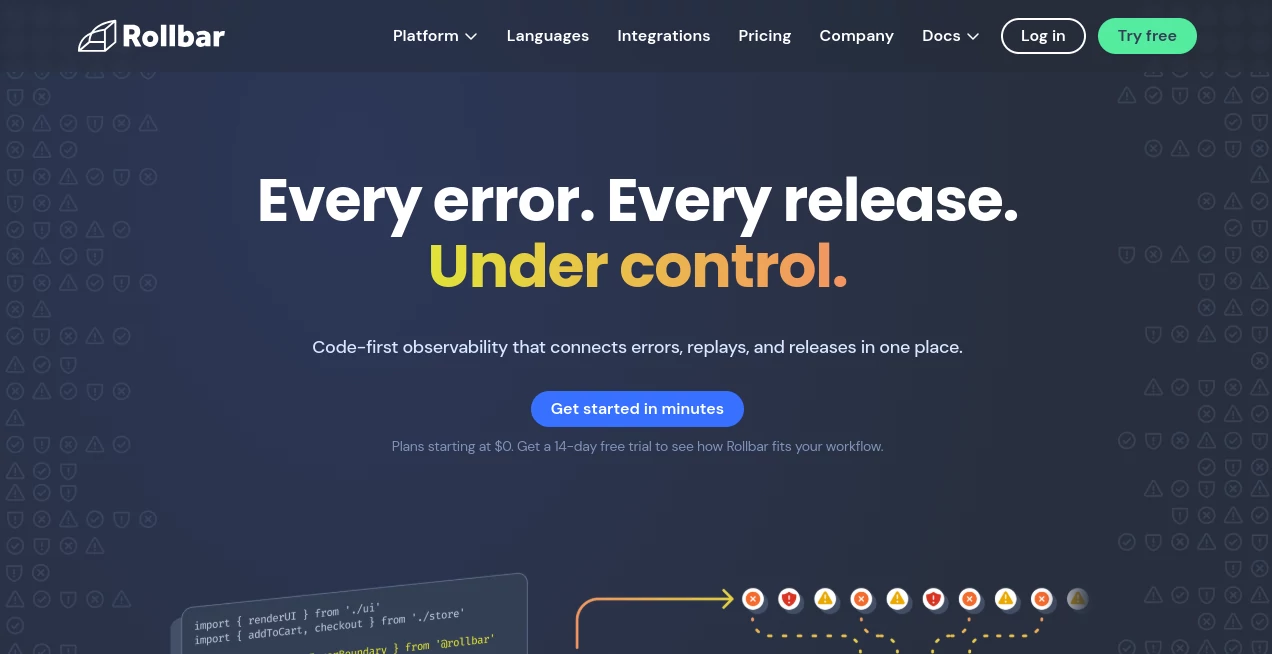
Modern software teams move fast, but even the most carefully tested applications can encounter unexpected issues once they reach production. This platform was created to help developers, engineering teams, and technology companies identify, understand, and resolve software errors before they impact users. By combining real-time error monitoring, release tracking, session replay, and intelligent diagnostics, it provides a complete view of application health in a single environment.
Instead of relying on customer complaints or manually searching through logs, teams can receive instant visibility into problems as they occur. The platform gathers rich debugging context, groups related issues automatically, and highlights the information engineers need to resolve incidents quickly. Whether managing a startup application or a large-scale enterprise system, it offers a practical way to reduce downtime and improve software quality.
Key Features
User Interface
The dashboard is designed for speed and clarity. Errors are displayed in an organized feed, making it easy to identify critical issues without sorting through overwhelming amounts of data. Important information such as affected users, deployment versions, stack traces, and related events is available within a few clicks.
Many teams appreciate how quickly they can move from detection to investigation. The layout helps developers focus on solving problems rather than searching for information scattered across multiple tools.
Accuracy & Performance
One of the strongest aspects of the platform is its ability to intelligently group similar errors. Rather than generating hundreds of duplicate alerts, related events are consolidated into meaningful issues. This reduces noise and allows engineering teams to prioritize the problems that truly matter.
Real-time monitoring ensures that incidents are detected immediately, while telemetry and contextual data help teams understand what happened, where it happened, and how often it occurs.
Capabilities
The platform goes beyond basic error tracking. It includes release monitoring, session replay, source control integrations, deployment tracking, alerting systems, and advanced debugging tools. Teams can connect their development workflows with project management platforms and automatically create issue tickets when problems are detected.
- Real-time error monitoring
- Session replay and user journey analysis
- Intelligent issue grouping
- Deployment and release tracking
- Automated alerts and notifications
- Source code integrations
- Root cause investigation tools
- Team collaboration and assignment features
Security & Privacy
Security is an important requirement for organizations handling production environments. The platform includes enterprise-grade controls, configurable retention options, secure integrations, and infrastructure designed to support professional development teams. Organizations can manage access permissions, monitor deployments, and maintain visibility into operational data while protecting sensitive information.
Use Cases
This solution serves a wide range of technical teams and business environments.
- Monitoring web applications for production errors
- Tracking mobile application crashes
- Investigating customer-reported issues
- Managing releases across multiple environments
- Improving software reliability and uptime
- Supporting DevOps and engineering teams
- Analyzing frontend and backend performance issues
- Reducing time spent on manual debugging
For example, an engineering team launching a new feature can immediately see whether a deployment introduces unexpected errors. Instead of waiting for customer feedback, developers receive actionable information within minutes and can respond before the issue becomes widespread.
Pros and Cons
Pros
- Fast and reliable error detection
- Excellent debugging context and stack traces
- Real-time notifications and alerts
- Useful session replay functionality
- Strong integration ecosystem
- Suitable for teams of various sizes
- Supports modern development workflows
Cons
- Advanced capabilities may require higher-tier plans
- New users may need time to explore all available features
- Large-scale environments can generate significant event volumes that require careful plan selection
Pricing Plans
A free plan is available for teams that want to start monitoring applications without an initial investment. This option includes core monitoring features, real-time alerts, intelligent grouping, telemetry, and deployment tracking.
Paid plans expand available event volume, increase data retention periods, provide advanced rate limiting controls, and unlock additional capabilities designed for growing organizations. Enterprise options are also available for companies requiring custom limits, enhanced support, and specialized security requirements.
How to Use Rollbar
Getting started is straightforward. After creating an account, developers install the appropriate SDK for their programming language or framework. Once integrated, application events begin flowing into the dashboard automatically.
- Create a project and select your platform.
- Install the SDK within the application.
- Configure monitoring settings and notifications.
- Deploy the application.
- Review incoming errors and prioritize fixes.
- Track releases and verify improvements after deployment.
Within a short time, teams gain visibility into production issues and can begin improving application stability with real-world insights.
Comparison with Similar Tools
Compared with traditional logging platforms, this solution focuses heavily on actionable error intelligence rather than simply collecting data. Developers receive contextual information, deployment history, telemetry, and user impact details in a unified workflow.
When evaluated alongside other error-monitoring platforms, it stands out through its combination of real-time monitoring, session replay, intelligent grouping, and release awareness. This integrated approach helps engineering teams move from detection to resolution faster while reducing alert fatigue.
Conclusion
For development teams that value reliability, rapid debugging, and production visibility, this platform delivers an impressive set of capabilities. Its combination of monitoring, diagnostics, release tracking, and collaboration tools creates a workflow that helps engineers spend less time chasing issues and more time building quality software.
Whether supporting a growing startup or a large engineering organization, it provides the insights needed to identify problems quickly, understand their impact, and resolve them with confidence. The result is a smoother development process and a better experience for end users.
Frequently Asked Questions (FAQ)
What is this platform used for?
It is used for monitoring software errors, tracking releases, investigating incidents, and improving application reliability.
Does it support real-time monitoring?
Yes. Errors and incidents are reported in real time, allowing teams to react quickly when issues occur.
Can it help identify the root cause of errors?
Yes. The platform provides detailed debugging information, telemetry, stack traces, and root-cause analysis features that help developers understand why an issue happened.
Is there a free plan available?
Yes. A free plan is available with core monitoring features suitable for individuals and smaller teams.
Who can benefit from using it?
Software developers, DevOps engineers, engineering managers, SaaS companies, startups, and enterprise development teams can all benefit from its monitoring and debugging capabilities.
AI Developer Tools , AI Code Assistant , AI Monitor & Report Builder , AI DevOps Assistant .
These classifications represent its core capabilities and areas of application. For related tools, explore the linked categories above.

Rollbar Alternatives Product

Somnio

DevUtilX
AgentOne

AI Workflow …
Schema Synth
Verne

CtrlOps

DDS Gub

VercelAPP