

















ScanRead AI
What is ScanRead AI?
In today’s fast-paced digital environment, dealing with large volumes of documents can quickly become overwhelming. From invoices and contracts to handwritten notes and research papers, users often struggle to extract meaningful information efficiently.
This platform is designed to simplify that entire experience. It transforms physical and digital documents into structured, readable, and actionable content. Instead of manually reviewing pages line by line, users can rely on intelligent processing to highlight key insights in seconds.
Whether you are a student, business professional, or researcher, the goal is the same: reduce time spent on reading and increase time spent on decision-making.
Key Features
User Interface
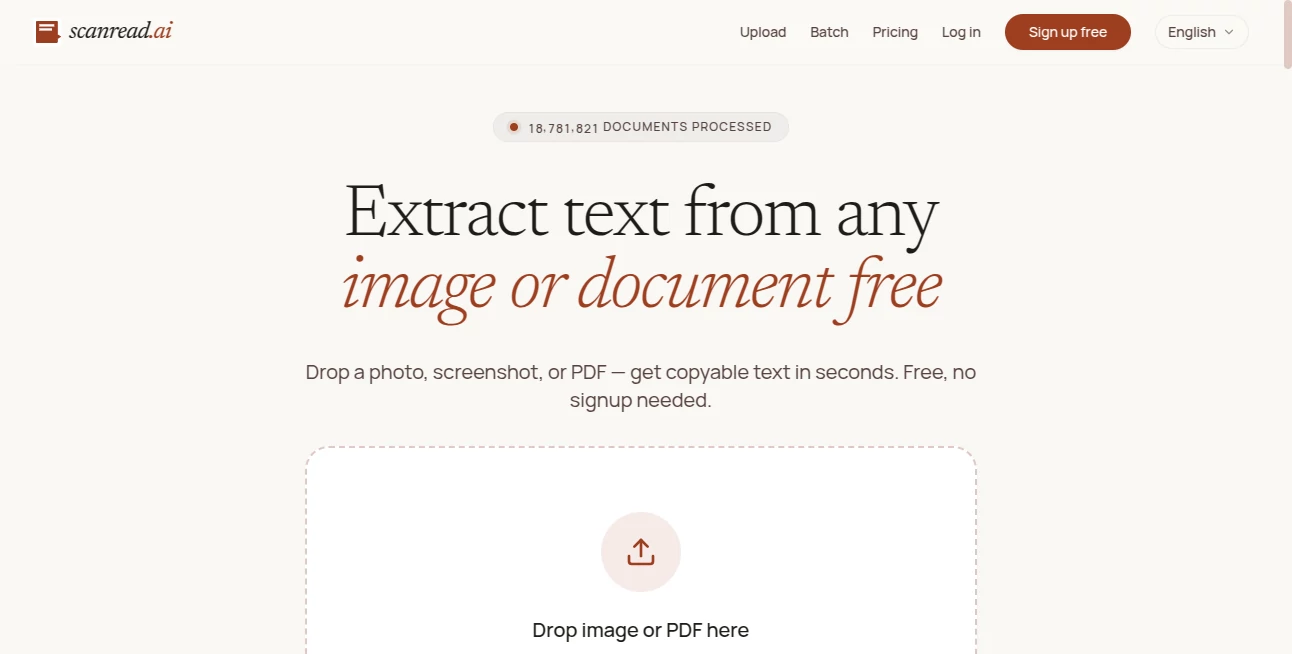
The interface is built with simplicity in mind. Users can upload or scan documents without navigating complex menus. Everything is designed to feel intuitive, even for first-time users.
The layout prioritizes clarity, allowing users to focus on results rather than settings. Drag-and-drop functionality and quick processing options make the experience smooth and efficient.
Accuracy & Performance
The system is optimized to interpret both printed and handwritten text with strong accuracy. It reduces common OCR errors and maintains structure even in complex documents.
Performance remains stable even when handling multi-page files or dense information, making it suitable for both personal and professional workloads.
Capabilities
This solution goes beyond simple scanning. It can extract key points, summarize long documents, and reorganize content into readable formats.
- Document scanning and digitization
- Text extraction from images and PDFs
- Automatic summarization of content
- Structured data output for easier use
- Support for multiple document types
Security & Privacy
Data protection is treated as a priority. Uploaded files are processed securely, and sensitive information is handled with care. The system is designed to minimize data exposure while still delivering fast results.
Use Cases
This tool fits into a wide range of real-world scenarios:
- Students converting lecture notes into digital summaries
- Businesses extracting data from invoices and contracts
- Researchers analyzing academic papers more efficiently
- Freelancers organizing client documents and reports
Pros and Cons
Pros:
- Simple and user-friendly interface
- Fast document processing
- Useful summarization features
- Works with multiple document formats
Cons:
- Advanced customization options may be limited for power users
- Performance may vary depending on image quality
Pricing Plans
The platform typically follows a flexible pricing structure, often including free access with basic features and premium tiers for advanced functionality. Paid plans usually unlock higher processing limits, faster performance, and additional extraction capabilities.
This makes it accessible for casual users while still offering value for professionals who handle documents regularly.
How to Use ScanRead AI
Getting started is straightforward and requires minimal setup:
- Upload or scan your document
- Wait for the system to process and analyze the content
- Review extracted text or summary
- Download or export results as needed
The workflow is designed to eliminate unnecessary steps and help users reach results quickly.
Comparison with Similar Tools
Compared to traditional OCR tools, this solution focuses more on intelligent understanding rather than just text recognition. While basic tools simply convert images into text, this platform adds an extra layer of interpretation by structuring and summarizing information.
It competes well with modern document automation tools, especially in terms of ease of use and speed of processing. However, highly specialized enterprise systems may offer deeper integrations depending on organizational needs.
Conclusion
Overall, this is a powerful and practical solution for anyone dealing with frequent document handling. It bridges the gap between raw data and usable information, making everyday tasks faster and more efficient.
Its balance of simplicity, performance, and intelligent processing makes it a strong choice for individuals and teams looking to streamline document workflows without unnecessary complexity.
Frequently Asked Questions (FAQ)
Is it suitable for handwritten documents?
Yes, it is designed to interpret both printed and handwritten text, although clarity of input affects accuracy.
Can it handle large documents?
Yes, it supports multi-page files and maintains stable performance with longer documents.
Does it require technical skills?
No, the interface is designed for non-technical users and requires minimal learning.
Is my data stored permanently?
The system prioritizes privacy and typically processes data securely without unnecessary long-term storage.
What file types are supported?
It generally works with common formats such as images and PDF files for scanning and extraction.
AI Document Extraction , AI PDF , AI Productivity Tools , AI Files Assistant .
These classifications represent its core capabilities and areas of application. For related tools, explore the linked categories above.

ScanRead AI Alternatives Product

Sales Prospe…

PDFgear

OLVA
BookTranslat…

hd image con…

Flitz AI

Receipt AI

Toolquix

GLM-OCR Onli…
