


















SeedDream
What is SeedDream?
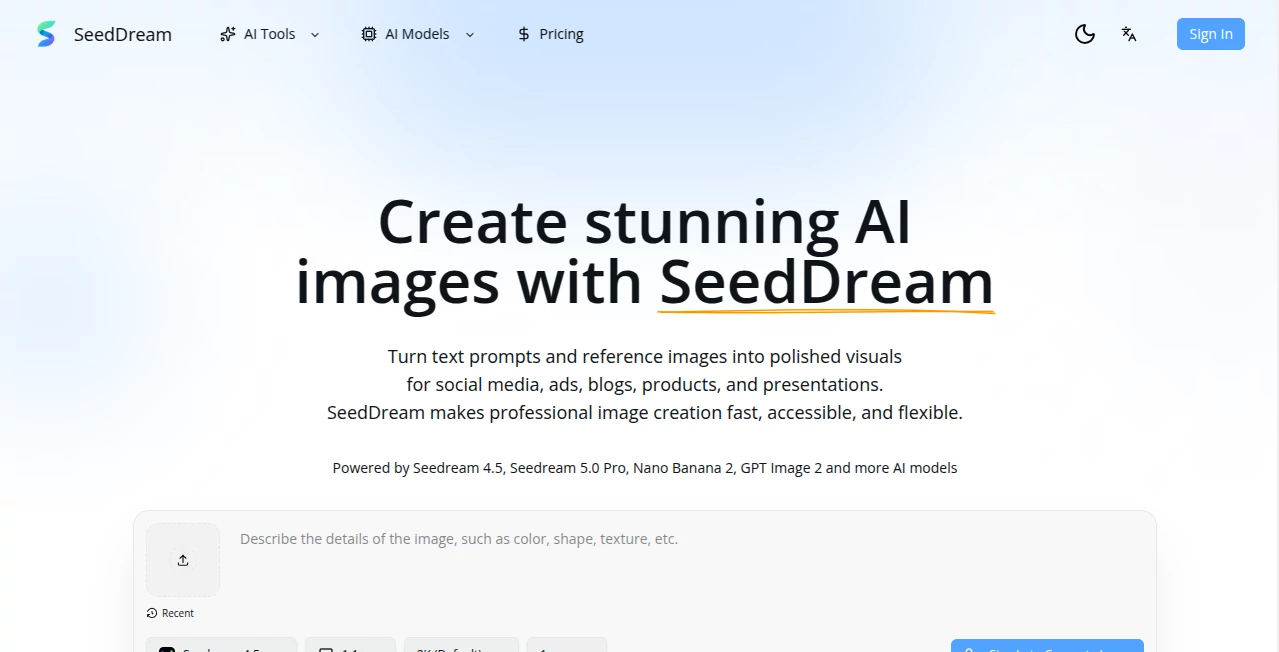
Creating a good visual often starts with a simple idea, but turning that idea into something polished can take much more time than expected. SeedDream brings that process into a straightforward online workspace where users can describe an image in natural language or provide a reference image and quickly explore visual directions.
The platform is designed for creators, marketers, designers, e-commerce teams, and anyone who needs professional-looking visuals without spending hours inside complicated design software. From a product concept and social media graphic to a blog cover or advertising visual, the workflow is built around moving from an idea to a usable image with fewer steps.
One particularly useful aspect is the ability to work with multiple AI image models in one place. The platform currently provides access to models including Seedream 4.5, Seedream 5.0 Pro, Nano Banana 2, and GPT Image 2, giving users more flexibility when experimenting with different visual requirements.
Key Features
The platform focuses on practical image creation rather than making users learn a complicated editing workflow. Its main features cover both generation and image-based creative work.
- Text-to-image generation from natural language prompts.
- Image-to-image creation using reference images.
- High-definition visual output for digital and business use.
- Access to multiple AI image models.
- Fast generation for rapid creative experimentation.
- Visual creation for advertising, social media, products, blogs, presentations, and creative concepts.
User Interface
The interface follows a simple prompt-first workflow. Instead of requiring users to understand layers, brushes, masks, and complicated editing panels before getting started, the experience centers on describing what should be created and refining the result.
This makes the service approachable for beginners while still being useful to experienced creators. A marketer can quickly test several advertising concepts, while a designer can use reference images to explore alternative compositions or styles.
Accuracy & Performance
Image generation quality depends heavily on the selected model and the prompt, but the platform is built around producing polished visuals rather than rough concept sketches. High-definition output is intended for practical applications such as marketing pages, presentations, social posts, product concepts, and advertising materials.
The fast generation workflow is also useful when the goal is comparison. Instead of becoming attached to the first idea, users can create several directions, compare them, and continue refining the strongest option. That can make early-stage creative work considerably less time-consuming.
Capabilities
The strongest part of the platform is its flexibility. Text-to-image generation can turn a written description into a complete visual, while image-to-image functionality allows an existing image to become the starting point for another creative direction.
For example, an online store could use a product reference to explore different backgrounds and promotional settings. A content creator could produce a series of visual concepts for social media. A designer could experiment with styles, compositions, and environments before committing to a final direction.
The availability of different models also gives users room to choose an approach that fits the project instead of relying on a single generation engine.
Security & Privacy
The platform publishes an Acceptable Use Policy that places restrictions on harmful, illegal, deceptive, infringing, and non-consensual content. It specifically prohibits NSFW material, graphic violence, child exploitation, non-consensual deepfakes, hate speech, and several other categories of misuse.
Users are also responsible for ensuring that reference images and other materials they upload can legally be used. Generated content should be reviewed before publication because AI-generated material can contain mistakes or inaccuracies.
Use Cases
There are many situations where an image generator can shorten the distance between an idea and a finished visual.
- Marketing: Create campaign concepts, promotional graphics, and advertising visuals.
- Social media: Produce eye-catching images for posts and content campaigns.
- E-commerce: Explore product presentations, packaging concepts, and alternative visual settings.
- Blogging: Create original cover images and supporting visuals for articles.
- Presentations: Generate visuals that make business and educational presentations more engaging.
- Design exploration: Test compositions, styles, environments, and visual concepts before detailed production.
- Game development: Explore character appearances, environments, and early concept-art directions.
- Creative projects: Turn imaginative descriptions into illustrations, portraits, landscapes, and other visual concepts.
Pros and Cons
Pros
- Simple workflow suitable for beginners.
- Supports both text-to-image and image-to-image creation.
- Provides access to multiple AI image models.
- Useful for marketing, social media, e-commerce, and creative projects.
- High-definition output is suitable for many digital applications.
- Reference images provide more control over creative direction.
Cons
- The final result can still vary depending on the prompt and selected model.
- Users may need several generations to achieve a very specific visual.
- AI-generated images should still be reviewed carefully before professional publication.
- Advanced design professionals may still need dedicated editing software for detailed post-production.
Pricing Plans
The website does not provide enough publicly verifiable pricing information on its main page to describe specific subscription tiers or prices accurately. This is worth checking directly before purchasing, as availability, credits, model access, and generation costs can change over time.
For users comparing image-generation platforms, the important points to check are the number of included generations or credits, access to premium models, output resolution, reference-image capabilities, and whether unused credits carry over.
How to Use It
- Open the online image-generation workspace.
- Choose the image-generation workflow that matches your project.
- Write a clear description of the image you want to create.
- Include useful details such as subject, setting, style, mood, composition, and visual direction.
- Upload a reference image when you want the generated result to follow an existing visual direction.
- Generate the image and review the result.
- Refine the prompt or try another model when the first version does not match your expectations.
- Compare the results and download the visual that best fits your project.
Comparison with Similar Tools
Compared with traditional graphic-design software, this platform is much more focused on idea-to-image generation. You do not need to construct every element manually before seeing a concept. That makes it particularly useful during brainstorming and early production.
Compared with single-model AI image generators, access to several models can be an advantage for users who want to experiment with different generation approaches from the same online environment. The combination of text prompts and reference-image editing also makes it more practical for projects where visual direction matters as much as the original description.
It is not necessarily a replacement for professional editing software in every situation. Designers who need pixel-level control, complex compositing, or extensive manual retouching may still want a dedicated editor after generation. For fast visual exploration, however, the workflow is considerably more direct.
Conclusion
For anyone who regularly needs original visuals but does not want every image to become a full design project, this platform offers a practical approach. The combination of natural-language prompting, reference-image editing, high-definition output, and access to multiple models gives creators plenty of room to experiment.
Its strongest use case is not simply generating a single attractive picture. It is the ability to explore an idea quickly, compare different directions, and turn the best concept into something that can actually be used in a campaign, product page, presentation, blog, or social media post.
Whether you are preparing an advertising concept, testing a product presentation, creating content visuals, or simply exploring an idea that is difficult to produce manually, the workflow provides a convenient starting point with relatively little technical overhead.
Frequently Asked Questions (FAQ)
What can I create with this platform?
You can create a wide range of visuals including marketing graphics, product concepts, social media images, blog covers, posters, portraits, landscapes, concept art, and presentation visuals.
Does it support text-to-image generation?
Yes. Users can describe a scene, style, mood, composition, and other visual details in a text prompt and generate an image based on that description.
Can I use a reference image?
Yes. Image-to-image functionality allows users to upload an existing image and use it as a reference for creating new variations, styles, or compositions.
Who is it designed for?
It is suitable for creators, marketers, designers, e-commerce businesses, content teams, and beginners who need to create visual assets without relying entirely on traditional design workflows.
Do I need professional design experience?
No. The prompt-based workflow is designed to be accessible without advanced design knowledge. More experienced users can still benefit from detailed prompts and reference images when they need greater creative control.
Can generated images be used for marketing?
The platform specifically presents marketing, advertising, product concepts, social media, and business presentations as use cases. However, users should review the applicable terms and policies and make sure their final content complies with their intended use.
Does it offer multiple AI models?
Yes. The platform currently lists several models, including Seedream 4.5, Seedream 5.0 Pro, Nano Banana 2, and GPT Image 2, allowing users to experiment with different image-generation capabilities.
Is the generated content always accurate?
No AI image generator should be treated as infallible. Generated visuals can contain unwanted details or inaccuracies, so users should inspect the final result before using it publicly or commercially.
Does the platform allow NSFW generation?
No. Its published Acceptable Use Policy prohibits NSFW and sexually explicit content, along with several other categories of harmful or prohibited material.
AI Photo & Image Generator , Photo & Image Editor , AI Graphic Design , AI Text to Image .
These classifications represent its core capabilities and areas of application. For related tools, explore the linked categories above.

SeedDream Alternatives Product
Seedream 5.0

Text Remover…
Imagine2

Krea 2

ChromaPeel
PhotoEditorAI
MuseCraft.AI

MeltFlex AI
renderpop
