
SelfManager
What is SelfManager?
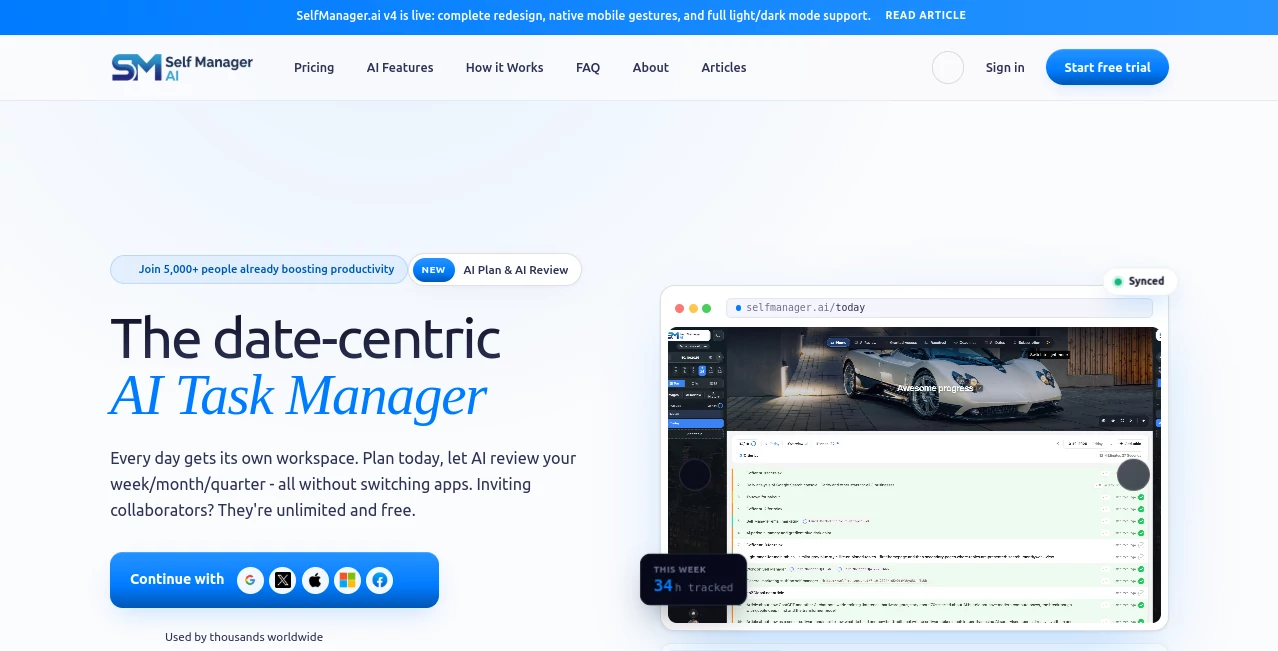
Managing work often becomes overwhelming when tasks are scattered across multiple boards, endless lists, and disconnected notes. This productivity platform introduces a refreshing approach by organizing work around the one thing every project has in common: time. Instead of forcing users to think in terms of complicated structures, every day becomes its own workspace, making planning, tracking, and reviewing feel far more natural.
Whether you're a freelancer balancing client projects, a student planning study sessions, or a growing team coordinating daily work, the platform simplifies the entire workflow. AI doesn't simply generate random suggestions—it understands your completed work, analyzes progress over real dates, and provides practical planning and review assistance that feels genuinely useful rather than gimmicky.
The combination of intelligent planning, built-in time tracking, collaborative workspaces, and AI-powered reviews creates an environment where productivity becomes easier to maintain. Instead of accumulating endless unfinished tasks, every day reaches a natural conclusion, helping users stay focused without carrying unnecessary backlog into tomorrow.
Key Features
User Interface
The interface is refreshingly minimal while remaining highly functional. Each calendar day opens into its own dedicated workspace containing unlimited tables for tasks, notes, images, comments, and project information. Navigation feels intuitive because everything follows chronological order instead of forcing users to jump between complicated boards or folders.
Accuracy & Performance
One of the strongest aspects is how the AI works with actual historical activity rather than isolated prompts. Weekly, monthly, and quarterly reviews are generated using completed tasks, tracked time, priorities, and comments, resulting in summaries that closely reflect real productivity. Planning suggestions are also generated from natural language requests and can even consider previous work patterns to create more realistic schedules.
Capabilities
- AI-powered weekly and monthly planning
- Automatic task generation from plain text
- Context-aware AI chat across projects
- Daily workspaces with unlimited task tables
- Built-in time tracking
- Project collaboration with comments and images
- Weekly, monthly, and quarterly AI reviews
- Real-time synchronization across devices
- Pinned projects for quick access
- Private journaling and self-messages
- Task prioritization with editable AI suggestions
- Unlimited collaborators on team subscriptions
Security & Privacy
Privacy receives considerable attention. User information is encrypted during storage and transmission, while authentication supports trusted providers such as Google, Microsoft, Apple, email, and phone login. The company also states that customer data is never sold and is not used to train AI models, giving professionals additional confidence when working with sensitive information.
Use Cases
- Planning daily personal productivity routines.
- Managing freelance clients and billable work.
- Organizing startup projects and weekly goals.
- Tracking employee tasks across collaborative teams.
- Reviewing monthly performance with AI-generated insights.
- Turning meeting notes into actionable task lists.
- Managing study schedules and coursework.
- Building long-term habits through date-based planning.
Pros and Cons
Pros
- Unique date-first workflow that feels natural.
- Powerful AI planning and review features.
- Excellent collaboration without per-seat pricing.
- Integrated time tracking.
- Fast and clean user experience.
- Context-aware AI understands historical work.
- Unlimited tables and flexible organization.
Cons
- The date-centric workflow may require adjustment for users accustomed to Kanban boards.
- Advanced AI features rely on available AI credits.
- Currently available as a web-based platform.
Pricing Plans
A free seven-day trial is available without requiring a credit card. Individual users can subscribe to an affordable monthly or annual plan that includes AI features, cloud synchronization, generous storage, and weekly AI credits. Teams benefit from a flat-rate subscription that allows unlimited collaborators instead of charging per user, making it especially attractive for growing organizations. Annual billing offers additional savings compared to monthly subscriptions.
How to Use SelfManager
Getting started is straightforward. Create an account, open today's workspace, and begin adding tasks or notes. You can describe your goals in plain English and let the AI generate a structured daily or weekly plan. Throughout the day, track progress, record time, attach files, and collaborate with teammates. At the end of the week or month, run an AI review to receive a detailed productivity summary along with suggestions for future improvements.
Comparison with Similar Tools
Many productivity applications organize work through boards, folders, or project lists. While those approaches work well for certain workflows, they often create clutter over time as unfinished tasks continue accumulating. This platform takes a different direction by making each day the primary workspace, naturally providing closure while preserving historical context.
Compared with traditional project management software, its AI capabilities are more deeply integrated into everyday work. Instead of functioning as a standalone chatbot, artificial intelligence actively assists with planning, task creation, progress analysis, and performance reviews using real project history. Combined with unlimited team collaboration under a single subscription, it offers a compelling alternative for professionals seeking a cleaner and more reflective productivity system.
Conclusion
For anyone looking to replace scattered task lists with a more structured and intelligent workflow, this platform delivers an impressive experience. Its date-centered philosophy, practical AI assistance, collaborative environment, and thoughtful review system create a productivity solution that feels both modern and refreshingly simple. Rather than overwhelming users with complexity, it encourages consistent daily progress while providing valuable insights that improve planning over time.
Frequently Asked Questions (FAQ)
What makes this task manager different from traditional productivity apps?
Its entire workflow revolves around calendar dates instead of projects or boards, allowing every day to become a dedicated workspace with natural closure.
Does it support AI-generated planning?
Yes. Users can describe their objectives in natural language, and the AI creates structured daily or weekly plans that remain fully editable.
Can teams collaborate together?
Yes. Team members can share workspaces, comments, images, tasks, and AI-powered reviews while collaborating in real time.
Is there a free trial?
Yes. Every feature can be explored during a seven-day free trial without providing payment information.
Is user data protected?
Yes. The platform uses encrypted storage and secure authentication while stating that customer data is never sold or used for AI model training.
AI Workflow Management , AI Productivity Tools , AI Task Management , AI Team Collaboration .
These classifications represent its core capabilities and areas of application. For related tools, explore the linked categories above.

SelfManager Alternatives Product

Caspian

PineBill

AI Wire

Beat API

Your Own AI

Nano Banana
AnyToURL

Jamy.ai | Au…

TierCove