Sidebridge
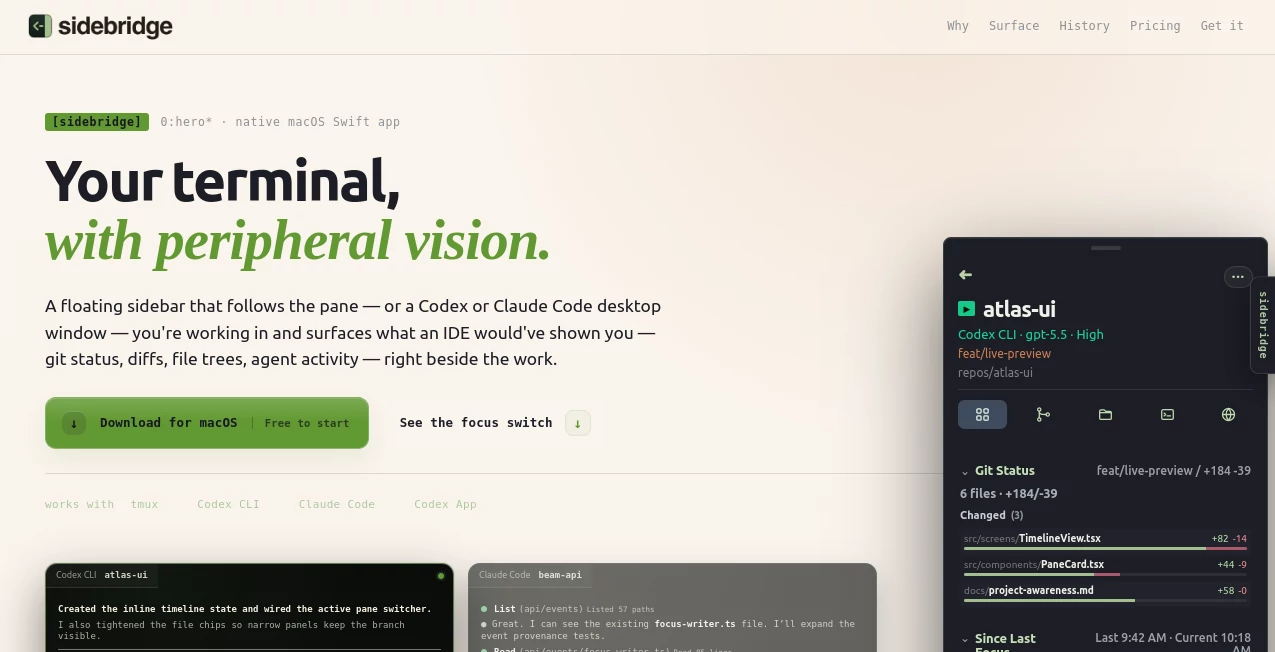
What is Sidebridge?
Sidebridge is a native macOS productivity tool designed for developers who work with modern terminal-based workflows, AI coding assistants, and multiple projects at the same time. It brings back the project awareness that traditional IDEs usually provide by adding a smart floating sidebar beside your active workspace.
Instead of constantly switching between terminals, editors, browser tabs, and AI agent conversations, developers can keep important context visible in one place. The tool follows the active terminal pane or supported development environment and surfaces information such as Git status, file changes, project activity, and agent interactions.
For developers who have moved away from traditional IDE workflows and now rely on tools like terminal agents and command-line environments, this approach creates a smoother way to understand what is happening across different projects without interrupting the creative flow.
Key Features
User Interface
The interface is built around a lightweight floating sidebar that stays available while coding but avoids becoming a distraction. The layout feels familiar to developers who appreciate IDE panels but prefer the flexibility of terminal-first workflows.
Users can customize the sidebar by moving modules, hiding unnecessary sections, and creating layouts that match their personal workflow. Whether you need Git information, recent activity, files, or agent details, the interface keeps frequently used information within reach.
- Native macOS application experience
- Floating sidebar designed for terminal workflows
- Customizable modules and layouts
- Quick access to project context without changing applications
- Minimal interface that stays out of the way when not needed
Accuracy & Performance
The application focuses on providing accurate project awareness by reading local development context, including repositories, branches, changes, sessions, and activity history. Instead of requiring developers to manually select projects, it automatically follows the workspace they are currently using.
This approach helps reduce the small interruptions that slow down development. When moving between projects or agent sessions, the relevant information appears automatically, making it easier to continue work without reconstructing previous context.
Capabilities
The tool provides a collection of features created specifically for developers working with AI-assisted programming environments. It connects the scattered pieces of modern development workflows and turns them into an organized overview.
- Track Git status and code changes
- View file structures and important project files
- Monitor AI agent activity and sessions
- Review recent focus history and development actions
- Access diffs, documentation, configuration files, and project notes
- Search project context across development activity
- Export activity information for reviews and handoffs
- Provide structured project information for AI agents through local context features
Security & Privacy
Privacy is an important part of the product design. The application works with local project information and keeps development context on the user's machine rather than depending on a cloud dashboard.
For developers working with private repositories or sensitive projects, a local-first workflow provides additional confidence because project awareness remains connected to the environment where the work is happening.
Use Cases
This tool is especially useful for developers who work across multiple repositories, use AI coding assistants, or spend significant time inside terminal environments.
- AI-assisted developers: Keep track of AI agent conversations, actions, and project changes without losing context.
- Software engineers: Monitor Git activity, files, branches, and ongoing work from a single view.
- Freelancers and consultants: Quickly switch between client projects while maintaining awareness of recent activity.
- Development teams: Create clearer handoffs by reviewing project history and progress.
- Power users: Improve productivity when working with terminal tools and multiple coding environments.
Pros and Cons
Pros
- Designed specifically for terminal-based development workflows
- Native macOS experience with a lightweight design
- Reduces context switching between applications
- Works well with AI-powered coding environments
- Provides useful project history and activity awareness
- Customizable workspace organization
Cons
- Currently focused on macOS users
- Best suited for developers rather than general users
- May require adjustment for developers used to traditional IDE layouts
Pricing Plans
The product offers a free plan that provides core project awareness features. Users can access the active sidebar experience, Git information, development context, and customizable modules without requiring a subscription.
A Pro plan is available for users who need deeper history, project search, exports, extended activity views, and additional features designed for advanced development workflows.
- Free: Core sidebar features, Git activity, active project awareness, and customizable modules.
- Pro: Extended history, project search, exports, deeper insights, and enhanced workflow features.
How to Use Sidebridge
Getting started is designed to be simple. After installing the macOS application, users can connect it with their preferred development environment and choose which applications or terminal workflows should be followed.
Once configured, the sidebar automatically updates as developers move between projects and sessions. Users can explore Git changes, review activity, check files, or return to previous work without manually searching through different tools.
- Install the desktop application
- Connect preferred terminal or coding environments
- Customize sidebar modules and layout
- Continue coding while keeping project information visible
Comparison with Similar Tools
Traditional IDEs provide strong project navigation features, but many developers now prefer flexible terminal workflows combined with AI coding assistants. This tool fills the gap by offering project awareness without forcing users back into a full IDE environment.
Compared with browser-based dashboards, the experience feels more connected to the actual development process because it follows active workspaces and local projects. It is designed for developers who want visibility without adding another complicated platform to manage.
Conclusion
For developers building software with terminals, AI agents, and modern coding workflows, maintaining context is often the biggest challenge. This tool offers a practical solution by bringing important project information closer to where the work happens.
Its combination of automatic workspace awareness, Git visibility, customizable modules, and local-first design makes it a valuable companion for developers who want the flexibility of terminal workflows while keeping the clarity of an organized development environment.
Frequently Asked Questions (FAQ)
What type of users can benefit from this tool?
It is mainly designed for software developers, AI coding enthusiasts, and professionals who work with terminal-based development environments.
Does it replace a code editor?
No. It works alongside existing editors and development tools by providing additional project awareness rather than replacing the coding environment.
Does it work with AI coding assistants?
Yes. It is designed to support workflows involving AI development assistants and helps users keep track of agent activity and project context.
Is my project data uploaded to the cloud?
The product follows a local-first approach, allowing developers to keep project context connected to their own machine.
What platform is supported?
The application is currently designed for macOS users.
AI Code Assistant , AI Productivity Tools , AI Developer Tools , AI DevOps Assistant .
These classifications represent its core capabilities and areas of application. For related tools, explore the linked categories above.

Sidebridge Alternatives Product

Nova AI
Layven

Agentys

Period Calcu…

OGimage

Nimbalyst
Motion

ToolIMG

Lynote